1. Introduction
Thank you for choosing the dellersound COOLMUSIC Unique 10G 10W Wireless Electric Guitar Amplifier. This portable practice amplifier is designed for electric guitarists, offering both clean and distortion channels, wireless connectivity, and a rechargeable battery for on-the-go use. This manual provides essential information for proper setup, operation, and maintenance of your amplifier.
What's in the Box:
- COOLMUSIC Unique 10G Amplifier
- Charging Cable (USB-C)
- User Manual
- Warranty Card

Figure 1: Front view of the COOLMUSIC Unique 10G Amplifier.
2. Setup
2.1 Charging the Amplifier
The amplifier features a built-in lithium polymer battery. To charge, connect the provided USB-C cable to the 'CHARGE' port on the rear panel and to a compatible 5V USB power source. The power indicator light will show charging status.

Figure 2: Rear panel with 'CHARGE' port highlighted.
2.2 Connecting Your Electric Guitar
Plug your electric guitar into the 'INPUT' jack on the top control panel using a standard 1/4" instrument cable.

Figure 3: Top panel with 'INPUT' jack.
2.3 Powering On/Off
Locate the 'POWER' switch on the top control panel. Toggle the switch to the 'ON' position to power on the amplifier. The power indicator light will illuminate. Toggle to 'OFF' to power down.
2.4 Bluetooth Pairing
To connect a smartphone or other Bluetooth device, press the 'BT' button on the top control panel. The Bluetooth indicator light will blink, indicating pairing mode. On your device, search for 'Dozzly' (or similar pairing name) and connect. Once paired, the indicator light will become solid. You can then play backing tracks or music through the amplifier.
Video 1: Demonstration of Bluetooth pairing with the amplifier.
This video shows the process of activating Bluetooth on the amplifier and pairing it with a mobile device. The amplifier's Bluetooth indicator light changes from blinking to solid upon successful connection, allowing audio playback from the paired device.
3. Operating the Amplifier
3.1 Controls Overview
The top panel of the amplifier features various controls for shaping your sound:
- INPUT: 1/4" jack for connecting your guitar.
- DIST./CLEAN: Toggle switch to select between clean and distortion channels.
- GAIN: Adjusts the input signal level and the amount of distortion.
- BASS: Controls the low-frequency response.
- TREBLE: Controls the high-frequency response.
- VOLUME: Adjusts the overall output volume of the guitar.
- BT/AUX VOL: Adjusts the volume of audio played via Bluetooth or the Auxiliary Input.
- AUX INPUT: 1/8" (3.5mm) jack for connecting external audio sources.
- PHONES: 1/4" jack for connecting headphones for silent practice.
- D.I. OUT: 1/4" output for connecting to a digital interface or mixer.
Figure 4: Detailed view of the amplifier's control panel.
3.2 Using Clean and Distortion Channels
Use the 'DIST./CLEAN' toggle switch to select your desired tone. The clean channel provides a clear, uncolored sound, while the distortion channel adds grit and sustain. Adjust the 'GAIN' knob to control the intensity of the distortion.

Figure 5: Amplifier demonstrating distortion effects.
3.3 Headphone Practice
For silent practice, connect your headphones to the 'PHONES' jack on the rear panel. This mutes the main speaker output, allowing you to practice without disturbing others.

Figure 6: Headphone output in use.
3.4 Auxiliary Input
Connect an external audio device (e.g., MP3 player, phone) to the 'AUX INPUT' jack using a 3.5mm audio cable. Adjust the 'BT/AUX VOL' knob to control the volume of the auxiliary audio.
Video 2: Demonstration of clean and overdrive effects on a mini guitar amplifier.
This video showcases the amplifier's ability to produce both clean and overdriven guitar tones, highlighting the versatility of its sound engine for different musical styles.
4. Maintenance
To ensure the longevity and optimal performance of your COOLMUSIC Unique 10G amplifier, follow these maintenance guidelines:
- Cleaning: Use a soft, dry cloth to clean the exterior of the amplifier. Avoid using abrasive cleaners or solvents.
- Storage: Store the amplifier in a cool, dry place away from direct sunlight, extreme temperatures, and high humidity.
- Battery Care: For optimal battery life, avoid fully discharging the battery frequently. Charge the amplifier regularly, even if not in use for extended periods.
- Handling: Handle the amplifier with care. Avoid dropping it or subjecting it to strong impacts.
5. Troubleshooting
If you encounter any issues with your amplifier, refer to the following common troubleshooting steps:
- No Sound:
- Ensure the amplifier is powered on and charged.
- Check all cable connections (guitar to amp, headphones, aux).
- Verify that the 'VOLUME' and 'BT/AUX VOL' knobs are turned up.
- If using headphones, ensure they are fully plugged into the 'PHONES' jack.
- Distorted/Unwanted Noise:
- Adjust the 'GAIN' knob to reduce excessive distortion.
- Check your guitar's volume and tone controls.
- Ensure your instrument cable is not faulty.
- Bluetooth Connectivity Issues:
- Ensure the amplifier is in pairing mode (blinking blue light).
- Forget the device on your smartphone and try pairing again.
- Ensure no other devices are currently connected to the amplifier via Bluetooth.
If the issue persists, please refer to the warranty and support section for further assistance.
6. Specifications
| Feature | Specification |
|---|---|
| Output Wattage | 10 Watts |
| Item Weight | 4.75 pounds |
| Product Dimensions | 4.72 x 8.66 x 6.5 inches |
| Batteries | 1 Lithium Polymer battery (included) |
| Compatible Devices | Guitar |
| Connector Type | 6.35mm Jack, 3.5mm Jack |
| Material Type | Metal |
| Power Source | Battery Powered |
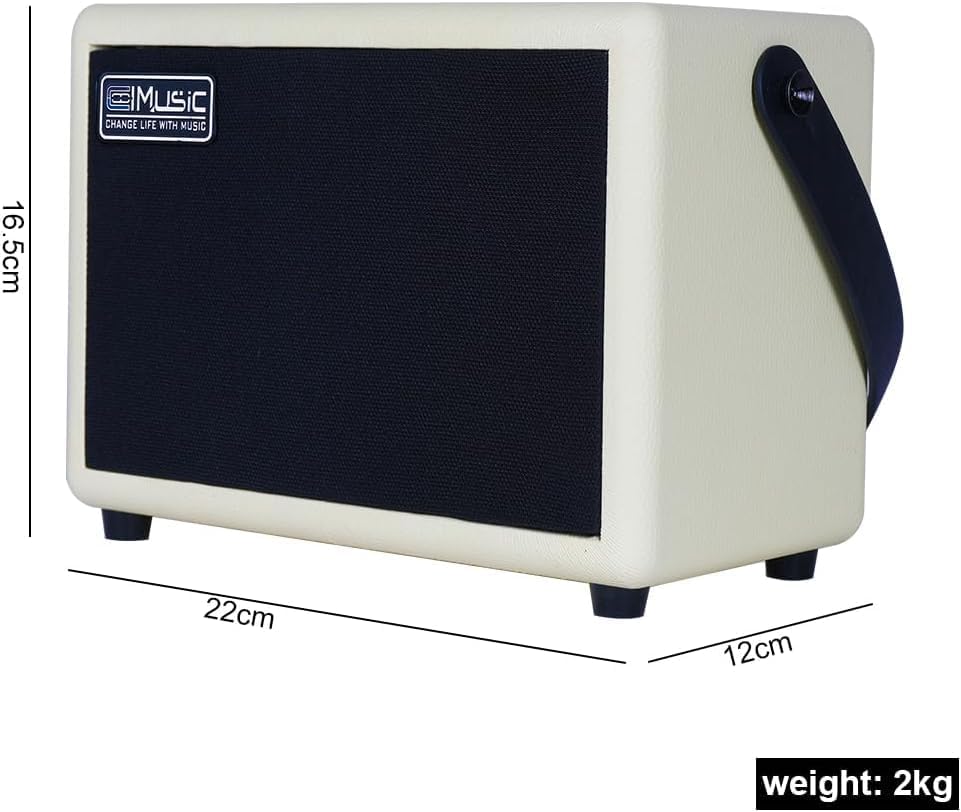
Figure 7: Amplifier dimensions.
Video 3: Unboxing and feature overview of a 10-watt practice guitar amplifier.
This video provides an unboxing experience and highlights the key features and specifications of a similar 10-watt practice amplifier, including its compact size and various input/output options.
7. Warranty and Support
The dellersound COOLMUSIC Unique 10G amplifier comes with a manufacturer's warranty. Please refer to the included Warranty Card for detailed terms and conditions. For technical support, troubleshooting assistance, or warranty claims, please contact dellersound customer service through your retailer or the official dellersound website.