
Introduction
This instruction manual provides essential information for the safe and effective use of your UpBright AC/DC Adapter. This adapter is designed to provide reliable power to compatible Vtech baby monitors. Please read this manual thoroughly before using the product and retain it for future reference.
Product Overview
The UpBright AC/DC Adapter is a high-quality power supply unit designed for specific Vtech baby monitor models. It features a compact design and incorporates multiple protection mechanisms to ensure safe operation.

Figure 1: The UpBright AC/DC Adapter with its power cord and barrel connector.
Compatibility
This adapter is compatible with various Vtech 7" Wi-Fi 1080p Pan & Tilt Video Baby Monitor models, including:
- Vtech RM7866HD
- Vtech RM7866-2HD
- Vtech RM7868HD
- Vtech RM7868-2HD
It is designed to power both the BU Unit Camera and the PU Parent LCD unit.

Figure 2: The AC adapter shown with a compatible Vtech RM7866HD 7-inch Smart Wi-Fi 1080p Pan & Tilt Video Baby Monitor (monitor not included).

Figure 3: The AC adapter shown with a compatible Vtech RM7868HD 7-inch Touch Screen Wi-Fi 1080p Pan & Tilt Video Baby Monitor (monitor not included).
Safety Features
The adapter incorporates advanced safety features to protect your devices and ensure reliable power delivery:
- OVP (Over Voltage output Protection): Prevents damage from excessive voltage.
- OCP (Over Current output Protection): Protects against overcurrent conditions.
- SCP (Short Circuit output Protection): Safeguards against short circuits.
- Over Charge Protection
- Temperature Protection
- Over Load Protection
- Over Voltage Protection
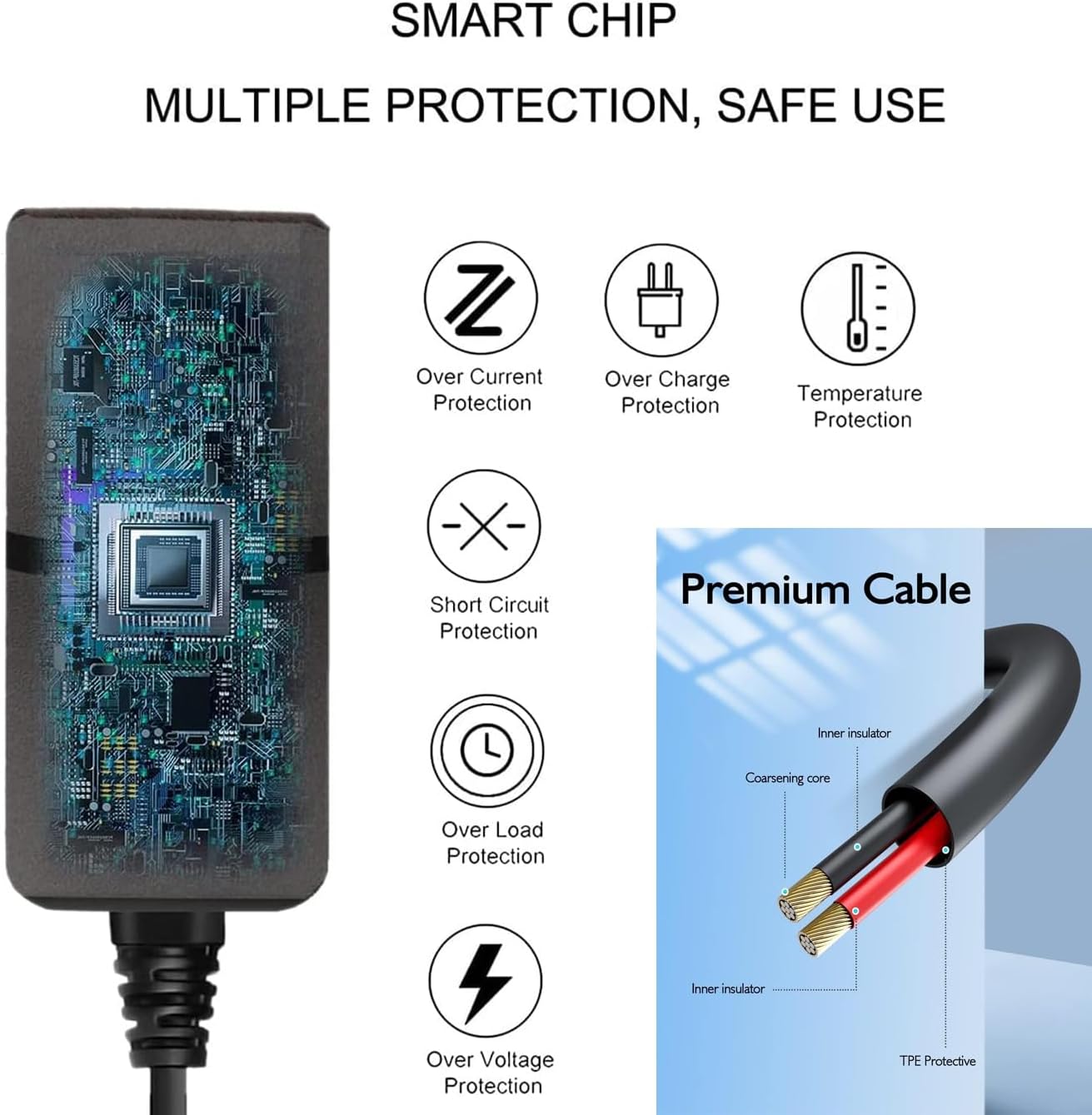
Figure 4: Diagram illustrating the smart chip and various protection features integrated into the adapter.

Figure 5: An internal view of the adapter highlighting its robust security protection components and features like good heat resistance and fire-retardant materials.
Durable Design
The adapter features a flexible and durable wire constructed from high-quality, environmentally friendly TPE material, designed for longevity and resistance to wear and tear.

Figure 6: Illustration of the adapter's flexible and durable wire undergoing tensile testing, demonstrating its resistance to pulling and wear.
Space-Saving Design
The adapter is designed to occupy only one outlet space, allowing other outlets to remain free for additional devices.

Figure 7: Comparison showing the UpBright adapter's single-outlet design versus a typical charger that may block multiple outlets.
Setup Instructions
- Verify Compatibility: Ensure your Vtech baby monitor model (e.g., RM7866HD, RM7868HD) is listed as compatible with this UpBright AC/DC adapter.
- Connect to Device: Insert the barrel connector end of the adapter cable firmly into the power input port of your Vtech baby monitor unit (either the camera unit or the parent LCD unit).
- Connect to Power Outlet: Plug the AC prongs of the adapter into a standard 100-240VAC 50/60Hz wall power outlet.
- Power On: Once connected, your device should receive power. Refer to your Vtech baby monitor's manual for specific power-on procedures.
Note: Always ensure the power outlet is easily accessible for quick disconnection if needed.
Operating Instructions
The UpBright AC/DC Adapter operates automatically once connected to a power source and a compatible device. It is a plug-and-play device requiring no additional configuration.
- The adapter will supply the necessary power to your Vtech baby monitor.
- Its built-in protection features (OVP, OCP, SCP) continuously monitor the power output to safeguard your device from electrical fluctuations.
- No user interaction is required for the adapter's operation beyond initial connection.
Maintenance
Proper maintenance ensures the longevity and safe operation of your AC/DC adapter.
- Cleaning: Disconnect the adapter from the power outlet and the device before cleaning. Use a soft, dry cloth to wipe the exterior. Do not use liquid cleaners or abrasive materials.
- Storage: When not in use, store the adapter in a cool, dry place away from direct sunlight and extreme temperatures. Avoid tightly coiling the cable to prevent damage.
- Inspection: Periodically inspect the adapter cable and connector for any signs of damage, such as fraying, cuts, or bent pins. If damage is observed, discontinue use immediately.
- Ventilation: Ensure the adapter is used in a well-ventilated area. Do not cover the adapter during operation, as this can lead to overheating.
Troubleshooting
| Problem | Possible Cause | Solution |
|---|---|---|
| Device not powering on. |
|
|
| Adapter feels hot during use. |
|
|
Specifications
| Feature | Detail |
|---|---|
| Product Dimensions | 4 x 3 x 2 inches |
| Item Weight | 4 ounces |
| Input Voltage | 100-240VAC 50/60Hz (World Wide Input) |
| Compatible Devices | Vtech RM7866HD, RM7866-2HD, RM7868HD, RM7868-2HD 7" Wi-Fi 1080p Pan Tilt Video Baby Monitors |
| Connector Type | Barrel Connector |
| Special Features | OVP, OCP, SCP Protection, Over Charge Protection, Temperature Protection, Over Load Protection, Over Voltage Protection |
| Included Components | 2 AC Adapters |
Warranty and Support
UpBright stands behind the quality of its products. This AC/DC adapter comes with:
- 30-Day Refund Policy: If you are not satisfied with your purchase, you may be eligible for a refund within 30 days.
- 24-Month Exchange Policy: The product is covered by a 24-month exchange policy for manufacturing defects.
For support inquiries, please refer to the contact information provided with your purchase or visit the official UpBright website for assistance.
