
1. Introduction
Thank you for choosing the Kyglaring LED Light Kit. This kit is designed to enhance your Lego Glinda & Elphaba's Dormitory 75683 model, bringing it to life with vibrant illumination. This manual provides essential information for the safe and correct installation and operation of your light kit. Please note that this product includes the lighting kit only; the Lego model is not included.
2. Safety Information
- Small Parts Warning: This kit contains small parts which may pose a choking hazard. Keep out of reach of small children.
- Delicate Wiring: The wires are thin and delicate. Avoid pulling them forcefully during installation to prevent damage.
- Power Supply: Use a USB power source with a voltage of less than 5V. Exceeding this voltage may damage the lights.
- Age Recommendation: This product is recommended for users aged 12 months to 10 years, though adult supervision is advised due to the delicate nature of installation.
3. Package Contents
Please verify that all components are present before beginning installation. The kit typically includes:
- LED light strips and individual lights
- Connection cables
- Expansion boards
- USB power cable
- Battery box (3x AAA batteries not included)
- Instruction card with QR code for online manual
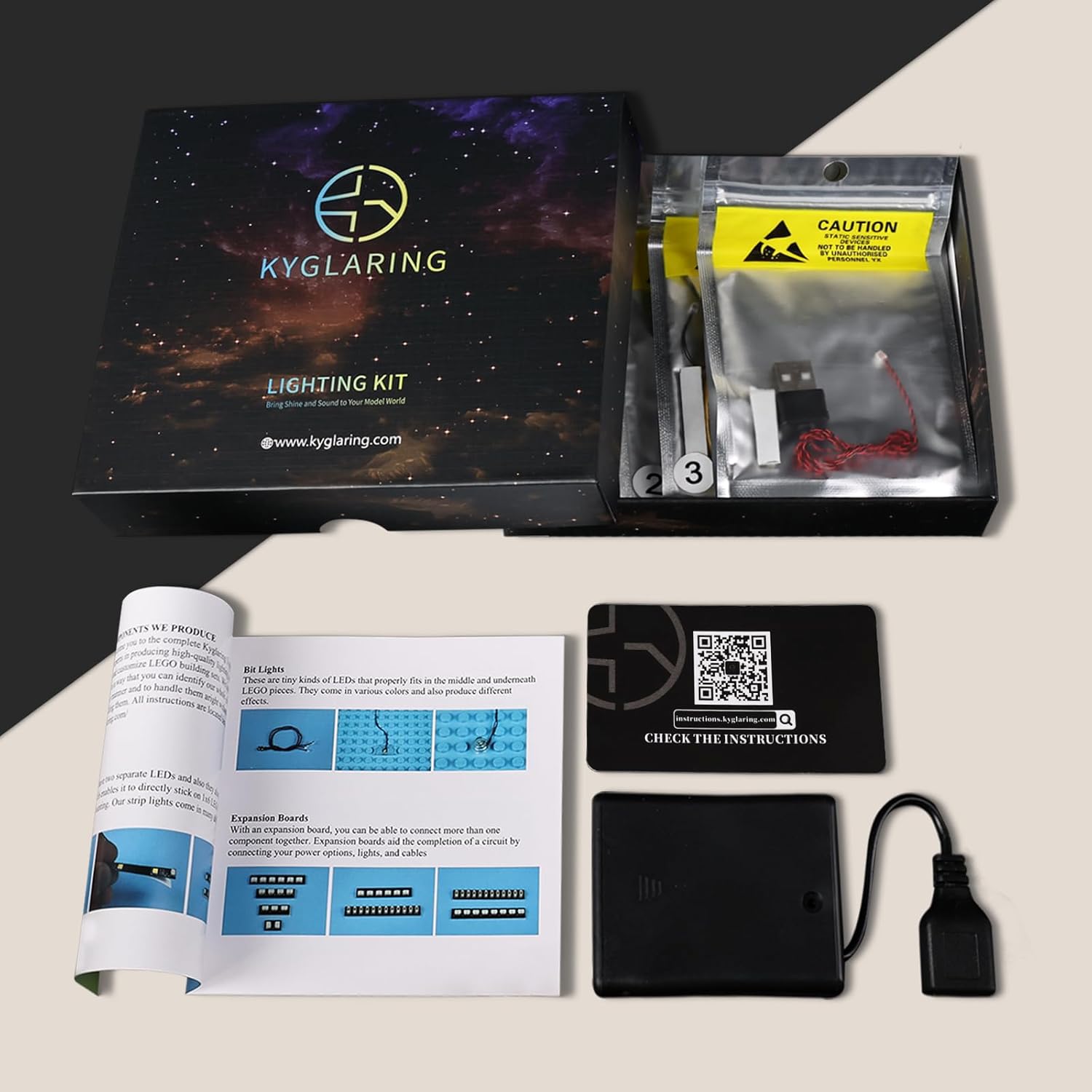
Image: Contents of the Kyglaring LED Light Kit.
4. Installation Instructions
For detailed, step-by-step installation guidance, please refer to the official online instructions. These instructions include video tutorials and PDF guides with numbered light bags and clear visuals.
Access Online Instructions:
- Locate the QR code on the instruction card included in your kit.
- Scan the QR code with your smartphone or tablet, or visit instructions.kyglaring.com directly.
- Search for your model (75683) to find the specific installation guide.

Image: Guide to accessing online installation instructions.
General Installation Steps:
- Preparation: Ensure your Lego model is fully assembled. You may need to carefully disassemble small sections of your model to integrate the lights.
- Placement: Follow the online guide to strategically place each LED light and route the wires. The wiring is designed to be nearly invisible when correctly installed.
- Connection: Connect the individual lights and light strips to the expansion boards, and then connect the expansion boards to the main power cable.
- Testing: Before fully reassembling your model, test each light part. Connect the power source and ensure all lights function correctly.
- Reassembly: Carefully reassemble any disassembled Lego bricks, ensuring wires are not pinched or damaged.

Image: The Lego Glinda & Elphaba's Dormitory model illuminated by the Kyglaring LED Light Kit.

Image: Detailed view of integrated lights within the model.
5. Operating Instructions
Your Kyglaring LED Light Kit can be powered in two ways:
- USB Power: Connect the provided USB power cable to a USB port (e.g., power bank, USB wall adapter, computer). The lights will generally be brighter when powered via USB.
- Battery Box: Insert 3 AAA batteries (not included) into the battery box and connect it to the main power cable.
To turn the lights on or off, press the designated button or switch on the battery box or main control unit, if present. Some kits may require continuous pressure on a switch for illumination.

Image: Visual comparison of the model with lights off and lights on.
6. Maintenance
To ensure the longevity and optimal performance of your light kit:
- Cleaning: Use a soft, dry cloth to gently wipe dust from the lights and wires. Avoid using liquids or harsh chemicals.
- Handling: Always handle the model and light kit with care. Avoid dropping or applying excessive pressure to the wired components.
- Storage: If storing the model for an extended period, disconnect the power source and consider removing batteries from the battery box to prevent leakage.
7. Troubleshooting
If you encounter issues with your light kit, please refer to the following common solutions:
| Problem | Possible Cause | Solution |
|---|---|---|
| Lights do not turn on. | No power, loose connection, faulty component. | Check power source (USB or batteries). Ensure all connections are secure. Test individual lights if possible. |
| Some lights are flickering or dim. | Loose connection, insufficient power, damaged wire. | Verify all connections. Try a different USB power source or fresh batteries. Inspect wires for damage. |
| Lights only stay on when button is pressed. | Specific design of the switch. | This may be an intended feature for some kits. Refer to the online instructions for your specific model. Some users have found a workaround by bypassing the switch and plugging wires into empty slots on the back panel. |
If these steps do not resolve the issue, please contact Kyglaring customer support for further assistance.
8. Specifications
- Product Dimensions: 7.37 x 4.21 x 1.33 inches
- Item Weight: 1.92 ounces
- Power Input: USB (less than 5V) or 3x AAA batteries
- Manufacturer: Kyglaring
9. Warranty and Support
For warranty information, product support, or to purchase replacement parts, please visit the official Kyglaring website or contact their customer service department. You can find contact details on the Kyglaring website or through your purchase platform.
Online Support: instructions.kyglaring.com

