1. Introduction
This manual provides comprehensive instructions for the installation, operation, and maintenance of your GIGABYTE GP-AE1000PM PG5 1000W 80 Plus Platinum Certified Fully Modular Power Supply. Please read this manual thoroughly before installation and retain it for future reference. This power supply unit (PSU) is designed to deliver stable and efficient power to your computer system, featuring ATX 3.1 and PCIe 5.1 compliance for modern hardware.
2. Safety Information
Always observe the following safety precautions to prevent injury or damage to your equipment:
- Do not open the power supply cover. High voltages are present inside, even when the unit is unplugged. There are no user-serviceable parts inside.
- Only qualified personnel should attempt repairs.
- Ensure the power supply is disconnected from the AC outlet before installation or handling.
- Install the PSU in a well-ventilated area, away from heat sources, direct sunlight, and moisture.
- Use only the modular cables provided with this power supply. Using incompatible cables may damage the PSU and connected components.
- Ensure all cables are securely connected before powering on the system.
- This product is designed for computer use only. Do not use it for any other purpose.
3. Package Contents
Verify that all items are present in the package:
- GIGABYTE GP-AE1000PM PG5 1000W Power Supply Unit
- Modular Cable Set (including ATX 24-pin, CPU 8-pin, PCIe 6+2-pin, PCIe 12+4-pin (12VHPWR), SATA, and Peripheral/Molex cables)
- AC Power Cord
- Mounting Screws
- User Manual (this document)
4. Product Overview
The GIGABYTE GP-AE1000PM PG5 is a high-performance 1000W power supply designed for demanding PC systems. It features 80 PLUS Platinum certification for high efficiency, a fully modular design for clean cable management, and is compliant with Intel ATX 3.1 and PCIe 5.1 standards, including a native 12+4 pin connector for next-generation graphics cards.

Figure 4.1: GIGABYTE GP-AE1000PM PG5 Power Supply with its retail packaging.
Key Features:
- 1000W Capacity with Single +12V Rail for stable power delivery.
- Supports PCIe Gen 5.1 graphics cards with a dedicated 12+4 Pin connector.
- Intel ATX 3.1 Certified for broad compatibility and performance.
- 80 PLUS Platinum Certified for up to 92% efficiency at 50% load.
- Fully Modular Design allows for connecting only necessary cables, improving airflow and aesthetics.
- 100% Japanese Capacitors ensure long-term reliability and stability.
- 120mm Fluid Dynamic Bearing (FDB) Fan provides quiet and efficient cooling.

Figure 4.2: The fully modular cable connection panel on the GIGABYTE GP-AE1000PM PG5, showing labeled ports for mainboard, CPU, PCIe, SATA, and peripheral connections.
The modular design allows for flexible cable management. Connect only the cables required for your system components. Refer to the labels on the PSU and the cable connectors to ensure correct connections.
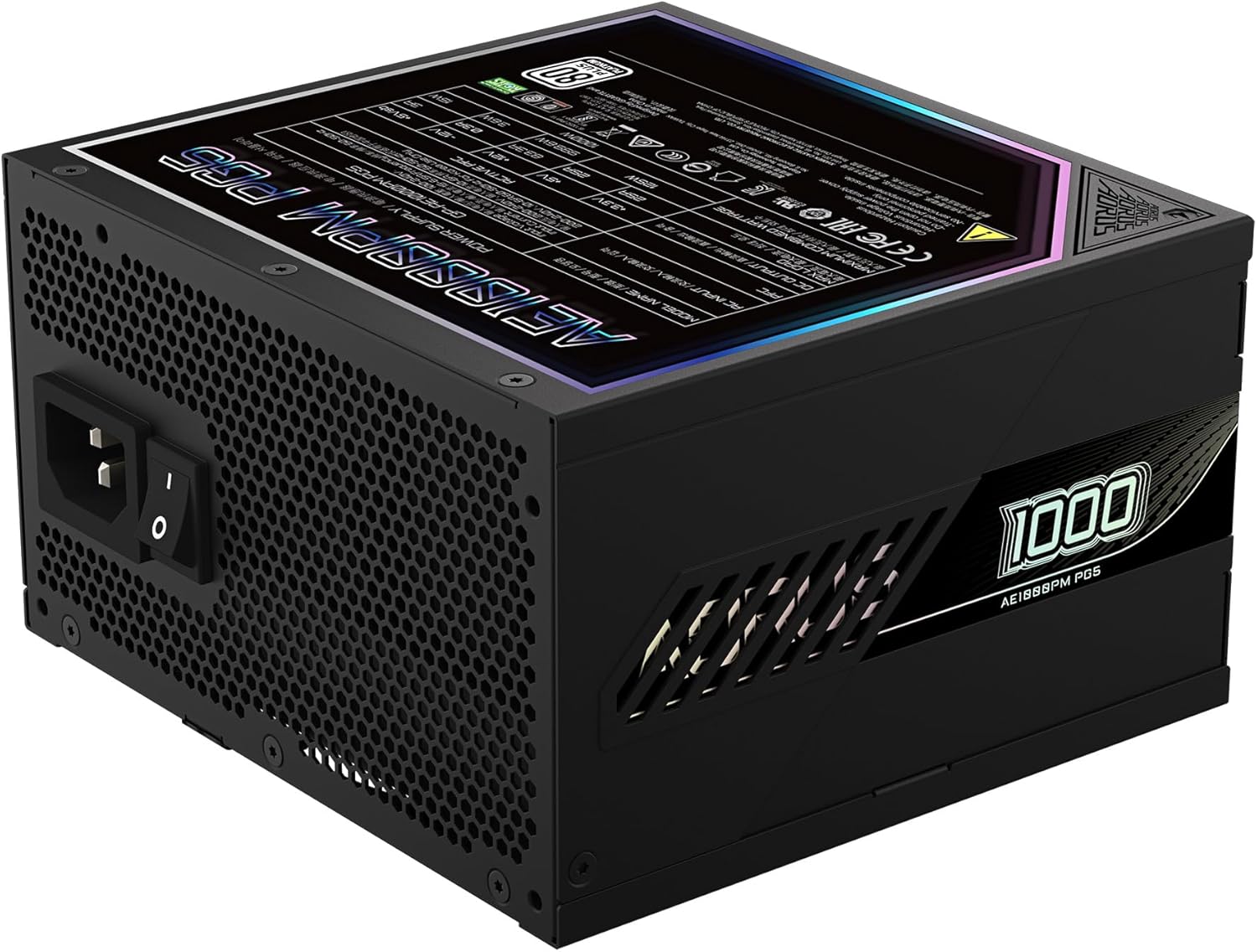
Figure 4.3: Rear view of the power supply, featuring the AC power input and the main power switch.
The rear panel includes the AC power input socket and a master power switch. Always ensure this switch is in the "OFF" position before connecting or disconnecting the AC power cord.

Figure 4.4: Product label displaying electrical specifications and certifications for the GIGABYTE GP-AE1000PM PG5.
The product label provides detailed electrical specifications, including voltage outputs and current ratings for each rail, along with various safety and compliance certifications.
5. Setup and Installation
Follow these steps to install the power supply in your computer system:
- Preparation: Ensure your computer is completely powered off and unplugged from the wall outlet. Open your computer case.
- Mounting the PSU: Carefully place the GIGABYTE GP-AE1000PM PG5 into the designated PSU bay in your computer case. Align the screw holes and secure the PSU using the provided mounting screws.
- Connecting Modular Cables:
- Connect the 24-pin ATX cable to the mainboard.
- Connect the 8-pin (or 4+4-pin) CPU power cable(s) to the mainboard.
- Connect the appropriate PCIe 6+2-pin or 12+4-pin (12VHPWR) cables to your graphics card(s). Ensure the 12+4 pin connector is fully seated if used.
- Connect SATA power cables to your storage drives (HDDs, SSDs) and optical drives.
- Connect Peripheral/Molex cables to any other components requiring them (e.g., case fans, fan controllers).
Important: Always use the modular cables supplied with this GIGABYTE power supply. Do not mix cables from other power supplies, as pinouts can vary and cause severe damage.
- Cable Management: Route cables neatly to improve airflow and aesthetics within your case.
- Close Case and Connect AC Power: Close your computer case. Ensure the PSU's master power switch on the rear is in the "OFF" position. Connect the AC power cord to the PSU and then to a wall outlet or surge protector.
- Power On: Flip the PSU's master power switch to the "ON" position. You can now power on your computer system.
6. Operating Instructions
Once installed, the GIGABYTE GP-AE1000PM PG5 operates automatically. The 120mm Fluid Dynamic Bearing fan will adjust its speed based on the power supply's temperature and load to maintain optimal cooling and quiet operation. This PSU is designed for continuous operation within its specified wattage limits.
- Power On/Off: Use the master power switch on the rear of the PSU to completely cut power to the unit. For normal system shutdown, use your operating system's shutdown function.
- Efficiency: As an 80 PLUS Platinum certified unit, the PSU operates with high efficiency, converting more AC power into usable DC power and generating less heat.
- Protections: The PSU incorporates multiple protection circuits, including Over Voltage Protection (OVP), Under Voltage Protection (UVP), Over Power Protection (OPP), Short Circuit Protection (SCP), Over Current Protection (OCP), and Over Temperature Protection (OTP), to safeguard your components.
7. Maintenance
Minimal maintenance is required for the GIGABYTE GP-AE1000PM PG5. Regular cleaning can help maintain optimal performance and longevity.
- Dust Removal: Periodically, and with the system powered off and unplugged, use compressed air to gently clear dust from the PSU's fan intake and exhaust vents. Avoid inserting any objects into the fan grille.
- Environmental Conditions: Ensure the computer case has adequate airflow and is kept in a clean, dry environment to prevent dust buildup and moisture exposure.
8. Troubleshooting
If you encounter issues with your power supply, refer to the following common troubleshooting steps:
| Problem | Possible Cause | Solution |
|---|---|---|
| System does not power on. |
|
|
| System powers on but shuts down unexpectedly. |
|
|
| Fan is not spinning. |
|
|
If these steps do not resolve your issue, please contact GIGABYTE customer support for further assistance.
9. Specifications
| Feature | Detail |
|---|---|
| Brand | GIGABYTE |
| Model Name | GP-AE1000PM PG5 |
| Output Wattage | 1000 Watts |
| 80 PLUS Certification | Platinum |
| Form Factor | ATX |
| ATX Standard | ATX 3.1 |
| PCIe Standard | PCIe 5.1 (with 12+4 Pin connector) |
| Cooling Method | Air (120mm Fluid Dynamic Bearing Fan) |
| Capacitors | 100% Japanese Capacitors |
| Modular Type | Fully Modular |
| Dimensions (L x W x H) | 13.3 x 8.1 x 4.7 inches (approximate, based on product dimensions) |
| Weight | 6.83 pounds |
| Protections | OVP, UVP, OPP, SCP, OCP, OTP |
10. Warranty and Support
The GIGABYTE GP-AE1000PM PG5 Power Supply comes with a 10-year warranty, ensuring long-term reliability and peace of mind. For warranty claims, technical support, or further assistance, please visit the official GIGABYTE website or contact their customer service department.
GIGABYTE Official Website: www.gigabyte.com


