
Introduction
This manual provides detailed instructions for the setup, operation, and maintenance of your CNBRO Smart Ring W8. This device is designed to monitor various health metrics, including heart rate, sleep patterns, blood pressure, and daily activity. Please read this manual thoroughly to ensure proper use and to maximize the benefits of your smart ring.

Image: The CNBRO Smart Ring W8, showcasing its sleek design and internal sensors.
Package Contents
Verify that all items are present in the package:
- 1 x CNBRO Smart Ring W8
- 1 x User Manual (this document)
- 1 x Magnetic Charging Cable
Setup
1. Charging the Smart Ring
Before initial use, fully charge the smart ring.
- Connect the magnetic charging cable to a USB power source (e.g., computer USB port, wall adapter).
- Attach the magnetic end of the charging cable to the charging contacts on the smart ring. Ensure a secure connection.
- The ring will indicate charging status (e.g., an LED indicator or app notification). A full charge typically takes approximately 1-2 hours.
2. App Installation and Pairing
The CNBRO Smart Ring W8 operates with the "Smart Health" application.
- Download the App: Search for "Smart Health" in your smartphone's app store (Apple App Store for iOS, Google Play Store for Android).
- Compatibility: Ensure your smartphone runs iOS 8.0 or above, or Android 5.1 or above, and has Bluetooth 5.0 enabled.
- Install and Open: Install the app and open it. Follow the on-screen prompts to create an account or log in.
- Pairing:
- Enable Bluetooth on your smartphone.
- In the "Smart Health" app, navigate to the device pairing section (usually found under "Device" or "Profile").
- Select "Add Device" or "Scan for Devices."
- Choose the CNBRO Smart Ring W8 from the list of available devices.
- Confirm the pairing request on both your phone and, if prompted, on the ring.
3. Ring Sizing and Placement
Proper sizing and placement are crucial for accurate data collection.

Image: A size chart displaying inner diameter and circumference for various ring sizes, along with a two-step guide on how to measure your finger using a non-stretchy wire and a ruler.
- Refer to the size chart to ensure your ring fits comfortably but snugly.
- Wear the ring on a finger where it feels secure and does not rotate freely.
- A loose fit can affect the accuracy of sensor readings.
Operating Instructions
1. Heart Rate Monitoring
The smart ring continuously tracks your heart rate.
- Wear the ring consistently for 24-hour heart rate tracking.
- Open the "Smart Health" app to view real-time heart rate data and historical trends.

Image: A visual representation of the "Smart Health" app interface showing 24-hour real-time heart rate monitoring and blood oxygen monitoring data. The image also displays the smart ring itself.
2. Sleep Monitoring
The ring automatically monitors your sleep patterns.
- Wear the ring while sleeping.
- The app provides a comprehensive analysis of sleep quality, including deep sleep, light sleep, and wake-up times.

Image: A user wearing the smart ring while sleeping, alongside a screenshot of the "Smart Health" app displaying detailed sleep data, including total sleep time, deep sleep, light sleep, REM, and awake times.
3. Blood Pressure Monitoring
The smart ring can provide blood pressure readings.
- Ensure the ring is worn correctly for accurate readings.
- Access blood pressure data through the "Smart Health" app.
- Note: This device is not a medical device. Consult a healthcare professional for medical advice.
4. Activity Tracking and Sport Modes
Track your daily activity and specific workouts.
- The ring automatically tracks steps, calories consumed, and distance.
- To track specific exercises, activate the relevant sport mode within the "Smart Health" app. This will record your route, activity time, and heart rate during the exercise.

Image: A visual showing the smart ring being worn during cycling, with the "Smart Health" app interface displaying recorded exercise data such as duration, distance, and a map of the route.
5. Remote Camera Control
The ring can function as a remote shutter for your smartphone camera.
- Refer to the "Smart Health" app settings for instructions on enabling and using the remote camera feature.
6. Care for Family Feature
Share your health data with family members or friends through the app.
- In the "Smart Health" app, navigate to the "Care for Family" section.
- Follow the prompts to add friends or family members and share selected health metrics.

Image: A sequence of three smartphone screens demonstrating the "Care for Family" feature: adding a friend, clicking on the added friend, and viewing their shared health information (steps, calories, heart rate, blood pressure, SpO2).
7. Waterproof Guidelines
The CNBRO Smart Ring W8 is IP68 waterproof.
- It supports swimming, washing hands, cold showering, and rain exposure.
- Important: Do not expose the ring to hot water or steam, as this can damage the device and corrode charging contacts.
- After swimming or exposure to water, shake off excess water and wipe the ring dry.
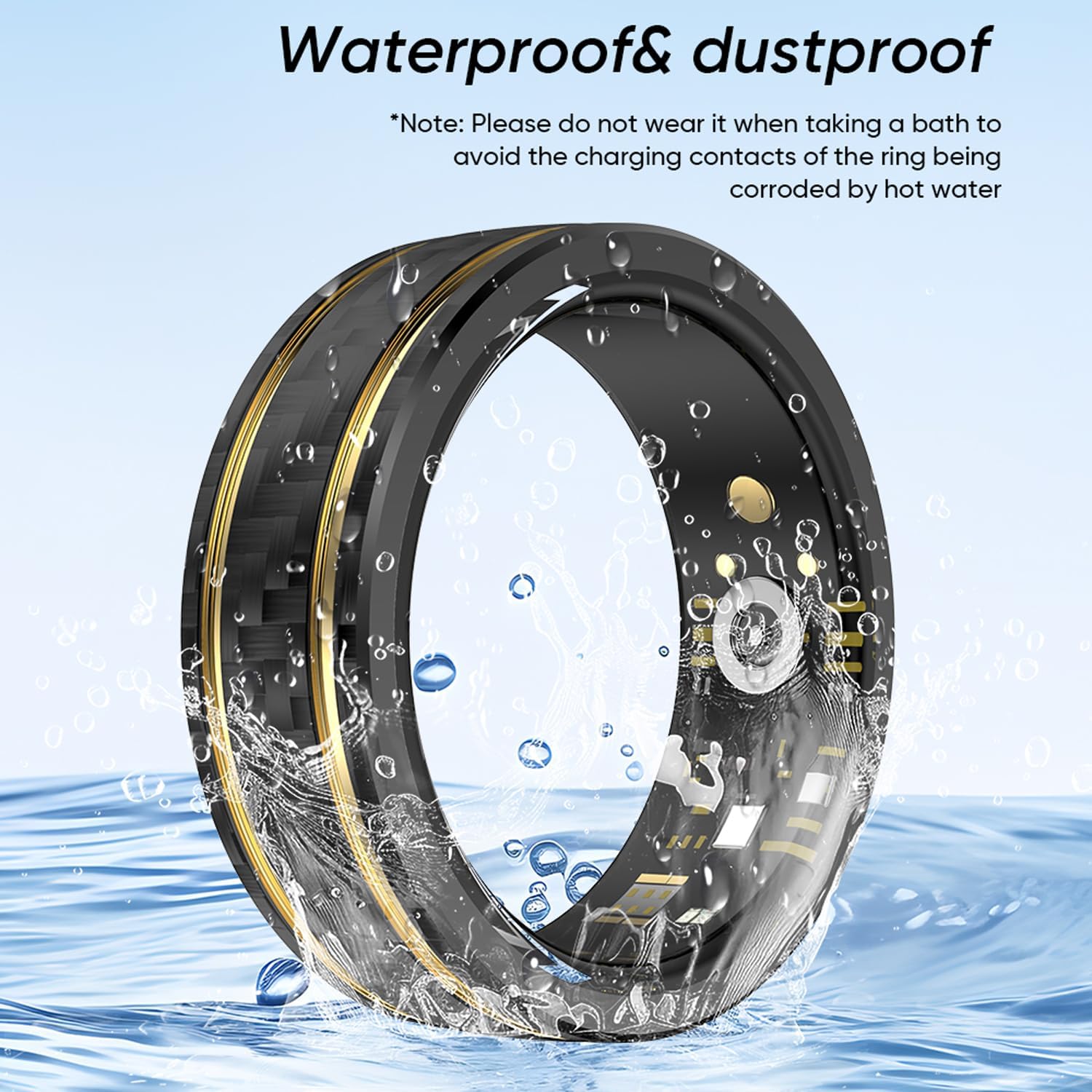
Image: The smart ring partially submerged in water, illustrating its waterproof capability. A note warns against using it in hot water.
Maintenance
- Cleaning: Wipe the ring regularly with a soft, dry cloth. If necessary, use a slightly damp cloth and immediately dry it. Avoid harsh chemicals or abrasive materials.
- Charging Contacts: Ensure the charging contacts on the ring and cable are clean and free of debris to maintain efficient charging.
- Storage: Store the ring in a cool, dry place when not in use.
- Water Exposure: Adhere strictly to the waterproof guidelines. Prolonged exposure to hot water or chemicals can damage the device.
Troubleshooting
If you encounter issues with your CNBRO Smart Ring W8, refer to the following common problems and solutions:
- Ring not charging:
- Ensure the magnetic charging cable is securely connected to both the ring and the power source.
- Check if the power source is functional.
- Clean the charging contacts on both the ring and the cable.
- Cannot pair with smartphone:
- Ensure Bluetooth is enabled on your smartphone.
- Verify that the "Smart Health" app is installed and updated.
- Restart both your smartphone and the smart ring (if applicable, by placing it on the charger).
- Ensure the ring is sufficiently charged.
- Check if your phone meets the compatibility requirements (iOS 8.0+ or Android 5.1+, Bluetooth 5.0).
- Inaccurate data readings (Heart Rate, Sleep, etc.):
- Ensure the ring is worn snugly on your finger and does not rotate freely.
- Avoid wearing the ring too loosely or too tightly.
- Clean the sensors on the inside of the ring.
- Ensure your personal profile information (age, height, weight) in the app is accurate.
- App not syncing data:
- Ensure your smartphone has an active internet connection.
- Check if the "Smart Health" app is running in the background.
- Restart the app or your smartphone.
- Short battery life:
- Ensure the ring is fully charged before use.
- Frequent use of certain features or continuous monitoring may consume more battery.
- Battery performance may degrade over time.
If these steps do not resolve the issue, please contact customer support for further assistance.
Specifications
| Feature | Detail |
|---|---|
| Model Name | W8 |
| Brand | CNBRO |
| Product Dimensions | 0.39 x 0.39 x 0.39 inches |
| Item Weight | 2.46 ounces (0.07 Kilograms) |
| Battery Type | 1 Lithium Ion battery (included) |
| Battery Capacity | 20 Milliamp Hours |
| Connectivity Technology | Bluetooth 5.0 |
| Water Resistance | IP68 (supports swimming, washing hands, cold showering, rain; not suitable for hot water/steam) |
| Special Features | Heart Rate, Sleep Tracker, Blood Pressure, Pedometer, Sport Mode, Remote Camera |
| App Name | Smart Health |
| Compatibility | Smartphone iOS 8.0 or above, Android 5.1 or above |
| Manufacturer | Shenzhen Taiyang Technology Co., Ltd |
Safety Information
- Medical Disclaimer: The CNBRO Smart Ring W8 is not a medical device and is not intended to diagnose, treat, cure, or prevent any disease. Consult a healthcare professional for any health-related concerns.
- Water and Heat: Adhere to IP68 guidelines. Avoid hot water, steam, or prolonged submersion beyond specified limits.
- Choking Hazard: Keep the ring and small parts (like the charging cable) out of reach of children.
- Battery Safety: Do not attempt to replace the battery yourself. Do not expose the device to extreme temperatures or puncture the battery.
- Skin Irritation: If you experience skin irritation, discontinue use and consult a doctor. Ensure the ring is clean and dry before wearing.
Customer Support
For any questions, concerns, or technical assistance regarding your CNBRO Smart Ring W8, please contact our customer support team. We are committed to providing a satisfactory solution within 24 hours.
Contact information can typically be found on the product packaging, the seller's page, or within the "Smart Health" application.