
1. Product Overview
The Beeasy AW05 Military Sports Watch is a robust timepiece designed for outdoor activities, featuring both analog and digital displays. It offers multiple functions including a stopwatch, four alarms, countdown timer, and dual time display, all housed in a 5ATM waterproof casing.

Key Features:
- Multi-functionality: Stopwatch, 12/24 Hour format, snooze mode, 4 alarms, split time, LED delay backlight, calendar (date, week display), dual time.
- 5ATM Waterproof: Suitable for daily waterproofing, swimming, and rain. Withstands water pressure up to 164FT/50M.
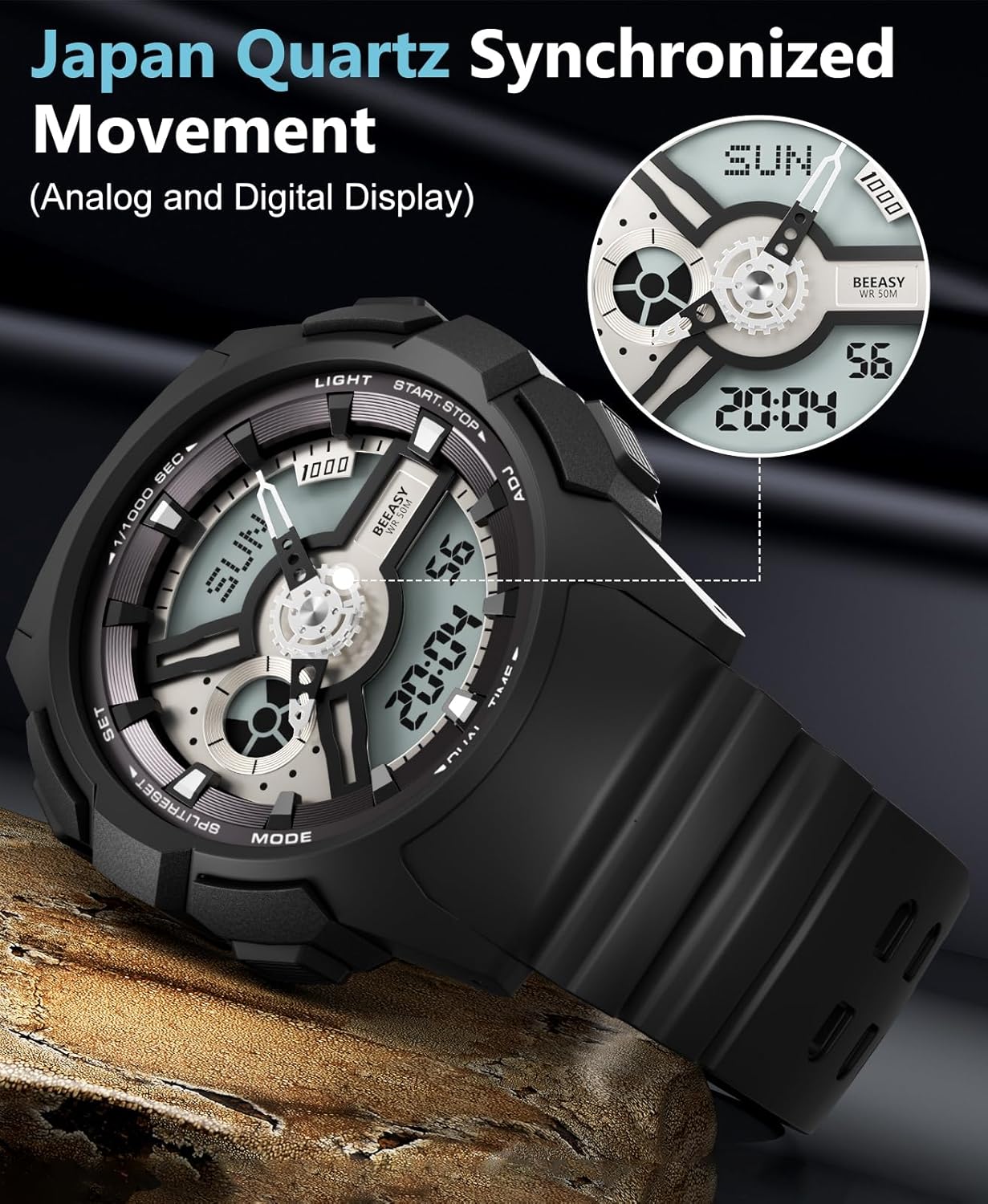
- Analog & Digital Display: Japan Quartz Synchronized Movement provides simultaneous setting and reading for accurate timekeeping.
- Durable Design: Soft and durable PU watch band, large dual dial design, and military-style construction for comfort and resilience.
2. Setup Instructions
2.1 Setting Date and Time
Follow these steps to set the year, month, and date on your Beeasy AW05 watch:
- Press and hold the RESET button for 3 seconds to enter setting mode.
- Press the MODE button 6 times to navigate to the year setting.
- Press the ST/STOP button to adjust the year to the correct value. If the current year is exceeded, press ST/STOP to set it to 99, then continue adjusting to the present year.
- Press the MODE button to set the month. Repeat the adjustment process using the ST/STOP button.
- Continue pressing MODE and adjusting with ST/STOP for the day, hour, minute, and second settings.
- Once all settings are complete, press RESET to exit the setting mode.

2.2 Synchronized Movement
The watch features a Japan Quartz Synchronized Movement, ensuring both analog and digital displays show the same accurate time once set.
3. Operating Instructions
3.1 Mode Navigation
Use the MODE button (typically on the bottom left) to cycle through the different functions: Time Display, Stopwatch, Alarm, and Dual Time.
3.2 LED Backlight
To illuminate the digital display in low-light conditions, press the LIGHT button (typically on the top right). The backlight will activate for a short duration.

3.3 Stopwatch Function
To use the stopwatch:
- Navigate to the Stopwatch mode using the MODE button.
- Press ST/STOP (typically top right) to start the stopwatch.
- Press ST/STOP again to pause the stopwatch.
- Press RESET (typically bottom left) to reset the stopwatch to zero.
- To record split times, press SPLIT/RESET while the stopwatch is running. The display will show the split time while the stopwatch continues to run in the background. Press SPLIT/RESET again to return to the running time.
3.4 Alarm Function
The watch supports up to four alarms. To set an alarm:
- Navigate to the Alarm mode using the MODE button.
- Press RESET to select the alarm number (AL1, AL2, AL3, AL4).
- Press ST/STOP to adjust the hour, then press MODE to move to minutes, and adjust with ST/STOP.
- Press RESET to toggle the alarm ON/OFF. An alarm icon will appear when activated.
- Press MODE to exit alarm setting.
3.5 Dual Time Function
To set and view a second time zone:
- Navigate to the Dual Time mode using the MODE button.
- Press and hold RESET to enter dual time setting mode.
- Use ST/STOP to adjust the hour, then MODE to move to minutes, and adjust with ST/STOP.
- Press RESET to save and exit.
4. Maintenance
4.1 Water Resistance Guidelines
The Beeasy AW05 watch is 5ATM waterproof, suitable for swimming and daily water exposure. However, to maintain its water resistance:
- Avoid Hot Water and Steam: Do not expose the watch to hot water, steam, or saunas, as this can compromise the seals.
- Do Not Press Buttons Underwater: Pressing buttons while the watch is submerged can allow water to enter the casing.

4.2 Cleaning
To clean your watch:
- Wipe the watch case and band with a soft, damp cloth.
- For stubborn dirt, use a mild soap solution and rinse thoroughly with clean water, ensuring no buttons are pressed.
- Dry the watch completely with a soft, dry cloth.


5. Troubleshooting
5.1 Display Issues
- Blank or Faint Display: This may indicate a low battery. Contact customer support for battery replacement options.
- Incorrect Time/Date: Refer to Section 2.1 to re-set the time and date.
5.2 Water Ingress
If you notice moisture inside the watch, stop using it immediately and contact customer support. Do not attempt to open the watch yourself.
5.3 Buttons Not Responding
Ensure the watch is not submerged in water. If buttons remain unresponsive, a soft reset (removing and reinserting the battery by a professional) might be required. Do not attempt this yourself.
6. Specifications
| Feature | Specification |
|---|---|
| Model Number | AW05 |
| Display Type | Analog-Digital |
| Movement Type | Japanese Quartz |
| Water Resistance Depth | 50 Meters (5ATM) |
| Case Material | Stainless Steel |
| Band Material | Rubber |
| Clasp Type | Buckle |
| Case Diameter | 51 Millimeters |
| Case Thickness | 13 Millimeters |
| Band Width | 22 Millimeters |
| Band Length | 237 Millimeters |
| Item Weight | 0.14 Kilograms |
| Power Source | Battery Powered |

7. Official Product Video
Video 7.1: An official product video showcasing the features and design of the Beeasy Military Digital Sport Watch.
8. Warranty and Support
8.1 Warranty Information
This Beeasy AW05 watch comes with a Limited Warranty. Please refer to the warranty card included with your purchase for specific terms and conditions.
8.2 Customer Support
For any questions, technical assistance, or warranty claims, please contact Beeasy customer support through the retailer where the product was purchased or visit the official Beeasy website for contact information.

