
AT&T EL51503
AT&T EL51503 DECT 6.0 Cordless Home Phone User Manual
Model: EL51503
Introduction
Welcome to your new AT&T EL51503 DECT 6.0 Cordless Home Phone system. This manual provides comprehensive instructions for setting up, operating, and maintaining your phone system. Designed for busy households, this system offers clear, interference-free communication with advanced features.

Image: The AT&T EL51503 cordless phone system, showing the main base unit with one handset and four additional charging cradles with handsets.
Key Features
Your AT&T EL51503 cordless phone system comes equipped with several features designed for convenience and clarity.
Backlit Screen & Lighted Keypad

High-contrast text on the white backlit screen ensures easy readability of incoming caller ID or call history records. The lighted handset keypad allows for effortless dialing even in low-light conditions.
Extra-Large Display

The large screen makes it easy to read information at a glance, improving user experience for all.
Big Buttons

Featuring large font and extra-large backlit keys, this design is particularly helpful for users with visual impairments, ensuring comfortable and accurate dialing.
DECT 6.0 Technology
This cordless telephone transmits secure signals via DECT 6.0 channel, ensuring crystal clear sounds, interference-free communication, and a stable operation range up to 1000 ft outdoors.
What's in the Box
Verify that your package contains all the items listed below:
- 1 Base unit
- 5 Handsets
- 4 Adaptors (for charging cradles)
- 5 Battery packs
- 1 Telephone line cord
- Quick start guide
Setup
1. Battery Installation
Each handset requires a battery pack for operation. Ensure correct polarity when inserting.
- Open the battery compartment cover on the back of the handset.
- Connect the battery pack connector securely into the jack inside the compartment.
- Place the battery pack into the compartment.
- Close the battery compartment cover.
2. Charging the Handsets
For optimal performance, charge each handset for at least 16 hours before initial use.
- Place each handset face forward into its respective charging cradle or the main base unit.
- The CHARGE light on the handset will illuminate, indicating proper charging.
3. Connecting the Base Unit
Connect the base unit to a power outlet and your telephone line.
- Plug the large end of the power adapter into an electrical outlet not controlled by a wall switch.
- Plug the small end of the power adapter into the POWER jack on the back of the base unit.
- Plug one end of the telephone line cord into the TEL LINE jack on the back of the base unit.
- Plug the other end of the telephone line cord into a telephone wall jack.
Important: Use only the power adapter and telephone line cord provided with this product.
Operating Your Phone System
Making and Answering Calls
- To make a call: Press PHONE/FLASH or SPEAKER, then dial the number.
- To answer a call: Press PHONE/FLASH or SPEAKER when the phone rings.
- To end a call: Press OFF/CANCEL or place the handset back in the cradle.
Using the Speakerphone
The simulated full-duplex speakerphone allows for natural, two-way conversations.
- During a call, press SPEAKER to switch to speakerphone mode.
- Press SPEAKER again to switch back to handset mode, or press OFF/CANCEL to end the call.
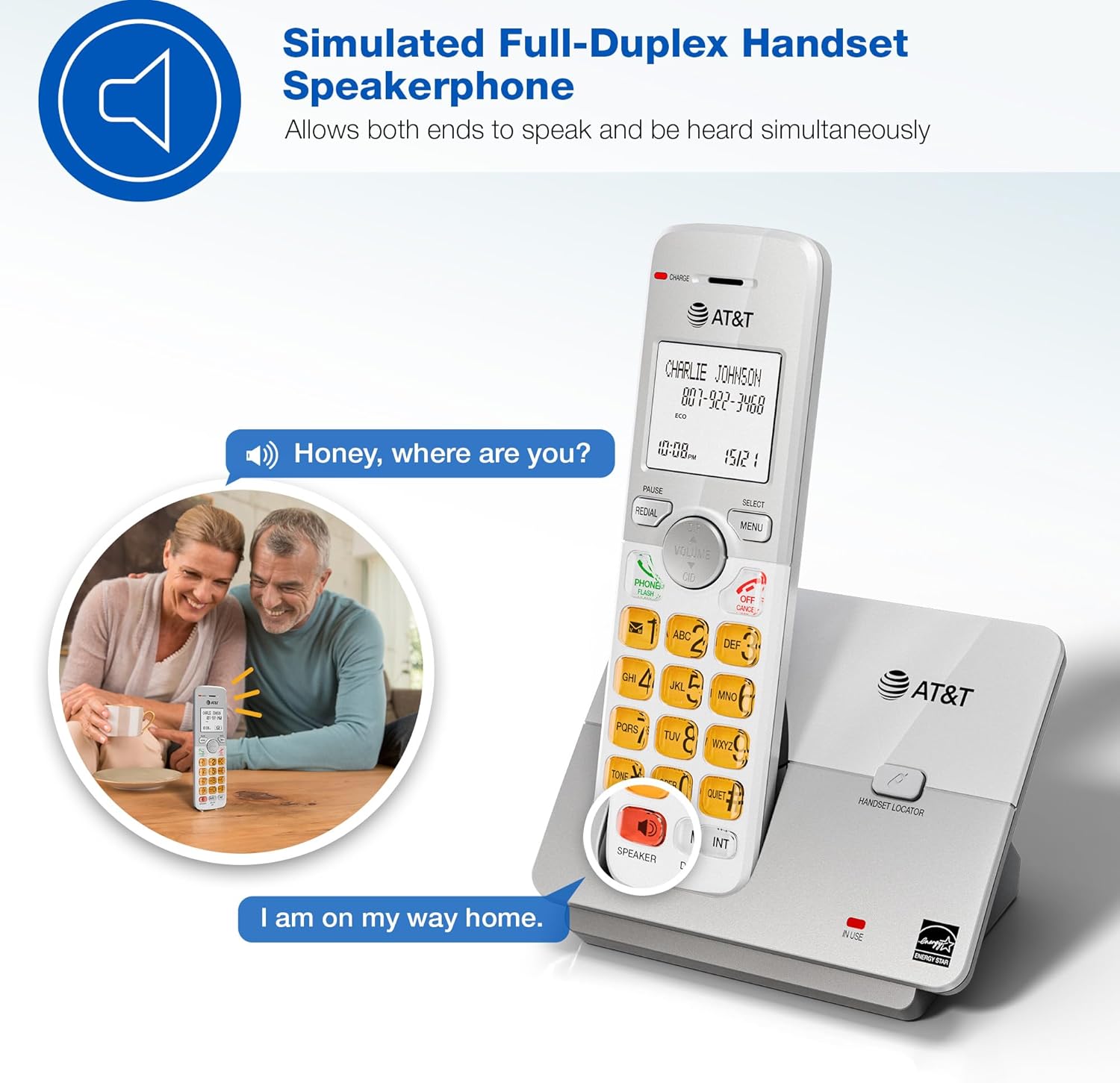
Image: A couple smiling while using the phone's speakerphone feature, demonstrating simultaneous speaking and hearing.
Phonebook Directory
Store up to 50 names and numbers for quick dialing.
- To add an entry: Press MENU, navigate to "Phonebook", then "Add New Entry". Follow the on-screen prompts.
- To dial from phonebook: Press DIR, scroll to the desired entry, then press PHONE/FLASH or SPEAKER.

Image: The phone's display showing a phonebook directory with contact names, illustrating the ability to store up to 50 names and numbers.
Caller ID / Call Waiting
View incoming caller information and manage multiple calls.
- Incoming calls display on the large, backlit LCD screen.
- To review Caller ID history: Press CID (up/down arrow) to scroll through recent calls.
- To call back a number from Caller ID: Select the entry and press PHONE/FLASH.

Image: A close-up of the phone's LCD screen displaying an incoming caller's name and number, along with the current time and date.
Eco Mode
The phone system features an ECO mode to manage power consumption, extending battery life and reducing energy use.
- ECO mode is typically activated automatically when the handset is close to the base unit.
- Look for the "ECO" indicator on the handset display.
Intercom Function
Use the intercom feature to communicate between handsets.
- To initiate an intercom call: Press INT on any handset.
- If you have multiple handsets, you may be prompted to select which handset to call.
- To end an intercom call: Press OFF/CANCEL.
Quiet Mode
Temporarily silence the ringer on all handsets and the base unit for a set period.
- To activate Quiet Mode: Press MENU, navigate to "Quiet Mode", and set the desired duration.
- Incoming calls will still be logged in Caller ID history.
Maintenance
Proper care ensures the longevity of your phone system.
- Cleaning: Wipe the phone and base unit with a soft, slightly damp cloth. Do not use cleaning sprays or harsh chemicals.
- Battery Care:
- Avoid overcharging by leaving handsets on the charger for extended periods after they are fully charged.
- If the phone will not be used for a long time, remove the battery from the handset.
- Replace batteries when performance degrades.
- Location: Keep the phone away from heat sources, direct sunlight, and moisture.
Troubleshooting
If you experience issues with your phone system, try these common solutions:
| Problem | Solution |
|---|---|
| No dial tone |
|
| Handset not charging |
|
| Poor sound quality / Static |
|
| Caller ID not displaying |
|
Specifications
| Feature | Detail |
|---|---|
| Model Number | EL51503 |
| Telephone Type | DECT 6.0 Cordless Phone |
| Number of Handsets | 5 (expandable) |
| Display | Backlit LCD |
| Keypad | Lighted |
| Speakerphone | Simulated Full-Duplex Handset Speakerphone |
| Phonebook Capacity | 50 names and numbers |
| Caller ID Memory | 50 calls |
| Eco Mode | Yes |
| Intercom | Yes |
| Power Source | Corded Electric (Base Unit) |
| Batteries | 5 Product Specific batteries (included) |
| Color | Black |
| Material | Plastic |
| Manufacturer | VTech |
| Product Dimensions (Base) | 4.76 x 3.29 x 6.81 inches (L x W x H) |
| Item Weight | 3.16 pounds |
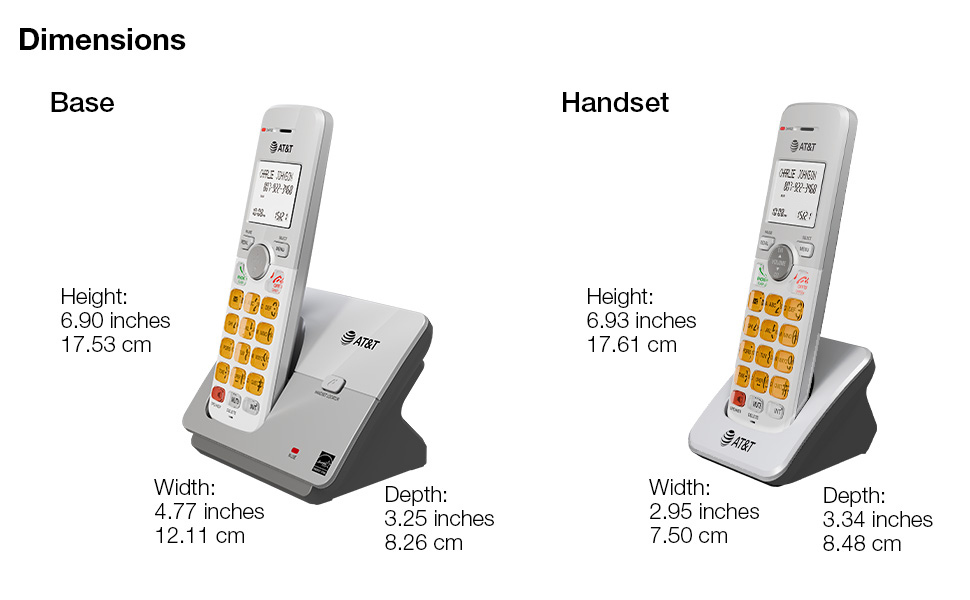
Image: A diagram illustrating the dimensions of both the base unit and a single handset, including height, width, and depth in inches and centimeters.
Warranty and Support
For warranty information and technical support, please refer to the quick start guide included in your package or visit the official AT&T support website.
- Manufacturer: VTech
- Brand: AT&T
- Online Support: Visit the AT&T Store on Amazon
Protection plans are also available for extended coverage:
- 3-Year Protection Plan
- 4-Year Protection Plan
- Complete Protect (monthly plan)
For details on these plans, please check the product listing or contact your retailer.
Ask a question about this manual
Ask about setup, troubleshooting, compatibility, parts, safety, or missing instructions. Manuals+ will review the question and use this page’s manual context to help answer it.