
Agrestem TSC-09HA2/I3TI23
Agrestem 9000 BTUs Mini Split AC/Heating System User Manual
Model: TSC-09HA2/I3TI23
1. Introduction
This manual provides detailed instructions for the installation, operation, maintenance, and troubleshooting of your Agrestem 9000 BTUs Mini Split AC/Heating System. This inverter split-system air conditioner is designed for efficient cooling and heating of rooms up to 450 sq. ft., featuring a 23 SEER2 rating and 230V power supply.
The system utilizes advanced DC inverter technology and a built-in heat pump for optimal energy efficiency, potentially saving up to 30% on energy consumption compared to conventional systems. Please read this manual thoroughly before installation and operation to ensure proper use and longevity of your unit.
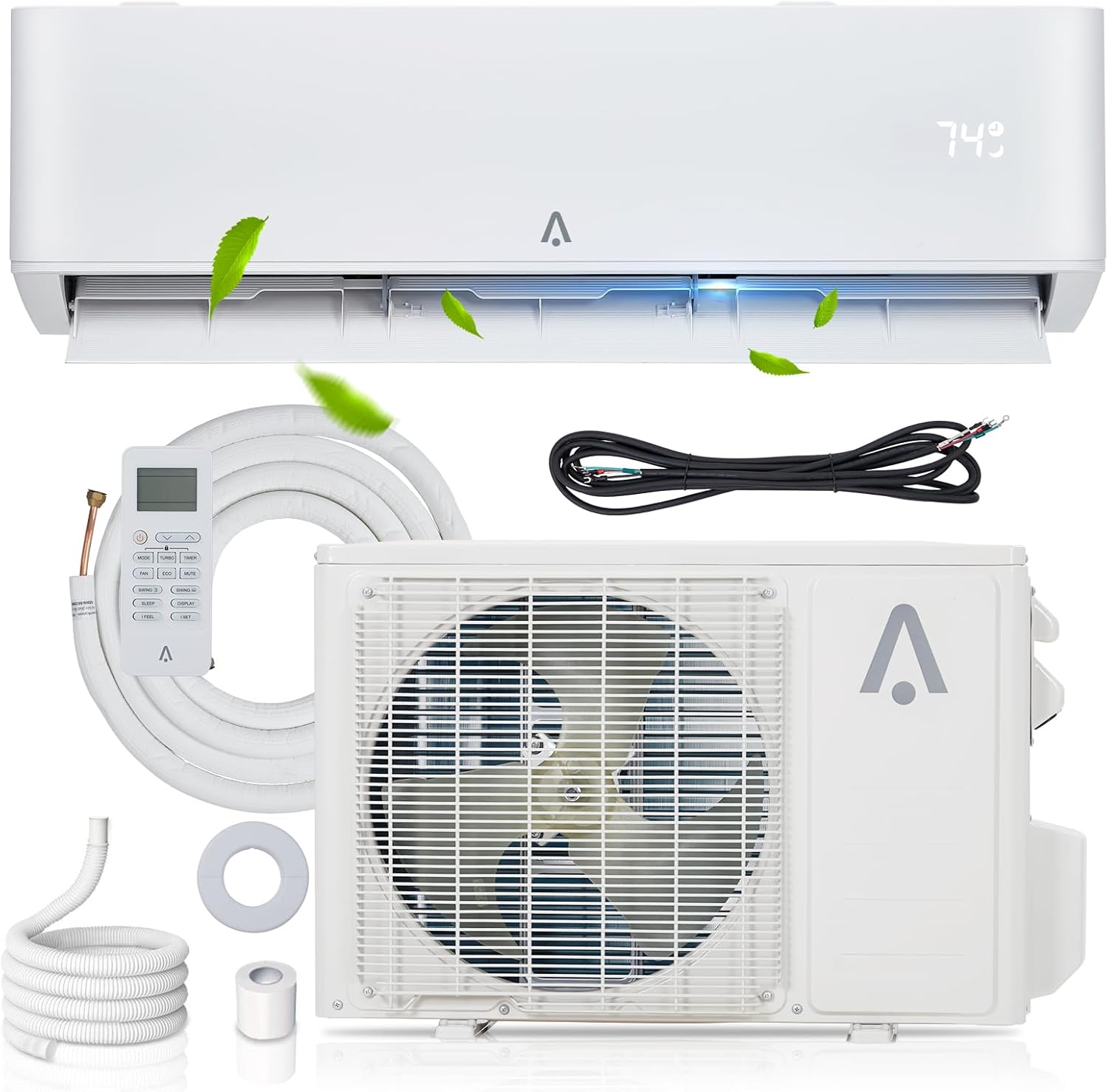
Figure 1.1: Agrestem 9000 BTUs Mini Split AC/Heating System components.
2. Important Safety Instructions
WARNING: Improper installation, adjustment, alteration, service, or maintenance can cause property damage, injury, or death. Refer to this manual. For assistance or additional information, consult a qualified installer or service agency.
- Always disconnect power to the unit before performing any maintenance or service.
- Installation must be performed by a qualified and certified HVAC technician in accordance with all local and national electrical and building codes.
- Ensure the power supply matches the unit's specifications (230V).
- Do not block the air intake or outlet of the indoor or outdoor units.
- Keep children and pets away from the outdoor unit during operation.
- Do not attempt to repair or modify the unit yourself. Contact qualified service personnel.
- Ensure proper grounding to prevent electrical shock.
3. What's in the Box
Your Agrestem Mini Split AC/Heating System package includes the following components:
- 1 x Indoor Unit
- 1 x Outdoor Condenser
- 1 x Copper & Aluminum Connection Pipe (Pre-charged with refrigerant)
- 1 x Wall Mounting Bracket (for indoor unit)
- 1 x Drain Hose
- 1 x Communication Wires
- 1 x User Guide (this manual)
- Remote Control (batteries not included)

Figure 3.1: Packaging contents, typically delivered in two separate boxes.
4. Installation Guide
Professional installation by a certified HVAC technician is highly recommended for this unit to ensure proper function, safety, and warranty validity.
4.1. Site Selection
- Indoor Unit: Choose a location that allows for optimal air distribution, is away from direct sunlight or heat sources, and has sufficient space for maintenance. Ensure the wall is strong enough to support the unit's weight.
- Outdoor Unit: Select a well-ventilated area, away from obstacles that might impede airflow. Ensure it is on a stable, level surface and has adequate clearance from walls and other structures.
4.2. Installation Steps (Overview)
- Mounting the Indoor Unit: Secure the mounting plate to the wall, ensuring it is level.
- Drilling Wall Hole: Create a hole through the wall for the refrigerant pipes, drain hose, and communication wires.
- Installing Outdoor Unit: Place the outdoor unit on a stable base.
- Connecting Refrigerant Pipes: Connect the pre-charged copper and aluminum pipes between the indoor and outdoor units. Ensure connections are tight to prevent leaks.
- Electrical Wiring: Connect the power supply and communication wires according to the wiring diagram provided in the full user manual. This step requires a qualified electrician.
- Drainage: Connect the drain hose from the indoor unit to ensure proper condensate removal.
- Vacuuming and Leak Check: Evacuate the system to remove air and moisture, then perform a leak check on all connections.
- Test Run: After all connections are secure and checked, perform a test run to verify proper operation.

Figure 4.1: System dimensions and connection details for installation planning.
5. Operating Instructions
Your Agrestem Mini Split system offers various modes and features for optimal comfort. All functions are controlled via the included remote control or smart voice control (if configured).
5.1. Basic Operation
- Power On/Off: Press the ON/OFF button on the remote control to start or stop the unit.
- Temperature Setting: Use the TEMP UP/DOWN buttons to adjust the desired temperature. The range is typically 60°F to 90°F.
- Fan Speed: Press the FAN button to cycle through fan speeds: Auto, Low, Mid, High.
5.2. Operating Modes
Press the MODE button to select from the following:
- COOL Mode (Snowflake icon): For cooling the room. The unit will cool to your set temperature.
- HEAT Mode (Sun icon): For heating the room. The built-in heat pump provides efficient warmth.
- DRY Mode (Water drop icon): For dehumidifying the room. The unit will remove excess moisture from the air (up to 56 Pints/Day).
- FAN Mode (Fan icon): Circulates air without cooling or heating.
- AUTO Mode: The unit automatically selects the operating mode (Cool, Heat, Fan) based on the room temperature and your set temperature.

Figure 5.1: Overview of operating modes: Cool, Dry, Fan, and Heat.
5.3. Special Features
- Smart Control System: The unit supports WiFi control and smart voice control (e.g., Alexa compatible). Refer to the full manual for setup instructions.
- Ultra-Quiet Operation: Designed for low noise levels (as low as 41dB), ideal for bedrooms.
- Timer Function: Set the unit to turn on or off automatically within a 0.5-24 hour period.
- Child Lock: A safety feature to prevent unintended changes to settings.

Figure 5.2: Smart Control System via WiFi and voice control.

Figure 5.3: Ultra-quiet operation for undisturbed sleep.
6. Care and Maintenance
Regular maintenance ensures optimal performance and extends the lifespan of your mini split system.
6.1. Air Filter Cleaning
The indoor unit's air filters should be cleaned regularly, typically every two weeks or more frequently depending on usage and air quality. A dirty filter can reduce cooling/heating efficiency and airflow.
- Turn off the unit and disconnect power.
- Open the front panel of the indoor unit.
- Remove the air filters.
- Clean the filters with a vacuum cleaner or wash them with lukewarm water and a mild detergent. Rinse thoroughly.
- Allow filters to dry completely before reinstalling.
- Close the front panel.

Figure 6.1: Detachable and easy-to-clean filter system for healthy air.
6.2. Outdoor Unit Maintenance
- Periodically clean the outdoor unit's coils and fins to remove dirt, leaves, and debris. Use a soft brush or vacuum.
- Ensure the area around the outdoor unit is clear of obstructions to allow for proper airflow.
- Check the drain hose for blockages.
6.3. Seasonal Checks
- Before the cooling or heating season, inspect all electrical connections and refrigerant lines for any signs of wear or damage.
- Consider scheduling a professional inspection annually to ensure the system is operating at peak efficiency and to address any potential issues.
7. Troubleshooting
Before contacting customer support, please refer to the following common issues and their solutions:
| Problem | Possible Cause | Solution |
|---|---|---|
| Unit does not turn on | No power; Remote control batteries dead; Circuit breaker tripped | Check power supply; Replace remote batteries; Reset circuit breaker |
| Insufficient cooling/heating | Dirty air filter; Blocked outdoor unit; Incorrect mode setting; Room size too large | Clean air filter; Clear obstructions; Select correct mode; Verify unit capacity for room size |
| Unusual noise | Loose parts; Obstruction in fan; Unit not level | Check for loose components; Remove obstructions; Ensure unit is level |
| Water leaking from indoor unit | Clogged drain hose; Improper installation | Clear drain hose; Contact a professional for inspection |
| Remote control not working | Dead batteries; Obstruction between remote and unit; Remote out of range | Replace batteries; Remove obstructions; Operate within range |
If the problem persists after attempting these solutions, please contact qualified service personnel or Agrestem customer support.
8. Technical Specifications
| Specification | Value |
|---|---|
| Brand | Agrestem |
| Model Number | TSC-09HA2/I3TI23 |
| Cooling/Heating Capacity | 9000 BTUs |
| SEER2 Rating | 23 SEER2 |
| Power Supply | 230V |
| Item Weight | 88.8 pounds (total) |
| Product Dimensions (Indoor Unit) | 33.07"W x 13.39"D x 23.82"H |
| Noise Level | 50 dB (max), as low as 41dB |
| Refrigerant Type | R-410A (Pre-charged) |
| Dehumidification Capacity | 56 Pints/Day |
| Recommended Room Area | Up to 450 Square Feet |
| Wattage | 730W |
9. Warranty and Support
Agrestem is committed to providing high-quality products and customer satisfaction.
9.1. Warranty Information
Your Agrestem Mini Split AC/Heating System comes with a 12-month free maintenance and technology support period from the date of purchase. This warranty covers defects in materials and workmanship under normal use.
Please retain your proof of purchase for warranty claims.
9.2. Return Policy
We offer a 30-day unreasonable return policy. Please refer to your purchase platform's return guidelines for specific details and procedures.
9.3. Customer Support
For technical assistance, warranty claims, or any questions regarding your product, please contact Agrestem customer support. We aim to provide email support within 12 hours.
For the most up-to-date contact information, please visit the official Agrestem store page on Amazon or refer to the contact details provided with your purchase documentation.

Figure 9.1: Agrestem customer support commitments.
Ask a question about this manual
Ask about setup, troubleshooting, compatibility, parts, safety, or missing instructions. Manuals+ will review the question and use this page’s manual context to help answer it.