1. Introduction
Thank you for purchasing the HelloRadio HR8E ELRS receiver. The HR8E receiver is based on the revolutionary ExpressLRS system. It offers high performance, high reliability, flexible configuration, fast response speed, and ultra-long range. This manual provides essential information for using your new HR8E receiver.
2. Product Overview
The HelloRadio HR8E receiver is specifically designed for fixed-wing users. It supports up to 8 servos and features built-in receiver voltage telemetry and flight battery telemetry with automatic voltage input detection. A 4-wire CRSF interface is included for future expansion of telemetry sensors. The HR8E incorporates a dual-antenna design with telemetry power up to 100mW.

Figure 2.1: A top-down view of the HelloRadio HR8E ELRS PWM Receiver, showcasing its compact black casing, dual antennas, and clearly labeled ports for power and channels.

Figure 2.2: An annotated diagram providing an overview of the HelloRadio HR8E receiver. It highlights the BOOT LED, Telemetry UART, S, +, and - pins, and the nine channel outputs (CH1-CH9), including CRSF/S.BUS on CH9.
3. Specifications
- Power Supply: DC 4.5 - 7.4V
- Antenna Type: 18cm high sensitivity dual antenna
- Wireless Protocol: ExpressLRS 3.3.0 pre-installed (2.4 GHz Radio Frequency)
- Output Channel: 9CH PWM
- Telemetry Power: Maximum 100mW (LUA Adjustable)
- Battery Voltage Detection Range: DC 4.0 - 35V
- Bus Interface: CRSF
- Weight: 13.7 grams
- Size: 48 x 27 x 15mm
- Firmware: Device Category: HelloRadioSky 2.4GHz, Device: HelloRadioSky HR8E 2400 PWM RX
- Connectivity Technology: CRSF, ExpressLRS

Figure 3.1: A visual summary of the HelloRadio HR8E receiver's key features and specifications, including power supply, antenna type, wireless protocol, output channels, telemetry power, battery voltage detection, bus interface, weight, and dimensions. It also highlights features such as high performance, stability, flexible configuration, fast response, 100mW telemetry, CRSF sensor input, ultra-long range, 9-channel PWM output, and ELRS 2.4GHz.
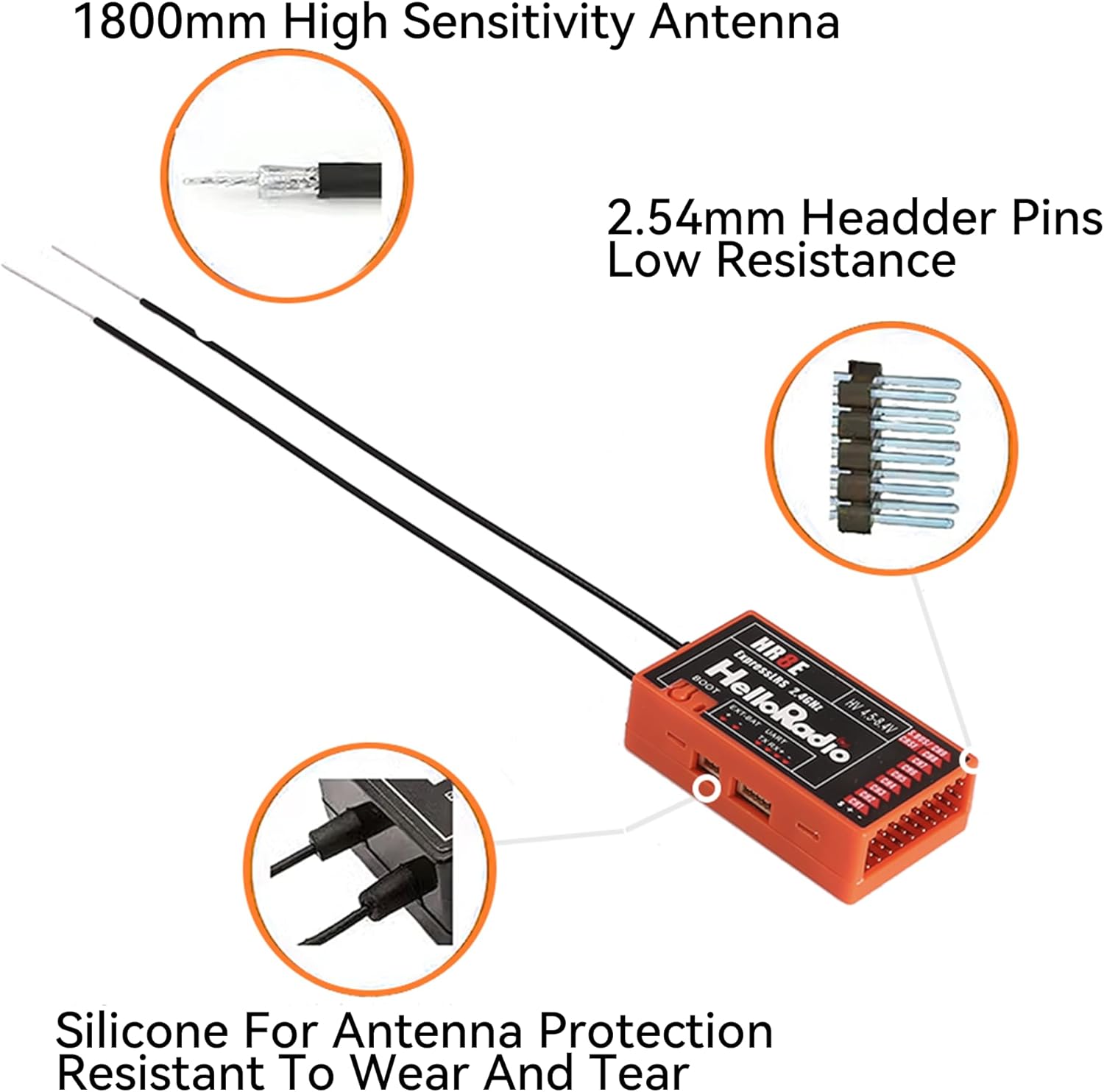
Figure 3.2: A close-up image highlighting the 18cm high-sensitivity dual antenna of the HelloRadio HR8E receiver, along with details of the 2.54mm header pins for low resistance connections. It also shows the silicone protection for the antenna connections, designed for durability.
4. Setup
4.1 Binding Procedure
To establish a connection between your remote control and the HR8E receiver, follow these steps:
- Ensure your remote control is powered off.
- Power on the HR8E receiver three times consecutively. The receiver's LED will blink twice after the third power cycle, indicating it has entered bind mode.
- On your remote control, access the ExpressLRS LUA script interface.
- Select the BIND option within the LUA script to initiate the binding process.
- Once binding is successful, the receiver's LED will illuminate steadily.
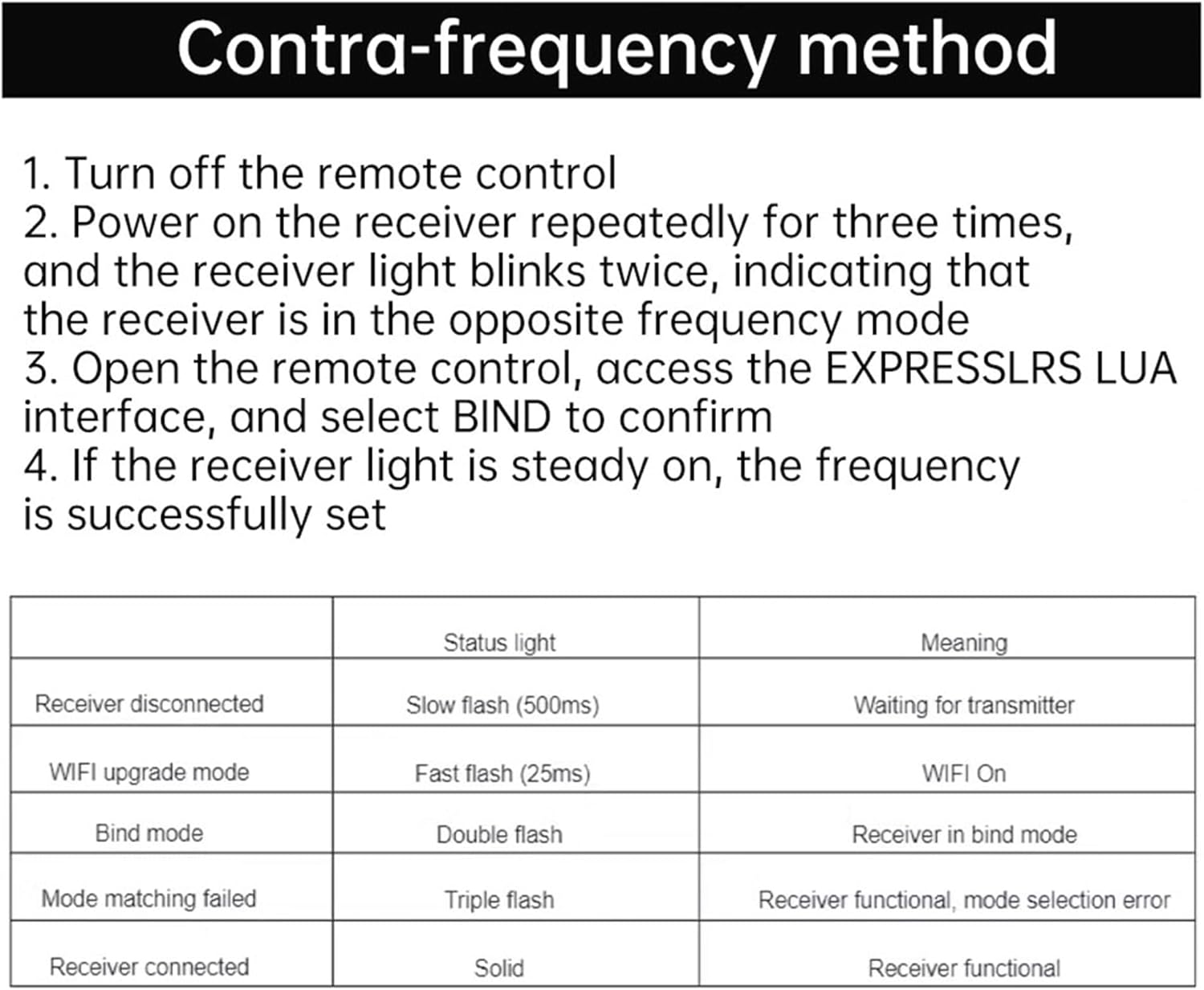
Figure 4.1: This image details the binding procedure for the HelloRadio HR8E receiver, outlining steps to enter bind mode via the remote control's LUA interface. It also includes a table explaining the meaning of different LED flash patterns for various receiver statuses, which is useful for troubleshooting.
5. Operating Instructions
After successful binding, the HR8E receiver is ready for operation. Connect your servos to the appropriate PWM channels (CH1-CH8) and utilize CH9 for CRSF/S.BUS. The integrated telemetry provides real-time receiver and flight battery voltage data, which can be monitored via your remote control's telemetry display. The CRSF interface allows for connection of additional telemetry sensors as needed.

Figure 5.1: An image displaying several HelloRadio HR8E receivers in different casing colors (black, orange, yellow), arranged to show their compact size and dual antenna setup, illustrating their suitability for various models.
6. Maintenance
To ensure the longevity and optimal performance of your HR8E receiver, consider the following maintenance guidelines:
- Keep Clean: Regularly inspect the receiver for dust or debris and gently clean with a soft, dry brush if necessary.
- Avoid Moisture: Protect the receiver from water and excessive humidity, as this can damage electronic components.
- Antenna Care: Handle the antennas carefully to prevent bending or damage. Ensure they are securely mounted and positioned for optimal signal reception. The silicone protection on the antenna connections helps prevent wear and tear.
- Firmware Updates: Periodically check for official firmware updates from HelloRadioSky or Speedybee to ensure your receiver has the latest features and performance enhancements.
7. Troubleshooting
The HR8E receiver provides visual feedback through its LED indicator to assist with troubleshooting. Refer to the table below for common LED status meanings:
| Status | LED Indication | Meaning |
|---|---|---|
| Receiver disconnected | Slow flash (500ms) | Waiting for transmitter connection |
| WIFI upgrade mode | Fast flash (25ms) | WIFI On, ready for firmware update |
| Bind mode | Double flash | Receiver is in bind mode |
| Mode matching failed | Triple flash | Receiver functional, but mode selection error occurred |
| Receiver connected | Solid | Receiver functional and connected to transmitter |
8. Warranty and Support
Specific warranty terms and detailed support contact information for the HelloRadio HR8E ELRS PWM Receiver are not provided in the available product data. Please refer to the official SPEEDY BEE website or your point of purchase for warranty details and customer support options.


