
Introduction
Thank you for choosing the DaToo DC 5V USB Water Pump. This mini submersible pump is designed for various water features, including fish tanks, pet fountains, hydroponics systems, and desktop fountains. It features an ultra-quiet design, adjustable water flow, and robust construction for reliable performance. Please read this manual carefully before use to ensure proper installation and operation.
Safety Information
- Ensure the power supply is USB DC 5V. Do not use higher voltage power adapters.
- Always disconnect the power supply before performing any maintenance or cleaning.
- The pump is designed for submersible use only. Do not operate the pump dry.
- Keep the power cord away from high temperatures and sharp objects.
- Ensure the pump is fully submerged in water during operation to prevent overheating.
- The pump is equipped with a safety filter screen to prevent blockage and protect aquatic life. Ensure it is properly installed.
Package Contents
Verify that all items are present in the package:
- 1 x DaToo USB Water Pump (3W)
- 1 x 3.3 ft (1m) Tubing

Figure 1: DaToo USB Water Pump and 3.3 ft tubing included in the package.
Specifications
| Specification | Value |
|---|---|
| Voltage | USB DC 5V |
| Power | 3 Watt |
| Max Lift | 2.0 ft (60cm) |
| Max Flow Rate | 50 GPH (190 L/H) |
| Waterproof Rating | IPX8 |
| Product Size | 1.5 x 1.2 x 1 inch |
| Power Cord Length | 4.92 ft (1.5m) |
| Tubing Length | 3.3 ft (1m) |
| Material | High-strength ABS |
Figure 2: Detailed product dimensions and key specifications.
Setup
- Attach Tubing: Connect the provided 3.3 ft tubing to the pump's outlet nozzle. Ensure a secure fit to prevent leaks.
- Position the Pump: Place the pump completely submerged in the water feature (aquarium, fountain, etc.). The three rubber suction cups on the bottom of the pump allow it to be firmly attached to smooth surfaces.
- Connect Power: Plug the USB cable into a compatible USB DC 5V power source (e.g., USB wall adapter, power bank, computer USB port).
- Check Water Flow: Once powered, the pump will begin to circulate water. Observe the water flow to ensure it is operating correctly.
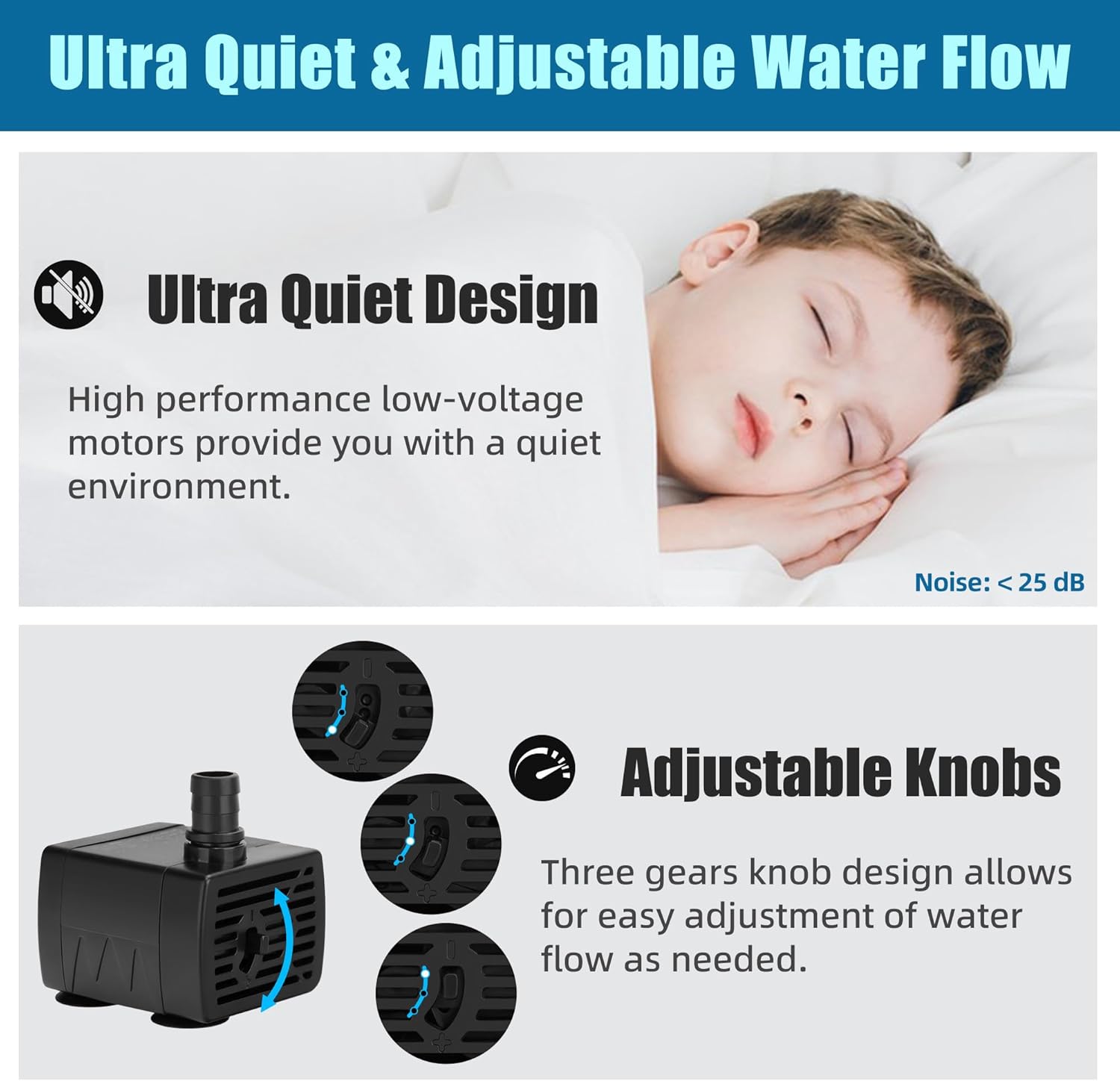
Figure 3: The DaToo USB Water Pump with its USB power connection.
Operating Instructions
Adjusting Water Flow
The DaToo USB Water Pump features a three-gear knob design for adjusting the water flow rate. Locate the knob on the side of the pump. Rotate the knob to increase or decrease the flow as desired for your specific application.

Figure 4: The adjustable flow knob on the pump, allowing for control over water output.
Quiet Operation
The pump is designed with a high-performance, low-voltage motor to ensure quiet operation, with noise levels as low as 25 decibels. This allows for a peaceful environment in your home or office.

Figure 5: The durable construction of the pump, featuring a high-strength ABS shell and secure suction cups.
Maintenance
Regular maintenance ensures the longevity and optimal performance of your pump.
- Disassembly: Disconnect the power. Gently pull apart the pump housing to access the impeller and filter screen. The pump is designed for easy disassembly.
- Cleaning: Rinse the impeller and filter screen under clean water to remove any debris, algae, or mineral buildup. Use a small brush if necessary to clean stubborn residue.
- Reassembly: Ensure all components are clean before reassembling. Carefully place the impeller back into its housing and secure the filter screen and pump cover.
- Frequency: Clean the pump every 2-4 weeks, or more frequently if you notice reduced water flow or increased noise.

Figure 6: The pump can be easily taken apart for thorough cleaning of internal components.
Troubleshooting
| Problem | Possible Cause | Solution |
|---|---|---|
| Pump not working | No power, clogged impeller, airlock | Check USB connection. Disconnect and clean impeller. Ensure pump is fully submerged and free of air bubbles. |
| Reduced water flow | Clogged filter screen or impeller, low water level | Clean filter screen and impeller. Add water to the feature to ensure the pump is fully submerged. Adjust flow knob. |
| Excessive noise | Debris in impeller, pump not fully submerged, pump not stable | Clean impeller. Ensure pump is fully submerged. Re-secure pump with suction cups on a smooth surface. |
Warranty and Support
DaToo provides a one-year warranty for this product from the date of purchase. This warranty covers manufacturing defects and material faults under normal use. It does not cover damage caused by misuse, neglect, unauthorized modification, or improper installation.
For warranty claims, technical support, or any questions regarding your DaToo USB Water Pump, please contact our professional customer service team. We are available 24 hours a day to assist you.
Contact Information: Please refer to the contact details provided on the product packaging or the retailer's website where you purchased the item.