
1. Introduction
This manual provides essential information for the safe operation and maintenance of your Teeggi SG109 MAX2 Drone. Please read this manual thoroughly before operating the drone to ensure proper usage and to prevent damage or injury. Keep this manual for future reference.
2. Safety Guidelines
Always prioritize safety during drone operation. Failure to follow these guidelines may result in injury, damage to the drone, or property damage.
- Pre-Flight Check: Ensure the drone, remote controller, and batteries are fully charged and in good working condition before each flight.
- Flight Environment: Fly in open areas, away from people, animals, buildings, and power lines. Avoid flying in strong winds, rain, or other adverse weather conditions.
- Maintain Line of Sight: Always keep the drone within your visual line of sight.
- Respect Local Regulations: Be aware of and comply with all local laws and regulations regarding drone operation.
- Battery Safety: Use only approved batteries and chargers. Do not overcharge or puncture batteries.
- Propeller Safety: Keep hands and face away from rotating propellers. Ensure propellers are securely attached before flight.
- Emergency Procedures: Familiarize yourself with emergency landing procedures and the Return-to-Home function.
3. Package Contents
Verify that all items are present in your package:
- Teeggi SG109 MAX2 Drone
- Remote Controller
- 7.4V 2200mAh Batteries (x2)
- USB Charging Cable
- Spare Propellers
- Screwdriver
- User Manual
- Carrying Bag

Figure 3.1: Teeggi SG109 MAX2 Drone package contents including the drone, remote controller, two batteries, and a carrying bag.
4. Drone Overview
4.1 Drone Components
Familiarize yourself with the main parts of the SG109 MAX2 drone:
- Foldable Arms with Motors and Propellers
- 4K Camera with 3-Axis Gimbal
- Obstacle Avoidance Sensor
- GPS Module
- Optical Flow Sensor (bottom)
- Battery Compartment
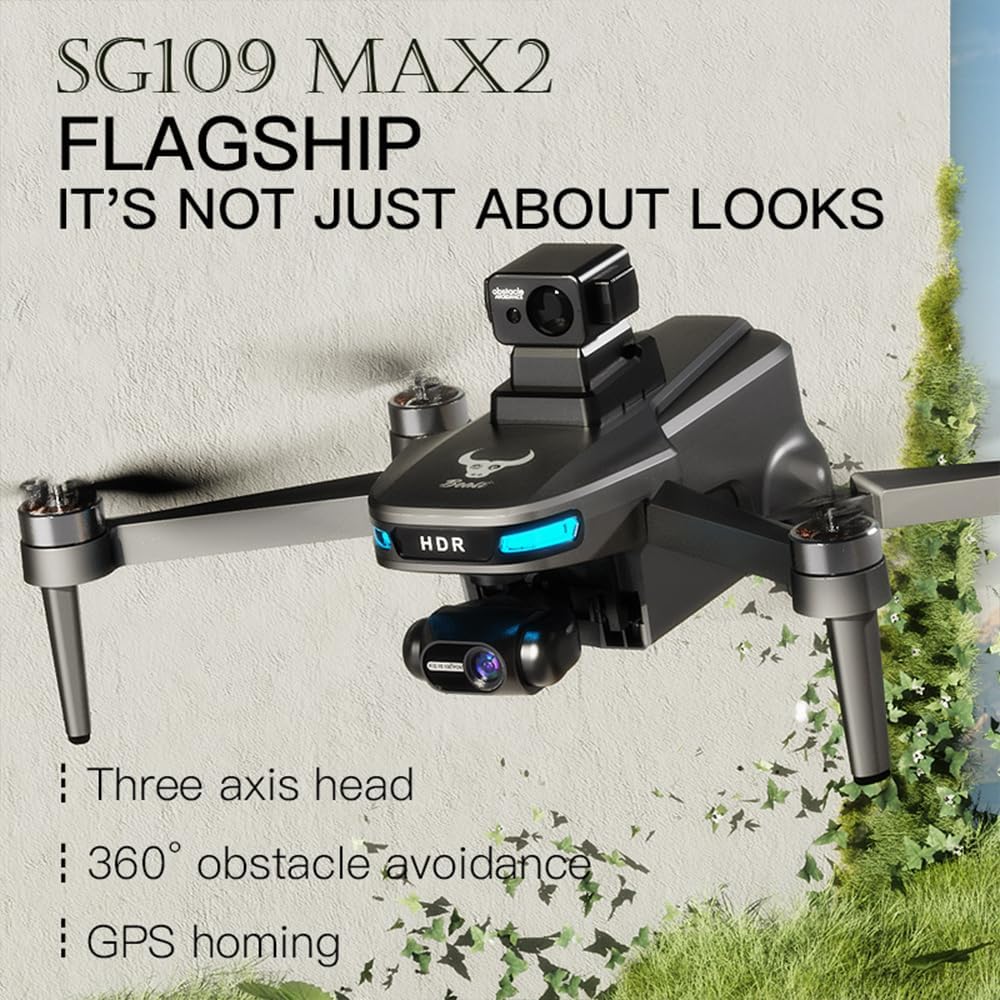
Figure 4.1: The Teeggi SG109 MAX2 Drone in flight, showcasing its design and key features.

Figure 4.2: Close-up view of the drone's self-stabilizing 3-axis gimbal and 4K camera.

Figure 4.3: Close-up of the drone's obstacle avoidance sensor.
4.2 Remote Controller Overview
The remote controller provides intuitive control over the drone's flight and camera functions. It features a smartphone holder for real-time video transmission.

Figure 4.4: The Teeggi SG109 MAX2 remote controller with a smartphone displaying the 5G HD image transmission feed.
5. Battery Installation and Charging
5.1 Charging the Drone Battery
- Connect the USB charging cable to the drone battery.
- Plug the other end of the USB cable into a 5V/2A USB power adapter (not included).
- The battery indicator lights will show charging status. Charging typically takes approximately 3-4 hours.
- Once fully charged, disconnect the battery from the charger.
5.2 Installing the Drone Battery
- Ensure the drone is powered off.
- Open the battery compartment on the rear of the drone.
- Insert the charged battery into the compartment, ensuring it clicks securely into place.
- Close the battery compartment cover.
5.3 Charging the Remote Controller
The remote controller typically has an internal rechargeable battery. Connect it to a USB power source using the provided cable. Refer to the controller's display for charging status.
6. Setup
6.1 App Installation
Download and install the official Teeggi drone application on your smartphone. Search for "Teeggi Drone" or scan the QR code provided in the quick start guide (if available) in your app store.
6.2 Pre-Flight Checklist
- Ensure drone and remote controller batteries are fully charged.
- Unfold the drone arms and propellers.
- Check that propellers are securely attached and undamaged.
- Remove the gimbal protector (if applicable).
- Mount your smartphone onto the remote controller.
- Power on the drone, then the remote controller.
- Connect your smartphone to the drone's Wi-Fi network.
- Open the Teeggi drone app.
7. Operating Instructions
7.1 Pairing and Calibration
- After powering on the drone and controller, wait for them to automatically pair. The indicator lights will change to solid when paired.
- Perform compass calibration as instructed by the app or controller. This usually involves rotating the drone horizontally and vertically.
- Wait for GPS signal acquisition. The drone should indicate sufficient GPS satellites before outdoor flight.
7.2 Takeoff and Landing
- Automatic Takeoff: Press the one-key takeoff button on the remote controller or in the app. The drone will ascend to a safe altitude and hover.
- Manual Takeoff: Push both joysticks down and outwards to arm the motors. Slowly push the left joystick up to ascend.
- Automatic Landing: Press the one-key landing button or the Return-to-Home (RTH) button. The drone will descend and land automatically at its takeoff point.
- Manual Landing: Slowly pull the left joystick down to descend. Once landed, push both joysticks down and inwards to disarm the motors.
7.3 Flight Modes and Controls
- Left Joystick: Controls altitude (up/down) and yaw (rotate left/right).
- Right Joystick: Controls forward/backward and left/right movement.
- GPS Positioning: Provides stable hovering and precise return-to-home functionality.
- Optical Flow Positioning: Enables stable hovering in indoor environments or areas without GPS signal.
- 360° Obstacle Avoidance: The drone features sensors to detect and actively avoid obstacles, enhancing flight safety.
- Intelligent Flight Modes (via App):
- Waypoint Flight: Plan a custom flight path on the map.
- Follow Me Mode: The drone will automatically follow the remote controller or smartphone.
- Gesture Control: Use specific hand gestures for photo and video capture.
- Point of Interest: The drone will circle a designated point.

Figure 7.1: Illustrations of advanced flight modes: Waypoint flight planning, Follow Me mode, and 360-degree Point of Interest flight.
7.4 Camera Operation
- Photo Capture: Press the dedicated photo button on the remote controller or in the app.
- Video Recording: Press the dedicated video button to start/stop recording.
- Gimbal Control: Use the gimbal dial on the remote controller to adjust the camera's tilt angle.
- Image Transmission: View live 4K HD video feed on your connected smartphone via 5G Wi-Fi.
8. Maintenance
- Cleaning: Use a soft, dry cloth to clean the drone and remote controller. Avoid using solvents.
- Propeller Inspection: Regularly check propellers for cracks, bends, or damage. Replace damaged propellers immediately.
- Motor Care: Keep motors free from dust and debris.
- Battery Storage: Store batteries in a cool, dry place, partially charged (around 50-60%) if not used for extended periods.
- Firmware Updates: Check the official Teeggi website or app for any available firmware updates for the drone and remote controller.
9. Troubleshooting
| Problem | Possible Cause | Solution |
|---|---|---|
| Drone does not power on | Low battery; Battery not installed correctly | Charge battery; Reinstall battery securely |
| No signal from remote controller | Controller not paired; Low controller battery | Re-pair drone and controller; Charge controller battery |
| Poor image transmission | Weak Wi-Fi signal; Interference | Ensure smartphone is connected to drone's Wi-Fi; Fly in open areas away from interference |
| Drone drifts during flight | Improper calibration; Strong winds | Perform compass calibration; Avoid flying in strong winds |
| Obstacle avoidance not working | Sensor blocked; Feature disabled | Clean sensors; Ensure feature is enabled in app |
10. Specifications
| Feature | Specification |
|---|---|
| Brand | Teeggi |
| Model | SG109 MAX2 |
| Item Weight | 245 Grams |
| Product Dimensions (L x W x H) | 31 x 26 x 9 cm |
| Video Recording Resolution | 4K |
| Connectivity Technology | Wi-Fi (5G HD Image Transmission) |
| Battery Capacity | 2200 mAh (7.4V) |
| Flight Time | Up to 25 minutes |
| Control Range | Up to 800 meters |
| Special Features | 3-Axis Gimbal, 360° Obstacle Avoidance, GPS Positioning, Optical Flow Positioning, Auto Landing, App Control, Gesture Control, Follow Me Mode, Waypoint Flight |
| Skill Level | All |
11. Warranty and Support
The Teeggi SG109 MAX2 Drone comes with a standard manufacturer's warranty. For specific warranty details, please refer to the warranty card included in your package or contact Teeggi customer support directly. For technical assistance, troubleshooting beyond this manual, or spare parts, please visit the official Teeggi website or contact their customer service department.