
Dolphin KP-500 VocalPro Portable Karaoke Bluetooth Speaker Instruction Manual
Model: KP-500
1. Introduction
Thank you for purchasing the Dolphin KP-500 VocalPro Portable Karaoke Bluetooth Speaker. This system is designed to provide a versatile audio experience with features such as Bluetooth connectivity, dynamic LED lights, and microphone support. Please read this manual carefully to ensure proper setup, operation, and maintenance of your device.

Image: Front view of the Dolphin KP-500 speaker, showcasing its integrated colorful LED lighting around the speaker grille.
2. Package Contents
Please check the package for the following items:
- Dolphin KP-500 VocalPro Speaker Unit
- Microphone
- Adjustable Microphone Stand
- Power Cable
- User Manual
3. Setup
3.1 Charging the Speaker
Before initial use, fully charge the speaker. Connect the provided power cable to the DC5V input port on the speaker and plug the other end into a power outlet. The 'CHARGE' indicator light will illuminate during charging and turn off when fully charged. A full charge typically takes several hours.
3.2 Assembling the Microphone Stand
Attach the microphone stand to the designated slot on top of the speaker. Ensure it is securely fastened. The stand is adjustable for height and angle to suit your preference. The speaker also features a built-in phone holder on the top panel for convenience.
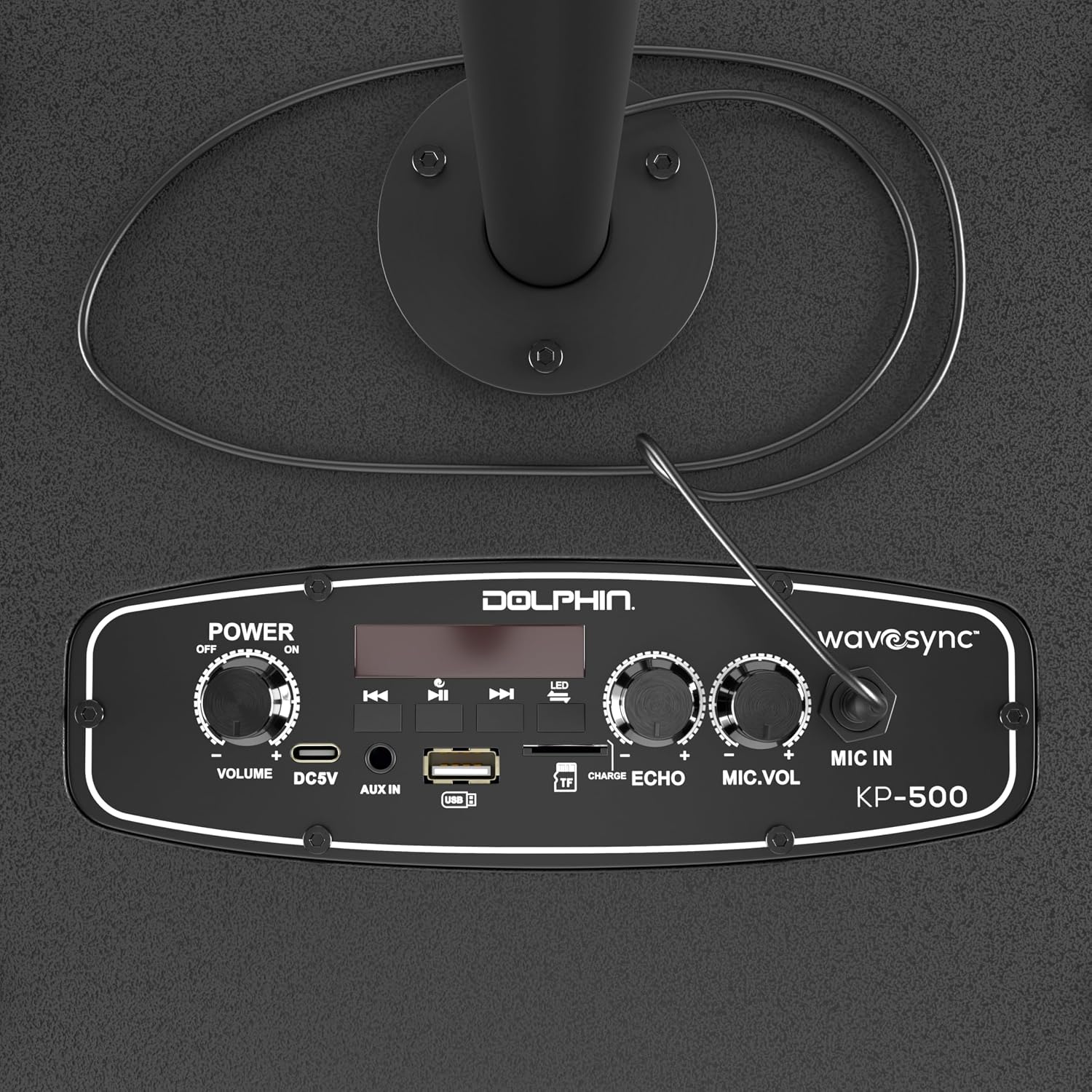
Image: Top-down view of the Dolphin KP-500 control panel, showing various input ports and adjustment knobs including power, volume, microphone input, and echo controls.
4. Operating Instructions
4.1 Power On/Off
Locate the POWER switch on the control panel. Slide the switch to the 'ON' position to power on the speaker. Slide it to 'OFF' to power off the speaker.
4.2 Mode Selection
Press the 'M' (Mode) button on the control panel to cycle through available input modes: Bluetooth, USB, TF Card, AUX, and FM Radio. The display screen will indicate the current mode.
4.3 Bluetooth Pairing
- Power on the speaker and select Bluetooth mode. The speaker will enter pairing mode, indicated by a flashing Bluetooth icon on the display.
- Enable Bluetooth on your mobile device (smartphone, tablet, etc.).
- Search for 'Dolphin KP-500' in your device's Bluetooth list and select it to pair.
- Once paired, the speaker will emit a confirmation sound, and the Bluetooth icon will stop flashing. You can now stream audio wirelessly.
The Bluetooth range is approximately 10 meters (33 feet).
4.4 USB/TF Card Playback
Insert a USB drive or TF (MicroSD) card into the respective port. The speaker will automatically switch to USB or TF mode and begin playing compatible audio files. Use the playback controls (Play/Pause, Next/Previous Track) on the control panel to manage your music.
4.5 AUX Input
Connect an external audio device (e.g., MP3 player, laptop) to the AUX IN port using a 3.5mm audio cable. Select AUX mode on the speaker. Audio will play from the connected device.
4.6 FM Radio
Select FM Radio mode. Press and hold the Play/Pause button to initiate an automatic scan for available radio stations. The speaker will save the found stations. Use the Next/Previous Track buttons to navigate between saved stations.
4.7 Microphone Usage
Plug the microphone into the MIC IN port. Adjust the microphone volume using the 'MIC.VOL' knob and add echo effects with the 'ECHO' knob for enhanced vocal performance.
4.8 LED Lights
The speaker features dynamic LED lights that respond to music. Use the 'LED' button on the control panel to cycle through different light modes or turn the lights off.
4.9 WaveSync Technology
To link multiple Dolphin WaveSync-compatible speakers wirelessly for a unified audio experience, ensure both speakers are in Bluetooth mode. Press and hold the 'WaveSync' button on one speaker until it pairs with the other. Once connected, audio will play synchronously across both units.
5. Maintenance
5.1 Cleaning
Wipe the speaker's exterior with a soft, dry cloth. Do not use abrasive cleaners, waxes, or solvents as they may damage the finish. Avoid getting moisture into any openings.
5.2 Battery Care
To prolong battery life, avoid fully discharging the battery frequently. Recharge the speaker regularly, even if not in use for extended periods. Store the speaker in a cool, dry place.
6. Troubleshooting
- No Power: Ensure the speaker is charged and the power switch is in the 'ON' position. Check the power cable connection.
- No Sound: Check the master volume level on the speaker and the connected audio source. Ensure the correct input mode is selected. If using Bluetooth, ensure the device is properly paired.
- Bluetooth Not Connecting: Make sure the speaker is in Bluetooth mode and within range (10 meters). Turn off Bluetooth on your device and the speaker, then try pairing again. Disconnect from other Bluetooth devices.
- Microphone Not Working: Ensure the microphone is securely plugged into the MIC IN port. Adjust the 'MIC.VOL' knob.
- Distorted Sound: Reduce the volume of the speaker or the connected audio source. Ensure audio files are not corrupted.
7. Specifications
| Model Number | KP-500 |
| Dimensions (D x W x H) | 25.4 x 20.32 x 35.56 cm (10 x 8 x 14 inches) |
| Weight | 3.18 kg (7 lbs) |
| Connectivity Technology | Bluetooth, Auxiliary, USB |
| Wireless Technology | Bluetooth 5.0 |
| Bluetooth Range | Up to 10 meters (33 feet) |
| Input Ports | USB, TF Card, AUX IN, MIC IN |
| Audio Output Mode | Stereo |
| Power Source | Battery Powered (1 x 12V battery required) |
| Additional Features | Adjustable Microphone Sensitivity, Built-In Amplifier, Portable, Rechargeable, Dynamic LED Lights, WaveSync Technology, Phone Holder |
| Control Method | On-device controls, App (if available) |

Image: Side view of the Dolphin KP-500 speaker with its physical dimensions clearly marked.
8. Warranty and Support
For warranty information and customer support, please refer to the documentation provided with your purchase or contact the retailer where the Dolphin KP-500 VocalPro speaker was acquired. You may also visit the official Dolphin brand website for further assistance.


