
1. Introduction and Product Overview
The All-O-Matic SL-150 AC Slide Gate Operator is a robust and reliable system designed for commercial slide gates. This operator is capable of handling gates up to 60 feet in length, providing efficient and secure access control for various commercial applications.
This manual provides essential information regarding the installation, operation, maintenance, and troubleshooting of your SL-150 AC gate operator. Please read this manual thoroughly before attempting any installation or operation.

Image 1.1: Front view of the All-O-Matic SL-150 AC Slide Gate Operator. This image shows the main unit of the gate operator, which is black and has a textured finish. It features a rectangular shape with a slightly recessed central panel.

Image 1.2: All-O-Matic SL-150 AC Slide Gate Operator mounted on a stand. This image displays the black gate operator unit positioned on a silver-colored metal stand, illustrating how the unit would appear when installed.
2. Specifications
The following table details the technical specifications of the SL-150 AC Slide Gate Operator:
| Specification | Detail |
|---|---|
| Manufacturer | ALL-O-MATIC |
| Item Weight | 165 pounds |
| Product Dimensions | 19.5 x 15 x 25 inches |
| Item Model Number | SL-150AC |
| Color | Black |
| Included Components | 1 RECEIVER, 2 GATE OPENER CLICKERS |
| ASIN | B0DL1BCNTH |
| Date First Available | October 26, 2024 |
| Max Gate Length | 60 feet |
| Max Gate Weight | ½ HP: 1,500 lbs, 1 HP: 2,500 lbs |
| Motor | ½ HP and 1 HP |
| Gate Speed | 12 inches per second |
| Power Options | 220 VAC |
| Duty Cycle | Continuous |
| Battery Back Up | N/A |
| Battery Back Up Capacity | N/A |
| Temperature Range | 40 to 160° |
| Gearbox Ratio | 30:1 with internal clutch |
| Shipping Weight | 150 lbs |
| Emergency Release | Mechanical foot pedal release |
| Belt Size | N/A |
| Main Sprocket Size | 40B22X1 |
| Chain Size | 40NP (20' Included) |
| Gearbox Sprocket | 40B22X1 |
| Limit Shaft Sprocket | 41B10X5/8 |
| Breaker Requirement | 20 amp dedicated |
| Gearbox Pulley | N/A |
| Motor Pulley | N/A |

Image 2.1: Official specifications sheet for the All-O-Matic SL-150 AC. This image provides a detailed list of technical specifications, including gate length, weight capacity, motor details, and dimensions.

Image 2.2: Overview of key features for the All-O-Matic SL-150 AC. This image highlights features such as heavy-duty gearbox, pre-wired loop detector rack, and mechanical foot pedal release.
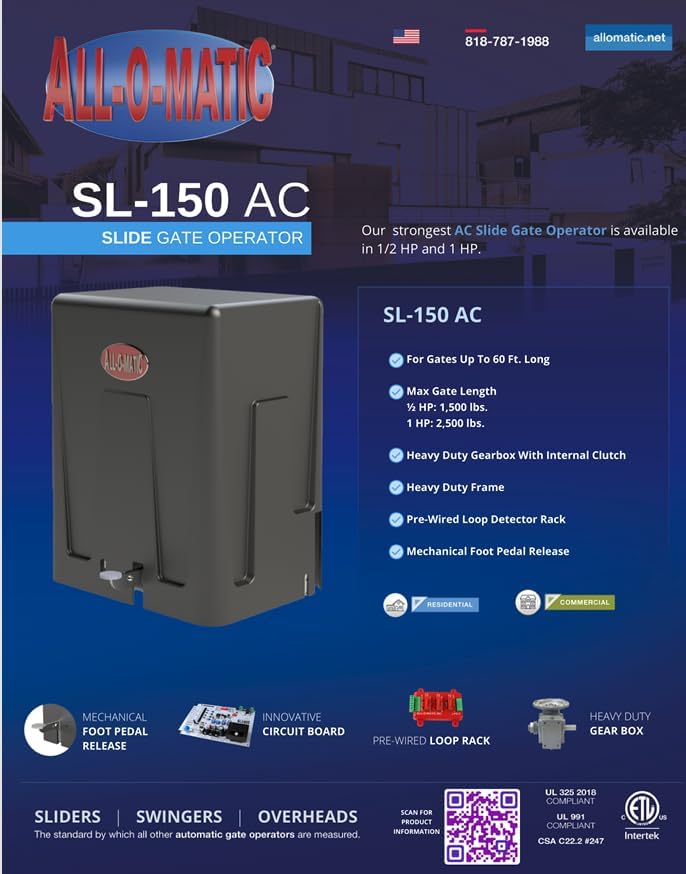
Image 2.3: Close-up view of the heavy-duty gearbox component. This image shows the robust construction of the gearbox, which is a critical part of the gate operator's mechanism.

Image 2.4: View of the motor component for the All-O-Matic SL-150 AC. This image displays the electric motor responsible for driving the gate operator.
3. Setup and Installation
Important: Professional installation is required for the All-O-Matic SL-150 AC Slide Gate Operator. Due to the complexity of electrical connections, mechanical setup, and safety regulations, installation should only be performed by qualified and certified professionals.
3.1 Pre-Installation Checklist
- Ensure the gate area is clear of obstructions and level.
- Verify power supply (220 VAC) is available at the installation site.
- Confirm the gate length does not exceed 60 feet and its weight is within the operator's capacity (1,500 lbs for ½ HP, 2,500 lbs for 1 HP).
- Note that the gate motor stand is NOT INCLUDED and must be acquired separately if needed for your installation.
3.2 Included Components
Upon unpacking, verify that the following components are included with your SL-150 AC operator:
- 1 x Receiver unit
- 2 x Gate opener clickers (remote controls)
For detailed installation instructions, refer to the comprehensive installation manual provided by your professional installer or contact All-O-Matic technical support.
4. Operating Instructions
Once the SL-150 AC Slide Gate Operator is professionally installed and configured, operation is straightforward.
4.1 Remote Control Operation
The included gate opener clickers (remote controls) are pre-programmed to operate your gate. To open or close the gate:
- Ensure you are within range of the gate operator's receiver.
- Press the designated button on your remote control. The gate will begin to open or close.
- Pressing the button again during operation will typically stop the gate. A third press will reverse its direction.
Always ensure the gate path is clear of people, vehicles, and obstructions before and during operation.
4.2 Manual Release
In case of power outage or system malfunction, the SL-150 AC features a mechanical foot pedal release for manual gate operation. Consult your installer for the exact procedure to engage the manual release safely.
5. Maintenance
Regular maintenance is crucial to ensure the longevity and optimal performance of your All-O-Matic SL-150 AC Slide Gate Operator. It is recommended that maintenance be performed by a qualified technician.
5.1 Recommended Maintenance Schedule
- Monthly: Inspect the gate path for any obstructions. Check the gate's movement for smoothness and listen for unusual noises.
- Quarterly: Inspect the chain tension and lubricate the chain if necessary. Check all mounting hardware for tightness.
- Annually: Have a professional technician inspect the motor, gearbox, electrical connections, and safety features (e.g., photo eyes, loop detectors).
5.2 Cleaning
Keep the exterior of the operator clean and free of debris. Use a soft, damp cloth for cleaning. Avoid using harsh chemicals or abrasive cleaners.
6. Troubleshooting
This section addresses common issues you might encounter with your SL-150 AC Slide Gate Operator. For complex problems, always contact a professional technician.
6.1 Common Issues and Solutions
- Gate Not Responding to Remote:
- Check if the remote control batteries need replacement.
- Ensure there are no obstructions blocking the signal to the receiver.
- Verify the operator has power.
- Gate Stops Mid-Operation:
- Check for physical obstructions in the gate's path.
- Inspect safety sensors (photo eyes) for alignment or blockage.
- Ensure the gate moves freely when in manual release mode.
- Unusual Noises During Operation:
- This may indicate a need for lubrication or inspection of mechanical components. Contact a technician.
- Gate Does Not Fully Open/Close:
- Limit switches may need adjustment. This should be done by a professional installer.
If troubleshooting steps do not resolve the issue, contact All-O-Matic customer support or a certified gate technician.
7. Warranty and Support
7.1 Product Warranty
ALL-O-MATIC INC. warrants its gate openers for a period of five (5) years in commercial installations and for a period of seven (7) years in residential installations, counting from the date of purchase by the original owner. This warranty covers defects in materials and workmanship. This warranty is transferable to the original owner.
The Warrantor will repair or, at its option, replace any device which it finds to require service. The device must be sent to the Warrantor at the consumer's expense. The Warrantor will return the repaired or replaced unit to the consumer at the consumer's expense. Labor charges for repair service or replacement are the responsibility of the owner. These warranties are in lieu of all other warranties, expressed or implied, and ALL-O-MATIC, INC. shall not be liable for consequential damages. All implied warranties of merchantability and/or fitness for a particular purpose are hereby disclaimed and excluded. This limitation is not valid in jurisdictions which do not allow consequential damages or limitations on implied warranties.
The warranty is not valid unless the warranty registration card is sent by mail within 30 days of purchasing from ALL-O-MATIC INC. or your Installer. If not registered, only a one-year warranty on all parts will be provided.
7.2 Customer Support
For technical assistance, warranty claims, or further information, please contact All-O-Matic:
- Phone: 818-787-1988
- Website: allomatic.net/product/sl-150-ac/
Please have your model number (SL-150AC) and purchase date ready when contacting support.


