
AC Infinity CTR89Q
AC Infinity Controller AI+ Environmental Controller User Manual
Model: CTR89Q
Introduction
The AC Infinity Controller AI+ (Model CTR89Q) is a revolutionary environmental controller designed to optimize grow environments. It features advanced AI capabilities that learn and adapt to climate patterns, automating connected devices to maintain ideal conditions. This manual provides essential information for setting up, operating, and maintaining your Controller AI+.

Figure 1: AC Infinity Controller AI+ and companion mobile application.
Setup
Follow these steps to set up your AC Infinity Controller AI+:
- Unpacking: Carefully remove all components from the packaging. Verify that all parts are present according to the packing list.
- Mounting: Choose a suitable location for the controller, ensuring it is away from direct moisture and extreme temperatures. The controller can be mounted on a wall or placed on a flat surface.
- Connecting Devices: Connect your AC Infinity smart grow devices (fans, lights, humidifiers, etc.) to the controller's device ports. The controller supports up to 8 direct device connections and up to 32 devices with optional 4-in-1 splitter hubs.
- Connecting Sensors: The Controller AI+ has built-in temperature and humidity sensors. Connect any optional external sensors (CO₂, hydro, soil) to the designated sensor ports for enhanced monitoring.
- Power Connection: Plug the controller into a standard 100-240V AC power outlet.
- App Connection: Download the AC Infinity app from your device's app store. Follow the in-app instructions to connect your Controller AI+ to your Wi-Fi network and pair it with the app. This enables remote control and access to AI features.

Figure 2: The Controller AI+ integrates with a wide range of AC Infinity devices.

Figure 3: Expandable sensor options for comprehensive environmental monitoring.
Operating the Controller
The Controller AI+ offers both manual and AI-driven automated control over your grow environment.
AI Control and Automations
The core feature of the Controller AI+ is its dynamic AI. It learns climate patterns and anticipates environmental changes to proactively adjust connected devices. This ensures optimal temperature, humidity, and VPD (Vapor Pressure Deficit) levels are maintained with precision.

Figure 4: The AI system actively learns and automates equipment for optimal growth.
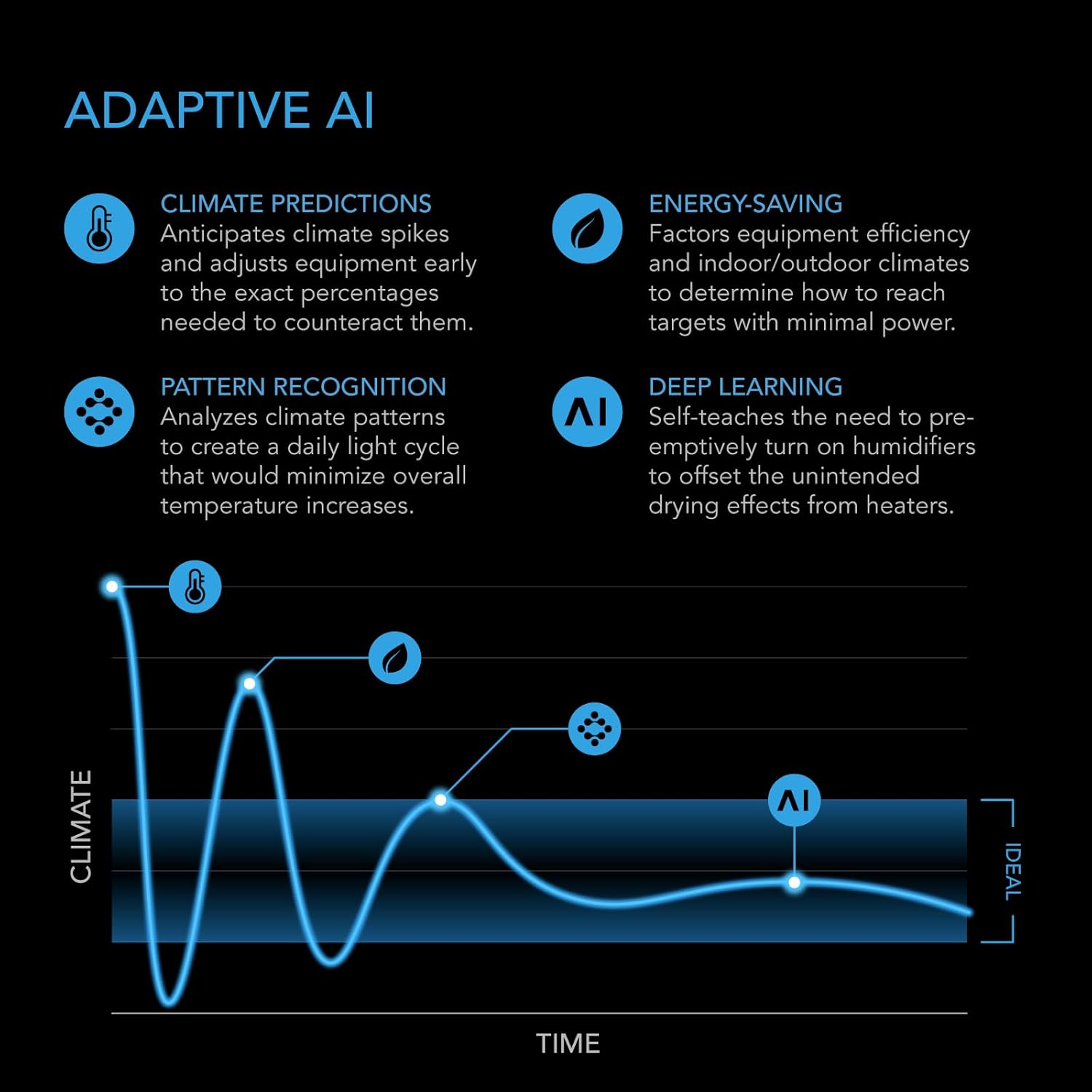
Figure 5: Adaptive AI capabilities for intelligent environmental management.
Mobile App Features
The AC Infinity app provides comprehensive control and monitoring capabilities:
- Real-time Insights: View current environmental data and AI-driven recommendations.
- Guides and Alerts: Access helpful growing guides and receive notifications for critical environmental changes.
- Charts and Data Analysis: Track historical data and analyze trends to optimize your grow cycles.
- AI Chat Bot: Interact with an AI assistant for personalized advice and troubleshooting.
- Remote Control: Adjust settings and control connected devices from anywhere via Wi-Fi.

Figure 6: The AI App Assistant provides comprehensive control and information.
Universal Compatibility
The Controller AI+ can integrate with non-AC Infinity grow lights and outlet devices using UIS™ adapters (sold separately), expanding its control capabilities.
Maintenance
To ensure the longevity and optimal performance of your Controller AI+:
- Cleaning: Regularly wipe the controller's display and casing with a soft, dry cloth. Avoid using abrasive cleaners or solvents.
- Sensor Care: Keep the sensor probes clean and free from debris. For external sensors, follow their specific cleaning instructions.
- Environmental Conditions: Ensure the controller is operated within its specified temperature and humidity ranges. Avoid exposing it to excessive dust or moisture.
- Software Updates: Periodically check the AC Infinity app for firmware updates for your controller. Updates often include performance improvements and new features.
Troubleshooting
If you encounter issues with your Controller AI+, refer to the following common troubleshooting steps:
- Controller Not Responding:
- Check power connection.
- Unplug and re-plug the power cable to perform a soft reset.
- Ensure the power outlet is functional.
- Devices Not Recognized/Controlled:
- Verify that devices are securely plugged into the controller's ports.
- If using splitters, ensure they are correctly connected.
- Check device settings within the AC Infinity app to ensure they are enabled and configured correctly.
- Perform a controller restart.
- Wi-Fi Connectivity Issues:
- Ensure your Wi-Fi network is active and the signal strength is adequate where the controller is located.
- Verify correct Wi-Fi password entry in the app.
- Restart your Wi-Fi router.
- Attempt to re-pair the controller with the app.
- Inaccurate Sensor Readings:
- Ensure sensor probes are clean and free from obstructions.
- Verify external sensors are securely connected to their respective ports.
- Calibrate sensors if the app or controller interface provides this option.
For persistent issues, consult the AC Infinity online support resources or contact customer service.
Specifications
| Feature | Detail |
|---|---|
| Model | CTR89Q |
| Manufacturer | AC Infinity |
| Product Dimensions | 5.87 x 0.94 x 3.43 inches (14.9 x 2.4 x 8.7 cm) |
| Item Weight | 2.25 pounds |
| ASIN | B0DKZZZCLP |
| Country of Origin | China |
| Batteries Required | No |
| Color | Black |
| Material | Plastic |
| Display Type | Digital display (4.5" Backlit LCD) |
| UPC | 819137024403 |
| App Control | Wi-Fi + Bluetooth |
| Devices Supported | 8 (32 with Splitters) |
| Sensors Supported | 3 (1 Built-In) |
| Voltage | 100-240V AC |

Figure 7: Physical specifications and port layout of the Controller AI+.
Warranty and Support
AC Infinity products are designed for durability and performance. For information regarding product warranty, please refer to the official AC Infinity website or the warranty card included with your purchase.
For technical support, troubleshooting assistance, or to inquire about additional products and accessories, please visit the official AC Infinity support page or contact their customer service department. You can find contact information on the AC Infinity website: www.acinfinity.com.
Related documentsCTR89Q


Ask a question about this manual
Ask about setup, troubleshooting, compatibility, parts, safety, or missing instructions. Manuals+ will review the question and use this page’s manual context to help answer it.