
1. Introduction
This manual provides detailed instructions for the installation, operation, and maintenance of your Erisin ES6758PN 7-inch Android 14 Car Multimedia System. This system is designed for Fiat Panda (MK3 Type 319) models from 2013 to 2020. It features an 8-Core processor, 4GB RAM, 64GB ROM, Wireless CarPlay, Android Auto, GPS navigation, Bluetooth 5.0, Dual-Band WiFi, and a 4G module. Please read this manual thoroughly before use to ensure proper installation and optimal performance.
2. What's in the Box
Verify that all components listed below are included in your package:
- 1x Erisin ES6758PN Car Multimedia System
- 1x English User Manual
- 1x AV RCA Connection Cable
- 1x Reversing Camera Input and Control Cable
- 1x Power Cable with ISO Connector
- 1x Special CANBus Decoder Box
- 1x Radio Antenna Adapter (Din to ISO)
- 1x Radio Antenna Adapter (Din to Fakra)
- 2x Rear USB Adapter Cables
- 1x Installation Accessories
- 1x External Microphone
- 1x 4G Antenna
- 1x GPS Antenna

Image: Overview of included accessories and the wiring diagram.
3. Setup and Installation
3.1. Pre-Installation Check
Before beginning installation, ensure the vehicle's ignition is off and the battery is disconnected. Confirm the central console dimensions match the unit's dimensions (246mm width x 78mm height) for Fiat Panda (2013-2020) models.

Image: Comparison of the car dashboard before and after the Erisin ES6758PN installation.
3.2. Wiring Diagram
Refer to the detailed wiring diagram provided in the 'What's in the Box' section for all connections. Ensure all cables are securely connected to their corresponding ports. The CANBus decoder box is essential for steering wheel control functionality.
3.3. Physical Dimensions
The unit's installation dimensions are 246mm (width) x 78mm (height). The main body of the unit measures 178mm (width) x 50mm (height) x 110mm (depth).
Image: Detailed diagram illustrating the dimensions of the car multimedia system and its components.
4. Operating Instructions
4.1. Android 14 Operating System
The system runs on Android 14, providing a familiar and intuitive interface. It is powered by an 8-Core processor (MT8667 1.5GHz*4+2.0GHz*4 64-bit 12nm Cortex 8*A53) with 4GB RAM and 64GB ROM, ensuring fast boot-up and smooth application performance. The IPS touchscreen has a resolution of 1024x600 pixels.
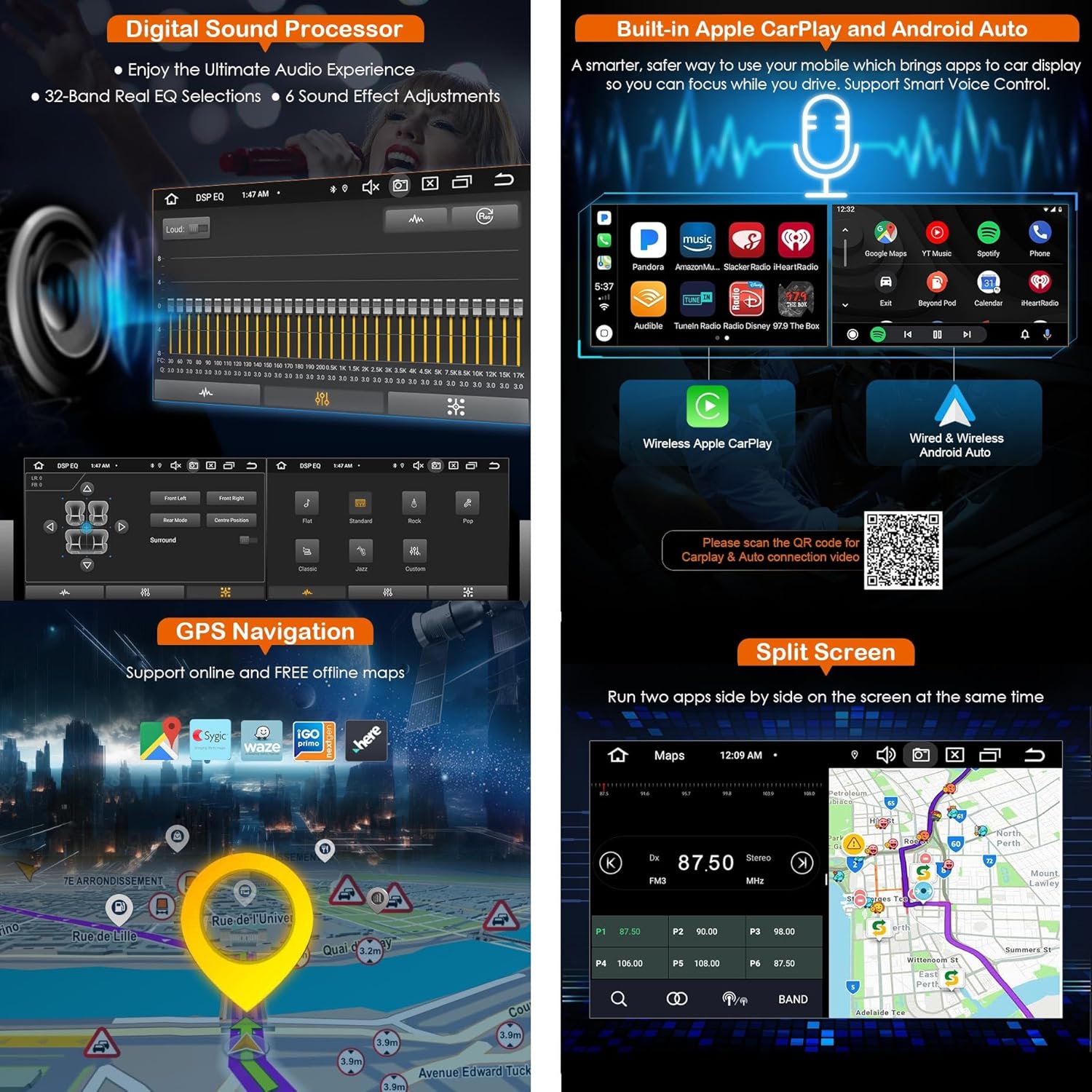
Image: The main menu interface displaying various applications and system icons.
4.2. Wireless CarPlay and Android Auto
Connect your iPhone (via Bluetooth) or Android smartphone (via Bluetooth/USB) to access CarPlay or Android Auto wirelessly. This allows for safe and convenient control of phone functions such as calls, messages, music, and navigation directly from the car stereo.

Image: Display of the Wireless CarPlay and Android Auto interface, demonstrating phone integration.
Video: Demonstration of CarPlay and Android Auto connection. View on Google Drive
4.3. GPS Navigation
The system includes a built-in GPS module with an external antenna. A free offline map is pre-installed. Online navigation apps like Waze, Sygic, and HereWeGo are also supported, providing real-time traffic updates and optimal route planning.

Image: GPS navigation screen showing map display and supported navigation applications.
4.4. Bluetooth 5.0
The integrated Bluetooth 5.0 module supports hands-free calling, phonebook synchronization, and audio streaming, allowing you to manage calls and play music safely while driving.

Image: Bluetooth interface showing connection status, call functions, and music playback.
4.5. Digital Sound Processor (DSP)
The built-in DSP amplifier features a 30-band equalizer, enabling precise audio customization to match your preferred musical style. It also supports subwoofer output for enhanced bass.

Image: DSP interface displaying the 30-band equalizer and sound effect adjustments.
4.6. Steering Wheel Control (SWC)
The system supports original steering wheel controls, allowing you to adjust volume, answer calls, and change tracks without taking your hands off the wheel, enhancing driving safety.

Image: Illustration of steering wheel controls interacting with the car multimedia system.
4.7. Dual-Band WiFi and 4G Module
Integrated dual-band WiFi supports both 2.4GHz and 5GHz networks for stable and fast internet connectivity. The built-in 4G module allows for internet access by inserting a micro 4G SIM card (not included).

Image: Visual representation of dual-band WiFi (2.4GHz and 5GHz) and 4G connectivity features.
4.8. Split Screen Function
The split-screen feature allows you to run two applications simultaneously, side-by-side. For example, you can use navigation on one side while playing music or radio on the other.

Image: Display of the split-screen function, showing navigation and radio simultaneously.
4.9. AM/FM Radio with RDS
The built-in radio tuner supports AM/FM frequencies and includes RDS (Radio Data System) functionality, providing station information and enhanced listening experience.

Image: Radio interface showing AM/FM tuning and RDS information.
5. Advanced Features (Optional Accessories)
The Erisin ES6758PN supports various optional accessories to expand its functionality. These accessories are sold separately.
- DAB+ Digital Radio (ES364): Connect an external DAB+ box to access digital radio channels with higher audio quality.
- DVR Input (ES570K): Connect a USB DVR camera to record driving footage, providing a visual record of your journeys.
- Reversing Camera Input (ES580): Connect a reversing camera for enhanced safety during parking and reversing maneuvers. Supports various camera types (720P/1080P AHD).
- OBD2 Support (ES357): Connect an OBD2 scan tool to monitor your car's status and diagnose potential issues.
- TPMS Monitor (ES341): Connect a TPMS module to monitor tire pressure and temperature in real-time.
- Video Output (ES102): Use a USB-RCA converter to output video to external monitors, allowing passengers to watch content.
- Digital TV Input (ES338-KD): Connect a DVB-T/T2 box to watch digital TV channels.

Image: Overview of optional accessories including DAB+, rear view camera, OBD2, DVR, USB-RCA converter, USB Hub, DVB-T/T2 box, external microphone, TPMS module, and USB 3.0 card reader.
6. Maintenance
6.1. Cleaning the Screen
To clean the IPS touchscreen, use a soft, lint-free cloth. For stubborn smudges, lightly dampen the cloth with water or a screen-safe cleaning solution. Avoid harsh chemicals, abrasive materials, or excessive moisture, as these can damage the screen.
6.2. Software Updates
Periodically check the Erisin official website or contact customer support for available software updates. Keeping your system updated ensures optimal performance, security, and access to new features.
6.3. General Care
Avoid exposing the unit to extreme temperatures, direct sunlight for prolonged periods, or excessive humidity. Ensure proper ventilation around the unit to prevent overheating. Do not attempt to disassemble or repair the unit yourself, as this will void the warranty.
7. Troubleshooting
This section addresses common issues you might encounter. For problems not listed here, please contact customer support.
| Problem | Possible Cause | Solution |
|---|---|---|
| Unit does not power on | Incorrect wiring; Blown fuse; Power supply issue. | Check power connections and fuse. Ensure vehicle battery is connected. |
| No sound | Speaker wiring incorrect; Volume too low; Mute activated. | Verify speaker connections. Increase volume. Check if mute is active. |
| GPS signal lost or inaccurate | GPS antenna obstructed or disconnected; Poor satellite coverage. | Ensure GPS antenna is properly installed and has a clear view of the sky. |
| Bluetooth connection issues | Device not in pairing mode; Interference; Bluetooth module error. | Ensure your device is discoverable. Restart both devices. Clear previous pairings. |
| Steering Wheel Controls not working | CANBus decoder not connected or faulty; Incorrect SWC settings. | Verify CANBus decoder connection. Check SWC settings in the system menu. |
8. Specifications
Key technical specifications of the Erisin ES6758PN Car Multimedia System:
| Feature | Specification |
|---|---|
| Operating System | Android 14 |
| CPU | 8-Core (MT8667 1.5GHz*4+2.0GHz*4 64-bit 12nm Cortex 8*A53) |
| RAM | 4GB |
| ROM | 64GB |
| Screen Size | 7 inches |
| Screen Type | IPS Touchscreen |
| Screen Resolution | 1024 x 600 pixels |
| Audio Output Power | 4 * 48W (Total 192W) |
| Bluetooth Version | 5.0 |
| WiFi | Dual-Band (2.4GHz & 5GHz) |
| 4G Module | Built-in (Micro SIM card required) |
| CarPlay/Android Auto | Wireless |
| DSP | Built-in, 30-band equalizer |
| Radio Tuner | AM/FM with RDS |
| Connectivity | USB, TF, AUX, Bluetooth, WiFi, 4G |
| Compatible Devices | Smartphone |
| Weight | 2.5 Kilograms |
| Country of Origin | China |
9. Warranty and Support
9.1. Product Warranty
This Erisin product comes with a 1-year manufacturer's warranty from the date of purchase. The warranty covers defects in materials and workmanship under normal use. It does not cover damage caused by improper installation, accident, misuse, abuse, unauthorized modifications, or natural disasters. Please retain your proof of purchase for warranty claims.
9.2. Customer Support
For technical assistance, troubleshooting, or warranty inquiries, please contact Erisin customer support through the retailer where the product was purchased or visit the official Erisin website for contact information.


