
1. Introduction
The Smart Air Sqair Air Purifier is designed to improve indoor air quality by filtering airborne particles and gaseous pollutants. This manual provides essential information for the safe and efficient operation, maintenance, and troubleshooting of your device.

Image: The Smart Air Sqair Air Purifier shown alongside its H13 HEPA and activated carbon filters.
2. Important Safety Information
Please read all safety instructions before using this appliance to prevent injury or damage. Keep this manual for future reference.
- Ensure the power supply voltage matches the rating label on the purifier.
- Do not operate the purifier with a damaged cord or plug.
- Keep the air inlet and outlet clear of obstructions.
- Do not immerse the unit in water or other liquids.
- Unplug the purifier before cleaning or performing any maintenance.
- This appliance is not intended for use by persons with reduced physical, sensory, or mental capabilities unless supervised or instructed.
3. Package Contents
Verify that all items are present in the package:
- Smart Air Sqair Air Purifier Unit
- H13 HEPA Filter (pre-installed or separate)
- Activated Carbon Filter (pre-installed or separate)
- Power Cord
- Smart Air Handbook (this manual)
4. Setup
- Unpacking: Carefully remove the air purifier and all components from the packaging.
- Filter Installation:
The filters may come pre-installed or require installation. If separate, remove the bottom cover of the purifier, insert the H13 HEPA filter, followed by the Activated Carbon filter. Ensure they are seated correctly. Close the bottom cover securely.
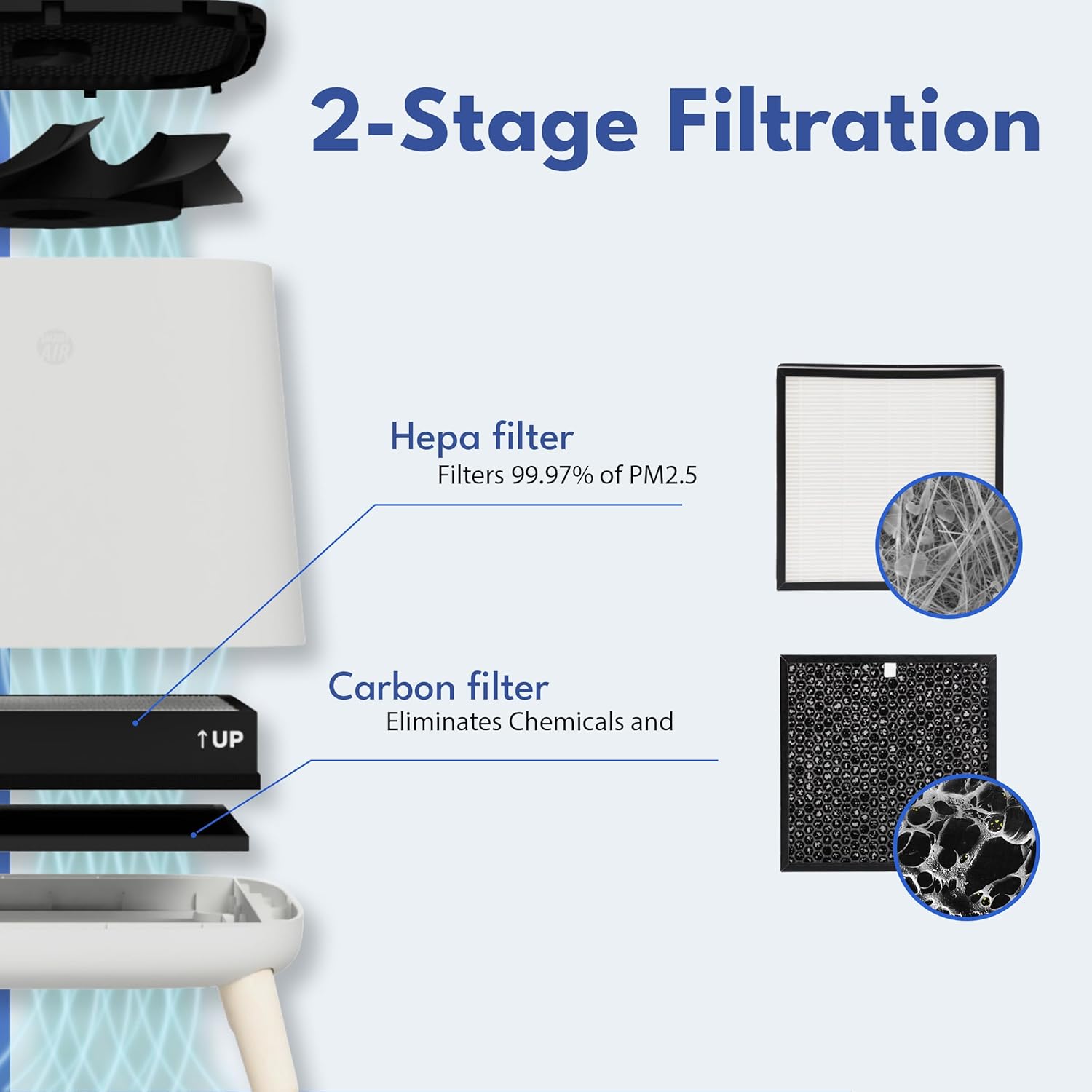
Image: Exploded view illustrating the two-stage filtration system, with the HEPA filter below the activated carbon filter.
- Placement: Place the air purifier on a flat, stable surface. Ensure there is adequate space (at least 8 inches) around all sides for optimal airflow. Avoid placing it directly against walls or furniture.
- Power Connection: Connect the power cord to the purifier and then plug it into a standard 120V AC electrical outlet.
5. Operating Instructions
The Smart Air Sqair Air Purifier features a simple rotary dial for operation.
- Power On/Off: Rotate the dial from "OFF" to any of the speed settings (1, 2, or 3) to turn the unit on. Rotate back to "OFF" to power down.
- Speed Settings:
- Speed 1 (Low): Quiet operation, suitable for continuous background purification in small spaces or during sleep. Noise level: 23dBA.
- Speed 2 (Medium): Balanced performance for general use in most rooms. Noise level: 43dBA.
- Speed 3 (High): Maximum purification power for rapid air cleaning or larger areas. Noise level: 52dBA.

Image: The air purifier with a graphic illustrating its low noise levels across different speed settings, ranging from 23dBA to 52dBA.
The purifier is designed to clean up to 900 sq ft in approximately 30 minutes on its highest setting.
6. Maintenance
Regular maintenance ensures optimal performance and extends the lifespan of your air purifier.
6.1. Filter Replacement
The H13 HEPA and Activated Carbon filters have an average lifespan of 9-12 months, depending on usage and air quality. Replace filters when you notice a decrease in performance or increased noise.
- Power Off: Unplug the air purifier from the power outlet.
- Access Filters: Hold down the two handles on the left and right sides of the unit and lift the top section, which contains the fan.
- Remove Old Filters: Carefully remove the used Activated Carbon filter (top) and then the H13 HEPA filter (bottom). Dispose of them responsibly.
- Install New Filters: Insert the new H13 HEPA filter first, ensuring it sits flush. Then place the new Activated Carbon filter on top. Ensure the "UP" indicator on the carbon filter faces upwards.
- Reassemble: Carefully place the top section back onto the base, ensuring it clicks securely into place.
- Power On: Plug the purifier back in and resume operation.
Replacement Filters:
- Smart Air Sqair H13 HEPA filter: ASIN B0DKW2F5TP
- Smart Air S Carbon Filter: ASIN B091D1KTBV

Image: A detailed view of the activated carbon filter, illustrating its ability to capture various airborne particles and gaseous pollutants like smoke, odors, VOCs, viruses, allergens, dust, mold, pollen, and formaldehyde.
6.2. Exterior Cleaning
Wipe the exterior of the purifier with a soft, dry cloth. Do not use abrasive cleaners or solvents.
7. Troubleshooting
| Problem | Possible Cause | Solution |
|---|---|---|
| Purifier does not turn on. | No power supply; power cord not connected; dial not set to a speed. | Check power outlet; ensure power cord is securely plugged in; rotate dial to speed 1, 2, or 3. |
| Reduced airflow or purification. | Clogged filters; air inlets/outlets blocked. | Replace filters (refer to Section 6.1); ensure no obstructions around the unit. |
| Unusual noise. | Filters not seated correctly; foreign object inside; unit not on a stable surface. | Re-seat filters; check for and remove any foreign objects (unplug first); place on a stable, flat surface. |
If the problem persists after attempting these solutions, please contact Smart Air customer support.
8. Specifications
| Feature | Detail |
|---|---|
| Model Number | SA120-3-4 |
| Product Dimensions (D x W x H) | 13" x 13" x 14.3" |
| Weight | 10.7 Pounds |
| Power Consumption (High) | 38 Watts |
| Voltage | 120 Volts AC |
| Filter Type | H13 True HEPA, Activated Carbon |
| Noise Level | 23-52 dBA |
| Coverage Area | Up to 900 sq ft (cleans in 30 minutes) |
| Certification | CARB Certified |
9. Warranty and Support
For warranty information or technical assistance, please contact Smart Air customer support through their official website or the retailer where the product was purchased. Please have your model number (SA120-3-4) and purchase date available.
Legal Disclaimer: Statements regarding dietary supplements have not been evaluated by the FDA and are not intended to diagnose, treat, cure, or prevent any disease or health condition.


