
1. Introduction
Thank you for choosing the Mepplzian 16x24-Wood LED Backlit Recessed Medicine Cabinet. This manual provides essential information for the safe installation, operation, and maintenance of your new medicine cabinet. Please read these instructions thoroughly before installation and keep them for future reference.
This medicine cabinet is designed to offer both practical storage and enhanced lighting for your bathroom. It features a high-quality mirror, adjustable LED backlighting, and a durable construction suitable for both recessed and wall-mounted installations.

The Mepplzian 16x24-Wood LED Backlit Recessed Medicine Cabinet, showcasing its sleek design and integrated lighting.
2. Safety Information
WARNING: Assembly is required. Follow provided instructions and videos for safe installation. Be cautious when handling the cabinet, especially around the lights and mirror. Professional installation is recommended for electrical connections.
- Always disconnect power at the circuit breaker before installation or maintenance.
- Do not attempt to modify the electrical components of the cabinet.
- Ensure the mounting surface is structurally sound and can support the weight of the cabinet and its contents.
- Keep children away from the installation area.
- Wear appropriate safety gear, including eye protection, during installation.
3. Package Contents
Please verify that all components are present before beginning installation:
- Medicine Cabinet x 1
- User Manual x 1
- Installation Hardware (screws, anchors, etc.)
- Adjustable Shelves x 2
4. Product Dimensions
| Measurement | Value |
|---|---|
| Overall Product Dimensions (D x W x H) | 5.6"D x 16.5"W x 23.6"H (5.59 x 16.54 x 23.62 inches) |
| In-wall Cabinet Dimensions | 13.8" x 17.7" x 3.9" |
| Mirror Dimensions | 16.5" x 23.6" |
| Item Weight | 9 Kilograms |

This diagram provides critical measurements for both the cabinet itself and the necessary wall opening for recessed installation, including height, width, and depth.
5. Installation (Setup)
The Mepplzian medicine cabinet offers versatile installation options: it can be either recessed into the wall or surface-mounted. Detailed instructions and an installation video are provided to assist you.
5.1. Choosing Installation Type
- Recessed Installation: Requires a wall cut-out of approximately 13.8"W x 17.7"H x 3.9"D. This option saves space and provides a flush appearance.
- Wall-Mounted Installation: The cabinet is mounted directly onto the wall surface. This is a simpler installation method.

This image demonstrates the two primary installation methods: recessed, where the cabinet is flush with the wall, and wall-mounted, where it is affixed to the surface.
5.2. General Installation Steps
- Prepare the Area: Ensure the power is off at the circuit breaker. For recessed installation, mark and cut the wall opening according to the specified dimensions.
- Mount the Cabinet: Secure the cabinet to the wall using the provided hardware. For recessed mounting, ensure it fits snugly into the opening. For surface mounting, attach the mounting bracket (if applicable) and then the cabinet.
- Electrical Connection: Connect the cabinet's electrical wiring to your home's electrical system. This step should be performed by a qualified electrician.
- Install Shelves: Place the adjustable shelves inside the cabinet at your desired heights.
- Test Functionality: Restore power and test the LED lights and any other features.
5.3. Installation Video
For a visual guide, please refer to the official installation video:
This video demonstrates the key features of the Mepplzian Recessed Medicine Cabinet, including its LED lighting with adjustable color temperature and brightness, and the dual installation options (recessed or wall-mounted).
6. Operation
The medicine cabinet features integrated LED lighting with adjustable settings.
6.1. LED Light Control
- Power On/Off: Tap the touch sensor on the mirror surface to turn the LED lights on or off.
- Adjust Color Temperature: Briefly tap the touch sensor to cycle through the three available color temperatures: Warm Light (3000K), Natural Light (4500K), and Cold Light (6500K).
- Adjust Brightness (Stepless Dimming): Press and hold the touch sensor to adjust the brightness level from 5% to 100%. Release when the desired brightness is achieved.

The LED lighting offers three color temperatures (3000K Warm, 4500K Natural, 6500K Cold) and stepless dimming from 5% to 100% brightness, controlled by a long press on the touch sensor.
6.2. Storage
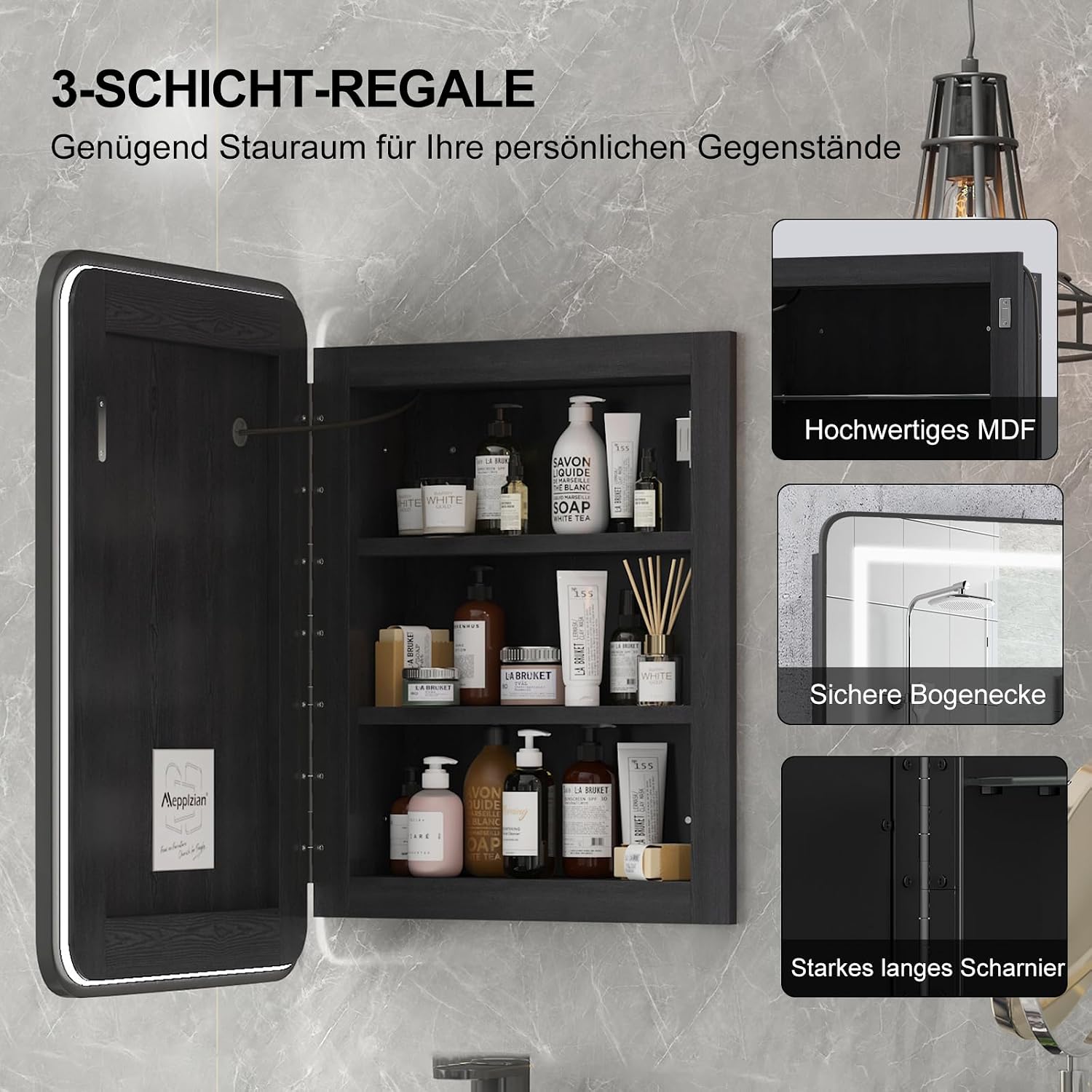
The cabinet provides ample storage with two adjustable shelves, creating three distinct storage levels. These shelves are designed to hold various bathroom essentials.

The cabinet features two adjustable shelves, creating three levels of storage space for organizing toiletries and other essentials.
The high-definition mirror provides a realistic reflection, essential for daily grooming and makeup application.
7. Maintenance
Proper care will ensure the longevity and appearance of your medicine cabinet.
- Cleaning the Mirror: Use a soft, lint-free cloth and a non-abrasive glass cleaner. Spray cleaner onto the cloth, not directly onto the mirror, to avoid liquid seeping into the edges.
- Cleaning the Cabinet: Wipe surfaces with a damp cloth. For stubborn marks, use a mild, non-abrasive cleaner. Follow with a dry cloth to prevent water spots.
- Electrical Components: Do not use liquid cleaners near electrical components. Ensure the power is off before cleaning any part of the lighting system.
- Avoid Harsh Chemicals: Do not use abrasive cleaners, ammonia-based products, or solvents, as these can damage the finish and mirror.
8. Troubleshooting
If you encounter any issues with your medicine cabinet, please refer to the following common problems and solutions:
| Problem | Possible Cause | Solution |
|---|---|---|
| LED lights do not turn on. | No power supply; loose electrical connection; faulty touch sensor. | Check circuit breaker. Ensure all electrical connections are secure (consult an electrician). Contact customer support if the sensor is unresponsive. |
| Lights flicker or dim unexpectedly. | Unstable power supply; loose wiring. | Verify stable power. Check electrical connections (consult an electrician). |
| Mirror appears distorted or cloudy. | Surface smudges; improper cleaning. | Clean the mirror with a soft, lint-free cloth and appropriate glass cleaner. |
| Cabinet door does not close properly. | Misaligned hinges; obstruction. | Adjust hinges if necessary. Remove any obstructions. |
If the problem persists after attempting these solutions, please contact Mepplzian customer support for further assistance.
9. Specifications
| Feature | Detail |
|---|---|
| Brand | Mepplzian |
| Model Number | BC0 |
| Color | Led Backlit |
| Material | Engineered Wood, Metal (Frame) |
| Product Dimensions (D x W x H) | 5.6"D x 16.5"W x 23.6"H |
| Installation Type | Wall mount, Recessed |
| Number of Shelves | 3 (2 adjustable) |
| Additional Features | Illuminated, Storage, Mirrored Door |
| Required Assembly | Yes |
| Light Color Temperatures | 3 (Warm, Natural, Cold) |
| Dimming | Stepless (5%-100%) |
10. Warranty and Support
Mepplzian is committed to providing high-quality products. While specific warranty details are not included in this manual, please retain your proof of purchase. For any questions, concerns, or issues regarding your medicine cabinet, including assembly, operation, or defects, please contact Mepplzian customer support through the retailer where the product was purchased or visit the official Mepplzian store online.
You can find more information and contact details on the Mepplzian Store Page.

