
Lian Li EDGE850W
Lian Li EDGE850W ATX Power Supply User Manual
Model: EDGE850W
1. Introduction
Thank you for choosing the Lian Li EDGE850W Fully Modular Low-Noise ATX Power Supply. This power supply unit (PSU) is designed to provide stable and efficient power to your high-performance PC components, featuring ATX 3.1 and PCIe 5.1 compliance, Cybenetics Gold efficiency, and a unique L-shape design for enhanced cable management. This manual will guide you through the installation, operation, maintenance, and troubleshooting of your new PSU.
2. Safety Information
- Always disconnect the power cord from the wall outlet before installing or removing the PSU or any other components.
- Do not open the PSU casing. High voltages are present inside, and opening it will void the warranty.
- Ensure proper grounding to prevent electrical hazards.
- Install the PSU in a well-ventilated area, away from heat sources and moisture.
- Use only the modular cables provided with your Lian Li EDGE850W PSU. Using incompatible cables can damage the PSU and connected components.
- This product is intended for computer use only.
3. Package Contents
Verify that all items are present in your package:
- Lian Li EDGE850W Power Supply Unit
- Modular Cable Set (including 12V-2x6 cable)
- AC Power Cord
- Mounting Screws
- User Manual
Note: The optional USB/Fan Hub (EG-HUB01W & EG-HUB01B) is sold separately and is not included with this model.
Video: Lian Li Edge Gold PSU unboxing video. This video demonstrates the unboxing process and shows the components included with the Lian Li Edge Gold PSU, which is similar to the EDGE850W model.
4. Setup and Installation
4.1 Physical Installation
- Prepare your PC case: Ensure your PC case has adequate space for an ATX power supply.
- Mount the PSU: Slide the Lian Li EDGE850W PSU into the designated PSU bay in your PC case. Secure it with the provided mounting screws.
- Connect the main motherboard cable: Connect the 24-pin ATX cable to your motherboard.
- Connect CPU power cables: Connect the 8-pin (4+4 pin) CPU power cable(s) to your motherboard.
- Connect GPU power cables: For NVIDIA GeForce RTX 50 and 40 Series graphics cards, use the provided 12V-2x6 cable. Connect other GPU power cables as needed.
- Connect peripheral cables: Connect SATA power cables for storage drives and Molex cables for other peripherals.
- Organize cables: Utilize the L-shape design and modularity for efficient cable management, reducing clutter and improving airflow.

Image: Innovative L-Shape Design. This image illustrates the unique L-shape design of the PSU, which helps in simplifying cable management by reorienting connectors outwards.

Image: Braided Cables with Cable Combs. This image shows the braided texture of the PSU cables and included cable combs, designed for neat and organized cable runs.
4.2 Connecting the Edge Hub (Optional)
If you have purchased the optional Lian Li Edge Hub (EG-HUB01W or EG-HUB01B), follow these steps for integration:
- Remove the protective cap from the Edge PSU connector.
- Attach the Edge Hub directly to the PSU for power.
- Place the hub inside your PC case, utilizing its integrated magnets for easy placement.
- Connect the hub to a PCIe 8-pin cable for independent operation if desired.
- Connect your fans and USB devices to the hub's 4-pin fan connectors and USB ports.
- Sync fan speed by connecting the fan 3-PIN to 3-PIN cable to your motherboard.

Image: Edge Hub Connectors. This image details the fan PWM hub with six 4-pin connectors and the USB hub with four ports for downstream connections.

Image: Edge Hub Magnetic Design. This image highlights the magnetic design of the Edge Hub, allowing for flexible placement within the PC case.

Image: Connecting Edge Hub to Edge Gold PSU. This image provides a visual guide on how to connect the optional Edge Hub to the main power supply unit.

Image: Edge Hub Placement Inside Case. This image shows an example of how the Edge Hub can be placed and integrated within a PC case.

Image: Motherboard Signal Connection. This image illustrates the two options for connecting the motherboard USB signal to the Edge Hub (USB Type-A and USB-USB).
5. Operation
5.1 Powering On Your System
After all components are securely connected and the PSU is mounted, connect the AC power cord to the PSU and then to a wall outlet. Flip the power switch on the back of the PSU to the "ON" position. You can then power on your computer using the case's power button.
5.2 Key Features and Performance
- ATX 3.1 & PCIe 5.1 Compliance: The EDGE850W ensures stable and efficient power delivery, supporting the latest high-performance components and offering enhanced resistance to transient power spikes.
- Cybenetics Gold Efficiency: Certified for high efficiency, this PSU minimizes energy waste and heat generation, contributing to a cooler and more stable system.
- Low Noise Operation: Designed for optimal performance with minimal noise, the 120mm PWM fan operates efficiently, and the PSU features a fanless mode at low loads for silent operation.
- 12V-2x6 Connector: Equipped with a high-quality 12V-2x6 dual-color connector, featuring alloy copper soldered terminals for secure and efficient power delivery to NVIDIA GeForce RTX 50 and 40 Series graphics cards.
- Industrial-Grade Capacitors: Integrates German EPCOS or equivalent Japanese capacitors, providing robust performance and high tolerance to harsh temperatures.
Video: Lian Li - Edge Gold Series Product Video. This official product video highlights the key features and design aspects of the Lian Li Edge Gold Series PSUs, including the EDGE850W.

Image: ATX 3.0 and 3.1 Compliant. This image emphasizes the PSU's compliance with the latest ATX standards, ensuring compatibility and performance.

Image: Stable Dual Color PCIe 5.1 Connector. This image details the construction of the 12V-2x6 connector, highlighting features like soldered terminals and increased copper thickness for stability.

Image: Industrial Grade Capacitors. This image shows the internal capacitors, emphasizing their quality for robust performance.

Image: Efficiency Level Certified. This graph illustrates the 80 PLUS Gold and Cybenetics Platinum efficiency curves for the EDGE Gold 850W PSU.

Image: Cool in Silence - Fan Acoustic Noise. This graph shows the fan speed and noise level of the Edge Gold 850W PSU under various power outputs, highlighting its quiet operation.
6. Maintenance
6.1 Cleaning the Dust Filter
The Lian Li EDGE850W PSU features a magnetic dust filter mesh on top of the fan for easy maintenance.
- Power Off: Ensure your computer is completely powered off and unplugged from the wall outlet.
- Remove Filter: Gently pull the magnetic dust filter mesh upwards to remove it from the PSU.
- Clean Filter: Clean the filter using compressed air or a soft brush to remove accumulated dust.
- Reattach Filter: Place the clean filter back onto the PSU, ensuring it is securely seated.

Image: Magnetic Dust Filter. This image shows the removable magnetic dust filter, highlighting its ease of access for cleaning and its role in maintaining airflow and quiet fan operation.
6.2 General Cleaning
Periodically clean the exterior of the PSU and the surrounding area inside your PC case to prevent dust buildup, which can affect cooling performance. Use a soft, dry cloth or compressed air. Do not use liquid cleaners.
7. Troubleshooting
If you encounter issues with your Lian Li EDGE850W PSU, refer to the following common troubleshooting steps:
- No Power:
- Ensure the AC power cord is securely connected to both the PSU and the wall outlet.
- Check that the power switch on the back of the PSU is in the "ON" position.
- Verify that the wall outlet is functional by plugging in another device.
- Confirm all modular cables are correctly and firmly seated into the PSU and components.
- System Instability/Crashes:
- Ensure your PSU wattage is sufficient for all your components. Refer to the specifications section.
- Check all power connections to the motherboard, CPU, and GPU for secure fit.
- Test components individually if possible to isolate the issue.
- Excessive Noise:
- Check the PSU fan for any obstructions.
- Ensure the magnetic dust filter is clean and properly seated.
- If the noise persists and is unusual, contact customer support.
- Component Not Detected:
- Verify that the specific power cable for the component (e.g., GPU, SATA drive) is correctly connected to both the PSU and the component.
- Ensure the component itself is properly installed in its slot.
For further assistance, please refer to the Support section.
8. Specifications
Detailed specifications for the Lian Li EDGE850W Power Supply:
| Feature | Detail |
|---|---|
| Brand | Lian Li |
| Model Number | EDGE850W |
| Output Wattage | 850 Watts |
| Form Factor | ATX 3.1 |
| Efficiency Certification | 80 PLUS Gold, Cybenetics Gold |
| Dimensions (L x W x H) | 12.99 x 8.39 x 5.24 inches (330 x 213 x 133 mm) |
| Item Weight | 7.7 Pounds (3.5 kg) |
| Fan Count | 1 |
| Fan Type | 120mm FDB Fan |
| Input Voltage | 100-240Vac |
| Input Frequency Range | 9-4.5A 50-60Hz |
| PFC | Active PFC, PF > 0.90 under full load @ 115Vac, 60Hz |
| Protective Circuit | OCP / OVP / OPP / OTP / SCP / UVP |
| Main Motherboard Connector | 1x 24/20-Pin (620mm) |
| CPU/ATX 12V Connector | 1x 8-pin (750mm) |
| CPU Connector | 1x 4+4 Pin (750mm) |
| GPU Connector | 1x 6+2 Pin (650mm+100mm) |
| 12V-2x6 450W Connector | 1x (650mm) |
| SATA Connector | 1x (300mm-150mm-150mm) |
| SATA-Y Connector | 1x (375mm-150mm-150mm) |
| Peripheral Connector | 4x 4-Pin (500mm-150mm-150mm-150mm) |
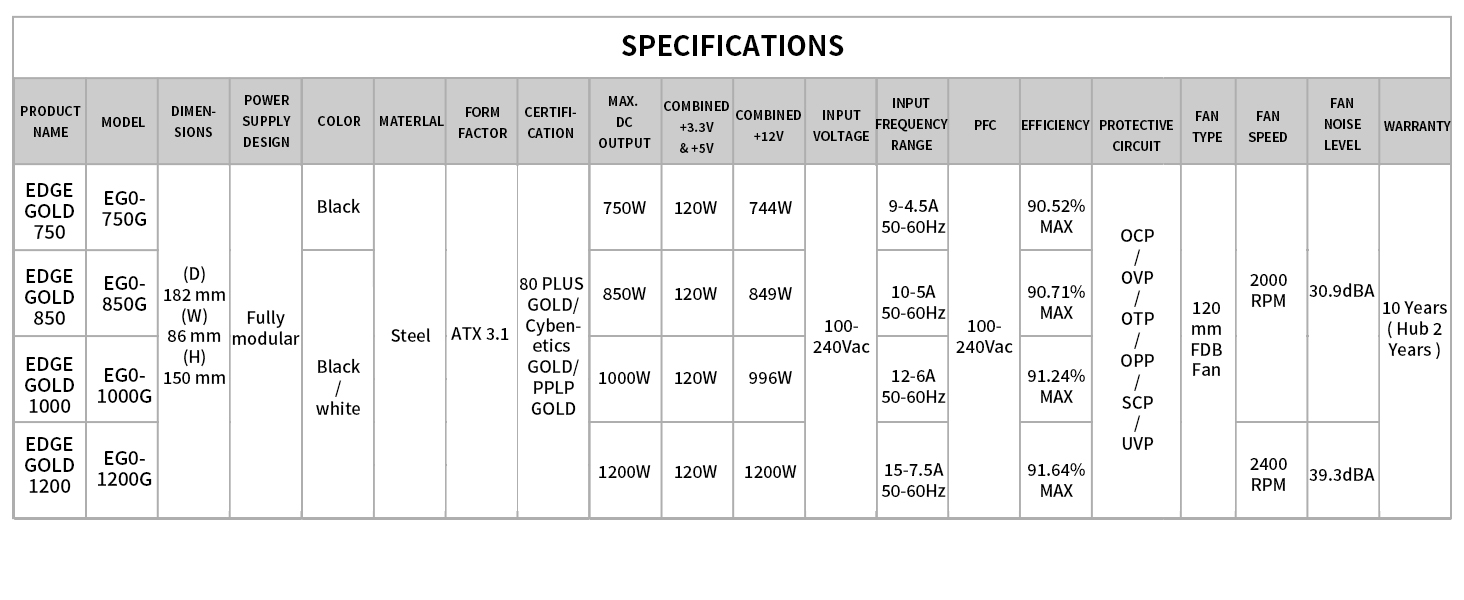
Image: Full Specifications Table. This image provides a comprehensive table of specifications for various EDGE Gold PSU models, including the EDGE850W.
9. Warranty Information
The Lian Li EDGE850W Power Supply comes with a 2-year limited warranty from the date of purchase. This warranty covers defects in materials and workmanship under normal use. It does not cover damage caused by accident, abuse, misuse, natural disaster, or unauthorized modification or repair. Please retain your proof of purchase for warranty claims.
For detailed warranty terms and conditions, please visit the official Lian Li website.
10. Support and Contact
If you require technical assistance or have questions regarding your Lian Li EDGE850W Power Supply, please contact Lian Li customer support through their official website:
- Lian Li Official Website: www.lian-li.com
- Refer to the support section on the website for FAQs, driver downloads, and contact forms.
Related documentsEDGE850W


Ask a question about this manual
Ask about setup, troubleshooting, compatibility, parts, safety, or missing instructions. Manuals+ will review the question and use this page’s manual context to help answer it.