
1. Important Safety Information
Please read this manual carefully before operating your IGLIDE Hoverboard. Failure to follow these instructions may result in serious injury or damage to the product.
- Minimum and Maximum Load: The hoverboard is designed for riders with a minimum weight of 25-27 kg and a maximum weight of 120 kg. Exceeding these limits can affect performance and safety.
- Water Exposure: This hoverboard is not waterproof. Avoid using it in water, mud, or high amounts of sand (sea sand or river sand) to prevent damage to internal components and voiding the warranty.
- Operation Posture: Always keep the hoverboard on the floor when it is switched on. Do not lift the hoverboard while it is powered on.
- Charging Safety: The hoverboard must be switched off at all times when charging.
- Operating Temperature: The optimal operating temperature range is 10°C to 50°C.
2. Product Overview
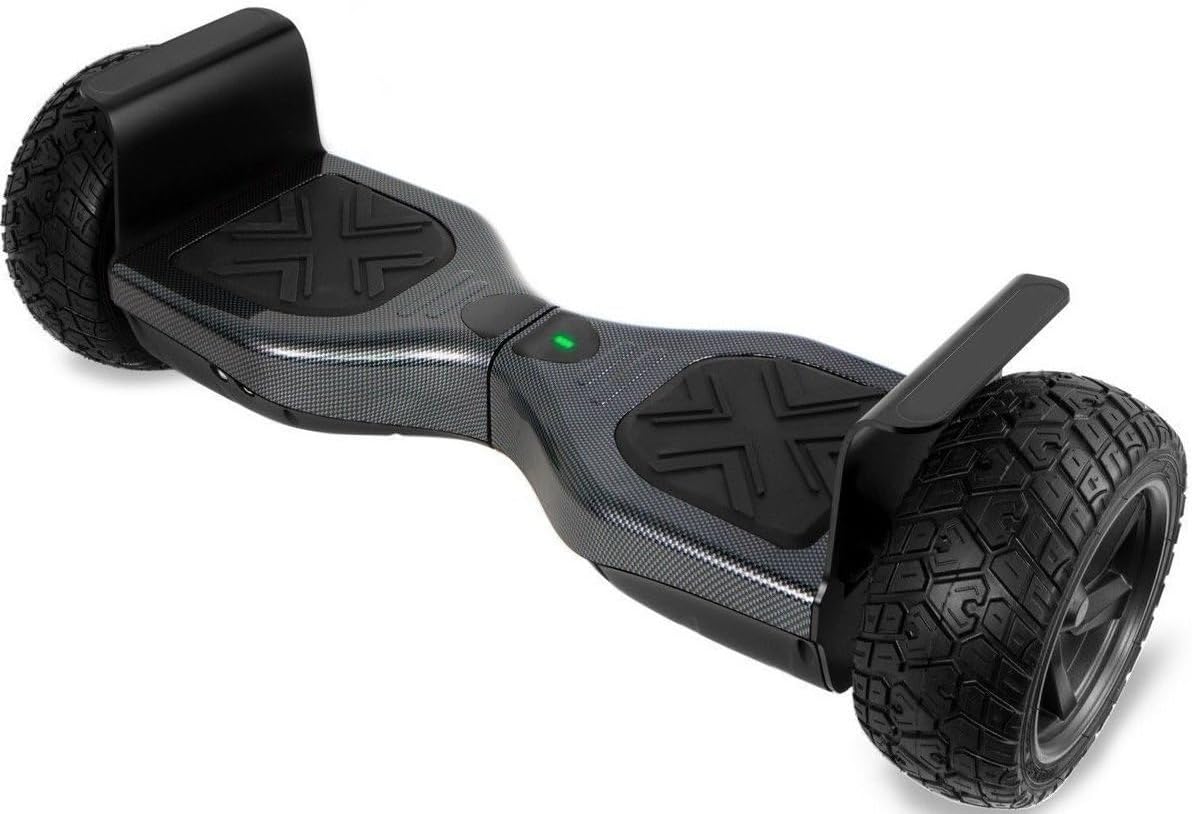
The IGLIDE Hoverboard i-Glide™ 8.5" Bluetooth Off-Road is a self-balancing scooter designed for various terrains. It features robust construction, integrated Bluetooth connectivity for audio playback, and LED lights for enhanced visibility.
Key Features:
- 8.5-inch Solid Rubber Tires for off-road capability.
- Integrated Bluetooth speaker for music playback.
- LED Lights for improved visibility and aesthetics.
- Suitable for both on and off-road use.

3. Setup
3.1 Charging the Hoverboard
Before first use, fully charge the hoverboard. Ensure the hoverboard is switched off during the entire charging process.
- Connect the charger to a standard 100V-240V, 50/60Hz power outlet.
- Connect the charging cable to the hoverboard's charging port.
- The charging indicator light on the charger will change (e.g., from red to green) when charging is complete.
- Average charging time is 3-6 hours. Do not overcharge the battery.
4. Operating Instructions
4.1 Basic Operation
To operate the hoverboard, gently step onto the footpads one foot at a time. Use slight pressure from your feet to control movement: lean forward to move forward, lean backward to move backward, and apply pressure to one footpad to turn.
4.2 Bluetooth Connection
Your hoverboard includes a built-in Bluetooth speaker for audio playback.
- Switch the hoverboard on. Ensure it remains on throughout the connection process.
- On your Bluetooth-enabled device (e.g., smartphone), navigate to the Bluetooth settings.
- Search for available devices. The hoverboard should appear as a new device in the list.
- Select the hoverboard from the list to initiate the connection.
- Once connected, you can play music from your device, and the audio will be broadcast through the hoverboard's speaker.
4.3 Terrains of Use
The i-Glide™ 8.5" Off-Road Hoverboard is designed for use on various surfaces:
- Indoors
- Grass
- Gravel
- Bricked Paving
- Tar surfaces
Avoid using the hoverboard through water, mud, or high amounts of sand (sea sand or river sand) as this can cause damage.
5. Maintenance
5.1 Cleaning
To clean your hoverboard, use a soft, damp cloth. Do not use harsh chemicals or abrasive cleaners. Ensure the hoverboard is switched off and unplugged before cleaning.
5.2 Storage
When not in use, store the hoverboard in a dry place within the recommended storage temperature range of -20°C to 50°C. Avoid direct sunlight and extreme temperatures.
5.3 Battery Care
To prolong battery life, avoid completely draining the battery frequently. If storing for an extended period, charge the battery to approximately 50-70% and recharge every few months.
6. Troubleshooting
6.1 Hoverboard Not Turning On
- Ensure the battery is charged. Connect the charger and check if the charging indicator lights up.
- Verify the power button is fully pressed.
6.2 Bluetooth Connection Issues
- Ensure the hoverboard is switched on and within range of your Bluetooth device.
- Turn off and on the Bluetooth function on your device and the hoverboard.
- Forget the device on your phone's Bluetooth settings and attempt to pair again.
6.3 Unusual Noises or Vibrations
- Immediately dismount the hoverboard.
- Check for any visible damage to the wheels or chassis.
- If the issue persists, contact customer support.
7. Specifications
| Feature | Specification |
|---|---|
| Minimum Load | 25-27 kg |
| Maximum Load | 120 kg |
| Maximum Cruising Speed | 15 - 20 km/h |
| Maximum Mileage (Full Charge) | Up to 15 km (terrain and rider weight dependent) |
| Power | 700-800 watts |
| Battery Type | Li-ion battery 37V, 4.4AH |
| Motor Power | 350W * 2 |
| Average Charging Time | 3-6 hours |
| Charging Requirements | 100V - 240V 50/60Hz |
| Working Temperature | 10°C - 50°C |
| Storage Temperature | -20°C - 50°C |
| Dimensions | 700mm * 220mm * 230mm (70L x 22W x 23H cm) |
| Pedal Height | 220mm |
| Tire Size | 200mm (8.5 inches) |
| Chassis Clearance | 50mm |
| Product Weight | 14.5 kg |
| Certification | CE & ROHS & FCC |
| Included Components | Hoverboard, Charger, Free Carry Bag, Built-in Battery, User Manual |
8. Warranty and Support
For service, returns, or warranty claims, it is crucial to retain the original packaging materials and your original receipt. Damage to a product returned to Exclusive Brands Online (EBO) for service or return due to inadequate packaging will void your warranty or return/exchange acceptance.
Manufacturer: Exclusive Brands Online
For further assistance, please refer to the contact information provided at the point of purchase or on the manufacturer's official website.


