
1. Product Overview
The Earldom M65 is a versatile 2-in-1 Bluetooth audio adapter designed to seamlessly switch between receiver (RX) and transmitter (TX) modes. It allows you to add Bluetooth functionality to non-Bluetooth devices, enabling wireless audio streaming and hands-free calling. This compact device is ideal for use in cars, home audio systems, and with various portable media players.
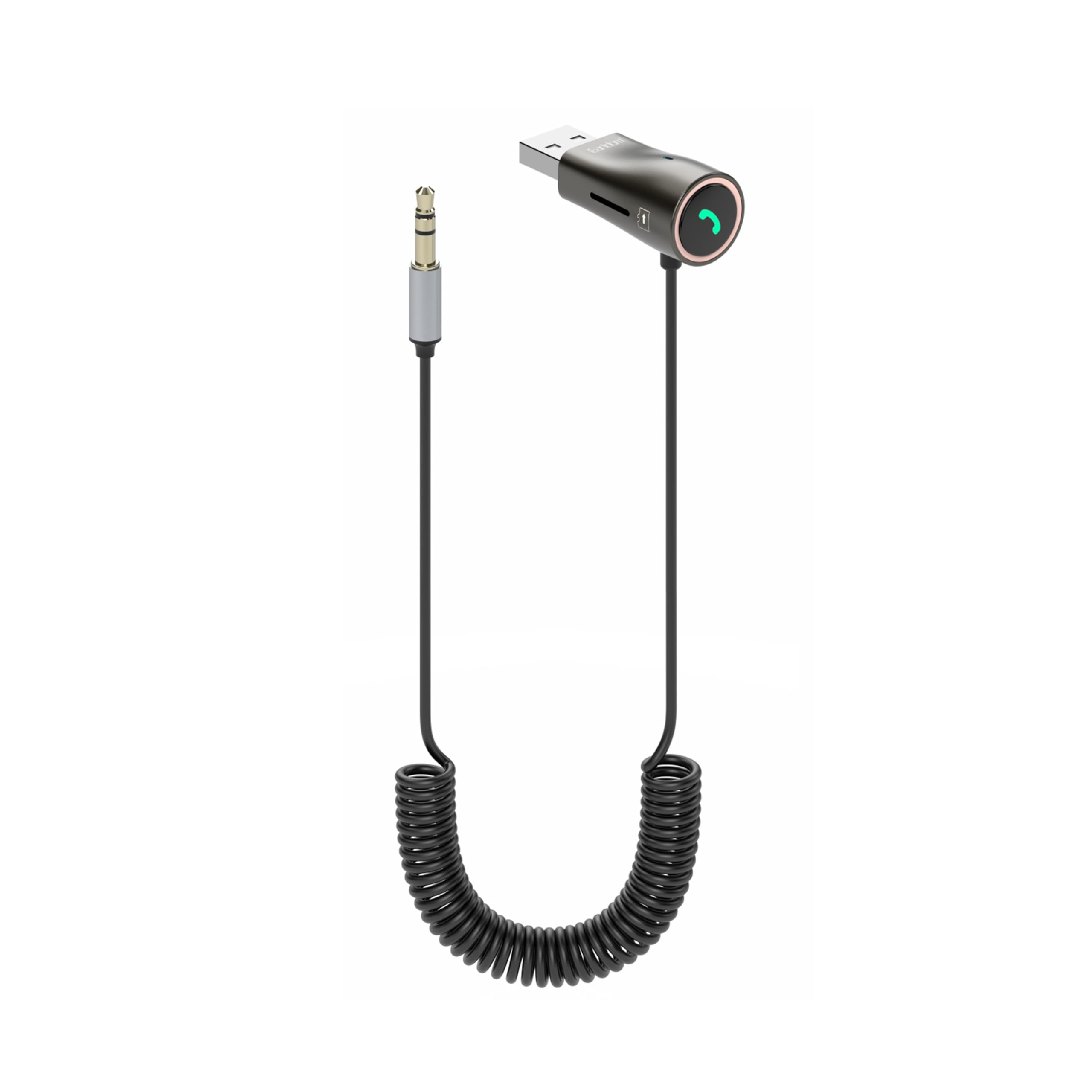
The Earldom M65 2-IN-1 Bluetooth Audio Receiver Transmitter, featuring a USB connector and a 3.5mm audio jack, designed for versatile wireless audio connectivity.
2. Package Contents
- Earldom M65 2-IN-1 Bluetooth Audio Adapter
- 3.5mm Audio Cable
- User Manual
3. Specifications
| Model | M65 |
| Material | ABS, TPE, Zinc alloy, PVC |
| Bluetooth Version | 5.0 |
| Features | TF card support, Play/Pause, Track Adjustment, Built-in Microphone, Hands-Free Calls, Low Latency, CD Sound quality |
| Connectivity | Bluetooth, 3.5mm Audio, USB |
| Compatible Devices | Car Stereo Systems, Headphones, Home Stereo Systems, Laptops, MP3 Players, Mobile Phones, Tablets |
| Operating Distance | Up to 10 meters (33 feet) |
| TF Card Capacity | Up to 128GB |
| Weight | 57.2g |
| Dimensions (Packaging) | 192 x 102 x 20mm |

The retail packaging for the Earldom M65 Bluetooth adapter, showcasing its key features, specifications, and wide compatibility with various audio devices and systems.
4. Setup
4.1 Receiver Mode (RX)
In Receiver Mode, the M65 receives Bluetooth audio from your smartphone or tablet and outputs it to a non-Bluetooth audio system.
- Plug the M65 into a USB power source (e.g., car USB port, USB charger, power bank). The device will power on automatically.
- Connect the M65's 3.5mm audio jack to the AUX input of your car stereo, home speaker, or headphones using the provided 3.5mm audio cable.
- The device will enter pairing mode, indicated by a flashing LED light.
- On your mobile phone or other Bluetooth-enabled device, search for Bluetooth devices and select "Earldom M65" to connect.
- Once connected, the LED light will become solid, indicating a successful connection.

The Earldom M65 Bluetooth adapter plugged into a car's USB port and connected via its 3.5mm auxiliary cable, ready to provide wireless audio to the car's stereo system.
4.2 Transmitter Mode (TX)
In Transmitter Mode, the M65 takes audio from a non-Bluetooth source and transmits it wirelessly to Bluetooth headphones or speakers.
- Plug the M65 into a USB power source. The device will power on automatically.
- Connect the M65's 3.5mm audio jack to the audio output of a non-Bluetooth device (e.g., TV, MP3 player, PC) using the provided 3.5mm audio cable.
- Ensure your Bluetooth headphones or speaker are in pairing mode.
- The M65 will automatically search for and connect to nearby Bluetooth audio devices.
- Once connected, the LED light will become solid.

The Earldom M65 Bluetooth adapter connected to a smart speaker, demonstrating its use in transmitter mode to stream audio from a non-Bluetooth source to a Bluetooth-enabled speaker.
5. Operating Instructions
5.1 Power On/Off
The M65 powers on automatically when connected to a USB power source and powers off when disconnected.
5.2 Music Playback
- Bluetooth Playback: After successful pairing in either RX or TX mode, play audio from your connected device.
- TF Card Playback: Insert a TF (MicroSD) card into the designated slot. The device will automatically switch to TF card playback.

A smartphone displaying music playback, wirelessly connected to the car's audio system via the Earldom M65 Bluetooth adapter, which is discreetly plugged into the car's console.
5.3 Controls
The M65 features intuitive controls for audio and call management:
- Play/Pause: Short press the multi-function button (phone icon).
- Next Track: Long press the "+" button.
- Previous Track: Long press the "-" button.
- Volume Up: Short press the "+" button.
- Volume Down: Short press the "-" button.
5.4 Hands-Free Calls (Receiver Mode Only)
When connected to your phone in Receiver Mode, you can manage calls directly from the M65:
- Answer Call: Short press the multi-function button.
- End Call: Short press the multi-function button during a call.
- Reject Call: Long press the multi-function button.
- Redial Last Number: Double-press the multi-function button.

The Earldom M65 adapter integrated into a car's dashboard, facilitating hands-free navigation audio and calls from a smartphone mounted nearby.
6. Maintenance
- Keep the device dry. Avoid exposure to moisture or liquids.
- Do not expose the device to extreme temperatures (hot or cold).
- Clean the device with a soft, dry cloth. Do not use harsh chemicals or abrasive cleaners.
- Do not attempt to disassemble or modify the device. This will void the warranty.
7. Troubleshooting
- Device not powering on: Ensure the M65 is securely plugged into a working USB power source.
- Cannot pair with Bluetooth device:
- Ensure the M65 is in pairing mode (flashing LED indicator).
- Turn off and on Bluetooth on your source device (phone, tablet, etc.).
- Move the M65 closer to the Bluetooth device.
- Clear previous Bluetooth connections on your source device if necessary.
- No sound or poor audio quality:
- Check the volume levels on both the M65 and the connected audio system/device.
- Ensure all 3.5mm audio cables are securely connected.
- Verify that the M65 is in the correct mode (RX for receiving, TX for transmitting).
- Reduce interference by moving away from other wireless devices.
- TF card not playing: Ensure the TF card is inserted correctly and contains supported audio files. Check if the card capacity exceeds 128GB.
8. Warranty and Support
The Earldom M65 2-IN-1 Bluetooth Audio Receiver Transmitter comes with a 1-year manufacturer's warranty from the date of purchase.
For technical support or warranty claims, please contact your retailer or refer to the official Earldom website for further assistance.