
1. Introduction
Thank you for choosing the TFA 35.1170.01 Wireless Weather Station. This device provides accurate indoor and outdoor temperature readings, a weather forecast trend, a radio-controlled clock with date, and an alarm function. This manual will guide you through the setup, operation, and maintenance of your new weather station.
2. Package Contents
Please check that all components are present in the package:
- 1x Base Station (TFA 35.1170)
- 2x Wireless Temperature Transmitters (TFA 30.3248.02)
- 1x Instruction Manual
Note: Batteries are not included and must be purchased separately. The base station requires 2x 1.5V AA batteries, and each transmitter requires 2x 1.5V AAA batteries.
3. Safety Instructions
- Keep this instruction manual for future reference.
- Do not expose the device to extreme temperatures, vibrations, or shocks.
- Protect the base station from moisture. The outdoor transmitters are splash-proof but should not be submerged in water.
- Do not attempt to repair the device yourself. Contact qualified personnel for repairs.
- Dispose of batteries responsibly according to local regulations.
4. Setup
4.1 Battery Installation
- For the Wireless Transmitters (TFA 30.3248.02):
Open the battery compartment cover on the back of each transmitter. Insert 2x 1.5V AAA batteries, observing the correct polarity (+/-). Close the cover securely.
- For the Base Station (TFA 35.1170):
Open the battery compartment cover on the back of the base station. Insert 2x 1.5V AA batteries, observing the correct polarity (+/-). Close the cover securely.
Note: It is recommended to insert batteries into the transmitters first, then into the base station, to ensure proper synchronization.
4.2 Initial Synchronization and Time Setting
After battery installation, the base station will automatically search for the radio-controlled time signal (DCF77) and the signals from the outdoor transmitters. This process may take several minutes. Ensure the base station is placed away from sources of interference (e.g., TVs, computers).
- The radio-controlled time signal ensures accurate time and date display.
- The outdoor temperature from the transmitters should appear on the display.
4.3 Manual Time and Time Zone Adjustment
If the radio-controlled time signal is not received, or if you are in a different time zone, you can manually adjust the time and time zone.
- Refer to the specific buttons on your device (usually labeled "SET", "MODE", or similar) for manual adjustment.
- The time zone correction allows for adjustments of +12/-12 hours.
- The radio-controlled function can be deactivated if desired.
4.4 Transmitter Placement
Place the wireless outdoor transmitters in a sheltered location outside, protected from direct sunlight and rain, to ensure accurate temperature readings. The maximum range is 100 meters in open field conditions. Walls and other obstacles will reduce this range.
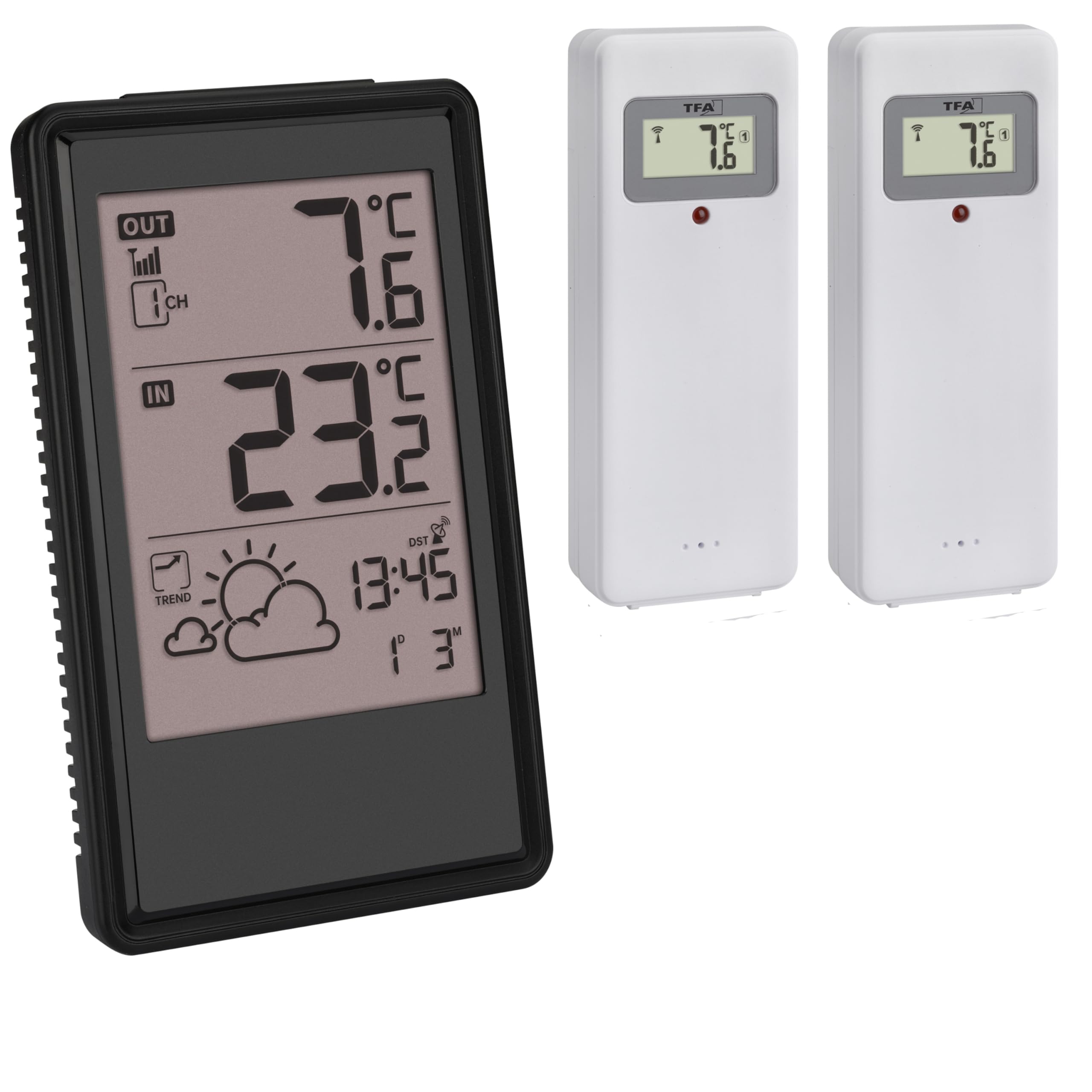
Image: The TFA 35.1170.01 base station and two wireless outdoor temperature transmitters. The base station displays indoor and outdoor temperatures, time, and weather forecast symbols.
5. Operating Instructions
5.1 Display Overview
The main display shows the following information:
- Indoor Temperature: Current temperature measured by the base station.
- Outdoor Temperature: Current temperature received from the wireless transmitters.
- Weather Forecast Symbols: Icons indicating predicted weather (sunny, partly cloudy, cloudy, rainy, snowy) based on atmospheric pressure changes.
- Weather Trend Arrows: Arrows indicating rising, stable, or falling atmospheric pressure.
- Radio-Controlled Time and Date: Accurate time and date.
- Alarm Icon: Indicates if the alarm is active.
- Frost Symbol: Appears when the outdoor temperature drops below 3°C.
5.2 Weather Forecast
The weather station predicts weather trends for the next 6 to 12 hours based on atmospheric pressure changes. The forecast is represented by 5 weather icons:
- Sunny
- Partly Cloudy
- Cloudy
- Rainy
- Snowy
Accompanying trend arrows indicate whether the atmospheric pressure is rising, stable, or falling, providing additional insight into the weather development.
5.3 Alarm and Snooze Function
The weather station includes an alarm with a snooze function, allowing it to be used as a bedside clock.
- Setting the Alarm: Use the designated buttons (e.g., "ALARM", "SET") to set your desired alarm time.
- Activating/Deactivating Alarm: Toggle the alarm on or off using the appropriate button.
- Snooze Function: When the alarm sounds, press the snooze button (often a large button on top) to temporarily silence the alarm for a few minutes. The alarm will sound again after the snooze period.
5.4 Expanding with Additional Transmitters
The weather station supports up to 3 wireless temperature transmitters. This package includes two. An additional transmitter (TFA 30.3248.02, sold separately) can be added to monitor temperature in other locations, such as a cellar or garage.
To add an additional transmitter, follow the battery installation steps for the transmitter, then initiate a manual search for new sensors on the base station (refer to your device's specific button functions for "SCAN" or "CHANNEL" settings).
6. Maintenance
6.1 Battery Replacement
When the battery indicator appears on the display, replace the batteries in the respective unit (base station or transmitter). Always replace all batteries in a unit at the same time with new ones of the same type.
- Base Station: 2x 1.5V AA batteries.
- Transmitters: 2x 1.5V AAA batteries per transmitter.
6.2 Cleaning
Clean the device with a soft, damp cloth. Do not use abrasive cleaners or solvents. Ensure no moisture enters the device's interior.
7. Troubleshooting
| Problem | Possible Cause | Solution |
|---|---|---|
| No outdoor temperature display. | Transmitter batteries are low or depleted. Transmitter is out of range or blocked. Interference. | Replace transmitter batteries. Move transmitter closer to the base station. Relocate base station or transmitter away from electronic devices. Initiate manual search for sensors. |
| Incorrect time display. | Radio signal not received. Incorrect time zone setting. | Ensure base station is in an area with good signal reception. Manually set time and time zone. Deactivate and reactivate radio-controlled function. |
| Weather forecast seems inaccurate. | Weather forecast is a prediction based on pressure changes, not always 100% accurate for local conditions. | Understand that the forecast is a general trend for 6-12 hours. Compare with local forecasts for verification. |
8. Specifications
| Feature | Detail |
|---|---|
| Model Number | TFA 35.1170.01 |
| Indoor Temperature Range | -9.9 °C to +50 °C (+15 °F to +122 °F) |
| Outdoor Temperature Range | -50 °C to +70 °C (-58 °F to +158 °F) |
| Measurement Accuracy | +/- 1 °C |
| Radio Frequency | 433 MHz |
| Maximum Range (Transmitters) | 100 m (open field) |
| Maximum Transmitters Supported | 3 (2 included) |
| Base Station Batteries | 2x 1.5V AA (not included) |
| Transmitter Batteries | 2x 1.5V AAA per transmitter (not included) |
| Dimensions (Base Station) | 145 (142) x 86 x 30 (55) mm |
| Weight (Base Station) | 160 g |
| Radio-Controlled Clock | Yes (DCF77, deactivatable) |
| Time Zone Correction | +/- 12 hours |
9. Warranty and Support
Information regarding specific warranty terms or availability of spare parts is not provided in the product details. For support or warranty inquiries, please contact your retailer or the manufacturer directly. Keep your proof of purchase for any warranty claims.


