
1. Important Safety Information
Please read all instructions carefully before assembly and use. Keep this manual for future reference.
- Ensure all parts are present before beginning assembly.
- Assemble the desk on a soft, clean surface to prevent scratches.
- Do not overtighten screws during assembly to avoid damaging components.
- Keep small parts away from children to prevent choking hazards.
- Do not stand or sit on the desk.
- Place the desk on a level surface to ensure stability.
- Maximum weight recommendation: 280 pounds (127 kg). Do not exceed this limit.
2. Package Contents
Verify that all components listed below are included in your package. If any parts are missing or damaged, please contact customer support.
- Desk panels (L-shaped main top, mini table, shelves)
- Metal frame components (legs, support beams)
- Assembly hardware (screws, bolts, nuts, Allen wrench)
- Headphone hook
- Hutch (for monitor stand)
- Speaker holders
- Instruction manual

Figure 2.1: Overview of desk components and features. This image illustrates the various parts of the L-shaped gaming desk, including the main desktop, the mini table, the right-side shelves, the headphone hook, and the wiring hole, along with the rounded corner design.
3. Assembly Instructions
Assembly requires approximately 1 person and clear, step-by-step instructions are included with the product. The estimated assembly time is 30-60 minutes. Please follow the provided instructions carefully.
- Unpack and Identify Parts: Carefully unpack all components and lay them out on a clean, soft surface. Refer to the package contents list to ensure all parts are present.
- Assemble the Frame: Begin by connecting the metal frame components according to the diagram in your separate assembly guide. Ensure all screws are finger-tightened initially.
- Attach Desk Panels: Secure the main L-shaped desktop panels to the assembled frame. Pay attention to the orientation of the panels, ensuring the carbon fiber style surface faces upwards.
- Install Shelves: Attach the right-side shelves to the designated frame sections. Ensure they are securely fastened to support your PC tower or other equipment.
- Mount Accessories: Install the headphone hook and the mini table on the desk as shown in the diagrams. The mini table provides an elevated surface for a laptop or monitor.
- Final Tightening: Once all components are in place and aligned, systematically tighten all screws and bolts using the provided Allen wrench. Do not overtighten.
- Positioning: Carefully move the assembled desk to its desired location. Ensure it is placed on a stable and level surface.

Figure 3.1: Fully assembled COMHOMA W-B2004 L-Shaped Gaming Desk. This image displays the complete desk setup, highlighting its L-shape, carbon fiber texture, and various features ready for use.

Figure 3.2: Detailed dimensions of the gaming desk. This diagram provides precise measurements for the desk's length, width, height, and individual sections, assisting with space planning and setup.

Figure 3.3: Another perspective of the assembled COMHOMA W-B2004 L-Shaped Gaming Desk, showcasing its carbon fiber finish and overall design.
4. Operating Instructions
The COMHOMA W-B2004 L-Shaped Gaming Desk is designed for optimal functionality and organization. Utilize its features to enhance your gaming or work setup.
- L-Shape Configuration: The L-shape design provides ample surface area for multiple monitors, keyboards, mice, and other peripherals, allowing for a spacious and efficient workstation.
- Mini Table: The elevated mini table can be used to place a laptop, a secondary monitor, or other accessories, freeing up space on the main desktop.
- Wiring Hole: Use the integrated wiring hole to manage cables, keeping your desk tidy and preventing tangles.
- Headphone Hook: Hang your headphones on the dedicated hook for easy access and to keep them off the desk surface.
- Right Shelf: The multi-level right shelf is ideal for storing your PC tower, speakers, books, or other gaming accessories. The semi-enclosed anti-fall board helps prevent items from falling off.
- Rounded Corner Design: The desk features rounded corners to enhance safety and prevent accidental bumps or injuries.

Figure 4.1: Illustration of the rounded corner design. This image highlights the safety feature of the desk's rounded edges, designed to prevent injury.
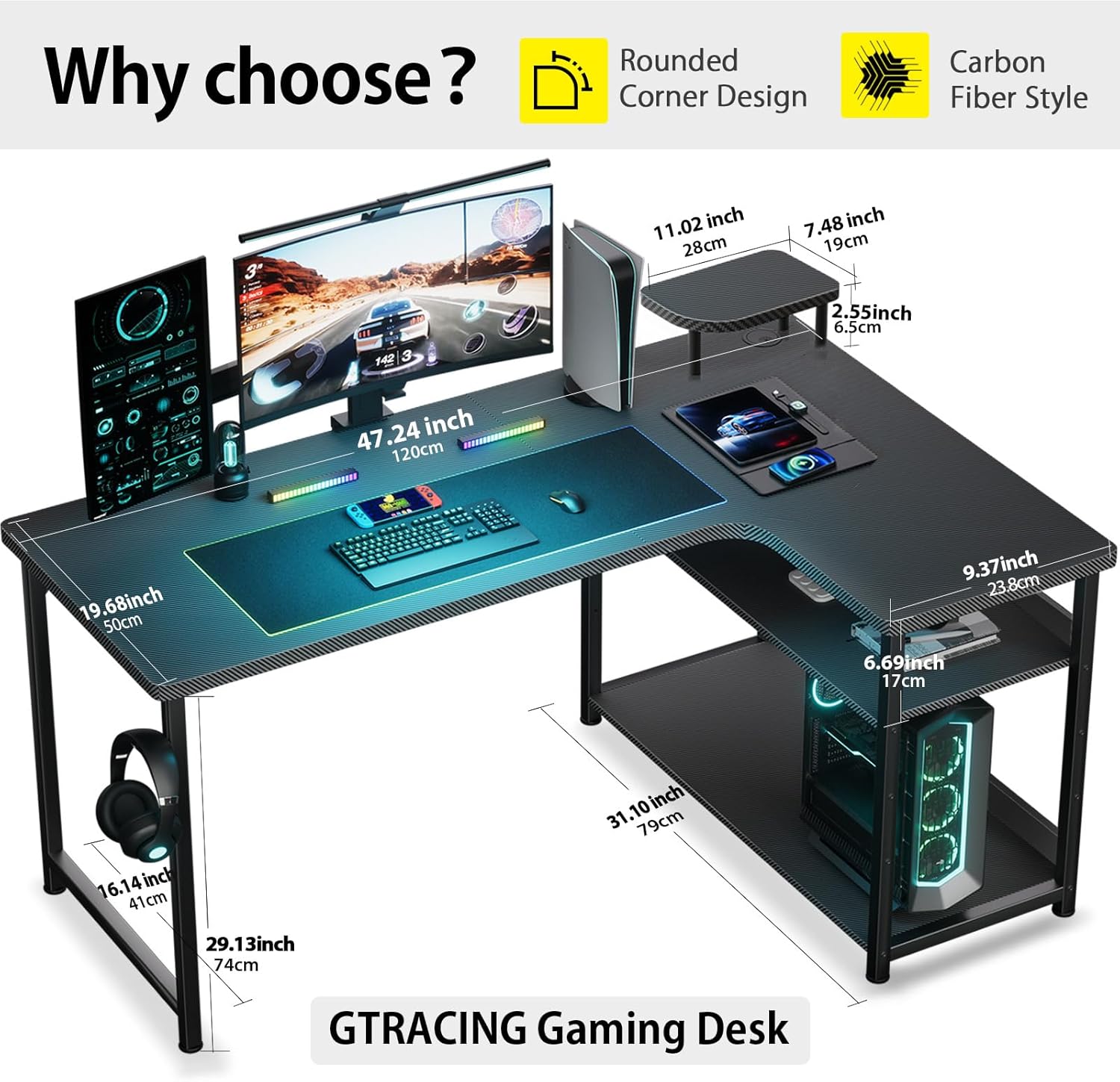
Figure 4.2: Detail of the safety anti-fall board on the shelves. This image demonstrates how the semi-enclosed anti-fall board helps secure items on the shelves, preventing them from toppling.
5. Maintenance and Care
Proper care will ensure the longevity and appearance of your COMHOMA W-B2004 L-Shaped Gaming Desk.
- Cleaning: The smooth, waterproof surface makes cleaning effortless. Simply wipe away dust, spills, or smudges with a damp cloth. Avoid abrasive cleaners or harsh chemicals that could damage the finish.
- Spill Management: In case of spills, wipe them immediately to prevent liquid from seeping into seams or damaging the material.
- Avoid Excessive Heat: Do not place extremely hot items directly on the desk surface. Use coasters or protective pads if necessary.
- Regular Inspection: Periodically check all screws and connections to ensure they remain tight. Retighten if necessary to maintain stability.
- Weight Distribution: Distribute weight evenly across the desk surface and shelves to prevent stress on any single point.
6. Troubleshooting
If you encounter any issues with your gaming desk, refer to the following common solutions:
- Desk Wobbles:
- Ensure the desk is on a level surface. Adjust any leveling feet if present.
- Check all assembly screws and bolts. Tighten any loose connections.
- Parts Don't Align During Assembly:
- Do not fully tighten screws until all parts are loosely assembled. This allows for minor adjustments.
- Double-check the orientation of each part against the assembly diagrams.
- Scratches on Surface:
- Minor scratches can sometimes be minimized with furniture polish. For deeper scratches, consider contacting customer support for advice.
- Always use mouse pads and coasters to protect the surface during use.
7. Specifications
| Feature | Detail |
|---|---|
| Brand | COMHOMA |
| Model Number | W-B2004 |
| Desk Design | Computer Desk (L-Shape) |
| Product Dimensions (D x W x H) | 19.68"D x 47.24"W x 29.13"H (50cm D x 120cm W x 74cm H) |
| Color | Black |
| Style | Modern |
| Top Material Type | Wood (Laminated, Carbon Fiber Finish) |
| Base Material | Metal |
| Item Weight | 10 Kilograms (22 lbs) |
| Maximum Weight Recommendation | 280 Pounds (127 kg) |
| Included Components | Headphone Hook, Hutch (Monitor Stand), Speaker Holders |
| Required Assembly | Yes |
| Recommended Number of People for Assembly | 1 |
8. Warranty Information
This COMHOMA W-B2004 L-Shaped Gaming Desk comes with a Limited Warranty. For specific details regarding warranty coverage, duration, and terms, please refer to the warranty card included in your product packaging or contact COMHOMA customer support directly. The warranty typically covers manufacturing defects under normal use.
9. Customer Support
For any questions, assistance with assembly, missing parts, or warranty claims, please contact COMHOMA customer support. You can typically find contact information on the product packaging, the brand's official website, or through your point of purchase.
Online Resources: For additional support and product information, visit the official COMHOMA store on Amazon: COMHOMA Store