
Introduction
The iHealth Accu Blood Pressure Monitor is designed for accurate and convenient blood pressure measurement at home. This device features a large LCD, Bluetooth connectivity for app integration, and detection for irregular heartbeats and body movement. Please read this manual thoroughly before using the device to ensure proper operation and accurate results.
What's in the Box
Verify that all components are present in your iHealth Accu Blood Pressure Monitor package:
- 1 x iHealth Accu Blood Pressure Monitor
- 1 x Large Adult Upper Arm Cuff (fits arm circumference 8.7-16.5 inches / 22-42 cm)
- 4 x AA Batteries
- 1 x Portable Travel Bag
- 1 x User Manual
- 1 x USB Power Cable

Setup
1. Powering the Device
The iHealth Accu monitor can be powered by either 4 AA batteries or a USB power supply.
- Battery Installation: Open the battery compartment on the back of the device. Insert 4 AA batteries, ensuring correct polarity (+/-).
- USB Power: Alternatively, connect the provided USB cable to the monitor's USB port and to a compatible USB power adapter (not included) or computer USB port.

2. Connecting the Cuff
Insert the air tube connector from the cuff firmly into the air jack on the side of the monitor.
3. App Pairing (Bluetooth)
To utilize the full features of the iHealth Accu monitor, including data tracking and sharing, pair it with the iHealth MyVitals app.
- Ensure your smartphone's Bluetooth is enabled.
- Download the free iHealth MyVitals app from the App Store (iOS) or Google Play Store (Android).
- Open the app and create an account or log in.
- On the monitor, press the 'M1' or 'M2' button to activate Bluetooth. The Bluetooth symbol will flash on the display.
- In the app, navigate to 'Devices' and select 'Add BP Monitor'. Follow the on-screen prompts to connect.
- Once connected, the Bluetooth symbol on the monitor will become solid.

Operating the Monitor
1. Measurement Preparation
For accurate readings, follow these guidelines:
- Sit quietly for at least 5 minutes before measurement.
- Avoid measuring immediately after eating, exercising, or bathing.
- Ensure your feet are flat on the floor, uncrossed.
- Extend your arm with your palm up on a flat surface, ensuring the cuff is at heart level.
- Wait at least 1-1.5 minutes between measurements if taking multiple readings.

2. Cuff Placement
Proper cuff placement is crucial for accuracy. The iHealth Accu monitor includes a cuff wrap indicator to assist you.
- Wrap the cuff around your bare upper arm, approximately 1 inch (2-3 cm) above your elbow.
- Ensure the red marking on the cuff faces downwards, aligning with your brachial artery.
- The airway tube should be positioned in the middle of your arm.
- The cuff should be snug but not too tight; you should be able to insert two fingers between the cuff and your arm.

3. Taking a Measurement
- Once the cuff is correctly placed and you are in the proper position, press the 'START/STOP' button.
- Within 3 seconds, select your user group (M1 or M2) by pressing the corresponding button. If no selection is made, it defaults to the last used group.
- The cuff will automatically inflate, and the measurement will begin. Remain still and silent during the measurement.
- The monitor will display your Systolic (SYS), Diastolic (DIA), and Pulse (PUL) readings.

4. Understanding Display Symbols
The large LCD provides clear indicators for various functions and alerts:
- Bluetooth Symbol: Indicates Bluetooth connection status.
- Body Movement Symbol: Alerts if body movement occurred during measurement, potentially affecting accuracy.
- Cuff Wrap 'OK' Symbol: Confirms correct cuff placement.
- Irregular Heartbeat Symbol: Indicates detection of an irregular heartbeat. Consult a healthcare professional if this appears frequently.
- Blood Pressure Level Classification Indicator: A color-coded bar on the left side of the display categorizes your blood pressure reading according to WHO guidelines.
- Low Battery Symbol: Appears when batteries need replacement or recharging.

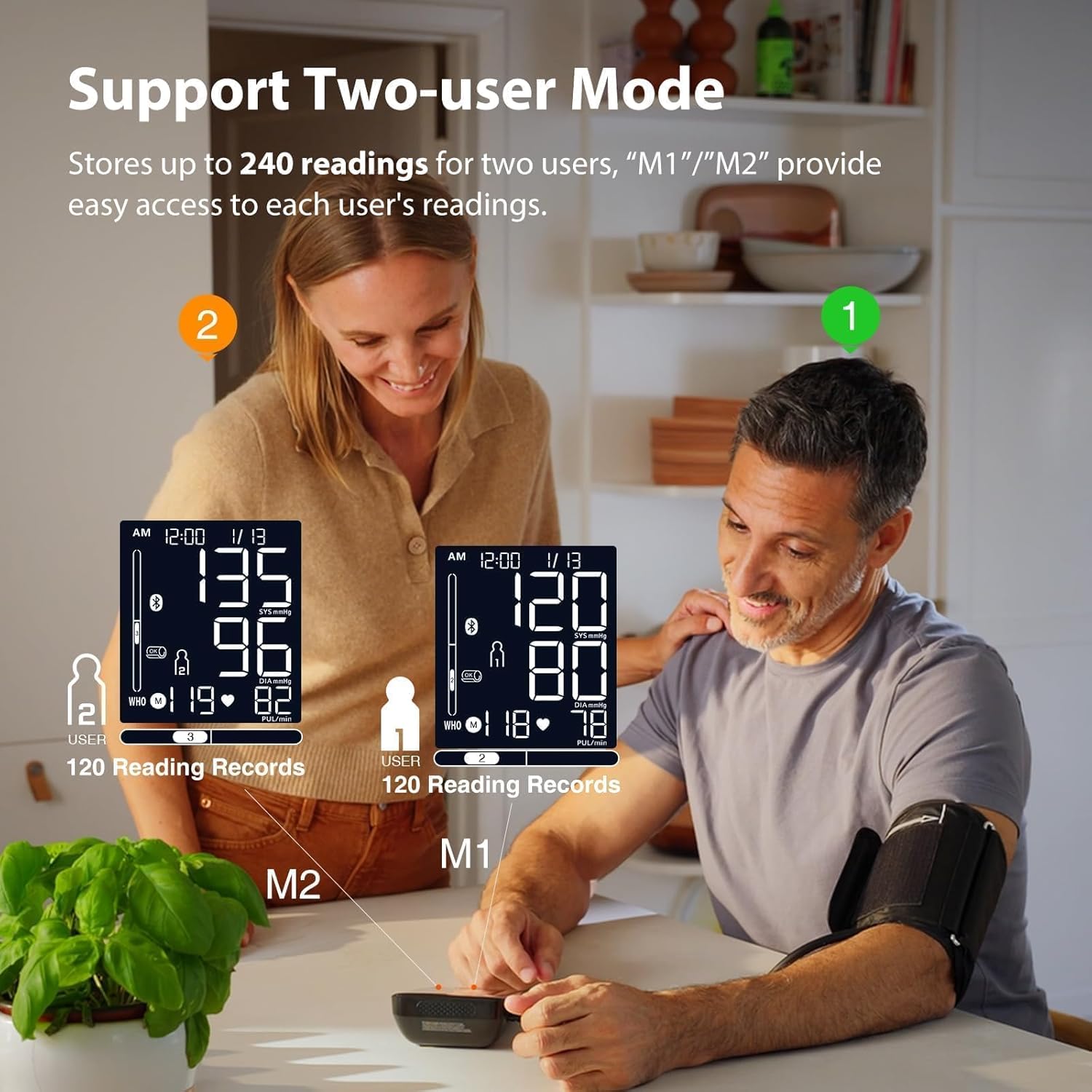
5. Two-User Mode
The monitor supports two users (M1 and M2), each capable of storing up to 120 readings. Select your user profile before each measurement to ensure data is saved correctly.
6. App Data Management
The iHealth MyVitals app offers comprehensive data management features:
- Unlimited Cloud Storage: All your readings are automatically synced and stored securely.
- Trend Charts: Visualize your blood pressure and heart rate trends over time.
- Share Reports: Easily generate and email PDF, CSV, or XLS reports to your doctor.
- Reminders & Notes: Set measurement reminders and add notes to your readings.

7. Reviewing Stored Readings
You can review past measurements directly on the monitor:
- Press the 'M1' or 'M2' button to display the number of stored readings for that user.
- Press 'M1' or 'M2' again to cycle through the average of all readings ('AL'), the average of the last three readings ('A3'), and individual readings ('01', '02', etc.).
- Wait 3 seconds for the screen to automatically advance to the next reading, or press the button repeatedly to browse.

Maintenance
- Cleaning: Wipe the monitor and cuff with a soft, dry cloth. If necessary, use a slightly damp cloth with mild soap, then dry thoroughly. Do not use abrasive cleaners or immerse the device in water.
- Storage: Store the device in its portable travel bag in a cool, dry place, away from direct sunlight and extreme temperatures.
- Battery Replacement: Replace all 4 AA batteries when the low battery symbol appears on the display. Remove batteries if the device will not be used for an extended period.
Troubleshooting
| Problem | Possible Cause | Solution |
|---|---|---|
| Monitor does not power on. | Batteries are depleted or incorrectly installed. | Replace batteries with new ones, ensuring correct polarity. Check USB connection if using external power. |
| Inaccurate or inconsistent readings. | Improper cuff placement, body movement, incorrect posture, or recent activity. | Ensure correct cuff placement (check 'Cuff Wrap OK' symbol). Remain still and silent during measurement. Follow measurement preparation guidelines. |
| Cuff inflates but measurement does not complete. | Cuff not properly connected or air leakage. | Check that the air tube connector is firmly inserted into the monitor. Inspect the cuff for any damage or leaks. |
| Cannot connect to iHealth MyVitals app. | Bluetooth is off, app is outdated, or device is already paired. | Ensure smartphone Bluetooth is on. Update the iHealth MyVitals app. Try unpairing and re-pairing the device. Ensure monitor batteries are not low. |
| Date/Time resets after power cycle. | Internal battery for clock may be low or depleted. | This issue may indicate a need for service. Contact customer support. |
Specifications
- Product Dimensions: 6.3"L x 3.15"W x 4.33"Th (16 x 8 x 11 cm)
- Weight: 1.23 Pounds (approx. 558 grams)
- Power Source: 4 AA batteries (included) or USB powered
- Display Type: 4.5" Large LCD
- Cuff Size: Large Adult Cuff, fits arm circumference 8.7-16.5 inches (22-42 cm)
- Age Range: Adult
- Connectivity: Bluetooth
- Model Number: KD-5811BT
- UPC: 850044118823
- Manufacturer: ANDON HEALTH CO., LTD.
Warranty and Support
The iHealth Accu Blood Pressure Monitor comes with a 12-month limited warranty from the date of purchase. This warranty covers manufacturing defects under normal use. For warranty claims or technical assistance, please contact iHealth customer support.
iHealth provides US-based customer support to assist you with any questions or issues you may encounter. Refer to the contact information provided in your product packaging or visit the official iHealth website for support details.


