
Introduction
This manual provides detailed instructions for the installation, operation, and maintenance of your CNBINGO Digital Room Thermostat (Model MT-WK-AJ). This thermostat is designed to control various home heating systems, including electric heating, hot water heating, and water/gas boilers, ensuring a comfortable indoor climate. Please read this manual thoroughly before installation and use to ensure proper function and safety.
Safety Information
WARNING: Electrical installation should only be performed by a qualified electrician. Always disconnect power at the circuit breaker before installing or servicing the thermostat to prevent electric shock or equipment damage.
- Ensure the power supply is turned off before any wiring.
- Verify that the voltage and current ratings of your heating system are compatible with the thermostat (110-240V, Max 16A).
- Do not expose the thermostat to water or excessive humidity.
- Keep out of reach of children.
Product Overview
The CNBINGO Digital Room Thermostat is an advanced temperature control unit featuring a clear digital display and intuitive controls. It is designed for seamless integration into various heating systems.
Key Features:
- System Compatibility: Controls electric heating, hot water heating, and water/gas boilers. Supports max current 16A, voltage 110-240V.
- Dual Sensors: Equipped with an integrated aluminum sensor and an external 3-meter temperature sensor for flexible temperature measurement.
- Precise Temperature Control: Target temperature adjustable with 0.5°C accuracy, ranging from 5°C to 99°C. Includes a calibration function.
- Day and Sleep Modes: Manual selection between day and sleep modes for optimized comfort and energy saving.
- Multifunctionality: Features temperature calibration, high/low temperature protection, child safety lock, frost protection, power failure data backup, backlight on/off, and Celsius/Fahrenheit display options.
Setup and Installation
Proper installation is crucial for the thermostat's performance. Follow these steps carefully.
Wiring Diagrams:
Refer to the wiring diagrams below for connecting the thermostat to your specific heating system. The NTC floor temperature sensor should be used with the NTC cable included in the package. In most cases, it is not connected to the boiler for heating.

The first diagram shows wiring for electric heating, connecting Load (L, N) and NTC sensor.
The second diagram shows wiring for hot water heating, connecting Load (L, N) and NTC sensor.
The third diagram shows wiring for water/gas boilers, connecting Load (L, N), NTC sensor, and Dry Contact.
An inset shows the NTC floor temperature sensor and its cable, with a note that it's typically not connected to the boiler for heating.
Physical Installation and Dimensions:
The thermostat is designed for flush-mounted installation in a standard wall box. Ensure the wall box has a diameter of 60 mm and a minimum depth of 35 mm.

The thermostat measures 86mm x 86mm (front view) and has a depth of 48mm, with the visible part being 9mm and the recessed part 25mm.
Below, it shows three types of wall boxes: an incompatible shallow box (<35mm depth), and two compatible boxes (60mm diameter, >=35mm depth).
Operating Instructions
Learn how to use your thermostat for optimal comfort and energy efficiency.
Display and Controls:

Labels point to: Sleep Mode icon (moon), Temperature Setting, Floor Heating Mode icon, Indoor Temperature display, Child Lock icon, Heating Start icon (flame).
The buttons are labeled: Power button, Up arrow, Down arrow, and Mode button.
Day Mode and Sleep Mode:
The thermostat allows manual switching between Day Mode and Sleep Mode to balance comfort and energy savings.

- To switch between modes, use the designated button (often labeled 'M' or a mode icon).
- Day Mode: Typically maintains a higher comfort temperature during active hours.
- Sleep Mode: Reduces the temperature during resting hours to save energy.
Temperature Adjustment:
- Use the Up and Down arrow buttons to set your desired target temperature.
- The thermostat provides precise control, adjustable in 0.5°C increments, within a range of 5°C to 99°C.
Advanced Features
Your thermostat includes several advanced functions for enhanced control and safety.

Temperature Sensors:
The thermostat offers flexibility with two types of temperature sensors:
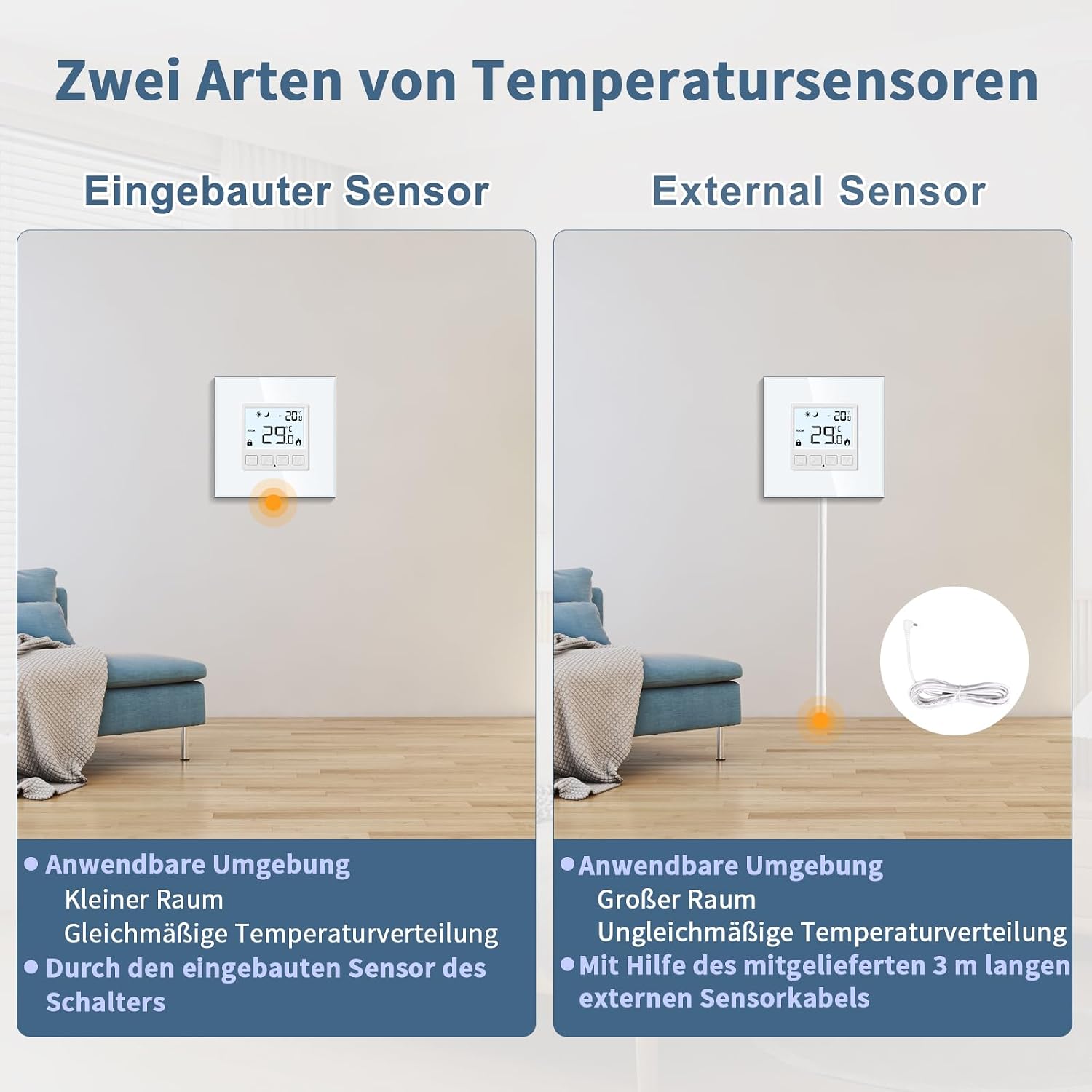
The "Built-in Sensor" section shows a thermostat on a wall in a small room, suitable for even temperature distribution.
The "External Sensor" section shows a thermostat with a connected 3-meter external sensor cable in a larger room, suitable for uneven temperature distribution.
- Built-in Sensor: Ideal for smaller rooms with uniform temperature distribution.
- External Sensor: Use the provided 3-meter external sensor cable for larger rooms or areas where temperature distribution might be uneven.
Accessing Advanced Options:
To access advanced settings, follow these steps:
- With the device turned off, press and hold the Power button and the Mode (M) button simultaneously for five seconds.
- Once in the advanced options mode, press the Mode (M) button to cycle through different options.
- Use the Up and Down arrow buttons to adjust parameters for the selected option.
- To exit the advanced options mode, press the Power button.
Within these options, you can configure:
- Temperature Calibration: Correct the thermostat's temperature display if it differs from the actual room temperature.
- Child Safety Lock: Prevent unintended changes to settings.
- Frost Protection: Automatically activate heating if the temperature drops below a set threshold to prevent freezing.
- Power Failure Data Backup: Ensures your settings are retained after a power outage.
- Backlight On/Off: Control the display backlight.
- Temperature Scale Change: Switch between Celsius (°C) and Fahrenheit (°F).
Maintenance
To ensure the longevity and optimal performance of your CNBINGO Digital Room Thermostat, follow these simple maintenance guidelines:
- Cleaning: Gently wipe the thermostat's surface with a soft, dry cloth. Do not use abrasive cleaners, solvents, or chemical sprays, as these can damage the display or casing.
- Avoid Obstructions: Ensure that the thermostat is not covered by curtains, furniture, or other objects that could obstruct airflow and affect its temperature readings.
- Regular Checks: Periodically check the wiring connections to ensure they are secure. (Only perform this if you are a qualified electrician and have disconnected power).
- Sensor Care: If using the external sensor, ensure its cable is not damaged and the sensor head is clean and unobstructed.
Troubleshooting
If you encounter issues with your thermostat, refer to the following common problems and solutions:
| Problem | Possible Cause | Solution |
|---|---|---|
| Thermostat display is blank. | No power supply; loose wiring. | Check circuit breaker. Ensure wiring is secure (consult a qualified electrician). |
| Heating system not responding. | Incorrect wiring; thermostat in wrong mode; temperature setting too low. | Verify wiring according to diagrams. Check if thermostat is in Day Mode or heating mode. Increase target temperature. |
| Temperature reading is inaccurate. | Sensor obstruction; need for calibration. | Ensure sensors are unobstructed. Use the temperature calibration feature in advanced options. |
| Thermostat settings change unexpectedly. | Child lock is not activated. | Activate the child safety lock feature in advanced options. |
If the problem persists after trying these solutions, please contact customer support.
Specifications
- Model Number: MT-WK-AJ
- Brand: CNBINGO
- Dimensions (L x W x H): 8.3 x 8.3 x 5.5 cm
- Weight: 200 grams
- Power Type: AC
- Voltage: 110-240 Volts (AC)
- Max Current: 16A
- Temperature Control Range: 5°C to 99°C
- Temperature Accuracy: 0.5°C
- Sensors: Built-in and 3m external NTC sensor
- Color: White
- Batteries Required: No
Warranty and Support
CNBINGO products are manufactured to high-quality standards. For warranty information or technical support, please refer to the documentation included with your purchase or visit the official CNBINGO website. If you require assistance, please contact CNBINGO customer service with your model number (MT-WK-AJ) and a detailed description of the issue.
Manufacturer: CNBINGO
Seller: CNBINGO EU