
1. Product Overview
The MDWXDOFP YL620-A series Frequency Inverter (VFD) is designed to control the speed of AC induction motors. It features a forced cooling fan for efficient heat dissipation, a smart chip for powerful functionality, and stable charging/discharging with DC blocking and filtering capabilities. This manual provides essential information for the safe and effective use of your VFD.
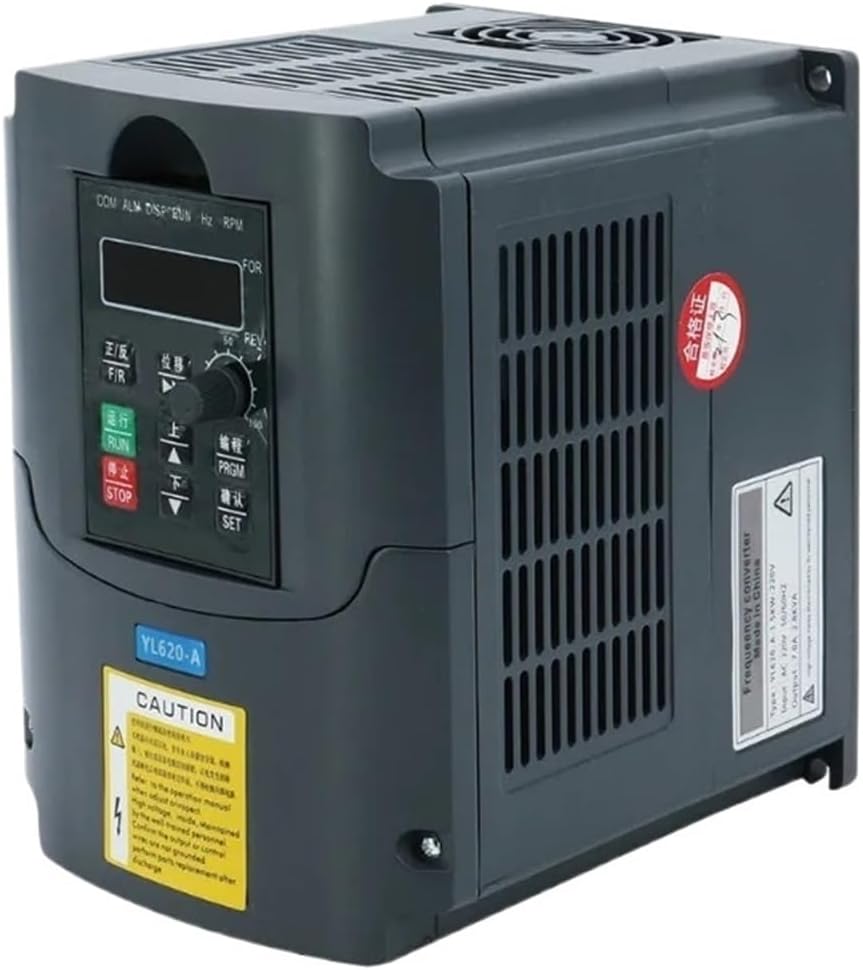
Image 1.1: Front view of the MDWXDOFP YL620-A Frequency Inverter VFD, showing the control panel and ventilation.
2. Safety Information
WARNING: High voltage is present inside the inverter. Improper handling can result in severe injury or death. Only qualified personnel should perform installation, wiring, and maintenance.
- Ensure the power supply is disconnected before any installation, wiring, or maintenance work.
- Wait at least 10 minutes after disconnecting power for internal capacitors to discharge before touching any components.
- Verify that the input voltage matches the inverter's specifications.
- Properly ground the inverter to prevent electric shock.
- Do not operate the inverter with damaged wiring or casing.
- Install the inverter in a well-ventilated area, free from dust, moisture, and corrosive gases.
3. Setup and Installation
3.1 Wiring Terminals
Identify the input and output terminals for proper connection. Refer to the diagram below for terminal locations.

Image 3.1: Close-up view of the MDWXDOFP YL620-A VFD's wiring terminals and control panel.
- N, L: Power input terminals. For 110V inverters, this is single-phase 110V input. For 220V inverters, this is single-phase 220V input.
- U, V, W: Inverter output terminals. For 110V inverters, this is three-phase 110V output. For 220V inverters, this is three-phase 220V output.
- +DB-: Braking resistor connection end (optional). Refer to the full product manual for detailed braking resistor configuration.
- FG: Frame Ground. Ensure this is properly connected to earth ground.
- External Terminals (X4, X5, X6): Used for two-wire or three-wire control motor wiring.
3.2 Parameter Settings for External Control
To control the motor via external terminals, adjust the following parameters:
- Set P00.1 to 1: This enables motor control via the external terminal. The STOP key on the operation panel remains valid.
- For three-wire control motor operation (e.g., using EF(X4), REV(X5), FWD(X6) with self-holding): Set P00.16 to 2.
4. Operating Instructions
4.1 Control Panel Overview
The YL Inverter features a digital display and several control keys:

Image 4.1: Top view of the MDWXDOFP YL620-A VFD, highlighting the control panel and display.
- Digital Display: Shows frequency, output current, and other operational parameters.
- F/R (Forward/Reverse) Switch Key: Changes motor rotation direction.
- RUN Key: Starts motor operation.
- STOP/RESET Button: Stops motor operation or resets errors.
- Shift Key: Used for navigating parameters.
- Up and Down Keys: Adjust frequency or parameter values.
- PRGM (Programming) Key: Enters programming mode.
- SET (Select/Confirm) Key: Confirms parameter selections.
4.2 Basic Operation
- Power On: Connect the inverter to the appropriate power supply. The digital display will illuminate.
- Frequency Adjustment: Use the Up and Down keys to set the desired output frequency. The default setting for the YL inverter is 400Hz, which is suitable for compatible motors. No adjustment is needed if your motor is designed for 400Hz.
- Start Motor: Press the RUN key to start the motor.
- Stop Motor: Press the STOP/RESET button to stop the motor.
- Change Direction: Use the F/R key to switch between forward and reverse rotation.
5. Maintenance
Regular maintenance ensures the longevity and optimal performance of your VFD.
- Cleaning: Periodically clean the cooling fan and heat sink fins to prevent dust accumulation, which can hinder heat dissipation. Use compressed air or a soft brush. Ensure power is disconnected before cleaning.
- Inspection: Regularly inspect all wiring connections for tightness and signs of wear or damage. Check for any unusual noises or vibrations during operation.
- Environment: Ensure the operating environment remains within specified temperature and humidity ranges. Avoid exposure to direct sunlight, excessive vibration, or corrosive substances.
6. Troubleshooting
This section provides solutions to common issues. For complex problems, contact qualified technical support.
Common Issues and Solutions:
- No Power/Display Off:
- Check power supply connections.
- Verify input voltage.
- Inspect fuses if accessible.
- Motor Not Running:
- Ensure the RUN key has been pressed.
- Check motor wiring (U, V, W terminals).
- Verify parameter settings, especially P00.1 for external control.
- Check for any error codes on the digital display.
- Overheat Alarm:
- Clean cooling fan and heat sink.
- Ensure adequate ventilation around the inverter.
- Check ambient temperature.
- Motor Speed Inconsistent:
- Check frequency setting.
- Verify motor load is within specifications.
- Inspect motor for mechanical issues.
7. Specifications
The YL620/YL620-A series offers various models with different power ratings and input voltages.
| Model | Input Voltage | Power (KW) | Driver Capacity (KVA) | Output Current (A) | Applicable Motor (KW) |
|---|---|---|---|---|---|
| YL620/YL620-A | Single-phase 110V 60Hz | 0.75 | 4 | 7.8 | 0.75KW |
| YL620/YL620-A | Single-phase 110V 60Hz | 1.5 | 6 | 13 | 1.5KW |
| YL620/YL620-A | Single-phase 110V 60Hz | 2.2 | 8 | 21 | 2.2KW |
| YL620/YL620-A | Single-phase 220V 50/60Hz | 0.75 | 2.4 | 4 | 0.75KW |
| YL620/YL620-A | Single-phase 220V 50/60Hz | 1.5 | 3.0 | 7 | 1.5KW |
| YL620/YL620-A | Single-phase 220V 50/60Hz | 2.2 | 4.0 | 10 | 2.2KW |
Additional Specifications:
- Brand: MDWXDOFP
- Model Name: MDWXDOFP (refer to YL620-A for series)
- Item Weight: Approximately 50 Grams (Note: This weight may refer to packaging or a component, actual VFD weight may vary by model)
- Manufacturer: MDWXDOFP
8. Warranty and Support
For warranty information, please refer to the documentation provided with your purchase or contact the seller directly. MDWXDOFP products typically come with a manufacturer's warranty covering defects in materials and workmanship.
For technical support, troubleshooting assistance beyond this manual, or inquiries regarding parts and service, please contact your authorized MDWXDOFP dealer or the customer service department through the retailer where the product was purchased.