
1. Introduction
This manual provides essential instructions for the safe and efficient operation of your SILVA Schneider PBS 3600 BT Bluetooth Speaker. Please read this manual thoroughly before using the device and retain it for future reference. The PBS 3600 BT is a portable Bluetooth speaker designed for high-quality audio playback, featuring wireless connectivity, TWS stereo pairing, IPX7 water protection, and integrated LED RGB lighting.
2. Safety Instructions
- Do not expose the speaker to extreme temperatures or direct sunlight for prolonged periods.
- Ensure the charging port cover is securely closed when using the speaker near water to maintain IPX7 water protection.
- Use only the provided charging cable or a certified equivalent.
- Do not attempt to disassemble, repair, or modify the speaker. This will void the warranty and may cause damage or injury.
- Keep the speaker away from medical devices, as magnetic fields may interfere with their operation.
- Dispose of the battery and speaker according to local regulations. Do not dispose of in household waste.
3. Package Contents
Verify that all items are present in the package:
- SILVA Schneider PBS 3600 BT Bluetooth Speaker
- Charging cable
- User Manual (this document)
4. Product Overview
Familiarize yourself with the speaker's controls and ports.

Figure 4.1: Front view of the speaker with volume/track controls.
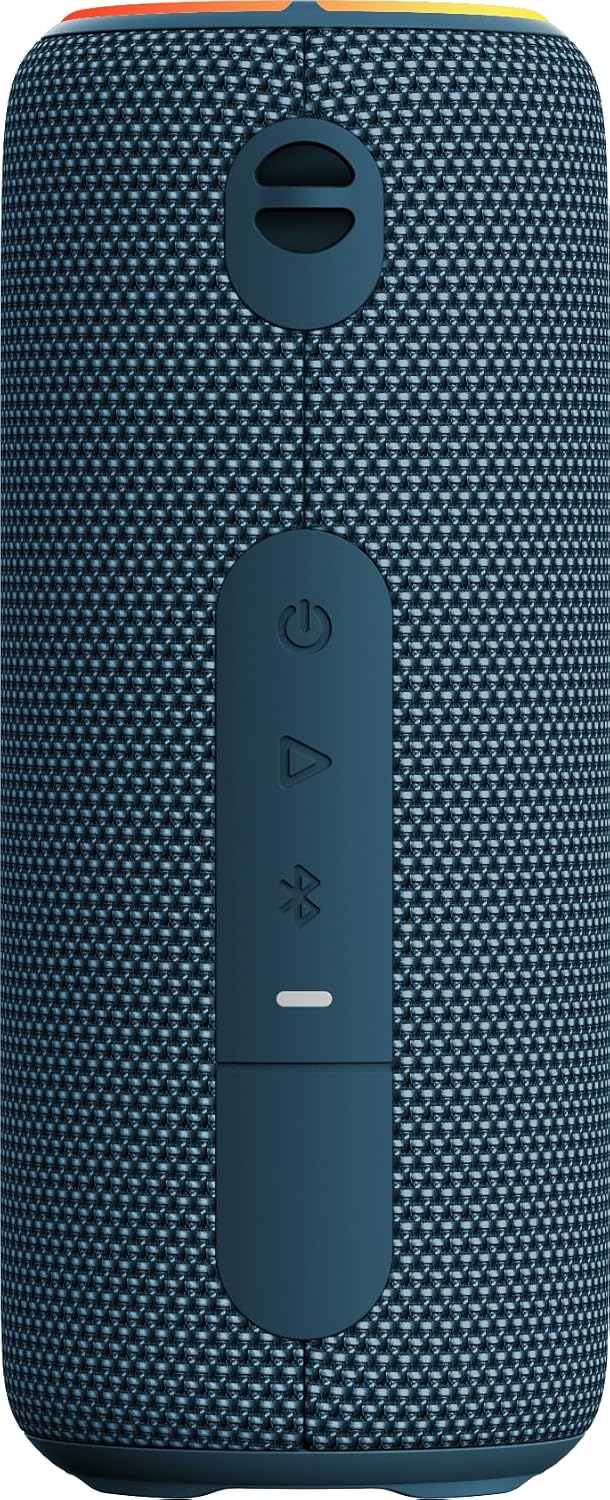
Figure 4.2: Rear view displaying the control panel and protected ports.
Control Panel Functions:
- Power Button (⏻): Press and hold to power on/off.
- Play/Pause Button (⏸): Press to play or pause music.
- Bluetooth Button (Ⓘ): Press to enter Bluetooth pairing mode.
- Volume Up / Next Track (+): Short press for volume up, long press for next track.
- Volume Down / Previous Track (-): Short press for volume down, long press for previous track.
- LED Indicator: Shows power status, charging status, and Bluetooth connection status.
Ports:
- USB-C Charging Port: For charging the internal battery.
- AUX-in Port: For wired audio connection.
5. Setup
5.1 Charging the Speaker
Before first use, fully charge the speaker. Connect the provided charging cable to the USB-C port on the speaker and to a compatible USB power adapter (not included). The LED indicator will show charging status and turn off or change color when fully charged. A full charge takes approximately 3 hours and provides up to 7 hours of playback.
5.2 Power On/Off
- To Power On: Press and hold the Power button (⏻) for 2-3 seconds. You will hear an audible prompt, and the LED indicator will light up.
- To Power Off: Press and hold the Power button (⏻) for 2-3 seconds. You will hear an audible prompt, and the LED indicator will turn off.
5.3 Bluetooth Pairing
To connect your speaker to a Bluetooth-enabled device:
- Ensure the speaker is powered on and the LED indicator is flashing, indicating it is in pairing mode. If not, press the Bluetooth button (Ⓘ) to enter pairing mode.
- Enable Bluetooth on your device (smartphone, tablet, etc.) and search for available devices.
- Select "PBS 3600 BT" from the list of devices.
- Once connected, the speaker will emit an audible confirmation, and the LED indicator will stop flashing and remain solid.
5.4 TWS (True Wireless Stereo) Function
The TWS function allows you to pair two PBS 3600 BT speakers together for a stereo sound experience.

Figure 5.1: Illustration of TWS pairing, AUX-in, and Bluetooth connectivity.
- Ensure both PBS 3600 BT speakers are powered on and not connected to any Bluetooth device.
- On one of the speakers (this will be the primary speaker), press and hold the Bluetooth button (Ⓘ) for 3 seconds until you hear a TWS pairing prompt.
- The two speakers will automatically search for and connect to each other. Once connected, you will hear a confirmation sound.
- Now, connect your Bluetooth device to the primary speaker as described in section 5.3. Audio will play in stereo through both speakers.
5.5 AUX-in Connection
To play audio from a device without Bluetooth:
- Connect one end of a 3.5mm audio cable (not included) to the AUX-in port on the speaker.
- Connect the other end of the audio cable to the audio output jack of your device.
- The speaker will automatically switch to AUX mode. Adjust volume from both your device and the speaker.
6. Operating Instructions
6.1 Music Playback
- Play/Pause: Press the Play/Pause button (⏸) to start or pause playback.
- Next Track: Long press the '+' button.
- Previous Track: Long press the '-' button.
6.2 Volume Control
- Increase Volume: Short press the '+' button.
- Decrease Volume: Short press the '-' button.
6.3 LED RGB Lighting
The speaker features integrated LED RGB lighting. The lighting effects typically cycle automatically. Refer to the product packaging or manufacturer's website for specific controls if available, as direct control buttons are not explicitly listed.
7. Maintenance
7.1 Cleaning
Wipe the speaker with a soft, damp cloth. Do not use abrasive cleaners or solvents. Ensure the charging port cover is closed before cleaning with a damp cloth.
7.2 Water Protection (IPX7)
The PBS 3600 BT is IPX7 rated, meaning it can be submerged in water up to 1 meter for 30 minutes. Ensure the charging port cover is fully sealed before exposing the speaker to water. After exposure to water, dry the speaker thoroughly, especially the charging port, before charging.

Figure 7.1: The speaker demonstrating its IPX7 splash protection.
7.3 Storage
Store the speaker in a cool, dry place when not in use. Avoid storing in areas with high humidity or extreme temperatures.
8. Troubleshooting
| Problem | Possible Cause | Solution |
|---|---|---|
| Speaker does not power on | Low battery; Power button not pressed long enough | Charge the speaker; Press and hold the Power button for 2-3 seconds |
| No sound | Volume too low; Device not connected; Incorrect input mode | Increase speaker and device volume; Ensure Bluetooth or AUX is connected; Check input mode |
| Bluetooth pairing fails | Speaker not in pairing mode; Device Bluetooth off; Too far from speaker | Press Bluetooth button; Enable Bluetooth on device; Move device closer to speaker (within 10m) |
| TWS pairing fails | Speakers already connected to other devices; Not in TWS pairing mode | Disconnect speakers from other devices; Ensure both speakers are in TWS pairing mode |
9. Specifications

Figure 9.1: Bottom view of the speaker with model and regulatory details.
| Feature | Detail |
|---|---|
| Model Number | 221029 |
| Brand | Silva Schneider |
| Connectivity Technology | Bluetooth 5.3 |
| Wireless Communication | Bluetooth |
| Speaker Type | Portable Speaker |
| Speaker Size | 52 Millimeters (x2) |
| Speaker Maximum Output Power | 200 Watts (p.m.p.o.) |
| Audio Output Mode | Stereo |
| Power Source | Battery Powered (3600 mAh Li-ion) |
| Battery Runtime | Up to 7 hours |
| Charging Time | Approximately 3 hours |
| Water Protection | IPX7 (Waterproof) |
| Control Method | Touch buttons |
| Product Dimensions | 8D x 8W x 19H centimeters |
| Item Weight | 0.54 Kilograms |
| Included Components | Charging cable |
| Compatible Devices | Smartphone, tablet, laptop, TV, MP3 player, projector, desktop, home theater, game console, karaoke machine |
10. Warranty and Support
The SILVA Schneider PBS 3600 BT Bluetooth Speaker comes with a manufacturer's warranty. For detailed warranty information, please refer to the warranty card included with your purchase or visit the official Silva Schneider website. For technical support, troubleshooting assistance, or service inquiries, please contact Silva Schneider customer service through their official channels.


