
Introduction
Thank you for choosing the Nilight 300W Power Inverter. This device converts 12V DC power from your vehicle's battery into 110V AC household power, along with PD 65W USB-C and QC3.0 USB-A fast charging ports. It is designed to power various electronic devices on the go. Please read this manual thoroughly before use to ensure safe and optimal operation.

Image: The Nilight 300W Power Inverter being used in diverse settings such as powering a projector for outdoor movie nights, charging devices during outdoor work, and providing power on road trips.
Safety Instructions
To prevent injury or damage to the inverter and connected devices, observe the following safety precautions:
- Do not expose the inverter to water, rain, or snow.
- Do not operate the inverter if it has received a sharp blow, been dropped, or otherwise damaged.
- Do not disassemble the inverter. Incorrect reassembly may result in electric shock or fire.
- Ensure proper ventilation. Do not block ventilation openings.
- Keep the inverter away from flammable materials, gases, or liquids.
- Connect the inverter only to a 12V DC power source.
- Do not exceed the inverter's rated power output of 300W. Overloading can cause damage or fire.
- The inverter features built-in protection against overheating, under/over voltage, short circuits, and overloads. If a fault is detected, the inverter will automatically shut off and illuminate a red indicator light.

Image: An internal view of the power inverter highlighting its multiple protection features, including overheating, low-voltage, short-circuit, overload, and over-voltage protection.
Package Contents
Verify that all items are present in your package:
- 1x Nilight 300W Car Power Inverter
- 1x Instruction Manual
Product Features
The Nilight 300W Power Inverter offers the following key features:
- 300W Continuous Power: Provides 300 Watts of continuous 12V DC to 110V AC power output.
- Multiple Charging Ports: Equipped with 1 USB-A port (QC3.0), 1 USB-C port (PD 65W), and 2 AC outlets.
- Fast Charging: USB-C (PD 65W) and USB-A (QC3.0) ports allow for rapid charging of compatible phones and tablets.
- Comprehensive Protection: Features a smart chip and built-in fuse for double protection against overheating, under/over voltage, short circuits, overloads, and overcharge.
- Efficient Cooling: Durable metal housing with a built-in silent automatic temperature-controlled cooling fan to dissipate heat and prevent damage.

Image: The Nilight 300W Power Inverter illustrating its 12V DC input and various outputs, including QC 3.0, PD 65W, and two 110V AC outlets, capable of powering devices like drones, cameras, inflators, and projectors.

Image: A close-up of the inverter's PD 65W USB-C and QC 3.0 USB-A ports, demonstrating their fast-charging capabilities for two devices simultaneously.

Image: A diagram illustrating the smart silent cooling fan of the Nilight 300W Power Inverter, showing its operation at different temperatures and noise levels compared to a library and normal communication.
Setup
Follow these steps to set up your power inverter:
- Ensure your vehicle's engine is running to provide stable power and prevent draining the car battery.
- Insert the inverter's cigarette lighter plug firmly into your vehicle's 12V DC cigarette lighter socket.
- The inverter's power indicator light should illuminate, indicating it is receiving power.
- Turn on the inverter using the ON/OFF switch located on the unit.
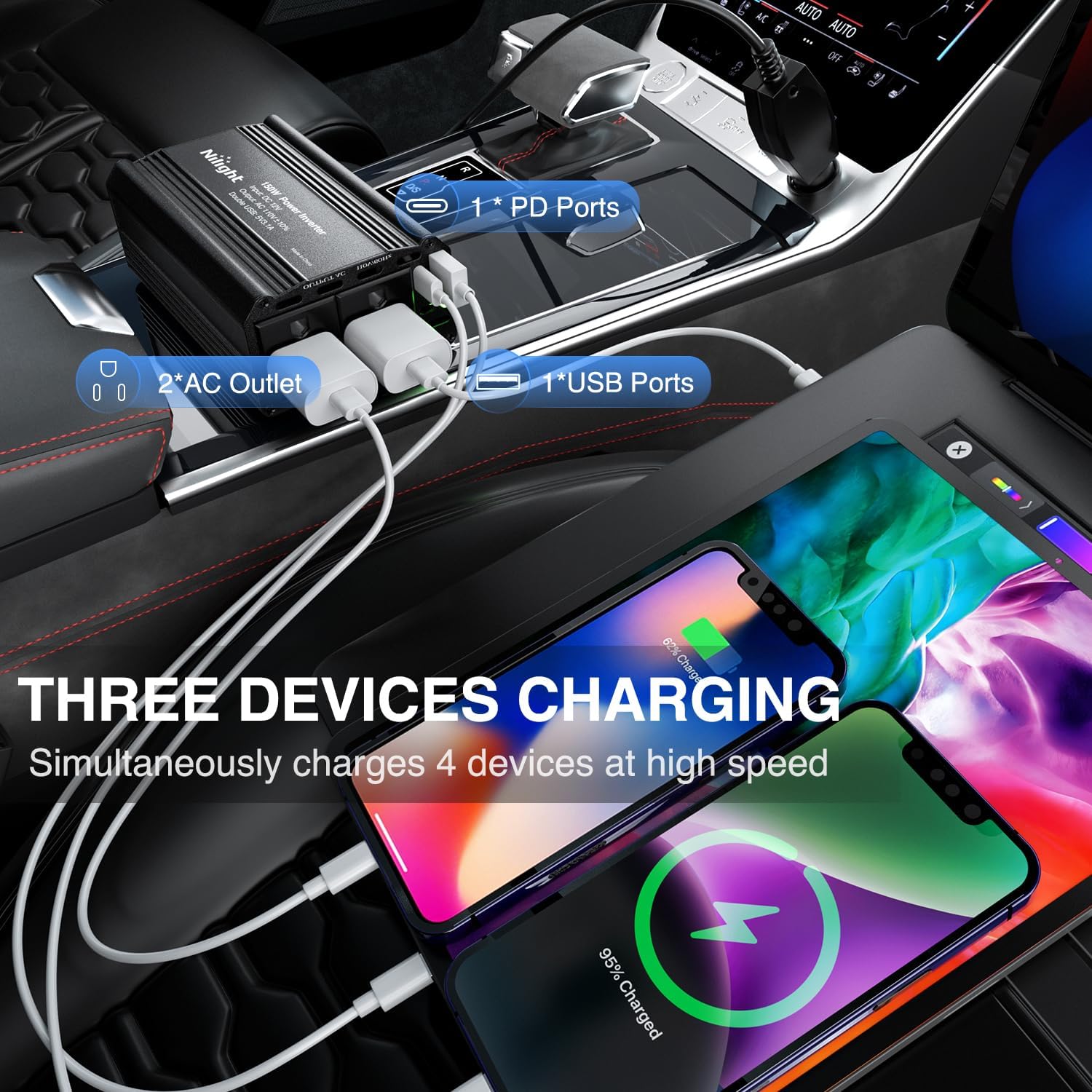
Image: The Nilight 300W Power Inverter plugged into a car's console, simultaneously charging a phone and a tablet via its AC outlets, USB-A, and USB-C ports.
Operating Instructions
Once the inverter is set up and powered on, you can connect your devices:
- AC Outlets: Plug your 110V AC devices (up to 300W total) into the two standard AC outlets. These are suitable for laptops, small electronics, and other devices within the power limit.
- USB-C (PD 65W) Port: Connect compatible devices for fast charging. This port can deliver up to 65W.
- USB-A (QC3.0) Port: Connect compatible devices for fast charging. This port supports Quick Charge 3.0.
- Power Consumption: Always ensure the total power consumption of all connected devices does not exceed 300W. Refer to your device's power requirements before connecting.
- Incompatible Devices: High-power appliances such as irons, coffee machines, and hair dryers typically exceed the 300W limit and should not be connected to this inverter.

Image: The Nilight 300W Power Inverter displaying its ports (QC 3.0, PD 65W, AC Out) and examples of compatible devices like SLR cameras, car cleaners, Macbooks, fans, car DVRs, phones, and iPads. It also indicates incompatible high-power devices such as irons, coffee machines, and hair dryers.
Maintenance
Proper maintenance ensures the longevity of your inverter:
- Cleaning: Disconnect the inverter from the power source before cleaning. Use a dry, soft cloth to wipe the exterior. Do not use liquid cleaners or solvents.
- Storage: Store the inverter in a cool, dry place away from direct sunlight and moisture when not in use.
- Ventilation: Ensure the cooling fan and ventilation openings are free from dust and obstructions.
Troubleshooting
If you encounter issues with your inverter, refer to the following common problems and solutions:
| Problem | Possible Cause | Solution |
|---|---|---|
| No power output / Inverter not turning on |
|
|
| Red indicator light is on |
|
|
| USB-A port always provides power even when unit switched off |
|
|
Specifications
Technical specifications for the Nilight 300W Power Inverter (Model 90542A):
- Model: 90542A
- Input Voltage: 12V DC
- Output Voltage: 110V AC
- Continuous Power Output: 300 Watts
- USB-C Output: PD 65W Max
- USB-A Output: QC3.0 18W Max
- Total Power Outlets: 2 AC, 1 USB-C, 1 USB-A
- Dimensions: Approximately 4.84 x 3.15 x 1.69 inches (12.3 x 8 x 4.3 cm)
- Weight: Approximately 499 g (1.1 lbs)
- Protection Features: Overheating, Low-voltage, Short-circuit, Overload, Over-voltage
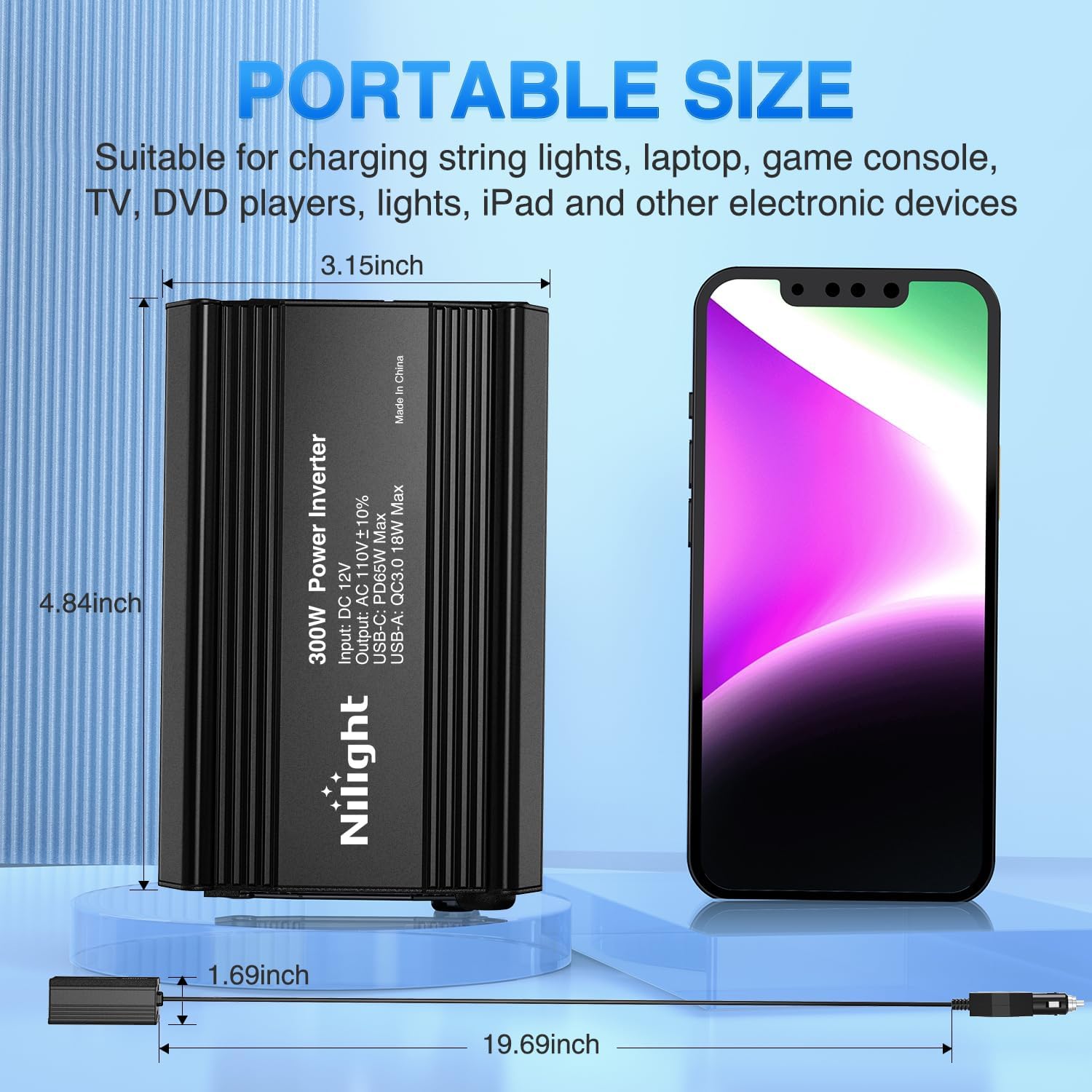
Image: The Nilight 300W Power Inverter displayed with its key dimensions: 4.84 inches in length, 3.15 inches in width, and 1.69 inches in height, alongside its 19.69-inch power cable.
Warranty and Support
For warranty information or technical support, please contact Nilight customer service through the retailer where the product was purchased or visit the official Nilight website. Please have your model number (90542A) and purchase details ready when contacting support.
Nilight Store Link: Visit the Nilight Store on Amazon