
1. Introduction
This manual provides detailed instructions for the proper use, setup, and maintenance of your Tomore Bluetooth Rechargeable Hearing Aids. These devices are designed for individuals with mild to moderate hearing loss, offering superior sound quality, noise cancellation, and convenient app control. Please read this manual thoroughly before using your hearing aids to ensure optimal performance and longevity.

Image 1.1: Tomore Hearing Aids in charging case with app interface. This image displays the hearing aids, their charging case, and a smartphone screen showing the companion application, illustrating the integrated system.
2. Product Overview
2.1 Package Contents
Upon unboxing, verify that all items listed below are present:

Image 2.1: Package Contents. This image shows all components included in the product box: two OTC hearing aids, one charging case, one cleaning brush, eight wax guards, four open ear tips (2xL, 2xM), eight closed ear tips (2xS, 2xXS), one USB cable, one tips card, and one user manual.
- OTC Hearing Aids (x2)
- Charging Case (x1)
- Cleaning Brush (x1)
- Wax Guard (x8)
- Open Ear Tips (x4: 2xL, 2xM)
- Closed Ear Tips (x8: 2xS, 2xXS)
- USB Cable (x1)
- Tips Card (x1)
- User Manual (x1)
2.2 Component Identification
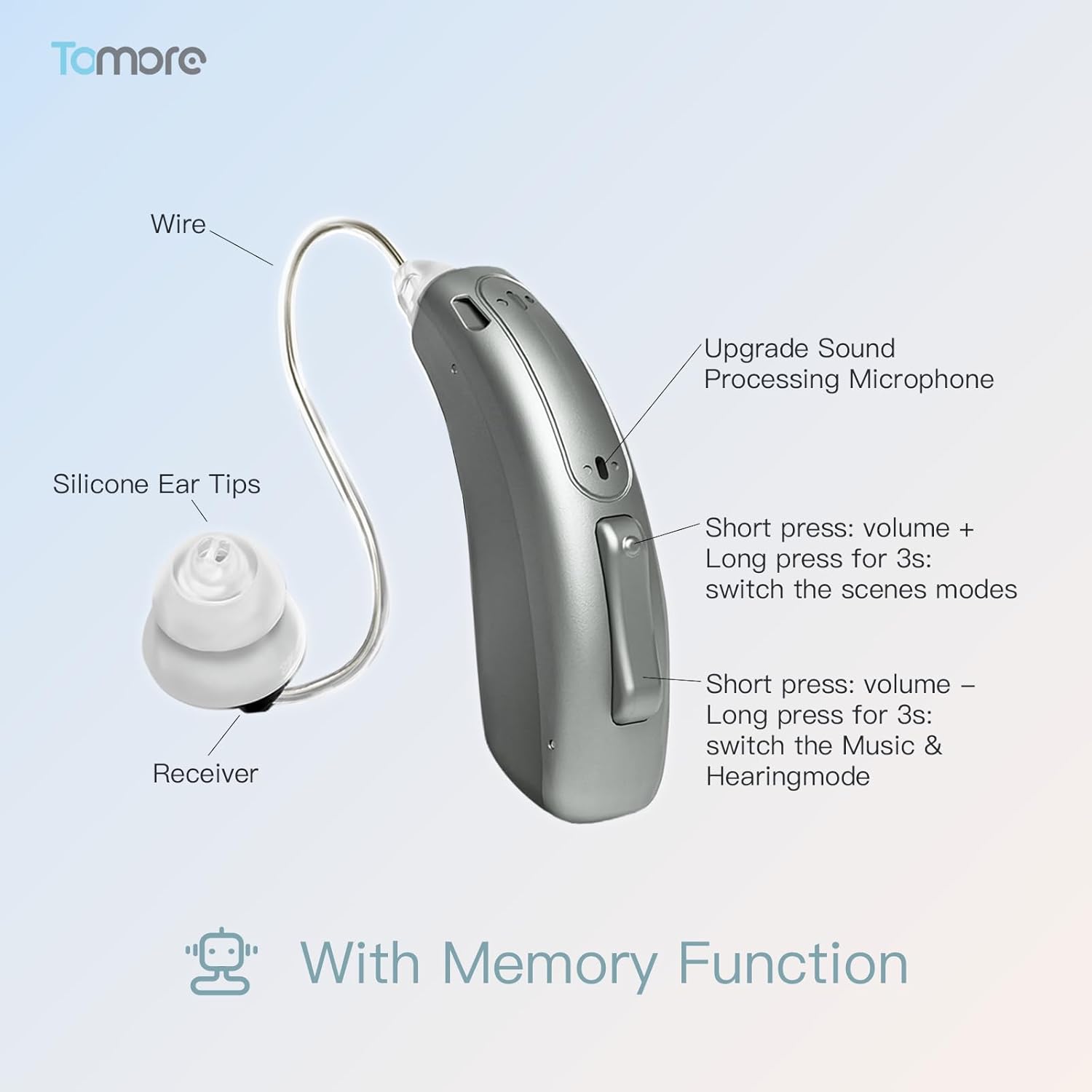
Image 2.2: Hearing Aid Components. This diagram labels the key parts of the hearing aid: the wire, silicone ear tips, receiver, upgrade sound processing microphone, and control buttons for volume adjustment and mode switching.
- Wire: Connects the main unit to the receiver.
- Silicone Ear Tips: Various sizes provided for comfortable and secure fit.
- Receiver: Delivers amplified sound into the ear canal.
- Upgrade Sound Processing Microphone: Captures sound for processing.
- Control Buttons:
- Short press (top button): Volume +
- Long press for 3s (top button): Switch scene modes
- Short press (bottom button): Volume -
- Long press for 3s (bottom button): Switch between Music & Hearing mode
2.3 Key Features
- Superior Sound Quality & Noise Cancellation: Utilizes a 16-channel digital sound processing chip to enhance human voice clarity and suppress background noise and whistling.
- OTC & App Control: Compatible with iOS and Android devices via a smart application, offering 4 scene modes (General, Outdoor, Indoor, Tinnitus) and 6 levels of volume adjustment.
- Comfortable & Discreet Design: Ergonomically shaped for behind-the-ear wear, with various dome sizes for a custom fit.
- Rechargeable & Long Battery Life: Provides approximately 20 hours of use per charge. The charging case holds 80 hours of power, allowing for 3 full recharges of the hearing aids.
- Bluetooth Connectivity: Seamlessly switch between hearing aid mode and Bluetooth connection for music streaming and phone calls. Features a memory function for settings.
- Whistle-Free Design: Precise distance between receiver and microphone minimizes whistling.
- Tinnitus Masking Mode: Releases white noise to help moderate tinnitus and improve sleep quality.
3. Setup
3.1 Initial Charging
Before first use, fully charge both the hearing aids and the charging case.
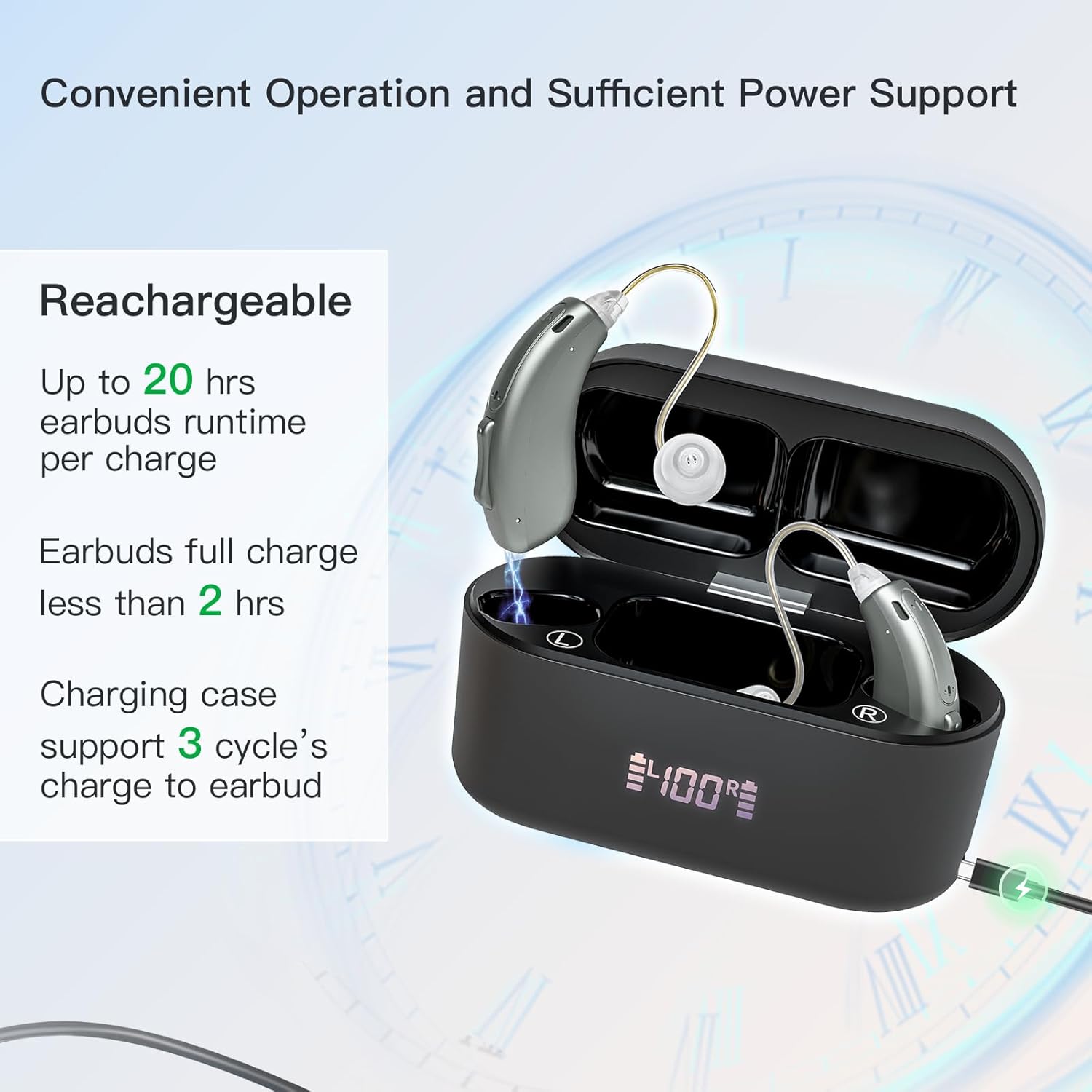
Image 3.1: Charging Process. This image shows the hearing aids placed in their charging case, with the case's LED display indicating 100% charge and a charging cable connected, demonstrating the rechargeable feature.
- Place the hearing aids into the charging case. Ensure they are correctly seated.
- Connect the charging case to a power source using the provided USB cable.
- The electronic LED display on the case will show the power level. Each square represents 25% of the charge.
- A full charge for the earbuds takes less than 2 hours. The charging case can store enough power for 3 full recharges of the hearing aids.
3.2 App Download and Connection
The Tomore hearing aids are controlled via a dedicated smartphone application.

Image 3.2: App Connection Guide. This image illustrates the three main steps for connecting the hearing aids to your phone: downloading the 'FORSOUND' app, connecting via Bluetooth, and personalizing volume/mode settings.
- Download & Connect:
- Search for "FORSOUND" in the Apple App Store (for iOS) or Google Play Store (for Android).
- Download and open the application.
- Tap to pair your hearing aid. A tone will indicate "Connected".
- Connecting Bluetooth:
- Turn on your hearing aid.
- Go to your cell phone's Bluetooth settings.
- Find and select "511BL" to pair.
- Personalize Volume/Mode:
- Once connected, click on Volume/Mode/Advanced at the top of the homepage within the app.
- Adjust the volume and other settings as desired.
- Hearing Check:
- The app includes a self-hearing check function.
- Perform the check to obtain your hearing loss data. The app can then suggest optimal settings based on these results.
3.3 Wearing the Hearing Aids
Proper placement ensures comfort and effective sound delivery.
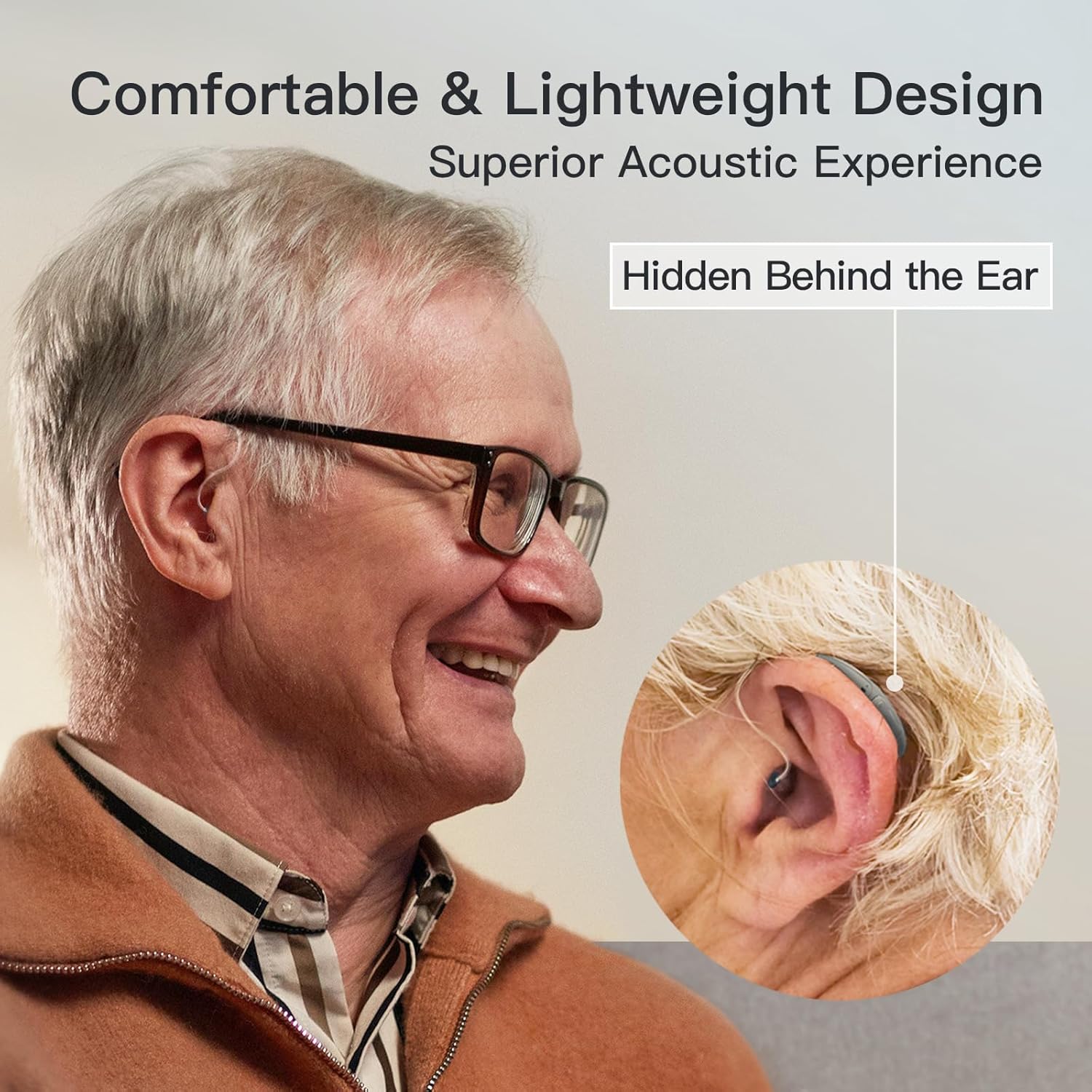
Image 3.3: Proper Wearing. This image shows a person wearing the hearing aid discreetly behind the ear, highlighting its comfortable and lightweight design.
- Select the appropriate silicone ear tip size for a snug yet comfortable fit in your ear canal.
- Place the main body of the hearing aid behind your ear.
- Gently insert the ear tip into your ear canal.
- Adjust the wire to ensure it sits comfortably and securely.
4. Operating Instructions
4.1 Adjusting Volume and Modes
You can adjust settings using either the physical buttons on the hearing aid or the companion app.

Image 4.1: Scene Modes. This image illustrates the hearing aid's ability to control input noise and offers four distinct scene modes: General, Outdoor, Indoor, and Tinnitus, allowing users to adapt to various environments.
- Volume Adjustment: Short press the top button for Volume + or the bottom button for Volume -. There are 6 levels of volume adjustment.
- Scene Modes: Long press the top button for 3 seconds to cycle through the 4 available scene modes: General, Outdoor, Indoor, and Tinnitus.
- Music & Hearing Mode Switch: Long press the bottom button for 3 seconds to switch between hearing aid mode and Bluetooth music streaming mode.
- App Control: For more precise and personalized adjustments, use the "FORSOUND" app. The app allows for personalized frequency adjustment and detailed control over settings.
4.2 Bluetooth Functionality
The hearing aids support Bluetooth for audio streaming and calls.
- Once paired with your smartphone (refer to Section 3.2), you can stream music or take phone calls directly through your hearing aids.
- Switch between Bluetooth connection mode and hearing aid mode using the physical button (long press bottom button for 3s) or the app.
- The device has a memory function, retaining your last used volume and mode settings.
4.3 Adaptation Schedule
It is recommended to gradually adapt to wearing hearing aids.

Image 4.2: Week 1-2 Usage. Recommended 1-2 hours/day for relaxed conversation in quiet environments.

Image 4.3: Week 3-4 Usage. Recommended 3-6 hours/day for social interactions like parties.

Image 4.4: Week 5-6 Usage. Recommended 6-9 hours/day to enjoy sounds in nature and children's laughter.

Image 4.5: Week 7-8 Usage. Recommended wear all day, adapting to most scenarios including theaters and lecture halls.
5. Maintenance
5.1 Cleaning Your Hearing Aids
Regular cleaning is essential for hygiene and optimal performance.
- Use the provided cleaning brush to gently remove any earwax or debris from the ear tips and microphone ports.
- Wipe the main body of the hearing aid with a soft, dry cloth.
- Do not use water or cleaning solutions directly on the hearing aids, as they are electronic devices.
- Replace wax guards as needed to prevent blockages.
5.2 Storage
- When not in use, store the hearing aids in their charging case to protect them and keep them charged.
- Store in a cool, dry place away from direct sunlight and extreme temperatures.
6. Troubleshooting
If you encounter issues, refer to the following common problems and solutions:
| Problem | Possible Cause | Solution |
|---|---|---|
| No sound or weak sound | Low battery, ear tip blocked by wax, incorrect volume setting, wrong mode. | Charge the hearing aids. Clean ear tips and wax guards. Increase volume. Switch to appropriate scene mode. |
| Whistling or feedback | Improper fit, ear tip too small, earwax buildup, hand/object near microphone. | Ensure ear tip is properly seated and fits snugly. Try a larger ear tip. Clean ear canal. Avoid covering the microphone. |
| Bluetooth connection issues | Hearing aids not in pairing mode, phone Bluetooth off, interference, app issues. | Ensure hearing aids are on and discoverable. Turn phone Bluetooth off and on. Re-pair the devices. Restart the app and phone. Ensure the app is the official "FORSOUND" app from a reputable app store. |
| App not working correctly | Outdated app version, software glitch, phone compatibility. | Update the app to the latest version. Restart the app and your phone. Reinstall the app if necessary. |
| Buzzing sound | Internal component issue, interference. | Try moving away from electronic devices. If persistent, contact customer support. |
If the problem persists after trying these solutions, please contact Tomore customer support.
7. Specifications
- Model: B0DKT3GYCD
- Brand: Tomore
- Sound Processing: 16-channel digital sound processing chip
- Noise Cancellation: Yes, reduces background noise to ≤15dB
- Modes: 4 scene modes (General, Outdoor, Indoor, Tinnitus)
- Volume Levels: 6 levels
- Battery Life (Hearing Aids): Up to 20 hours per charge
- Charging Case Capacity: Provides 3 full recharges (80 hours total power)
- Charging Time (Earbuds): Less than 2 hours
- Connectivity: Bluetooth enabled, App Control (iOS & Android)
- Dimensions (Package): 6.26 x 4.02 x 1.89 inches
- Weight (Package): 9.91 ounces
8. Warranty and Support
Tomore is committed to providing high-quality products and excellent customer service.
- Professional After-Sales Service: If you have any questions or concerns regarding your Tomore hearing aids, please do not hesitate to contact our dedicated customer support team.
- We aim to reply within 24 hours and ensure your satisfaction every step of the way.
- For support, please refer to the contact information provided on the product packaging or the official Tomore website.

Image 8.1: Customer Support. This image features an email icon over a keyboard, symbolizing accessible customer assistance for any product inquiries.


