
1. Introduction
Thank you for choosing the Nobsound NS-14G HiFi Bluetooth 2.1 Channel Power Amplifier. This manual provides detailed instructions for setting up, operating, and maintaining your amplifier to ensure optimal performance and longevity. Please read this manual thoroughly before using the product.
2. Product Overview
2.1 Key Features
- Powerful 2.1 Channel Sound: Equipped with a TPA3116 chip, delivering 50W×2 for left and right channels and 100W for the subwoofer, effectively driving passive speakers and subwoofers for immersive home audio.
- Versatile Input Options: Features Bluetooth 5.0 for wireless streaming and RCA inputs for wired connections, making it compatible with various devices such as phones, tablets, laptops, and CD players.
- Customizable Audio Controls: Includes knobs for adjusting main volume, treble, bass, subwoofer frequency, and L/R channel balance, allowing users to fine-tune the audio to their preferences.
- Compact and Elegant Design: Housed in a durable aluminum shell with stylish black and red knobs, its compact size fits easily into home or desktop audio systems without compromising aesthetics.
- Reliable and Efficient Performance: Supports 4-8Ω speakers with a wide frequency response of 20Hz-20kHz and a signal-to-noise ratio of ≥92dB, ensuring clear and distortion-free sound. Includes a 24V/4.5A power supply for optimal performance.
2.2 Components and Controls
Familiarize yourself with the front and rear panels of your NS-14G amplifier.

Figure 1: Front Panel Controls
This image displays the front panel of the Nobsound NS-14G amplifier, highlighting the input selector (RCA, BT, OFF), power switch, subwoofer frequency knob, subwoofer volume knob, bass knob, treble knob, balance adjustment, and master volume knob. Blue and red indicator lights for Bluetooth and RCA input are also visible.

Figure 2: Rear Panel Connections
This image shows the rear panel of the Nobsound NS-14G amplifier, detailing the RCA input ports (L/R), 3.5mm AUX line out, speaker output terminals (L/R), subwoofer output terminals, and DC 15-24V power input. The Bluetooth antenna port is also visible.
3. Setup
3.1 Unpacking
Carefully remove all components from the packaging. Please check that all items listed below are included:
- 1 × NS-14G Power Amplifier
- 1 × 24V/4.5A Power Supply
- 1 × Bluetooth Antenna
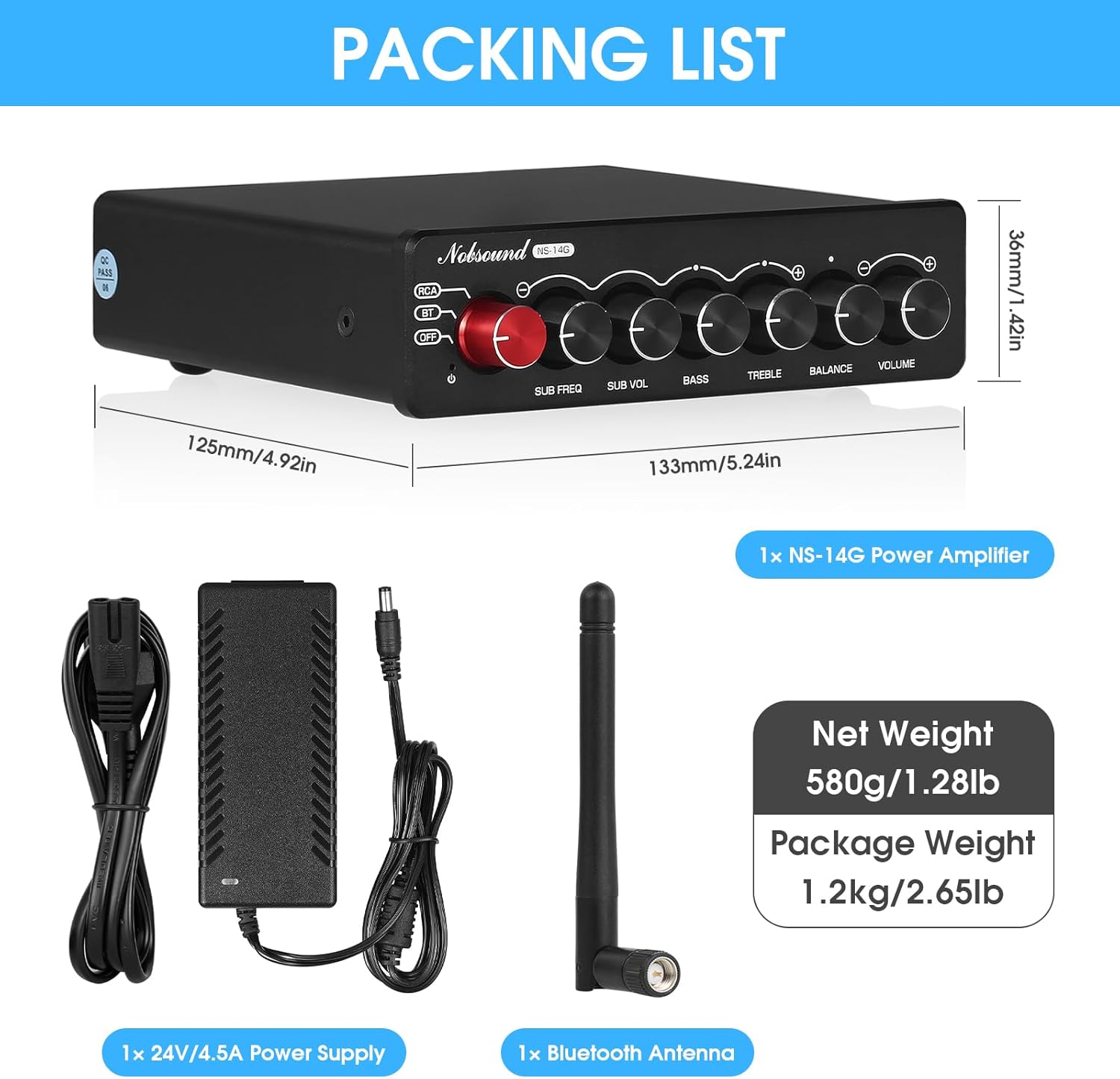
Figure 3: Packing List and Dimensions
This image illustrates the contents of the Nobsound NS-14G amplifier package, including the amplifier unit, power supply, and Bluetooth antenna. It also provides the dimensions of the amplifier (133mm x 125mm x 36mm) and the net/package weights.
3.2 Connecting Speakers
- Connect your passive stereo speakers to the SPEAKER OUTPUT binding posts on the rear panel. Ensure correct polarity (+ to + and - to -) for each channel (Left and Right). The amplifier supports 4-8Ω speakers.
- Connect your passive subwoofer to the SUB binding posts on the rear panel. The amplifier supports 2-8Ω subwoofers.
3.3 Connecting Audio Sources
The NS-14G supports both Bluetooth and RCA wired inputs.
- RCA Input: Use an RCA cable to connect your audio source (e.g., CD player, TV, DAC) to the RCA INPUT (L/R) ports on the rear panel.
- Bluetooth Input: Ensure the Bluetooth antenna is securely screwed into the RF port on the rear panel for optimal wireless performance.

Figure 4: Audio Input Options
This image illustrates the two primary audio input methods for the Nobsound NS-14G amplifier: Bluetooth 5.0 for wireless streaming and RCA inputs for wired connections, compatible with various devices like phones, tablets, computers, and CD players.
3.4 Power Connection
Connect the provided 24V/4.5A power supply to the DC 15-24V input port on the rear panel of the amplifier. Then, plug the power supply into a standard AC outlet.
4. Operating Instructions
4.1 Power On/Off
Press the red input selector knob on the front panel to toggle the amplifier ON or OFF. The indicator light will illuminate when the unit is powered on.
4.2 Input Selection
Rotate the red input selector knob to choose your desired audio input:
- RCA: Selects the wired RCA input. The red indicator light will be on.
- BT (Bluetooth): Selects the Bluetooth wireless input. The blue indicator light will be on.
4.3 Bluetooth Pairing
- Switch the input selector to BT. The blue indicator light will blink, indicating it's in pairing mode.
- On your Bluetooth device (e.g., smartphone, tablet), search for Bluetooth devices.
- Select "Nobsound NS-14G" (or similar name) from the list of available devices to pair.
- Once paired, the blue indicator light will stop blinking and remain solid. You can now stream audio wirelessly.
4.4 Adjusting Volume and Tone
Use the various knobs on the front panel to fine-tune your audio output:
- VOLUME: Adjusts the overall master volume level.
- TREBLE: Increases or decreases the high-frequency response (±6dB).
- BASS: Increases or decreases the low-frequency response (±6dB).
- BALANCE: Adjusts the left/right channel balance.
- SUB VOL: Adjusts the volume level of the connected subwoofer.
- SUB FREQ: Adjusts the subwoofer cutoff frequency (40-120Hz).
5. Specifications
| Parameter | Value |
|---|---|
| Audio Input | Bluetooth / Stereo RCA |
| Audio Output | AUX / Banana speaker jacks |
| Number of Channels | 2.1 |
| Max Output Power | 50W×2 (L/R channel) + 100W (subwoofer) |
| Speaker Impedance (L/R) | 4-8Ω |
| Speaker Impedance (Subwoofer) | 2-8Ω |
| Treble and Bass Adjustment Range | ±6dB |
| AUX Max Output Level | 1.2V |
| Bass Cutoff Frequency | 40-120Hz |
| Input Sensitivity | 0.775V |
| Frequency Response | 20Hz-20KHz (±2dB) |
| THD | 0.07% (1kHz) |
| SNR | ≥92dB |
| Working Voltage | DC 15-24V |
| Package Dimensions (W*D*H) | 133*125*36mm / 5.24*4.92*1.42in |
| Net Weight | 580g / 1.28lb |
| Package Weight | 1.2kg / 2.65lb |
| Item Model Number | NS-14G |
| Manufacturer | Nobsound |
| Country of Origin | China |
6. Maintenance
- Cleaning: Use a soft, dry cloth to clean the amplifier's surface. Do not use liquid cleaners or aerosols.
- Placement: Place the amplifier in a well-ventilated area, away from direct sunlight, heat sources, and moisture. Ensure there is adequate space around the unit for proper airflow.
- Power: Disconnect the power supply from the wall outlet if the unit will not be used for an extended period.
7. Troubleshooting
| Problem | Possible Solution |
|---|---|
| No power | Ensure the power supply is securely connected to both the amplifier and a working power outlet. Check if the power indicator light is on. |
| No sound output |
|
| Bluetooth connection issues |
|
| Distorted sound |
|
| Subwoofer not working |
|
8. Warranty and Support
Nobsound products are designed for reliability and performance. For warranty information or technical support, please refer to the contact details provided with your purchase or visit the official Nobsound website. Please have your model number (NS-14G) and purchase details ready when contacting support.