Introduction
Thank you for purchasing the WISCENT WTB-798 Compact Stereo System. This manual provides essential information for the safe and efficient operation of your device. Please read it thoroughly before use and retain it for future reference.
Safety Information
- Do not expose the unit to rain or moisture to prevent fire or electric shock.
- Do not block ventilation openings. Ensure adequate space around the unit for proper airflow.
- Use only attachments/accessories specified by the manufacturer.
- Unplug the unit during lightning storms or when unused for long periods.
- Refer all servicing to qualified service personnel.
Package Contents
Verify that all items listed below are included in your package:
- 1 x WISCENT WTB-798 Home Stereo System CD Player (2 x 10 W)
- 1 x Remote Control (Batteries not included)
- 1 x User Manual
- 1 x AC Power Cable
- 1 x AUX Cable

Image: Contents of the WISCENT WTB-798 package, including the stereo system, remote control, user manual, AC power cable, and AUX cable.
Product Overview
Familiarize yourself with the components and controls of your WISCENT WTB-798 stereo system.

Image: Front view of the WISCENT WTB-798 Compact Stereo System, showing the display, control buttons, USB port, AUX input, and volume knob.
Front and Rear Panel Controls

Image: Diagram illustrating the front control panel and rear connections of the WISCENT WTB-798. Labels include Power Standby, CD Door Switch, Next Selection/Alarm 2, Play/Pause & Scan, Previous Selection/Alarm 1, USB Port, AUX-in, Function/EQ, Program/Repeat, Time Set/FM M+, Stop, Volume/Snooze, FM Radio Antenna, AC Power, and Main Power Switch.
- Power Standby: Button to switch between standby and active modes.
- CD Door Switch: Opens the top-loading CD compartment.
- Next Selection / Alarm 2: Skips to the next track/station or sets Alarm 2.
- Play / Pause & Scan: Controls playback and initiates FM scan.
- Previous Selection / Alarm 1: Skips to the previous track/station or sets Alarm 1.
- USB Port: For USB drive playback.
- AUX-in: 3.5mm jack for external audio devices.
- FUN / EQ: Selects function mode (CD, USB, Bluetooth, Radio, AUX) or equalizer settings.
- PROG / REP: Programs CD/USB tracks or sets repeat mode.
- TIME SET / P+: Sets time or navigates preset radio stations.
- STOP: Stops playback.
- VOLUME / SNOOZE / ⚡: Adjusts volume, activates snooze, or controls charging.
- FM Radio Antenna: Extendable antenna for FM reception.
- AC Power: Power input connection.
- Main Power Switch: Located on the rear panel, controls the main power to the unit.
Setup
Power Connection
- Connect the supplied AC power cable to the AC Power input on the rear of the unit.
- Plug the other end of the AC power cable into a standard wall outlet.
- Ensure the Main Power Switch on the rear panel is in the "ON" position.
FM Antenna
For optimal FM radio reception, fully extend the telescopic FM antenna located on the rear of the unit.
Operating Instructions
Power On/Off
Press the POWER button on the front panel to switch the unit between standby mode and active mode. Ensure the main power switch on the back is ON.

Image: Diagram showing the location of the POWER and FUN/EQ buttons on the WISCENT WTB-798 for power control and mode selection.
Mode Selection
After powering on, short press the FUN/EQ button to cycle through available modes: CD, USB, AUX, Bluetooth, and Radio.
CD Playback
- Press the CD Door Switch to open the CD compartment.
- Place a CD (CD/CD-R/CD-RW/Audiobooks CD/CD-MP3 compatible) onto the spindle with the label side facing up.
- Close the CD compartment.
- Select CD mode using the FUN/EQ button.
- Press PLAY/PAUSE to start playback.
- Use PREVIOUS/NEXT buttons to skip tracks.
- Press PROG/REP to access shuffle, repeat (single/all/random), and program functions.
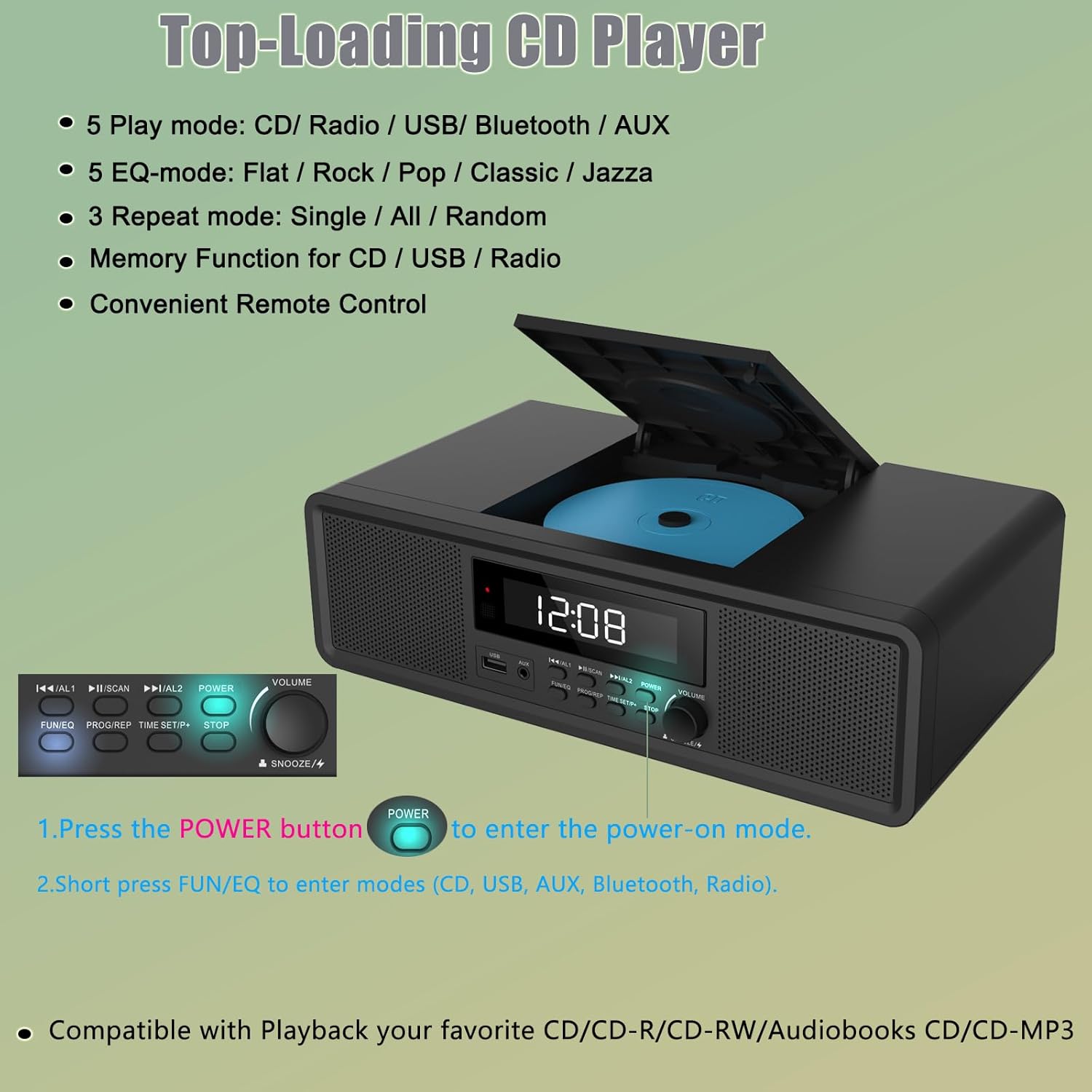
Image: The WISCENT WTB-798 with its top-loading CD player compartment open, showing a CD inside.
USB Playback
- Insert a USB drive (FAT format, up to 128G, MP3/WMA music format) into the USB port on the front panel.
- Select USB mode using the FUN/EQ button.
- Playback will begin automatically or by pressing PLAY/PAUSE.
- Use PREVIOUS/NEXT buttons to skip tracks.
Bluetooth Pairing
- Select Bluetooth mode using the FUN/EQ button. The display will show "BT" and flash, indicating it's in pairing mode.
- On your mobile device, enable Bluetooth and search for "WISCENT WTB-798".
- Select the device to pair. Once connected, the "BT" indicator will stop flashing.
- You can now stream audio from your device to the stereo system.
FM Radio Operation
- Extend the FM antenna fully.
- Select Radio mode using the FUN/EQ button. The display will show "RAD".
- Automatic Scan: Long press the SCAN button to automatically search and store available FM stations (up to 30 presets).
- Manual Tuning: Short press PREVIOUS/NEXT buttons to fine-tune frequencies. Long press to scan for the previous or next strong station.
- Access Presets: Press P+ to cycle through stored radio stations.

Image: Diagram illustrating the controls for FM Radio mode on the WISCENT WTB-798, showing how to tune and scan for stations.
AUX Input
Connect an external audio device (e.g., smartphone, MP3 player) to the AUX-in port on the front panel using the supplied 3.5mm AUX cable. Select AUX mode using the FUN/EQ button. Audio will play from the connected device.
Setting the Time
Video: Instructions on how to set the dual alarms and time on the WISCENT WTB-798 stereo system.
- Ensure the unit is in standby mode (press POWER button until display shows 0:00).
- Press the TIME SET/P+ button. The display will show "24H" or "12H".
- Turn the VOLUME knob to select between 24-hour or 12-hour format. Press TIME SET/P+ to confirm.
- The hour digits will flash. Turn the VOLUME knob to adjust the hour. Press TIME SET/P+ to confirm.
- The minute digits will flash. Turn the VOLUME knob to adjust the minutes. Press TIME SET/P+ again to confirm and exit time setting.
Alarm Clock Setup (Dual Alarms)
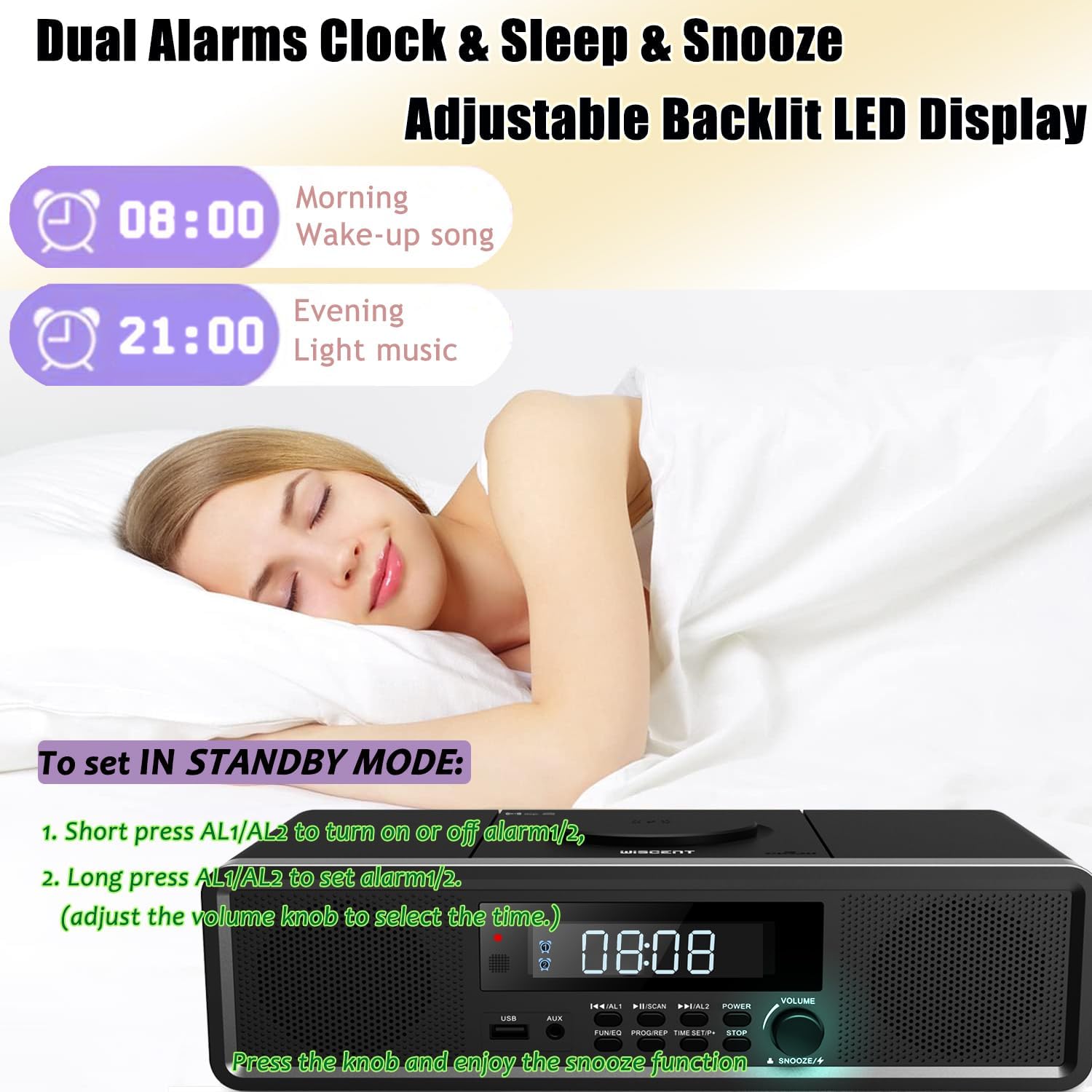
Image: The WISCENT WTB-798 display showing dual alarm settings, with examples for morning wake-up and evening light music.
Video: Detailed instructions on how to set the alarm time, playback mode (CD, USB, Bluetooth, Radio), and turn off alarms on the WISCENT WTB-798.
The unit supports two independent alarms (AL1 and AL2).
- Ensure the unit is in standby mode (display shows 0:00).
- To Set Alarm 1: Long press the PREVIOUS / AL1 button. The hour digits will flash.
- Turn the VOLUME knob to adjust the hour. Press PREVIOUS / AL1 to confirm.
- The minute digits will flash. Turn the VOLUME knob to adjust the minutes. Press PREVIOUS / AL1 to confirm.
- The display will show the alarm source (e.g., "Cd", "USb", "bt", "bb" for beep, "rAd" for radio). Turn the VOLUME knob to select your desired alarm tone (CD, USB, Bluetooth, Beep, or FM Radio). Press PREVIOUS / AL1 to confirm.
- The display will show the alarm volume (e.g., "U15"). Turn the VOLUME knob to adjust the alarm volume. Press PREVIOUS / AL1 to confirm and save Alarm 1 settings.
- To Set Alarm 2: Follow the same steps as above, but use the NEXT / AL2 button instead of PREVIOUS / AL1.
Turning Alarms On/Off
In standby mode, short press PREVIOUS / AL1 or NEXT / AL2 to toggle the respective alarm on or off. The alarm icon on the display will indicate its status.
Canceling a Set Alarm
To cancel a set alarm, enter the alarm setting mode (long press AL1 or AL2). Then, short press AL1 or AL2 until the alarm icon disappears from the display. This will deactivate the alarm.
Snooze Function
When an alarm sounds, press the VOLUME / SNOOZE knob to activate the snooze function. The alarm will temporarily pause and sound again after a short interval.
Sleep Timer
The unit features a sleep timer (10-90 minutes) to automatically turn off playback after a set duration. Refer to the full user manual for detailed instructions on setting the sleep timer.
Equalizer (EQ) Settings
Long press the FUN/EQ button to cycle through various equalizer presets: Flat, Classic, Rock, Pop, and Jazz, to customize your audio experience.
Remote Control Usage
The included remote control provides full functionality for operating the stereo system from a distance. Insert 2x AAA batteries (not included) into the remote control before use. Point the remote control directly at the unit's front panel for optimal response.
Maintenance
- Cleaning: Use a soft, dry cloth to clean the exterior of the unit. Do not use abrasive cleaners or solvents.
- CD Care: Handle CDs by their edges. Clean dirty CDs with a soft, lint-free cloth, wiping from the center outwards.
- Storage: If storing the unit for an extended period, unplug it from the power outlet.
Troubleshooting
If you encounter issues with your WISCENT WTB-798, refer to the following common problems and solutions:
| Problem | Possible Solution |
|---|---|
| No power | Ensure the AC power cable is securely connected and the main power switch on the rear is ON. Check the wall outlet. |
| No sound | Check the volume level. Ensure the correct input mode (CD, USB, BT, AUX, Radio) is selected. For AUX, check the connection cable. |
| CD not playing | Ensure the CD is clean and inserted correctly. Try a different CD. |
| Bluetooth pairing issues | Ensure the unit is in Bluetooth mode and your device's Bluetooth is enabled and discoverable. Move your device closer to the stereo system. |
| Poor FM reception | Fully extend and adjust the position of the FM antenna. Try moving the unit to a different location. |
| Alarm not sounding | Ensure the alarm is set correctly and activated (alarm icon visible). Check the alarm volume. |
If the problem persists, please contact WISCENT customer support for assistance.
Specifications
| Feature | Detail |
|---|---|
| Brand | WISCENT |
| Model Number | WTB-798 |
| Product Dimensions (L x W x H) | 12.2 x 6.69 x 3.94 inches (310 x 170 x 100 mm) |
| Item Weight | 4.4 pounds (2 kg) |
| Connectivity Technology | Auxiliary, Bluetooth, USB |
| Speaker Type | Stereo (2 x 10W RMS) |
| CD Compatibility | CD/CD-R/CD-RW/Audiobooks CD/CD-MP3 |
| USB Compatibility | FAT format, up to 128G, MP3/WMA |
| FM Radio | Digital tuning, up to 30 preset stations |
| Alarm Clock | Dual alarms, multiple alarm tones (CD, Bluetooth, USB, FM, beep) |
| Display | LED display with adjustable backlight |
| Sleep Timer | 10-90 minutes |
| Remote Control | Full-function (batteries not included) |
Warranty and Support
For any questions, concerns, or issues regarding your WISCENT WTB-798 Compact Stereo System, please contact WISCENT directly. Refer to the product packaging or the official WISCENT website for specific warranty details and contact information.
Online Support: Visit the WISCENT Store on Amazon for additional product information and support resources.


