
1. Introduction
The Wouxun KG-Q10G is a powerful handheld GMRS radio designed for reliable communication. It features a superheterodyne receiver, transmits on all 30 GMRS channels at up to 6 watts, and offers wide reception capabilities across various bands including VHF, UHF, 714-999 MHz, airband (AM), and CB channels (AM/FM). This radio includes NOAA weather mode with alerts, a built-in commercial FM radio, and advanced features such as GPS location tracking, 999 programmable memory channels, and a full-color dual-channel display. This manual provides essential information for setting up, operating, and maintaining your KG-Q10G radio.
2. What's in the Box
Upon unpacking your Wouxun KG-Q10G radio, please verify that all the following items are included:
- Wouxun KG-Q10G Handheld GMRS Radio
- 3000mAh Lithium-Ion Battery Pack
- Charging Dock
- Belt Clip
- Wrist Strap
- User Manual

Image: Wouxun KG-Q10G Handheld GMRS Radio with its included accessories, including the charging dock, battery, belt clip, wrist strap, and user manual.
3. Product Overview
Familiarize yourself with the physical components and controls of your KG-Q10G radio.
3.1 Front View and Keypad
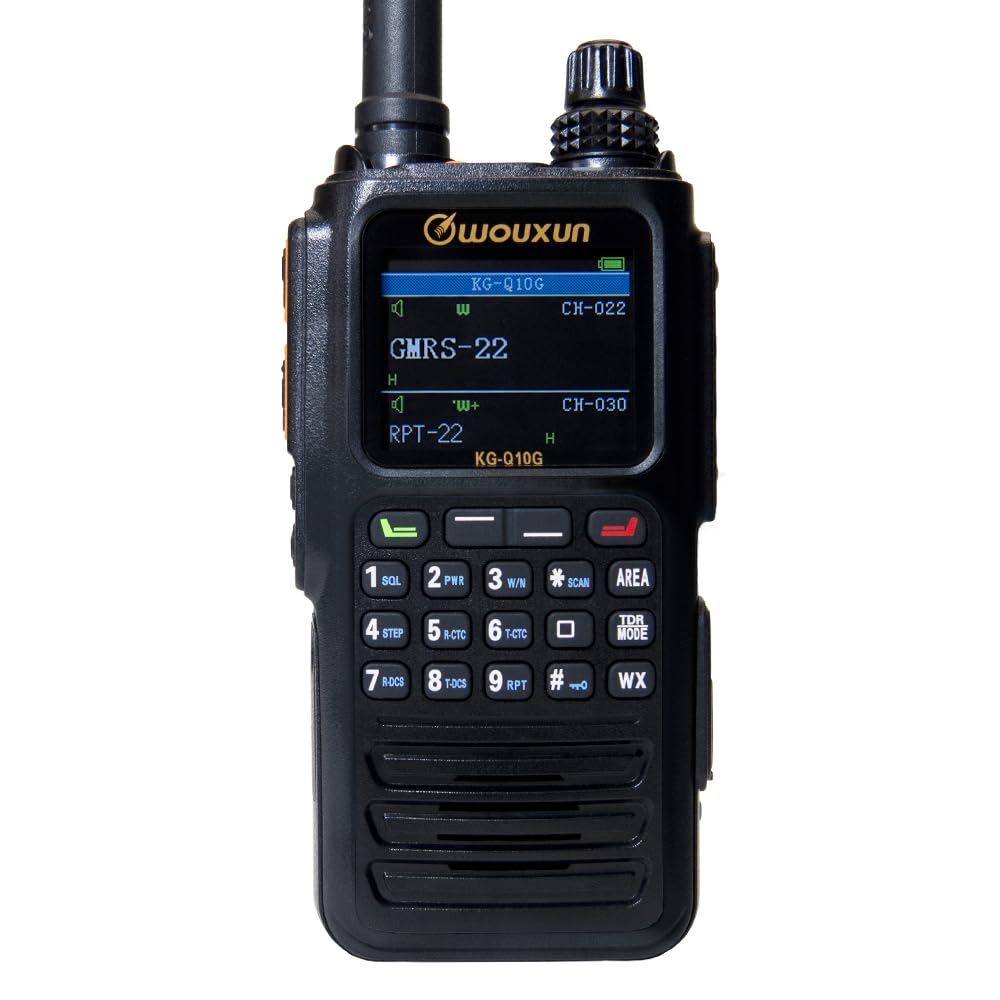
Image: Front view of the Wouxun KG-Q10G radio, showing the display, keypad, and stacked on/off/volume and channel knobs.

Image: Close-up of the KG-Q10G radio's keypad, highlighting the numerical and function buttons.
3.2 Side Views
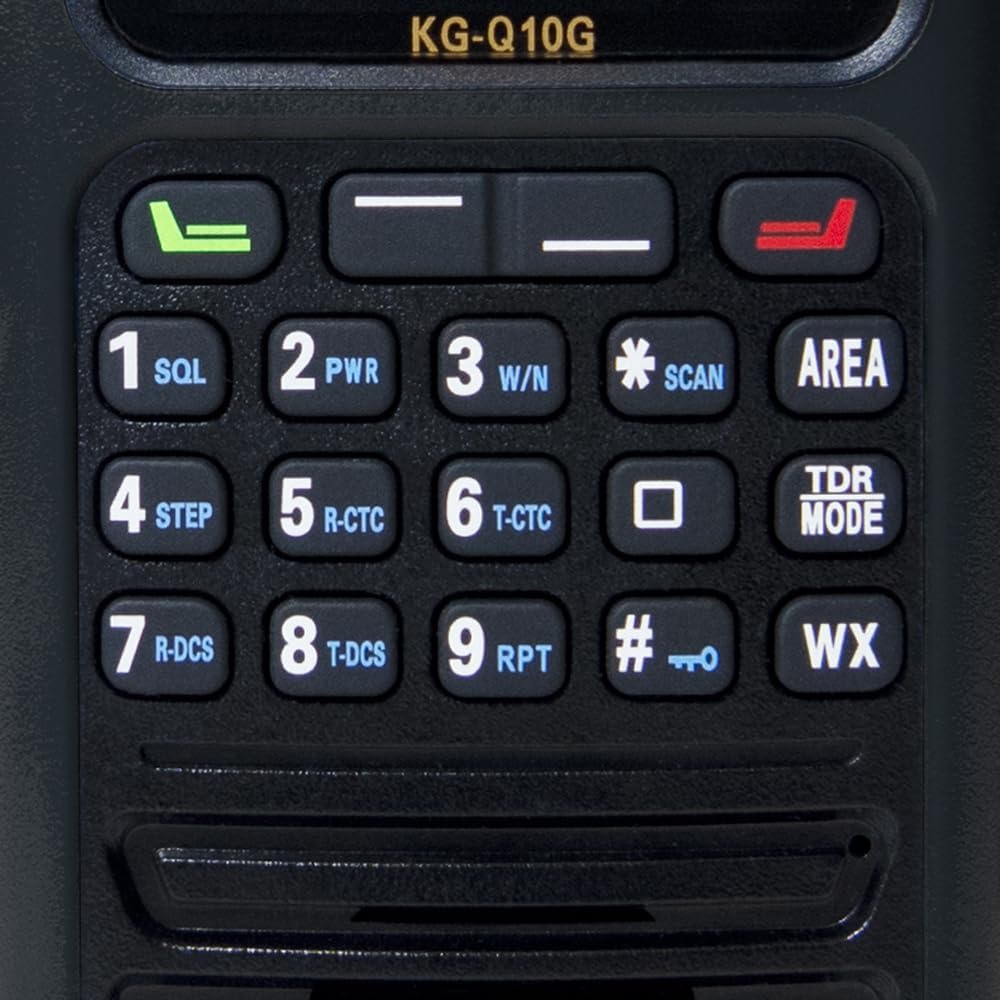
Image: Left side view of the Wouxun KG-Q10G radio, showing the two configurable PTT (Push-To-Talk) buttons.

Image: Right side view of the Wouxun KG-Q10G radio, displaying the accessory port cover.
3.3 Back View
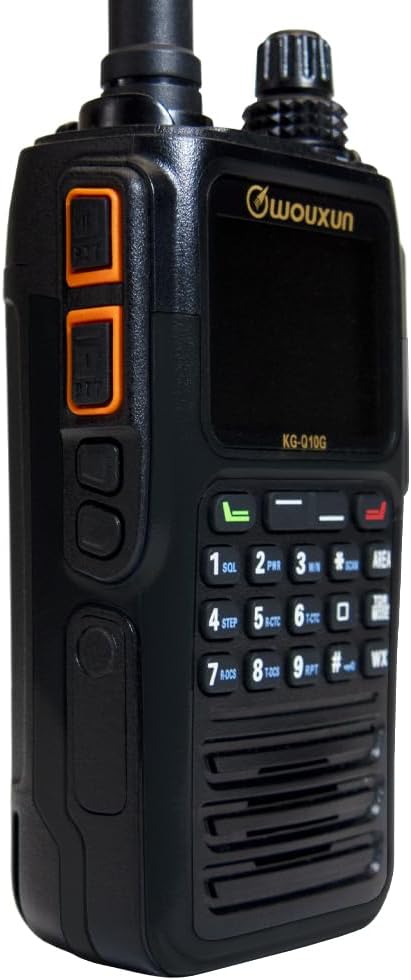
Image: Back view of the Wouxun KG-Q10G radio, showing the battery compartment and charging contacts.
4. Setup
4.1 Battery Installation and Charging
- Install Battery: Align the 3000mAh lithium-ion battery pack with the back of the radio and slide it into place until it clicks securely.
- Charge Battery: Place the radio with the installed battery into the charging dock. Connect the charging dock to a power source. The radio features a built-in USB-C charging port for direct charging without the dock, offering convenience. Ensure the charging indicator light on the dock or radio confirms charging is active.
- First Use: For optimal battery life, fully charge the battery before initial use.
4.2 Powering On/Off
To power on the radio, rotate the stacked on/off/volume knob clockwise until you hear a click and the display illuminates. To power off, rotate the knob counter-clockwise until it clicks off.
5. Operating Instructions
5.1 Basic Operation
- Volume Control: Adjust the stacked on/off/volume knob to set the desired audio level.
- Channel Selection: Use the stacked channel knob or the keypad to select GMRS channels or memory channels.
- Transmit (PTT): Press and hold the PTT button on the side of the radio to transmit. Release to receive.
5.2 Channel and Frequency Modes
The KG-Q10G supports both channel mode (for pre-programmed GMRS and memory channels) and frequency mode (for direct frequency input). It operates on all 30 GMRS channels and can receive on a wide range of frequencies:
- 136-174MHz VHF
- 320-480MHz UHF
- 714-999 MHz
- Airband frequencies (AM mode)
- CB channels (AM and FM mode)
5.3 Advanced Features
- NOAA Weather Mode: Access NOAA weather channels and receive weather alerts. The radio supports 5 Weather Alert Notifications.
- FM Radio: Tune into commercial FM radio stations.
- GPS Location Tracking: Utilize the built-in GPS for location data display.
- Memory Channels: Program up to 999 memory channels.
- CTCSS/DCS: Use standard and non-standard CTCSS tones and DCS codes for selective signaling. Features include CTCSS/DCS tone scan.
- Scanning: Perform channel scan and priority channel scan.
- Display: The full-color dual-channel display offers 14 different colorful themes, with four customizable via programming software.
- Voice Guide: English voice guide for menu navigation and announcements.
- Channel Wizard: Quickly program simplex or repeater channels directly from the keypad.
- PC Programmable: The radio is fully PC programmable for advanced customization.
6. Maintenance
6.1 Cleaning
Wipe the radio with a soft, damp cloth. Do not use harsh chemicals or abrasive cleaners. Ensure all port covers are securely closed before cleaning.
6.2 Water and Dust Protection
The Wouxun KG-Q10G is rated IP67 for dust and water protection. This means it is protected from total dust ingress and can withstand immersion in water up to 1 meter for 30 minutes. While robust, avoid unnecessary exposure to extreme conditions.
6.3 Storage
Store the radio in a cool, dry place away from direct sunlight and extreme temperatures. If storing for extended periods, ensure the battery is partially charged (around 50%) and recharge it every few months to prevent deep discharge.
7. Troubleshooting
If you encounter issues with your KG-Q10G radio, consider the following basic troubleshooting steps:
- No Power: Ensure the battery is fully charged and correctly installed. Check the power knob position.
- No Reception/Transmission: Verify the antenna is securely attached (note: antenna is non-removable). Check the selected channel/frequency. Ensure CTCSS/DCS settings match the other party.
- Poor Audio Quality: Adjust the volume. Check for obstructions near the microphone or speaker.
- Radio Not Responding: Try turning the radio off and then on again. If issues persist, a factory reset (refer to the full owner's manual for instructions) may be necessary, but this will erase custom settings.
For more detailed troubleshooting, please consult the comprehensive owner's manual or contact Wouxun support.
8. Specifications
| Feature | Specification |
|---|---|
| Item Weight | 1.6 pounds |
| Product Dimensions | 8 x 8 x 3 inches |
| Item Model Number | KG-Q10G-BK |
| Batteries | Nonstandard Battery batteries required. |
| Brand | Wouxun |
| Color | Black |
| Number of Channels | 999 |
| Special Feature | Weather Alert |
| Frequency Range | 136-174 MHz, 320-480 MHz, 462-467 MHz |
| Talking Range Maximum | 5 Kilometer |
| Voltage | 7.4 Millivolts |
| Water Resistance Level | Waterproof (IP67) |
9. Warranty Information
The Wouxun KG-Q10G Handheld GMRS Radio comes with a one-year manufacturer warranty. Please retain your proof of purchase for warranty claims. For specific terms and conditions, refer to the warranty card included with your product or contact Wouxun customer service.
10. Support
For further assistance, technical support, or inquiries regarding your Wouxun KG-Q10G radio, please refer to the official Wouxun website or contact their customer service department. Contact information can typically be found in the full owner's manual or on the manufacturer's official support pages.


