
1. Introduction
The Wouxun KG-Q10H is a versatile quad-band handheld amateur radio designed for reliable communication across multiple frequency bands. This manual provides detailed instructions for the proper setup, operation, and maintenance of your device, ensuring optimal performance and user safety.
Key features include quad-band transmission, wide-range reception, a full-color display, NOAA weather alerts, GPS data display, and IP67 dust and water protection.
2. Safety Information
Please read and understand all safety precautions before operating the radio. Failure to comply with these guidelines may result in injury, damage to the radio, or voiding the warranty.
2.1 General Safety
- Do not operate the radio in explosive atmospheres (e.g., near flammable gas, dust particles, or metallic powders).
- Keep the radio away from medical devices such as pacemakers to avoid interference.
- Use only Wouxun-approved accessories. Unauthorized accessories may cause damage or injury.
- Do not disassemble or modify the radio. Repairs should only be performed by authorized service personnel.
- Avoid exposing the radio to extreme temperatures, direct sunlight for prolonged periods, or excessive moisture.
2.2 Battery Safety
- Use only the specified battery pack and charger.
- Do not short-circuit the battery terminals.
- Do not dispose of batteries in fire.
- If the battery is damaged or leaking, do not touch it. Dispose of it properly according to local regulations.
2.3 RF Exposure
Your radio generates RF electromagnetic energy during transmission. To ensure compliance with FCC RF exposure guidelines, always observe the following:
- Do not transmit for more than 50% of the total radio use time.
- Hold the radio in a vertical position with the microphone at least 1 inch (2.5 cm) away from your mouth when transmitting.
- When worn on the body, keep the antenna at least 1 inch (2.5 cm) from the body.
3. Package Contents
Verify that all items are present in your package:
- Wouxun KG-Q10H Handheld Amateur Radio
- 3000mAh Battery Pack
- Two Antennas (one for 2m/70cm, one for 6m/1.25m)
- Charging Dock
- Belt Clip
- Wrist Strap
- Owner's Manual

Figure 3.1: Wouxun KG-Q10H radio with its complete set of accessories, including two antennas, battery, charging dock, belt clip, wrist strap, and user manual.
4. Product Overview
The KG-Q10H features a robust design with intuitive controls and a clear display for efficient operation.
4.1 Radio Components

Figure 4.1: Front view of the Wouxun KG-Q10H, showing the display, keypad, and primary controls.

Figure 4.2: Side view of the Wouxun KG-Q10H, highlighting the USB-C charging port and side keys.
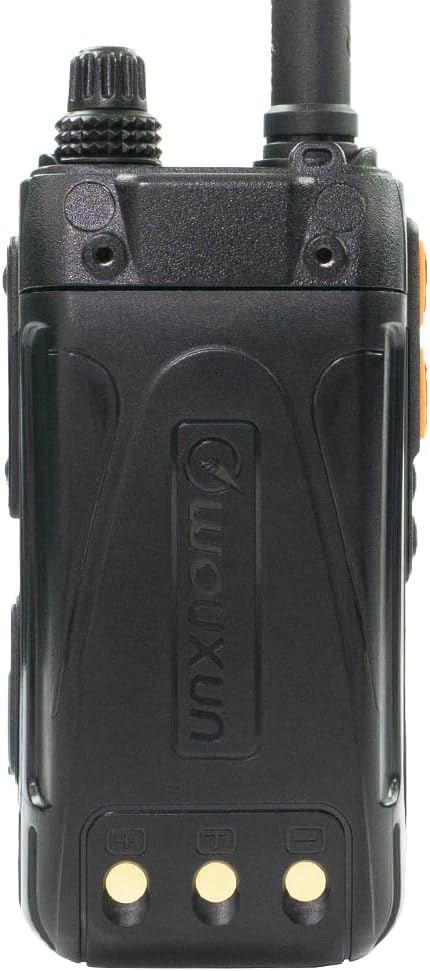
Figure 4.3: Back view of the Wouxun KG-Q10H, showing the battery compartment and belt clip attachment points.
4.2 Controls and Display
- Stacked Knobs: The top knob controls power ON/OFF and volume. The lower knob is for channel selection or frequency tuning.
- Full-Color Dual Channel Display: Provides clear information for two active channels simultaneously. Features 14 display themes, with four customizable via programming software.
- Keypad: Standard numeric and function keys for direct frequency entry, menu navigation, and feature activation.
- Programmable Side Keys: Two keys on the side, each configurable for two functions.
- Programmable Top Key: One key on top, configurable for two functions.
- PTT Keys: Two configurable Push-To-Talk keys for transmitting.
- Menu Key: Provides access to two distinct menu systems for radio settings.

Figure 4.4: Detailed view of the KG-Q10H keypad, showing function keys and numeric input.
5. Setup
5.1 Battery Installation
- Align the 3000mAh battery pack with the battery compartment on the back of the radio.
- Slide the battery into place until it clicks securely.
- To remove, press the release latch (if present) and slide the battery downwards.
5.2 Antenna Attachment
The KG-Q10H comes with two antennas. The shorter antenna is for 2m (144-148 MHz) and 70cm (430-450 MHz) bands. The longer antenna is for 6m (50-54 MHz) and 1.25m (220-225 MHz) bands.
- Select the appropriate antenna for the frequency band you intend to use.
- Screw the antenna clockwise onto the antenna connector on top of the radio until it is finger-tight. Do not overtighten.
5.3 Charging the Battery
The radio can be charged using the included charging dock or directly via the built-in USB-C port.
Using the Charging Dock:
- Connect the AC adapter to the charging dock and plug it into a power outlet.
- Place the radio (with battery installed) into the charging dock. Ensure the charging contacts align.
- The charging indicator light on the dock will show the charging status (e.g., red for charging, green for fully charged).
Using the USB-C Port:
- Connect a USB-C cable to the radio's USB-C port.
- Connect the other end of the cable to a compatible USB power source (e.g., a wall adapter, power bank, or computer USB port).
- The radio's display or an indicator light will show the charging status.
6. Basic Operation
6.1 Power On/Off and Volume Control
- Power On: Rotate the top stacked knob clockwise until you hear a click. The radio will power on.
- Power Off: Rotate the top stacked knob counter-clockwise until you hear a click. The radio will power off.
- Volume Adjustment: After powering on, continue rotating the top stacked knob to adjust the audio volume.
6.2 Channel Mode vs. Frequency Mode
The KG-Q10H operates in two primary modes:
- Channel Mode: Allows selection of pre-programmed memory channels (up to 999). Use the lower stacked knob or keypad to navigate channels.
- Frequency Mode (VFO Mode): Allows direct entry of frequencies and real-time tuning. Use the keypad to enter frequencies or the lower stacked knob to tune.
Refer to the full user manual for specific key presses to switch between these modes.
6.3 Transmitting (PTT)
To transmit, press and hold one of the configurable PTT (Push-To-Talk) keys on the side of the radio. Speak clearly into the microphone. Release the PTT key to stop transmitting and return to receive mode.
7. Advanced Features
The KG-Q10H offers a wide array of advanced functionalities:
- Quad Band Transmission: Transmit on 1.25 meter (220-225 MHz), 2 meter (144-148 MHz), 6 meter (50-54 MHz), and 70cm (430-450 MHz) amateur bands.
- Wide-Range Reception: Receive on 50-54 MHz, 108-174 MHz, 220-225 MHz, 320-480 MHz, 714-999 MHz, and airband frequencies in AM mode.
- Simultaneous Dual Channel Receive and Transmission: Monitor two frequencies at once and transmit on either.
- NOAA Weather Mode with Alerts: Access NOAA weather broadcasts and receive up to 5 weather alert notifications.
- Built-in Commercial FM Radio: Enjoy standard FM radio broadcasts.
- Cross Band Repeat: Utilize the radio as a temporary repeater to extend the range of other radios.
- CTCSS/DCS (Tone/Code Squelch): Supports standard and non-standard CTCSS/DCS tones for selective calling and interference reduction. Includes tone scan functionality.
- Channel Scan and Priority Channel Scan: Automatically scan through programmed channels or prioritize specific channels for monitoring.
- GPS Location Data Display: When enabled, the radio can display location data from other transmitting Wouxun Q-series radios.
- DTMF Support: For various control and signaling functions.
- Group Call, All Call, Select Call: Advanced calling features for specific groups or individuals.
- Incoming Caller ID Display: Shows the ID of the transmitting station.
- Reverse Frequency and Talkaround: Functions for repeater operation and direct radio-to-radio communication.
- Built-in Flashlight: For illumination in low-light conditions.
- English Voice Guide, Stopwatch, Clock: Additional utility features.
8. Programming
The Wouxun KG-Q10H is fully programmable, allowing customization of memory channels, frequencies, tones, and other settings.
8.1 Manual Programming
Many settings can be adjusted directly from the radio's keypad and menu system. Refer to the detailed owner's manual for step-by-step instructions on navigating menus and entering parameters such as frequencies, offsets, and CTCSS/DCS tones.
8.2 PC Programming
For extensive programming, especially for managing 999 memory channels and customizing display themes, PC programming software is recommended. This method is generally faster and more efficient for complex configurations.
- Obtain the official Wouxun programming software and a compatible programming cable (sold separately).
- Install the software on your computer.
- Connect the radio to your computer using the programming cable.
- Follow the software instructions to read from, write to, and manage your radio's settings.
For software downloads and security code verification, visit the official Wouxun website: https://www.wouxun.com/security-code.aspx

Figure 8.1: Back of the KG-Q10H, displaying the FCC ID and a QR code for security verification on the Wouxun website.
9. Maintenance
9.1 Cleaning
- Wipe the radio's surface with a soft, damp cloth. Do not use harsh chemicals or abrasive cleaners.
- Ensure the USB-C port cover is securely closed to maintain IP67 dust and water protection.
9.2 Storage
- Store the radio in a cool, dry place when not in use.
- For long-term storage, remove the battery pack and store it separately.
9.3 Water and Dust Protection (IP67)
The KG-Q10H is rated IP67, meaning it is protected from dust ingress and can withstand immersion in water up to 1 meter for 30 minutes. Ensure all port covers and the battery are properly sealed before exposing the radio to water or dusty environments.
10. Troubleshooting
| Problem | Possible Cause | Solution |
|---|---|---|
| Radio does not power on. | Battery is low or not installed correctly. | Charge the battery or re-install it securely. |
| Cannot transmit. | Incorrect frequency/channel, low battery, PTT not pressed fully. | Verify frequency/channel, charge battery, ensure PTT is fully pressed. Check if transmit is allowed on the selected frequency. |
| No reception or weak signal. | Antenna not attached, incorrect frequency, squelch level too high. | Attach antenna, verify frequency, adjust squelch level. Check for obstructions. |
| Audio is distorted. | Volume too high, weak signal, interference. | Adjust volume, check antenna connection, move away from interference sources. |
| Display is blank or frozen. | Software error, low battery. | Try turning the radio off and on. If issue persists, charge battery. If still frozen, remove and re-insert battery. |
11. Specifications
| Feature | Description |
|---|---|
| Model Number | KG-Q10H |
| Brand | Wouxun |
| Color | Black |
| Number of Channels | 999 |
| Transmit Frequency Range | 50-54 MHz (6m), 144-148 MHz (2m), 220-225 MHz (1.25m), 430-450 MHz (70cm) |
| Receive Frequency Range | 50-54 MHz, 108-174 MHz, 220-225 MHz, 320-480 MHz, 714-999 MHz (Airband AM RX) |
| Output Power | Up to 6 Watts |
| Battery | 3000mAh Li-Ion (Nonstandard Battery) |
| Charging Port | USB-C (built-in) |
| Water Resistance Level | IP67 (Dust and Water Protection) |
| Product Dimensions (D x W x H) | 8"D x 8"W x 3"H |
| Item Weight | 1.6 Pounds |
| Special Features | Weather Alert, Full-color display, GPS, Cross-Band Repeat, DTMF, FM Radio |
| Compatible Devices | External antennas, Two-way radios (1.25m, 2m, 6m, 70cm bands), GPS devices, DTMF devices, Headsets, Earpieces, USB-C chargers, Power banks |
| Impedance | 50 Ohms |
| Tuner Type | VHF |
12. Warranty and Support
12.1 Manufacturer Warranty
The Wouxun KG-Q10H comes with a one-year manufacturer warranty from the date of purchase. This warranty covers defects in materials and workmanship under normal use. Please retain your proof of purchase for warranty claims.
The warranty does not cover damage caused by misuse, accidents, unauthorized modifications, or failure to follow the instructions in this manual.
12.2 Customer Support
For technical assistance, troubleshooting, or warranty inquiries, please contact Wouxun customer support or visit their official website. Refer to the packaging or the official Wouxun website for the most current contact information.
Official Wouxun Website: https://www.wouxun.com


