
1. Safety Instructions
Please read all safety instructions carefully before operating the EUHOMY CFJ Series portable car refrigerator and battery. Failure to follow these instructions may result in electric shock, fire, or serious injury.
- Ensure the power supply voltage matches the specifications of the appliance (12/24V DC or 110-240V AC).
- Do not immerse the refrigerator or battery in water or expose them to rain.
- Keep ventilation openings clear of obstructions to ensure proper airflow and prevent overheating.
- Avoid placing the refrigerator near heat sources or in direct sunlight for extended periods.
- Do not use abrasive cleaners or sharp objects inside the refrigerator.
- Always disconnect the power supply before cleaning or performing maintenance.
- The battery is designed for EUHOMY CFIM / CFJ / TWW car refrigerators only. Do not use it with other models, especially CFD series.
- Handle the battery with care. Do not puncture, drop, or disassemble it.
2. Product Overview
The EUHOMY CFJ Series portable car refrigerator is a versatile 24QT (23L) appliance designed for cooling and freezing on the go. It operates on both DC (12/24V) and AC (110-240V) power, making it suitable for various environments, including vehicles and homes. It features a high-efficiency compressor for rapid cooling and comes bundled with a dedicated rechargeable battery for extended off-grid use.
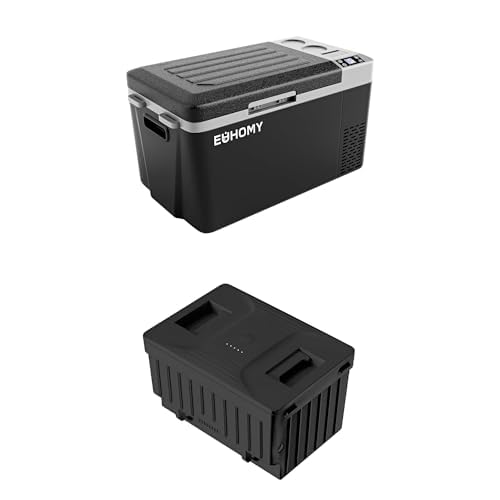
Image: The EUHOMY CFJ Series portable car refrigerator, showcasing its compact design and integrated battery compartment.
Key Features:
- Capacity: 24QT (23 Liters)
- Dual Power Input: 12/24V DC and 110-240V AC adapters included.
- Battery Protection System: Three-level (L/M/H) adjustable voltage protection (9.6V to 12.4V) to prevent vehicle battery drain.
- High-Efficiency Compressor: Cools from 50°F (10°C) to 32°F (0°C) in approximately 15 minutes.
- User-Friendly Design: Recessed handles for portability, built-in LED light for night access, and a USB port for charging devices.
- Independent Storage Space: A dedicated compartment that functions as a power/charging station and storage for small items.
- App Control: Bluetooth connectivity allows remote management of the refrigerator via a mobile application.
- Dedicated Battery: Provides up to 6 hours of operation in ECO mode on a full charge.
3. Setup
3.1 Unpacking
- Carefully remove the refrigerator and all accessories from the packaging.
- Check for any damage during transit. If damage is found, contact customer support immediately.
- Retain the packaging materials for future transport or storage.
3.2 Initial Placement
- Place the refrigerator on a flat, stable surface.
- Ensure there is adequate ventilation around the unit (at least 10 cm clearance on all sides).
- Avoid placing it in direct sunlight or near heat-emitting appliances.
3.3 Connecting to Power
The refrigerator can be powered by either DC (12/24V) or AC (110-240V).
- DC Power (Car/Vehicle): Connect the 12/24V DC power cord to the refrigerator's DC input port and then to your vehicle's cigarette lighter socket or a dedicated 12V/24V power outlet.
- AC Power (Home/Wall Outlet): Connect the 110-240V AC adapter to the refrigerator's AC input port, then plug the adapter into a standard wall outlet.
3.4 Battery Installation and Charging
The dedicated EUHOMY battery is designed to fit into a specific compartment on the refrigerator.
- Locate the battery compartment on the refrigerator.
- Insert the battery into the compartment, ensuring it is securely seated.
- The battery will charge automatically when the refrigerator is connected to an external AC or DC power source.
- A full charge typically allows for approximately 4 hours of use in MAX cooling mode or 6 hours in ECO cooling mode (with battery protection set to L).
4. Operating Instructions
4.1 Control Panel Overview
The control panel is located on the front of the refrigerator and features a display and several buttons for operation.
- Power Button: Turns the unit on/off.
- SET Button: Enters temperature setting mode or other settings.
- +/- Buttons: Adjust temperature or navigate settings.
- Display: Shows current temperature, battery status, and operating mode.
4.2 Setting Temperature
- Press the Power button to turn on the refrigerator.
- Press the SET button once. The temperature display will flash.
- Use the +/- buttons to adjust the desired temperature.
- Press the SET button again or wait a few seconds for the setting to be saved.
4.3 Battery Protection Modes (L/M/H)
This system prevents your vehicle's battery from draining completely. There are three modes: Low (L), Medium (M), and High (H).
- L (Low): Disconnects power at 9.6V (DC 12V) / 21.3V (DC 24V). Suitable for most vehicles.
- M (Medium): Disconnects power at 10.1V (DC 12V) / 22.3V (DC 24V).
- H (High): Disconnects power at 10.9V (DC 12V) / 24.3V (DC 24V). Recommended for starting batteries or when the vehicle is off for extended periods.
To change the mode:
- With the refrigerator on, press and hold the SET button for approximately 3 seconds until the display shows 'E1'.
- Press the SET button repeatedly until 'b' (for battery protection) appears.
- Use the +/- buttons to select L, M, or H.
- Wait a few seconds for the setting to be saved.
4.4 Cooling Modes (MAX/ECO)
The refrigerator offers two cooling modes:
- MAX Mode: Provides maximum cooling power for rapid temperature reduction.
- ECO Mode: Energy-saving mode for efficient operation and extended battery life.
To change the mode:
- With the refrigerator on, press and hold the SET button for approximately 3 seconds until the display shows 'E1'.
- Press the SET button repeatedly until 'F' (for cooling mode) appears.
- Use the +/- buttons to select MAX or ECO.
- Wait a few seconds for the setting to be saved.
4.5 App Control (Bluetooth)
The EUHOMY CFJ Series refrigerator supports Bluetooth connectivity for remote control via a smartphone app.
- Download the official EUHOMY refrigerator app from your device's app store.
- Ensure Bluetooth is enabled on your smartphone.
- Open the app and follow the on-screen instructions to pair with your refrigerator.
- Once paired, you can monitor temperature, adjust settings, and switch modes from your phone.
5. Maintenance
5.1 Cleaning
- Always disconnect the power supply before cleaning.
- Wipe the interior and exterior surfaces with a damp cloth and a mild detergent.
- Do not use abrasive cleaners, solvents, or sharp objects, as they can damage the surfaces.
- Ensure the refrigerator is completely dry before reconnecting power.
5.2 Defrosting
The CFJ Series features an automatic defrost system. However, if a significant layer of ice builds up, manually defrost the unit:
- Turn off the refrigerator and disconnect it from all power sources.
- Remove all contents.
- Leave the lid open to allow the ice to melt naturally.
- Wipe away melted water with a clean cloth. Do not use sharp tools to remove ice.
5.3 Storage
- If storing the refrigerator for an extended period, ensure it is clean and dry.
- Leave the lid slightly ajar to prevent odors and mold growth.
- Store in a dry, well-ventilated area, away from direct sunlight and extreme temperatures.
- For the battery, ensure it is charged to about 50-70% before long-term storage and recharge it every 3-6 months to maintain its health.
6. Troubleshooting
If you encounter issues with your EUHOMY CFJ Series refrigerator, refer to the following common problems and solutions:
| Problem | Possible Cause | Solution |
|---|---|---|
| Refrigerator not turning on | No power, faulty power cord, vehicle battery protection activated. | Check power connections. Ensure vehicle's ignition is on (if applicable). Adjust battery protection mode (L/M/H) to a lower setting if vehicle battery is low. |
| Refrigerator not cooling effectively | Lid not closed properly, poor ventilation, ambient temperature too high, excessive contents. | Ensure lid is sealed. Clear ventilation openings. Reduce contents if overloaded. Operate in MAX mode for faster cooling. |
| Display shows an error code (e.g., E1, E2) | Sensor fault, low voltage, compressor issue. | Refer to the specific error code in the full manual (if available) or contact customer support. For low voltage, check power source. |
| Battery not charging | Loose connection, faulty battery, refrigerator not connected to external power. | Ensure battery is correctly seated in its compartment. Verify the refrigerator is connected to a working AC or DC power source. |
| Unusual noise from the unit | Unit not level, fan obstruction, compressor vibration. | Place the unit on a level surface. Check for any objects obstructing the fan. Minor compressor noise is normal. |
If the problem persists after attempting these solutions, please contact EUHOMY customer support.
7. Specifications
| Feature | Specification |
|---|---|
| Brand | EUHOMY |
| Model Number | CFJ |
| Capacity | 24QT (23 Liters / 0.8 Cubic Feet) |
| Color | Black |
| Installation Type | Freestanding |
| Defrost System | Automatic |
| Form Factor | Portable |
| Cooling Method | Compressor |
| Adjustable Temperature Control | Yes |
| Power Input | 12V/24V DC, 110-240V AC |
| Average Energy Consumption | 45W |
| Battery Life (ECO mode) | Up to 6 hours (with battery protection L) |
8. Warranty and Support
EUHOMY provides a 2-year technical support for the CFJ Series portable car refrigerator. This support covers technical assistance and guidance for any operational issues or defects encountered during normal use.
For technical assistance, warranty claims, or any questions regarding your product, please contact EUHOMY customer service through the official website or the contact information provided with your purchase documentation.
Please have your model number (CFJ) and purchase details ready when contacting support to ensure efficient service.


