
1. Introduction
Thank you for choosing the iProvèn Blood Pressure Monitor BPM-35. This device is designed for convenient and accurate blood pressure measurement at home. It features easy one-touch operation, a large backlit display, and Bluetooth connectivity for integration with the MedM app. Please read this manual thoroughly before use to ensure proper operation and to obtain the most accurate readings.
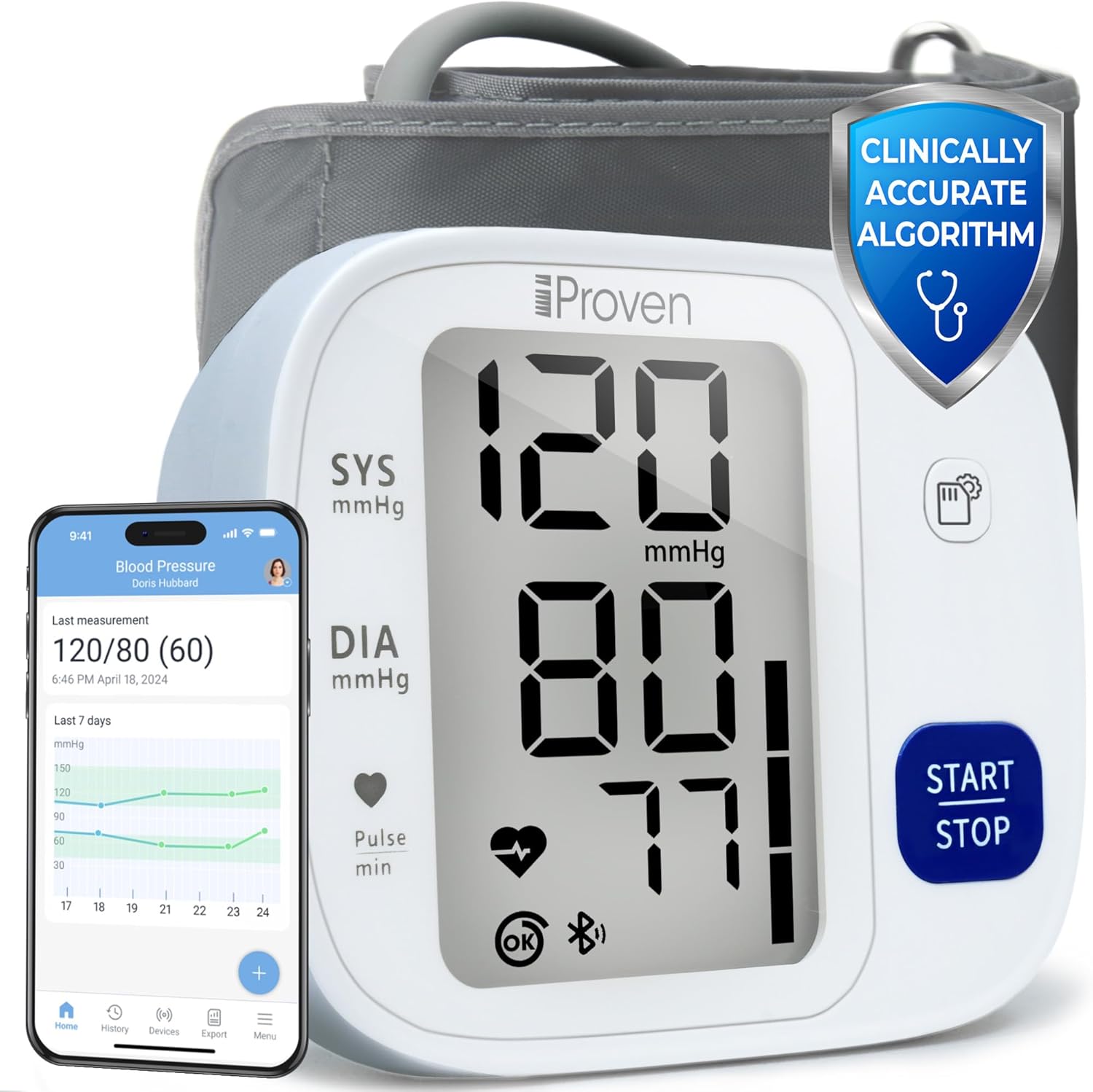
Figure 1: iProvèn Blood Pressure Monitor BPM-35 and its accompanying mobile application interface.
2. Important Safety Information
- Consult your physician before using this device if you have any medical conditions.
- Do not use this device for diagnosis or treatment of any health problem or disease. Always consult a medical professional for interpretation of measurements.
- Keep the device out of reach of children and pets.
- Do not use the device in a moving vehicle.
- Avoid strenuous activity, bathing, or consuming hot/cold beverages 30 minutes before measuring.
- Ensure the cuff is properly applied and not too tight to avoid discomfort or inaccurate readings.
3. Package Contents
The iProvèn Blood Pressure Monitor BPM-35 package includes the following items:
- iProvèn Blood Pressure Monitor (BPM-35)
- Upper Arm Cuff (fits arm circumference 8 3/4" to 16 1/2")
- 4 AAA Batteries
- Instruction Manual
- Bluetooth App Instructions
- Storage Case (not explicitly listed but implied by reviews)
4. Product Overview
The BPM-35 monitor features a large, backlit display for clear visibility of readings. It is designed for one-touch operation, making it simple to use for all ages.

Figure 2: Detailed view of the monitor's display and indicators.
Display Indicators:
- SYS (Systolic Pressure): The top number, indicating the pressure in your arteries when your heart beats.
- DIA (Diastolic Pressure): The bottom number, indicating the pressure in your arteries between beats.
- Pulse min: Your heart rate in beats per minute.
- Movement Detection: An icon indicating if movement was detected during measurement, which may affect accuracy.
- Irregular Heartbeat Detection: An icon that appears if an irregular heartbeat is detected.
- WHO Classification: A color bar on the side of the display indicates your blood pressure level according to World Health Organization (WHO) guidelines.
- Memory Indicator: Shows when readings are stored.
- Bluetooth Indicator: Shows connection status to the app.
5. Setup
5.1 Installing Batteries
- Open the battery compartment cover on the back of the monitor.
- Insert the 4 AAA batteries provided, ensuring correct polarity (+/-).
- Close the battery compartment cover securely.
5.2 Attaching the Cuff
- Insert the air plug of the cuff firmly into the air jack on the side of the monitor.
- Ensure the connection is secure to prevent air leakage during measurement.
6. App Integration (MedM App)
The iProvèn BPM-35 can connect to the MedM app (available for iOS and Android) to track, store, and share your blood pressure measurements. This allows for unlimited storage and trend analysis.

Figure 3: Enhanced tracking capabilities with the MedM App.
6.1 Pairing with the MedM App
- Download the MedM Health app from the App Store (iOS) or Google Play Store (Android).
- Enable Bluetooth on your smartphone.
- Open the MedM app and follow the on-screen instructions to add a new device.
- Turn on your iProvèn BPM-35 monitor. The app should detect the device and guide you through the pairing process.
- Once paired, your measurements will automatically sync to the app.
6.2 App Features
- Unlimited Measurements: Store an endless history of your readings.
- Track Trends: Visualize your blood pressure and heart rate trends over time with graphs.
- Share Results: Easily export or share your data with your healthcare provider.
- Custom Reminders: Set personalized reminders within the app to ensure regular monitoring.
7. Operating the Device: Taking a Measurement
For accurate readings, follow these steps carefully. The iProvèn BPM-35 uses a measurement method during cuff deflation for slower, more accurate results.

Figure 4: Step-by-step guide for taking a blood pressure measurement.
7.1 Preparation for Measurement
- Rest for at least 5 minutes before taking a measurement.
- Sit in a comfortable position with your back straight and supported.
- Keep your feet flat on the floor and do not cross your legs.
- Place your arm on a flat surface so the cuff is at heart level.
- Take a deep breath before you start.

Figure 5: Important tips for accurate blood pressure measurement.
7.2 Applying the Cuff
- Wrap the cuff around your bare upper left arm.
- Position the cuff so the bottom edge is approximately two fingers above your elbow.
- Ensure the air tube runs down the center of your arm.
- The cuff should be snug but not uncomfortably tight. You should be able to insert two fingers between the cuff and your arm.
7.3 Starting the Measurement
- Press the START/STOP button once.
- The cuff will begin to inflate. Remain still and silent during the measurement.
- The monitor will display your systolic, diastolic, and pulse readings once the measurement is complete.
- Press the START/STOP button again to turn off the device, or it will automatically power off after a period of inactivity.
8. Understanding Your Results
The monitor displays your Systolic (SYS), Diastolic (DIA), and Pulse readings. It also provides indicators for movement detection, irregular heartbeat, and a WHO classification bar.

Figure 6: Illustration of the measurement method during cuff deflation for improved accuracy.
8.1 WHO Blood Pressure Classification
The color bar on the right side of the display indicates your blood pressure category based on World Health Organization (WHO) guidelines. Consult your doctor for personalized advice.
| Category | Systolic (mmHg) | Diastolic (mmHg) |
|---|---|---|
| Optimal | < 120 | < 80 |
| Normal | 120-129 | 80-84 |
| High-Normal | 130-139 | 85-89 |
| Grade 1 Hypertension | 140-159 | 90-99 |
| Grade 2 Hypertension | 160-179 | 100-109 |
| Grade 3 Hypertension | ≥ 180 | ≥ 110 |
Note: This table is for general reference. Only a healthcare professional can diagnose and treat hypertension.
9. Memory Functions
The iProvèn BPM-35 automatically stores up to 99 measurements for two users, plus a guest mode. Readings are stored with date and time stamps.

Figure 7: The monitor's display and memory features.
9.1 Accessing Stored Readings
Specific instructions for navigating stored readings are typically found in the detailed manual provided with the device. Generally, a dedicated 'Memory' button or a long press of the 'Start/Stop' button when off will allow you to cycle through past measurements.
9.2 Switching Users
The device supports two user profiles and a guest mode. Refer to the detailed manual for instructions on how to select the correct user profile before taking a measurement to ensure readings are stored correctly.
10. Maintenance
10.1 Cleaning the Device
- Wipe the monitor and cuff gently with a soft, dry cloth.
- If necessary, use a cloth lightly dampened with water or a mild detergent. Do not use abrasive cleaners or immerse the device in water.
10.2 Storage
- Store the device and cuff in the provided storage case when not in use.
- Keep the device in a cool, dry place, away from direct sunlight, extreme temperatures, and humidity.
- Remove batteries if the device will not be used for an extended period.
11. Troubleshooting
| Problem | Possible Cause | Solution |
|---|---|---|
| Device does not power on | Dead batteries; Incorrect battery installation | Replace batteries; Check battery polarity |
| Inaccurate readings | Improper cuff placement; Movement during measurement; Not resting before measurement | Re-apply cuff correctly; Remain still and silent; Rest for 5 minutes before measuring |
| Cuff does not inflate | Air plug not securely connected; Air leakage from cuff | Ensure air plug is fully inserted; Check cuff for damage |
| Bluetooth connection issues | Bluetooth off on phone; App not open; Device not in pairing mode | Enable Bluetooth; Open MedM app; Follow app pairing instructions |
| Error message on display | Specific error (e.g., E1, E2) | Refer to the detailed instruction manual for specific error code meanings and solutions. Generally, re-measure after resting. |
12. Specifications
- Product Dimensions: 6.37"L x 4.05"W x 2.87"Th
- Weight: Approximately 15.84 ounces
- Power Source: 4 AAA batteries (included)
- Cuff Size: Fits upper arm circumference 8 3/4" to 16 1/2"
- Display Type: Large Backlit Display
- Memory: 99 readings for 2 users + Guest mode
- Connectivity: Bluetooth (for MedM app integration)
- Measurement Method: Oscillometric, during deflation
- Age Range (Description): Adult
13. Warranty and Support
iProvèn is committed to providing high-quality products. While specific warranty details are not provided in this document, please refer to the warranty card included with your product or visit the official iProvèn website for detailed warranty information and customer support contact details.
For technical assistance, troubleshooting, or any questions regarding your iProvèn Blood Pressure Monitor BPM-35, please contact iProvèn customer support through their official channels.
