Introduction
This manual provides instructions for the Xtrike Me GK-989A Wired Mechanical Gaming Keyboard. Designed for enhanced gaming and productivity, this keyboard features robust anti-ghosting technology, dynamic rainbow backlighting, and durable mechanical keys.
Key Features:
- Advanced multi-key anti-ghosting with 25-key rollover support provides enhanced command readings in the heat of battle.
- Rainbow backlight with 12 lighting systems allows you to play and work even in complete darkness.
- Keys: 87, Key life: 50 million presses.
- Provides a comfortable and accurate typing experience, in addition to long-lasting durability.
- Robust structure and high-quality materials.
Package Contents
- Xtrike Me GK-989A Wired Mechanical Gaming Keyboard
- User Manual
Setup Instructions
- Connect the Keyboard: Plug the USB Type-A connector of the keyboard into an available USB port on your computer.
- Driver Installation: The keyboard is plug-and-play and typically does not require additional drivers. Your operating system should automatically detect and install the necessary drivers.
- Ready for Use: Once detected, the keyboard is ready for immediate use.
Operating Instructions
Basic Functions
The GK-989A keyboard features standard QWERTY layout keys. Pressing keys will input characters or execute commands as expected by your operating system.
Multimedia Keys (Fn Combinations)
The keyboard includes multimedia functions accessible via the Fn key combined with the F1-F12 keys.
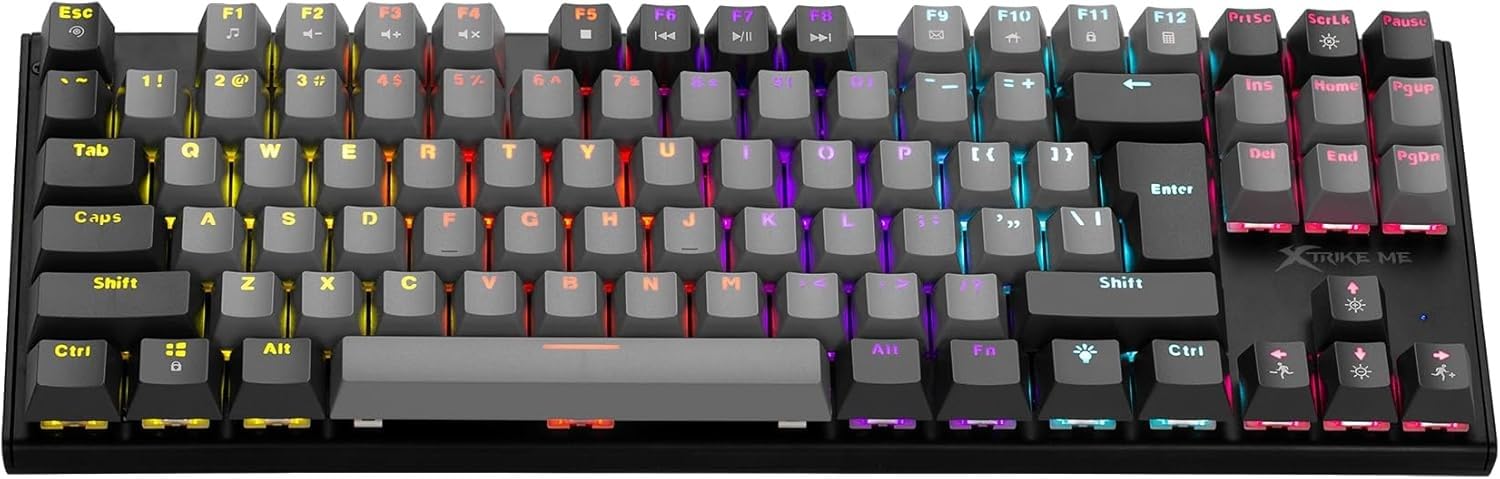
Image: Overview of the Xtrike Me GK-989A keyboard, showing the layout and multimedia key locations.
- Fn + F1: Media Player
- Fn + F2: Volume Down
- Fn + F3: Volume Up
- Fn + F4: Mute
- Fn + F5: Stop
- Fn + F6: Previous Track
- Fn + F7: Play/Pause
- Fn + F8: Next Track
- Fn + F9: Email
- Fn + F10: Web Browser Home
- Fn + F11: My Computer
- Fn + F12: Calculator
Backlight Control
The GK-989A features dynamic rainbow backlighting with 12 different lighting modes.

Image: Close-up of the keyboard showing the backlight control keys.
- Fn + Light Bulb Key (next to Alt Gr): Cycle through 12 different backlight modes.
- Fn + Up/Down Arrow Keys: Adjust backlight brightness.
- Fn + Left/Right Arrow Keys: Adjust backlight speed (for dynamic modes).
- ScrLk Key: Toggle backlight on/off.
Anti-Ghosting
The keyboard supports 25-key rollover, ensuring that multiple key presses are registered accurately, which is crucial for fast-paced gaming.
Maintenance
- Cleaning: Use a soft, dry cloth to wipe the keyboard surface. For deeper cleaning, use compressed air to remove dust and debris from between the keys.
- Avoid Liquids: Do not expose the keyboard to liquids. If liquid spills occur, immediately disconnect the keyboard and allow it to dry completely before reconnecting.
- Storage: Store the keyboard in a cool, dry place away from direct sunlight and extreme temperatures.
Troubleshooting
Keyboard Not Responding
- Ensure the USB cable is securely connected to both the keyboard and the computer.
- Try plugging the keyboard into a different USB port on your computer.
- Restart your computer.
- Test the keyboard on another computer to determine if the issue is with the keyboard or the computer's USB port/drivers.
Backlight Not Working
- Press the ScrLk key to ensure the backlight is not turned off.
- Try cycling through backlight modes using Fn + Light Bulb Key.
- Adjust brightness using Fn + Up/Down Arrow Keys.
Keys Not Registering Correctly
- Clean the affected keys with compressed air to remove any obstructions.
- Ensure no software conflicts are interfering with key inputs.
Specifications
| Feature | Detail |
|---|---|
| Brand | Xtrike Me |
| Model Number | XT-GK-989A |
| Connectivity Technology | Wired (USB Type-A) |
| Number of Keys | 87 |
| Key Life | 50 Million Presses |
| Backlight | Rainbow, 12 Modes |
| Anti-Ghosting | 25-Key Rollover |
| Material | Plastic |
| Color | Black |
| Product Weight | 700 g |
| Compatible Devices | Gaming Console (PC compatibility implied) |
Warranty and Support
This product comes with a standard manufacturer's warranty. Please refer to the warranty card included in your package or contact Xtrike Me customer support for detailed warranty information and assistance.
For technical support or inquiries, please visit the official Xtrike Me website or contact their customer service.


