
1. Introduction
This user manual provides essential information and instructions for the Xiaomi Redmi Note 14 Pro+ 5G smartphone. Please read this manual thoroughly before using your device to ensure proper operation and to maximize its performance. Keep this manual for future reference.
2. Product Overview
The Xiaomi Redmi Note 14 Pro+ 5G is a high-performance smartphone designed for advanced mobile computing and communication. It features a 200MP pro-grade AI camera system, 120W HyperCharge technology with a 5110mAh battery, a 1.5K 120Hz eye-care display protected by Corning Gorilla Glass Victus 2, and is powered by a 4nm Snapdragon 7s Gen 3 5G processor. The device also boasts IP68 dust and water resistance and integrates various AI features to enhance user experience.

Image 1: Front and back view of the Xiaomi Redmi Note 14 Pro+ 5G smartphone in purple.
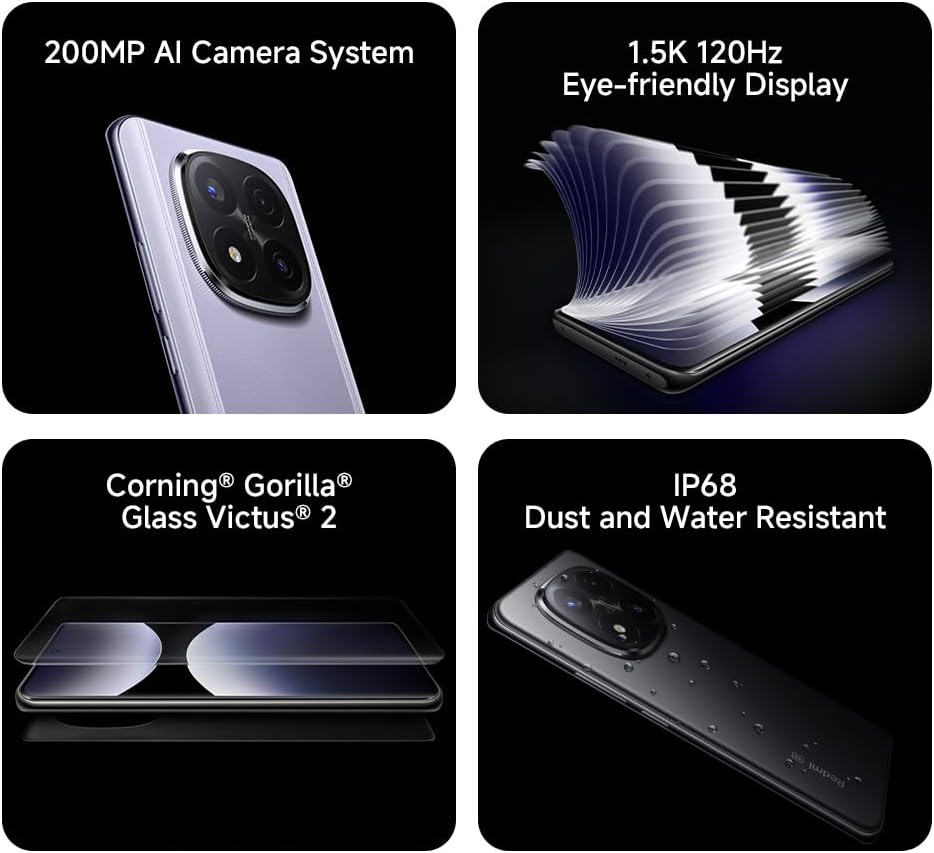
Image 2: Visual representation of key features including the 200MP AI Camera, 1.5K 120Hz Eye-friendly Display, Corning Gorilla Glass Victus 2, and IP68 Dust and Water Resistance.
3. Setup
3.1. Unboxing and Package Contents
Upon opening the package, verify that all items are present. The standard package includes:
- Xiaomi Redmi Note 14 Pro+ 5G Smartphone
- USB-C Charging Cable
- Ring Holder (may vary by region)
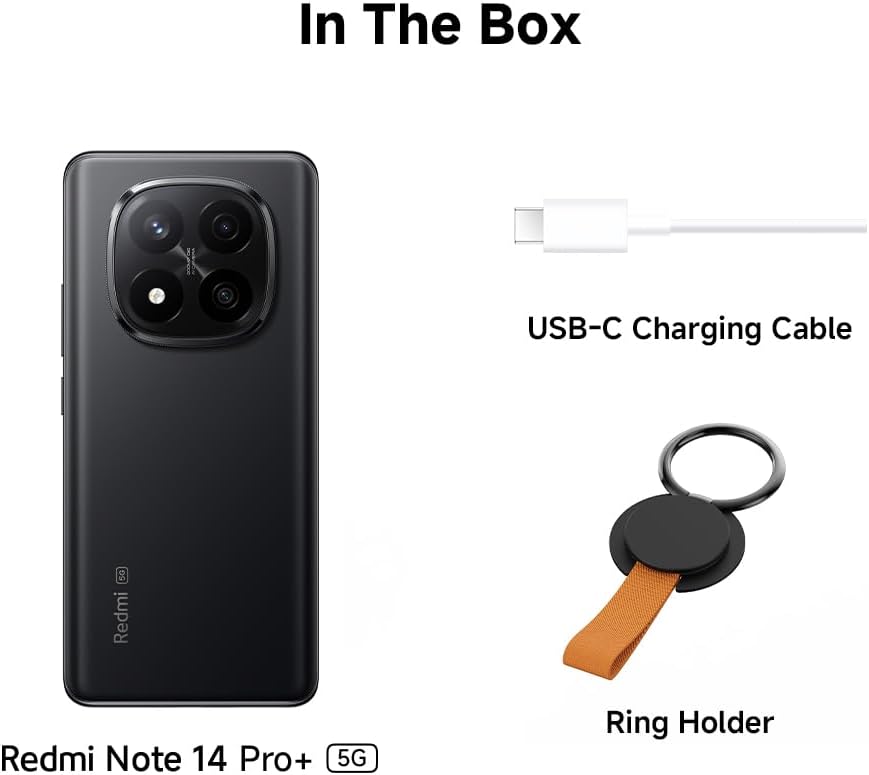
Image 3: Depiction of the items included in the product box.
3.2. Inserting SIM Card
- Locate the SIM card tray on the side of the device.
- Insert the SIM ejector tool into the small hole next to the tray and press firmly until the tray pops out.
- Place your Nano-SIM card(s) into the tray with the gold contacts facing down. Ensure proper orientation.
- Carefully push the tray back into the slot until it is flush with the device.
3.3. Initial Power On and Charging
- Press and hold the Power button (located on the side) until the Xiaomi logo appears.
- Follow the on-screen instructions to complete the initial setup, including language selection, Wi-Fi connection, and Google account setup.
- To charge the device, connect the USB-C charging cable to the phone's charging port and the other end to a compatible 120W HyperCharge power adapter (not included) or a standard USB power source.
4. Operating Instructions
4.1. Basic Navigation
The Redmi Note 14 Pro+ 5G features a responsive touchscreen. Use gestures such as tap, swipe, pinch-to-zoom, and long-press to interact with the interface. The device runs on Hyper OS, providing an intuitive user experience.
4.2. Camera Usage
The smartphone is equipped with a 200MP pro-grade AI camera system. Open the Camera application to access various modes, including Photo, Portrait, Video, and Pro mode. AI features automatically optimize settings for different scenes and subjects.
4.3. 120W HyperCharge and Battery Management
The 5110mAh battery supports 120W HyperCharge for rapid charging. For optimal battery life, avoid extreme temperatures and fully discharge the battery only occasionally. Monitor battery usage in the device settings.
4.4. AI Features
The device includes several AI-powered functionalities:
- AI Erase Pro: Intelligently removes unwanted objects or people from photos.
- AI Image Expansion: Expands the boundaries of an image using AI to generate new content.
- AI Notes: Enhances note-taking with AI capabilities.
- AI Subtitles: Provides real-time subtitles for media content.
- AI Recorder: Offers advanced recording features.
- AI Interpreter: Facilitates real-time language translation.
- Gemini: Integrates Google's AI assistant for various tasks.
- Circle to Search by Google: Allows users to circle objects on screen to initiate a Google search.
4.5. Connectivity
The Redmi Note 14 Pro+ 5G supports 5G connectivity. Ensure your SIM card and mobile plan support 5G for access to high-speed networks. The device also supports Wi-Fi and Bluetooth for wireless connections.
4.6. IP68 Dust and Water Resistance
The device is rated IP68 for dust and water resistance, meaning it can withstand immersion in fresh water up to 1.5 meters for 30 minutes. This resistance is not permanent and may decrease over time with normal wear. Avoid exposing the device to saltwater, chlorinated water, or other liquids. Damage caused by liquid immersion is not covered under warranty.
5. Maintenance
5.1. Cleaning Your Device
Use a soft, lint-free cloth to clean the screen and body of the phone. Avoid using abrasive cleaners, solvents, or aerosol sprays. If the device comes into contact with liquids other than fresh water, rinse it with fresh water and dry it thoroughly before use.
5.2. Software Updates
Regularly check for and install software updates to ensure your device has the latest features, security patches, and performance improvements. Updates can be found in the device's settings menu under 'About phone' or 'System updates'.
5.3. Screen Protection
The display is protected by Corning Gorilla Glass Victus 2, offering enhanced durability against drops and scratches. For additional protection, consider using a screen protector and a protective case.
6. Troubleshooting
If you encounter issues with your device, refer to the following common solutions:
- Device not turning on: Ensure the battery is charged. Connect the device to a charger for at least 10 minutes, then try powering it on again.
- Screen unresponsive: Restart the device by pressing and holding the Power button for about 10 seconds.
- Connectivity issues (Wi-Fi/5G): Toggle Wi-Fi or mobile data off and on. Restart your router for Wi-Fi issues. Check your SIM card insertion and mobile plan for 5G issues.
- Apps crashing: Clear the cache and data for the problematic app in Settings > Apps. If the issue persists, reinstall the app.
- Slow performance: Close unnecessary background apps. Clear cached data. Consider a factory reset if performance issues are severe (back up your data first).
For more complex issues, consult the official Xiaomi support website or contact customer service.
7. Specifications
| Feature | Specification |
|---|---|
| Model Name | Redmi Note 14 Pro+ 5G |
| Operating System | Hyper OS |
| CPU Model | Snapdragon 7s Gen 3 |
| RAM Memory | 8 GB |
| Storage Capacity | 256 GB |
| Screen Size | 6.67 Inches |
| Resolution | 1080 x 2340 |
| Refresh Rate | 120 Hz |
| Main Camera | 200MP AI Camera System |
| Battery Capacity | 5110 mAh |
| Charging | 120W HyperCharge |
| Water/Dust Resistance | IP68 |
| Display Protection | Corning Gorilla Glass Victus 2 |
| Connectivity | 5G |
| Item Weight | 400 g |
| Color | Purple |
| Audio Plug | No headphone jack |
| Batteries | 1 A batteries required (included) |
8. Warranty and Support
Your Xiaomi Redmi Note 14 Pro+ 5G smartphone is covered by a limited warranty. For detailed warranty terms and conditions, please refer to the warranty card included with your product or visit the official Xiaomi website. For technical support, software updates, and service inquiries, please visit the Xiaomi support portal or contact their customer service department in your region.


