
Introduction
Thank you for choosing the PNI SV180 Smart Water Valve. This manual provides essential information for the safe and efficient installation, operation, and maintenance of your device. Please read it thoroughly before use and retain it for future reference.
Safety Information
- Ensure the power supply is disconnected before any installation or maintenance work.
- The device operates on 5V DC. Use only the provided power cable or a compatible power source.
- This product is rated IP65, meaning it is protected against dust and low-pressure water jets. However, it is not designed for submersion.
- Installation should be performed by a qualified professional if you are unsure about plumbing or electrical connections.
- Do not attempt to disassemble or repair the device yourself. Contact support for assistance.
Package Contents
Verify that all items are present in the package:
- PNI SV180 Smart Water Valve
- Power Cable (USB to DC plug)

Image: PNI SV180 Smart Water Valve with its included power cable.
Specifications
| Feature | Specification |
|---|---|
| Model | PNI-SV180 |
| Valve Pressure | 1.0 MPa (10 bar) |
| Valve Diameter | DN25 (25 Millimeters) |
| Compatible Valve Type | Ball Valve |
| Open/Close Time | 5-10 seconds |
| Wireless Connectivity | Wi-Fi 2.4 GHz |
| Ingress Protection Rating | IP65 |
| Material | Metal (Stainless Steel appearance) |
| Dimensions (L x W x H) | 7 x 13 x 8.5 cm |
| Weight | 870 g |
| Power Supply | 5V DC |
| Manufacturer | ONLINESHOP |

Image: Close-up view of the valve connection, indicating DN25 diameter.
Setup
1. Physical Installation
- Identify the Valve: The PNI SV180 is designed to operate with standard ball valves. Ensure your existing valve is compatible.
- Mount the Device: Position the smart valve actuator over the handle of your existing ball valve. Secure it firmly using the provided mounting hardware. Ensure the actuator's rotation aligns with the valve's open/close mechanism.
- Connect Power: Plug the power cable into the smart valve and connect it to a 5V DC power source.
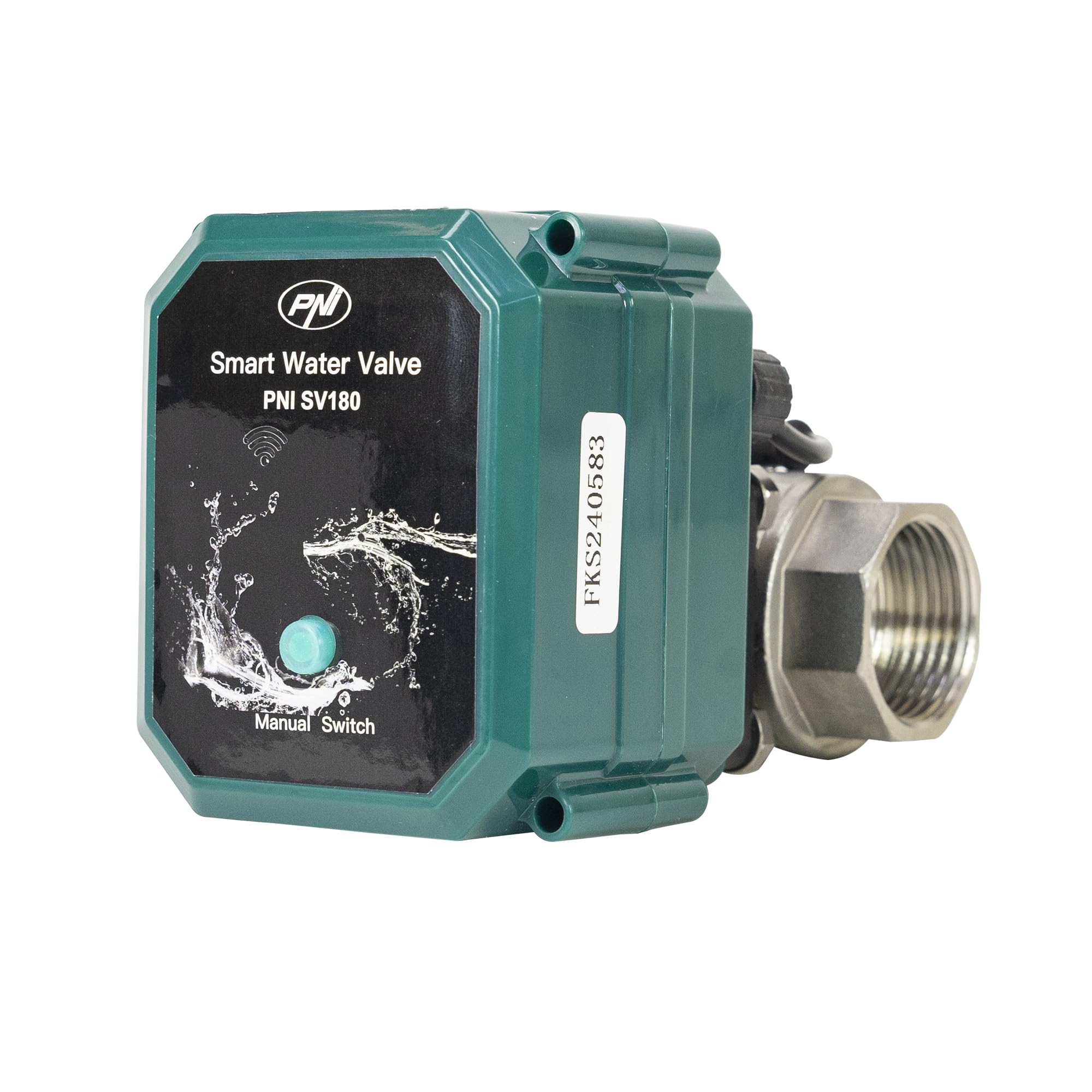
Image: The PNI SV180 Smart Water Valve actuator mounted on a ball valve.
2. App Connection (Tuya Smart Life)
- Download App: Download the "Tuya Smart" or "Smart Life" app from your smartphone's app store (iOS or Android).
- Register/Login: Create an account or log in to your existing account.
- Add Device: In the app, tap the "+" icon to add a new device. Select "Water Valve" or search for "SV180".
- Pairing Mode: Follow the app instructions to put the device into pairing mode. This usually involves pressing and holding the manual switch button on the device until the indicator light flashes rapidly.
- Connect to Wi-Fi: Enter your 2.4 GHz Wi-Fi network credentials when prompted by the app. The device will connect to your network.
- Rename Device: Once connected, you can rename the device for easier identification (e.g., "Main Water Valve").

Image: Top view of the PNI SV180 Smart Water Valve, highlighting the manual switch button.
3. Voice Assistant Integration (Optional)
- Amazon Alexa: Enable the "Tuya Smart" or "Smart Life" skill in your Alexa app. Link your Tuya/Smart Life account. Alexa will discover your PNI SV180 valve.
- Google Home: In the Google Home app, go to "Set up device" > "Works with Google" and link your Tuya/Smart Life account. Your valve will appear in your devices.
Operating Instructions
1. Manual Operation
- The device features a manual switch button on its top surface.
- Press the button once to toggle the valve's state (open or close).
2. App Control
- Open the Tuya Smart or Smart Life app.
- Select your PNI SV180 device from the list.
- Use the on-screen controls to open or close the water valve.
- The app also allows for scheduling, automation, and viewing the current status of the valve.
3. Voice Control
- Once integrated with Amazon Alexa or Google Home, you can use voice commands.
- Example commands: "Alexa, open [Valve Name]" or "Hey Google, close [Valve Name]".
Maintenance
- Cleaning: Wipe the exterior of the device with a soft, damp cloth. Do not use abrasive cleaners or solvents.
- Regular Checks: Periodically check the physical connection to the ball valve to ensure it remains secure.
- Firmware Updates: Check the Tuya Smart/Smart Life app for any available firmware updates to ensure optimal performance and security.
Troubleshooting
| Problem | Possible Cause | Solution |
|---|---|---|
| Device not powering on | No power, faulty cable/adapter | Check power connection, try a different 5V DC adapter/USB port. |
| Cannot connect to Wi-Fi | Incorrect Wi-Fi password, 5GHz network, device too far from router | Ensure 2.4 GHz Wi-Fi, verify password, move device closer to router, reset device and try pairing again. |
| Valve not responding to commands | No Wi-Fi connection, app issue, physical obstruction | Check Wi-Fi status, restart app, ensure no physical obstruction to valve movement. |
| Valve not fully opening/closing | Improper installation, valve stiffness | Re-adjust mounting, ensure the ball valve operates smoothly manually. |
Warranty and Support
The PNI SV180 Smart Water Valve comes with a standard manufacturer's warranty. For detailed warranty terms and conditions, please refer to the product packaging or contact your retailer.
For technical support, troubleshooting assistance, or inquiries regarding your product, please contact the manufacturer:
- Manufacturer: ONLINESHOP SRL
- Address: Olteniei 26A, Piatra Neamt, Neamt 610206, Romania
- Email: comenzi@pni.ro

Image: Product label showing manufacturer information, CE certification, and product barcodes (UPC: 5949066537929, Model ID: SV18000020).


