
Introduction
Thank you for choosing the KEEPHIFI KBEAR KB02 In-Ear Monitor Headphones. These headphones are designed to provide a high-fidelity audio experience, featuring bone conduction technology and a dynamic driver for clear and immersive sound. This manual provides essential information for setup, operation, and maintenance to ensure optimal performance and longevity of your device.

Image: A pair of KBEAR KB02 in-ear monitor headphones in a vibrant blue resin shell, connected by a braided cable, showcasing their design.
What's in the Box
Your KBEAR KB02 package includes the following items:
- One (1) pair of KBEAR KB02 In-Ear Monitor Headphones
- Three (3) pairs of eartips in various colors and sizes (small, medium, large)
- One (1) replaceable 2-pin 4N OFC (Oxygen-Free Copper) headphone cable with 3.5mm plug
- One (1) Product Manual (this document)

Image: The complete contents of the KBEAR KB02 product box, laid out on a white surface, showing the earbuds, detachable cable, various eartips, and user guide.
Key Features
- Bone Conduction Support: The KB02 headphones integrate a bone conduction unit within the earbud cavity. This unit transmits vibration energy to the shell and then to the human ear, enhancing audio engagement. It also provides low and very low frequency compensation for a distinct and immersive music experience.
- New Diaphragm Position Adjustment: These wired earphones feature a 10mm beryllium-plated moving coil unit and 10mm elastomers. The diaphragm is positioned closer to the headphone nozzle to reduce standing wave interference, resulting in clearer high frequencies and stable, high-quality Hi-Fi sound output.
- Exquisite Ear Cavity Design: The earphone shells are crafted using 3D printing and hand-polished, revealing a unique quicksand texture. Made from resin material, they are available in Crystal Violet, Misty Blue, and Maple Brown colors. The smooth surface is dustproof and resistant to rust, maintaining its luster over time.
- Ergonomic Design: Designed based on extensive human cochlea data analysis, the KB02 IEM earbuds are shaped for precise and comfortable fit within the ear canal. The skin-friendly silicone eartips help achieve sound isolation, suitable for various environments like libraries or during travel.
- High Purity Oxygen-Free Copper Cable: The included high-quality IEM cable ensures continuous and stable Hi-Fi music output while minimizing signal distortion. The KB02 uses a 0.78 2-pin detachable cable, a widely compatible option in the market.

Image: A visual representation of the KBEAR KB02's core features, including bone conduction, dynamic driver, resin shell, ergonomic fit, and high-purity cable.
Video: An official KEEPHIFI video highlighting the KBEAR KB02's hybrid driver system, including bone conduction, and its resin shell design.
Setup
1. Attaching the Cable
- Identify the left (L) and right (R) earbud units and the corresponding connectors on the cable. The cable connectors are typically marked with 'L' and 'R'.
- Align the 2-pin connector on the cable with the receptacle on the earbud unit. Ensure the pins are correctly oriented.
- Gently push the connector into the earbud until it clicks securely into place. Do not force the connection.
- Repeat for the other earbud.

Image: KBEAR KB02 earbuds shown with their detachable 2-pin cable, illustrating the connection points.
2. Selecting and Installing Eartips
- Choose the eartip size (small, medium, or large) that provides the most comfortable and secure fit, as well as the best sound isolation. A good seal is crucial for optimal audio performance.
- Gently remove the pre-installed eartips by twisting and pulling.
- Push the desired eartip onto the earbud nozzle until it is firmly seated.
3. Wearing the Earbuds
- Insert the earbud into your ear canal.
- Loop the cable over the top of your ear. The cable is designed with a pre-formed curve to fit comfortably over your ear, ensuring stability and reducing microphonics (cable noise).
- Adjust the earbud and cable until you achieve a snug and comfortable fit.

Image: A close-up of a person wearing the KBEAR KB02 earbuds, demonstrating the ergonomic fit and over-ear cable routing for comfort and stability.
Operating Instructions
Once properly set up, connect the 3.5mm plug of the cable to your audio source (e.g., smartphone, digital audio player, amplifier). The KBEAR KB02 headphones are designed for immediate use without additional software or drivers.
- Volume Control: Adjust the volume directly from your connected audio device.
- Audio Playback: Control playback (play, pause, skip tracks) using your audio device.
- Sound Isolation: The in-ear design and proper eartip selection provide passive noise isolation. Ensure a good seal for the best experience.
Video: An official KEEPHIFI video demonstrating the KBEAR KB02 in-ear monitors being used by a singer, highlighting their suitability for musicians and performers.
Maintenance
- Cleaning Earbuds: Regularly wipe the earbud units with a soft, dry cloth to remove dust and debris. For the earbud nozzles, gently clean with a small brush or cotton swab to prevent wax buildup.
- Cleaning Eartips: Remove eartips from the earbuds and wash them with mild soap and water. Rinse thoroughly and allow them to air dry completely before reattaching.
- Cable Care: Avoid sharp bends or excessive pulling on the cable. When not in use, coil the cable loosely to prevent tangling and damage.
- Storage: Store your KBEAR KB02 headphones in a clean, dry place, away from extreme temperatures and direct sunlight. Using a protective case is recommended to prevent physical damage.
Troubleshooting
If you encounter any issues with your KBEAR KB02 headphones, please refer to the following common solutions:
- No Sound or Intermittent Sound:
- Ensure the 3.5mm plug is fully inserted into the audio source.
- Check the connection of the 2-pin cable to the earbuds; ensure they are securely attached.
- Test with a different audio source or cable to rule out a faulty component.
- Verify that the volume on your audio device is turned up and not muted.
- Poor Sound Quality (e.g., lack of bass, muffled sound):
- Ensure the eartips create a proper seal in your ear canal. Try different sizes of eartips for a better fit.
- Clean the earbud nozzles and eartips to remove any obstructions.
- Check the audio source for any equalization settings that might be affecting the sound.
- Earbuds Falling Out:
- Experiment with different eartip sizes to find the most secure fit.
- Ensure the cable is correctly looped over your ear for added stability.
If the issue persists after trying these steps, please contact KEEPHIFI customer support for further assistance.
Specifications
| Feature | Detail |
|---|---|
| Model Name | KBEAR KB02 |
| Brand | keephifi |
| Ear Placement | In Ear |
| Form Factor | In Ear |
| Connectivity Technology | Wired |
| Headphones Jack | 3.5 mm Jack |
| Audio Driver Type | Bone Conduction Dynamic Driver |
| Noise Control | Sound Isolation (Passive) |
| Frequency Response | 20 Hz - 20 kHz (typical range for Hi-Fi) |
| Sensitivity | 108 dB |
| Impedance | 40 Ohms |
| Material | Resin (Shell) |
| Cable Feature | Detachable 0.78 2-pin, 4N OFC Cable |
| Water Resistance Level | Not Water Resistant |
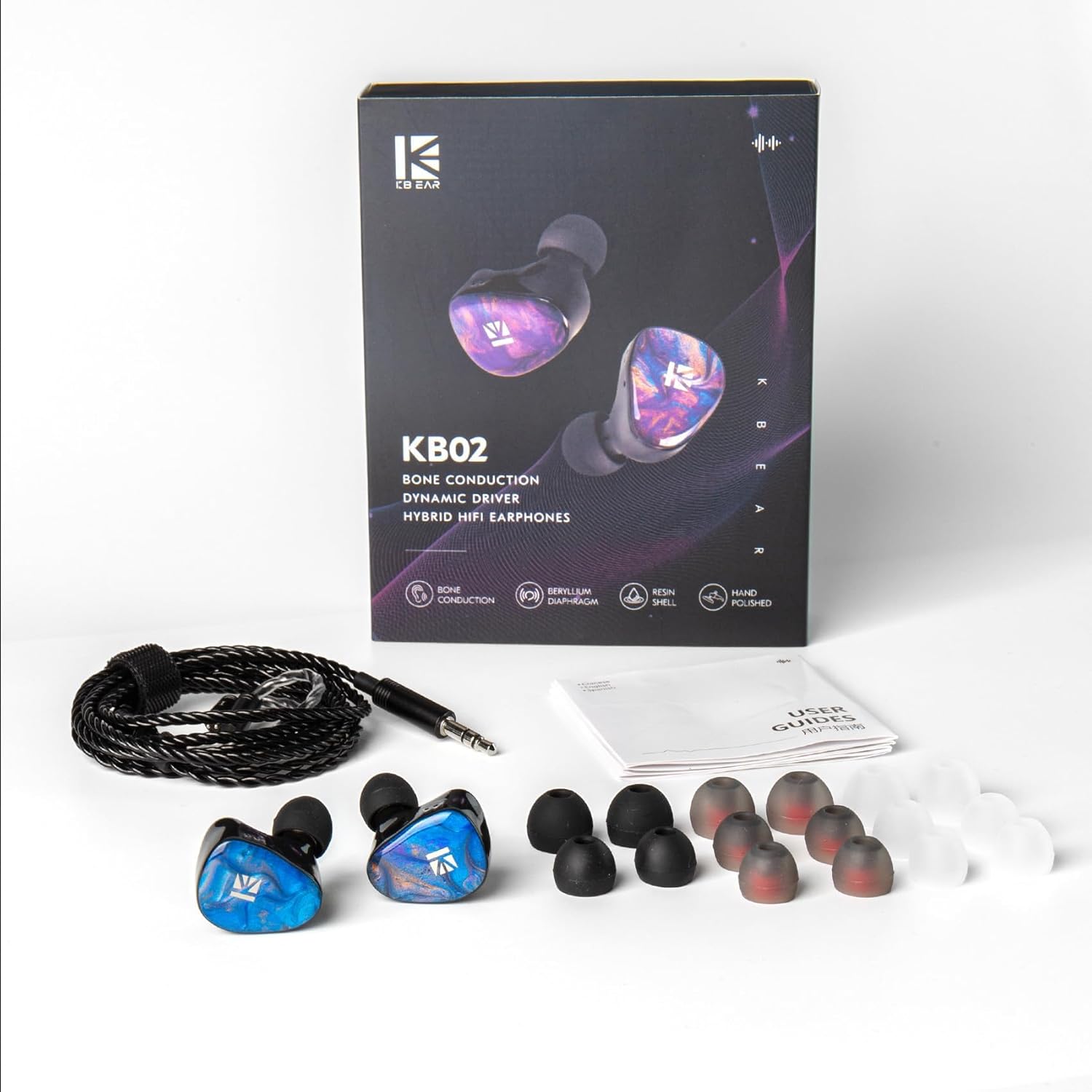
Image: A graph displaying the frequency response curve of the KBEAR KB02, indicating its audio performance across different frequencies.
Warranty and Support
KEEPHIFI provides a 1-year replacement service for the KBEAR KB02 In-Ear Monitor Headphones from the date of purchase. This warranty covers manufacturing defects and malfunctions under normal use.
For warranty claims, technical support, or any questions regarding your product, please contact KEEPHIFI customer service through the retailer where you purchased the product or visit the official KEEPHIFI store online.
Please retain your proof of purchase for warranty validation.