
1. Introduction
Thank you for choosing the BAOFENG K5Plus Two-Way Radio. This device is a high-performance communication tool designed for reliable long-range communication, featuring advanced functions such as GPS positioning, Type-C charging, DTMF signaling, and NOAA weather reception. This manual provides essential information for the safe and efficient operation of your radio. Please read it thoroughly before use.
2. Safety Information
- Battery Safety: Use only the specified Lithium-Ion battery pack. Do not short-circuit, incinerate, or disassemble the battery. Dispose of batteries properly.
- Antenna Safety: Do not touch the antenna during transmission. Avoid using the radio with a damaged antenna, as it may cause minor burns.
- Hearing Protection: Keep the volume at a comfortable level. Prolonged exposure to loud volumes may cause hearing damage.
- Explosive Environments: Turn off your radio in potentially explosive atmospheres (e.g., near gas pumps, chemical storage areas).
- Water Resistance: This device is NOT water resistant. Avoid exposure to water or moisture.
- Interference: Turn off your radio when instructed to do so in hospitals or aircraft.
3. Package Contents
Please check the package carefully to ensure all items are present:
- 1 x Portable Radio (BAOFENG K5Plus)
- 1 x 2500mAh Li-ion Battery
- 1 x Antenna
- 1 x Type-C Cable
- 1 x Belt Clip
- 1 x Lanyard
- 1 x Product Manual (this document)
- 1 x Programming Cable
4. Product Overview
The BAOFENG K5Plus features a 1.77-inch TFT large screen, a full keypad for direct frequency input and menu navigation, and a robust design for outdoor use. Key components include the antenna connector, PTT (Push-to-Talk) button, speaker, microphone, and Type-C charging port.
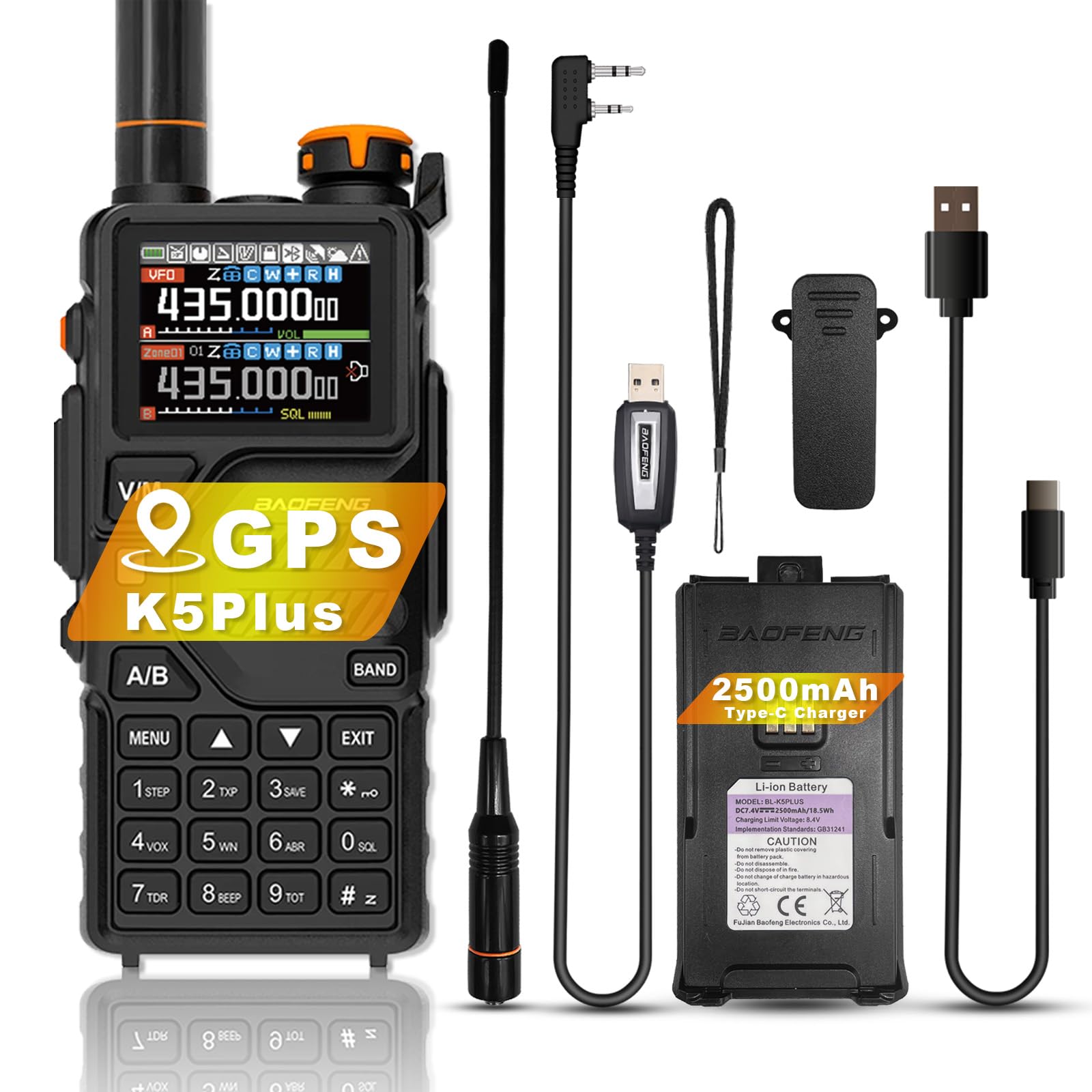
Image 1: Front view of the BAOFENG K5Plus Two-Way Radio, showing the display, keypad, and speaker.
5. Setup
5.1. Battery Installation
- Ensure the radio is turned OFF.
- Align the battery pack with the compartment on the back of the radio.
- Slide the battery into place until it clicks securely.
5.2. Charging the Battery
The BAOFENG K5Plus supports convenient Type-C USB charging.
- Ensure your radio is turned OFF.
- Plug the Type-C USB cable into the Type-C USB charging port on your battery pack.
- Connect the other end of the Type-C cable to a compatible USB power source (e.g., wall adapter, computer USB port).
- An empty battery will typically be fully charged in approximately 4 hours. The battery meter on the LCD will indicate charging status.
5.3. Antenna Attachment
- Screw the antenna clockwise onto the connector on top of the radio until it is finger-tight. Do not overtighten.
5.4. Belt Clip and Lanyard Attachment
Attach the belt clip to the designated slot on the back of the radio for easy carrying. The lanyard can be attached to the top or side loop for added security.
6. Operating Instructions
6.1. Power On/Off and Volume Control
- Power On: Rotate the power/volume knob clockwise until you hear a click.
- Power Off: Rotate the power/volume knob counter-clockwise until you hear a click.
- Volume Adjustment: Rotate the power/volume knob to adjust the listening volume.
6.2. Channel Selection
The radio supports up to 640 named memory channels. You can select channels using the keypad or the up/down navigation buttons.
- Direct Entry: Enter the channel number directly using the keypad.
- Scan Mode: Activate scan mode to automatically search for active channels.
6.3. Transmitting and Receiving
- Receiving: When a signal is detected on the current channel, the radio will automatically open the squelch and you will hear the transmission.
- Transmitting: Press and hold the PTT (Push-to-Talk) button on the side of the radio. Speak clearly into the microphone. Release the PTT button to stop transmitting and return to receive mode.
6.4. GPS Function
The BAOFENG K5Plus includes an optional GPS function for location sharing and requesting. This feature requires hardware support and specific settings.
- Activation: Access the position system menu to enable/disable GPS, set time zone, and GPS mode.
- Viewing Location: Press and hold the designated key (refer to your radio's specific key mapping) to view your current location information.
- Sharing/Requesting Location: This is a DTMF calling application. Ensure radios are on the same frequency/channel and main frequency band. Refer to the "Signaling Calls" section in the radio's on-screen menu for setting call codes, names, and local IDs.
- Note: In GPS mode, you can only view location information. To make normal voice calls, you must exit GPS mode.
6.5. DTMF Function
DTMF (Dual-Tone Multi-Frequency) is an in-band signaling method used for various applications, including signaling calls and GPS location requests.
- The radio supports DTMF encoder and DTMF manual dial.
- Refer to the radio's menu for specific DTMF settings and usage for signaling calls.
6.6. NOAA Weather Forecast
The BAOFENG K5Plus can receive 10 channels of America NOAA weather forecasts, providing timely weather alerts for the United States and Canada.
- Access the NOAA weather forecast menu to select and monitor weather channels.
6.7. VOX (Voice Activated Transmit)
VOX allows for hands-free operation by automatically transmitting when it detects your voice. Adjust VOX sensitivity in the radio's menu.
6.8. Alarm Function
The radio includes an alarm function for emergency situations. Consult the menu for activation and settings.
6.9. Programming
The BAOFENG K5Plus is PC programmable. Use the included programming cable and compatible software (available from BAOFENG's official website or authorized dealers) to customize channels, frequencies, and other advanced settings.
7. Features
- 1.77” TFT large screen, full keypad, fully open menu operation
- Built-in input method for editing channel names
- 10 Channels America NOAA weather forecast reception
- Type-C direct charging and charging stand compatibility
- DTMF encoder and DTMF manual dial
- VOX (voice activated transmit)
- Alarm function
- 50 CTCSS tones and 105 DCS codes
- 10 zones storage, up to 640 named memory channels
- Display illumination programmable via keypad
- High or low power selectable
- Function beep on the keyboard
- Battery saving function
- Programmable repeater offset
- Scan mode
- Transmission time-out timer
- Built-in CTCSS/DCS tones
- Busy channel lock out
- PC programmable
- Cross band reception
- Ten (10) levels of Squelch adjustment
- One touch search frequency
- End of transmission tone (Roger Beep)
- Analog signaling DTMF, 2TONE, 5TONE, BDC1200 codecs
- GPS positioning function, location sharing and requesting location information from others
8. Specifications
| Feature | Specification |
|---|---|
| Model Number | K5Plus |
| Frequency Range F1 (RX/TX) | 136-174MHz |
| Frequency Range F2 (RX/TX) | 220-260MHz |
| Frequency Range F3 (RX) | 400-520MHz |
| Frequency Range F3 (TX) | 400-480MHz |
| Frequency Range F4 (AM RX) | 108-136MHz |
| Frequency Range F5 (Police RX) | 350-390MHz |
| Frequency Range F6 (FM RX) | 65-108MHz |
| Number of Channels | 640 |
| Battery Type | 1 Lithium Ion battery (2500mAh) |
| Battery Life | Up to 48 Hours (typical use) |
| Charging Port | Type-C USB |
| Item Weight | 1.06 pounds (approx. 16.93 ounces) |
| Product Dimensions | 1.57 x 2.54 x 4.92 inches (D x W x H) |
| Talking Range Maximum | 6.21 Miles (under optimal conditions) |
| Water Resistance Level | Not Water Resistant |
9. Maintenance
- Cleaning: Use a soft, damp cloth to clean the radio's exterior. Do not use harsh chemicals or solvents.
- Battery Care: Store the battery in a cool, dry place when not in use. Avoid fully discharging the battery for extended periods.
- Antenna: Ensure the antenna is securely attached. Do not bend or force the antenna.
- Storage: If storing the radio for a long time, remove the battery.
10. Troubleshooting
- Radio does not power on: Check if the battery is properly installed and charged. Ensure the power/volume knob is turned on.
- Cannot transmit or receive: Verify that the antenna is attached. Check the selected frequency/channel. Ensure the battery has sufficient charge. Adjust squelch level.
- Poor audio quality: Check volume level. Ensure the antenna is secure. Move to an area with better signal reception.
- GPS not working: Ensure GPS function is enabled in the menu. Move to an open outdoor area for better satellite reception.
- Radio is unresponsive: Try removing and reinserting the battery to perform a soft reset.
11. Warranty and Support
The BAOFENG K5Plus comes with a 1-year warranty provided exclusively through "Shiqun Electronics Co., Ltd". Please retain your proof of purchase for warranty claims.
For technical support, troubleshooting assistance beyond this manual, or warranty inquiries, please contact the seller or an authorized BAOFENG service center.


