
LEKATO MT-32W
Contents
LEKATO MT-32W Metronome Tuner and Bluetooth Page Turner Pedal User Manual
1. Introduction
This manual provides comprehensive instructions for the operation and maintenance of your LEKATO MT-32W Metronome Tuner and Bluetooth Page Turner Pedal. This device combines a digital metronome, tuner, and tone generator with a wireless Bluetooth page turner, designed to assist musicians in practice and performance. Please read this manual thoroughly before use to ensure proper functionality and longevity of the product.
2. Product Overview
The LEKATO MT-32W system includes two main components: the 3-in-1 Metronome Tuner (MT-32W) and the Wireless Bluetooth Page Turner Pedal.
2.1. Package Contents
- LEKATO MT-32W Metronome Tuner
- Wireless Bluetooth Page Turner Pedal
- USB Charging Cable
- Clip-on Pickup (for tuner)
- User Manual (this document)
2.2. Device Layout and Controls

Figure 1: LEKATO Metronome Tuner and Bluetooth Page Turner Pedal.
2.2.1. MT-32W Metronome Tuner

Figure 2: Front view of the MT-32W Metronome Tuner.

Figure 3: MT-32W Metronome Tuner with key features labeled.
- Display Screen: Color screen for mode, tuning, and metronome information.
- Power Button (⑂): Press and hold to turn on/off.
- Mode Button (M): Cycles through Tuner, Metronome, and Tone Generator modes.
- Up/Down Buttons (▲/▼): Adjust parameters (e.g., tempo, pitch).
- Vocal Count Button (∼): Activates/deactivates human voice count in metronome mode.
- Speaker: For metronome beats and tone generator sounds.
- Charging Port: USB-C port for recharging.
- Headphone Jack: For private listening.
- Pickup Jack: For connecting the clip-on pickup.
- Sound Adjustment Wheel: Controls volume.
- Bracket: Foldable stand for tabletop use.
2.2.2. Wireless Bluetooth Page Turner Pedal

Figure 4: Controls on the Bluetooth Page Turner Pedal.
- Power Switch (OFF/ON): Turns the pedal on or off.
- Mode Button: Cycles through 5 page turning modes.
- Repeat Button: Activates/deactivates repeat function.
- Left Pedal: Functions as 'Page Up' or 'Left' depending on mode.
- Right Pedal: Functions as 'Page Down' or 'Right' depending on mode.
- Charging Port: USB-C port for recharging.
- LED Indicators: Show power, mode, and Bluetooth status.
3. Setup
3.1. Charging the Devices
Both the MT-32W Metronome Tuner and the Bluetooth Page Turner Pedal are equipped with rechargeable batteries. Before first use, fully charge both devices.
- Connect the provided USB charging cable to the charging port on each device.
- Connect the other end of the cable to a standard USB power adapter (not included) or a computer USB port.
- The charging indicator will illuminate during charging and turn off or change color when fully charged.
3.2. Powering On/Off
- MT-32W Metronome Tuner: Press and hold the Power Button (⑂) for approximately 2 seconds to turn on or off.
- Bluetooth Page Turner Pedal: Slide the Power Switch to the 'ON' position to turn on, and 'OFF' to turn off.
3.3. Bluetooth Pairing (Page Turner Pedal)
To use the page turner pedal, it must be paired with your device (smartphone, tablet, or computer) via Bluetooth.

Figure 5: Bluetooth connection compatibility with various devices.
- Ensure the page turner pedal is charged and powered on. The Bluetooth indicator light will flash, indicating it is in pairing mode.
- On your device (e.g., iPad, iPhone, Android tablet, laptop), go to the Bluetooth settings.
- Search for available devices. The pedal should appear as 'LEKATO Page Turner' or similar.
- Select the pedal to pair. Once paired, the Bluetooth indicator light on the pedal will stop flashing and remain solid.
- The pedal is compatible with iOS, Android, and Windows systems.
4. Operating the MT-32W Metronome Tuner
Press the Mode (M) button to cycle through the three main functions: Tuner, Metronome, and Tone Generator.
4.1. Tuner Mode
In Tuner mode, the display shows the note, pitch deviation, and A4 calibration.
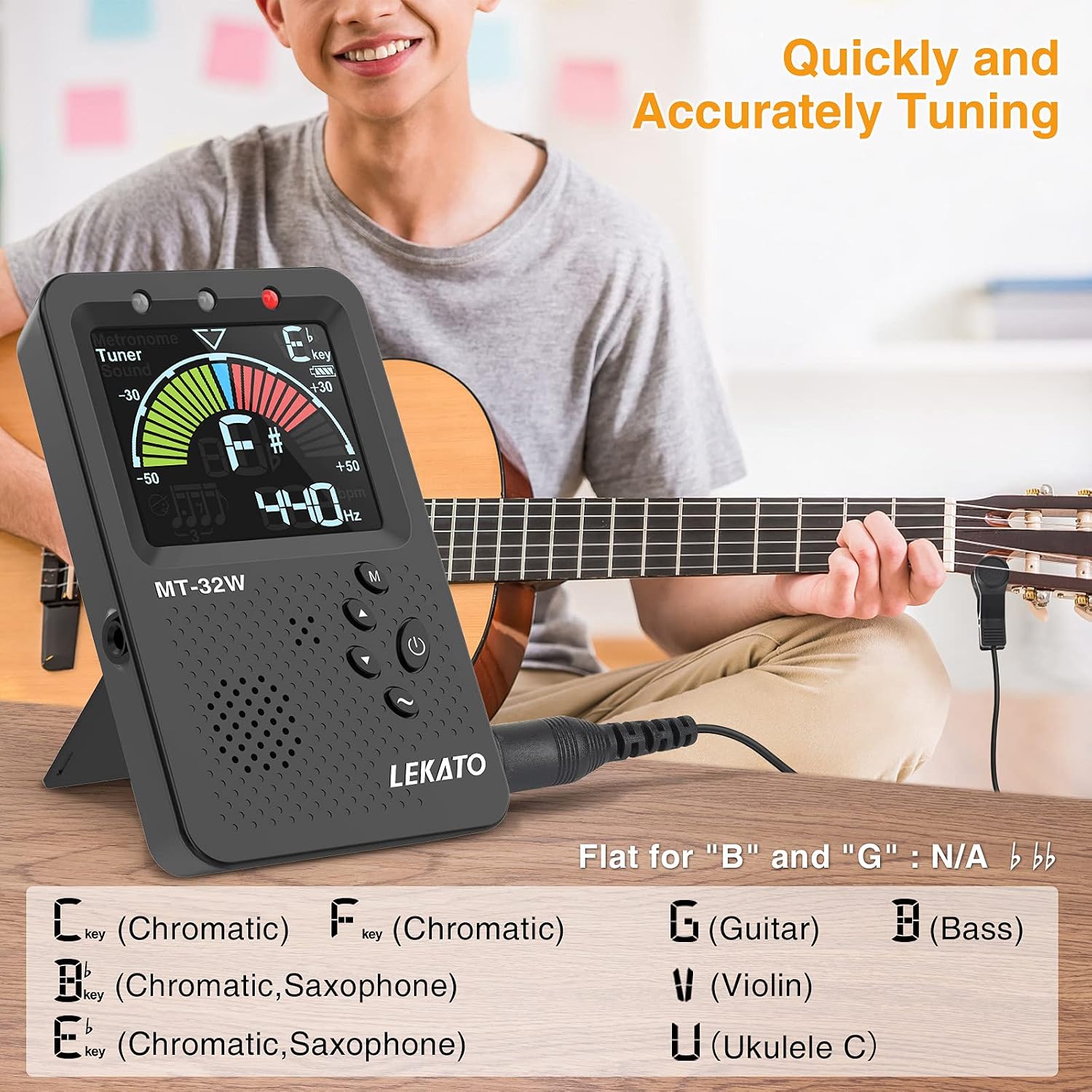
Figure 6: Tuner mode displaying instrument options and tuning interface.
- Select Input: Use the built-in microphone or connect the clip-on pickup to the Pickup Jack for direct instrument vibration detection.
- Select Instrument Mode: Repeatedly press the Mode (M) button (or a dedicated instrument button if available, refer to screen icons) to cycle through tuning modes: Chromatic (C), Guitar (G), Bass (B), Violin (V), Ukulele (U), Saxophone (E♭ key, F key).
- Adjust A4 Calibration: Use the Up/Down (▲/▼) buttons to adjust the A4 reference frequency, typically from 430Hz to 450Hz (default is 440Hz).
- Tune Your Instrument: Play a single note on your instrument. The display will show the note name and a meter indicating if the pitch is flat, sharp, or in tune. Adjust your instrument until the needle is centered and the display shows green.
4.2. Metronome Mode
In Metronome mode, the device provides a steady beat to help with rhythm and timing.
Figure 7: Metronome mode showing BPM and beat settings, with vocal count option.
- Adjust Tempo (BPM): Use the Up/Down (▲/▼) buttons to set the desired beats per minute (BPM), ranging from 30 to 250.
- Set Beat/Time Signature: Press the Mode (M) button briefly to cycle through beat settings (e.g., 0/4, 1/4, 2/4, 3/4, 4/4, 5/4, 6/4, 7/4, 8/4, 9/4). Use Up/Down (▲/▼) to adjust the beat value.
- Vocal Count: Press the Vocal Count (∼) button to toggle the human voice count on or off. When active, the metronome will vocalize the beat numbers.
- Adjust Volume: Use the Sound Adjustment Wheel on the side of the device to control the metronome's volume.
- Start/Stop: Press the Power Button (⑂) briefly to start or stop the metronome.
4.3. Tone Generator Mode
In Tone Generator mode, the device produces a continuous tone at a selected pitch.
- Select Note: Use the Up/Down (▲/▼) buttons to select the desired note and octave.
- Adjust Volume: Use the Sound Adjustment Wheel to control the volume of the generated tone.
5. Operating the Bluetooth Page Turner Pedal
Once paired with your device, the pedal allows hands-free page turning in compatible applications.
5.1. Page Turning Modes
The pedal offers 5 different control modes to suit various applications and operating systems. Press the Mode Button to cycle through these modes.

Figure 8: Table of page turning modes and their functions.
- Mode 1 (Up ↑ Dn ↓): Left Pedal = Page Up, Right Pedal = Page Down. (Common for sheet music apps)
- Mode 2 (Left ← Right →): Left Pedal = Left Arrow, Right Pedal = Right Arrow.
- Mode 3 (Up ↑ Down ↓): Left Pedal = Up Arrow, Right Pedal = Down Arrow.
- Mode 4 (Left-click ▣ Right-click ▣): Left Pedal = Left Mouse Click, Right Pedal = Right Mouse Click.
- Mode 5 (Space ▣ Enter ▣): Left Pedal = Spacebar, Right Pedal = Enter Key.
Select the mode that best suits your application or operating system. The active mode is indicated by the LED lights on the pedal.
5.2. Repeat Function
Press the Repeat Button to toggle the repeat function on or off. When active, holding down a pedal will continuously trigger its action (e.g., continuously scroll pages).
5.3. Compatibility
The LEKATO page turner pedal is compatible with most popular music reading applications and multimedia platforms on iOS, Android, Mac, and Windows devices.
6. Maintenance
6.1. Cleaning
Wipe the devices with a soft, dry cloth. Do not use abrasive cleaners, solvents, or immerse the devices in water.
6.2. Battery Care
- To prolong battery life, avoid fully discharging the devices frequently.
- Recharge the devices regularly, even if not in frequent use.
- Store in a cool, dry place when not in use for extended periods.
6.3. Storage
Store the devices in a clean, dry environment away from extreme temperatures, direct sunlight, and moisture.
7. Troubleshooting
| Problem | Possible Cause | Solution |
|---|---|---|
| Device does not power on. | Low battery. | Charge the device fully. |
| MT-32W tuner is inaccurate. | Incorrect A4 calibration; noisy environment; improper pickup placement. | Adjust A4 to 440Hz (or desired); use clip-on pickup; ensure pickup is securely attached to instrument. |
| Metronome sound is too low/high or absent. | Volume setting; headphone connected. | Adjust the Sound Adjustment Wheel; disconnect headphones if sound is desired from speaker. |
| Page turner pedal not connecting via Bluetooth. | Pedal not in pairing mode; device Bluetooth off; already paired to another device. | Ensure pedal is on and indicator is flashing; enable Bluetooth on your device; unpair from other devices if necessary. |
| Page turner pedal not responding in app. | Incorrect mode selected; app not compatible; app requires specific settings. | Cycle through modes to find the correct one; check app settings for external controller support. |
8. Specifications
8.1. MT-32W Metronome Tuner
- Functions: Tuner, Metronome, Tone Generator
- Tuning Modes: Chromatic, Guitar, Bass, Violin, Ukulele, Saxophone (E♭, F)
- A4 Frequency: 430Hz - 450Hz
- Tempo Range: 30 - 250 bpm
- Beat Range: 0, 1, 2, 3, 4, 5, 6, 7, 8, 9
- Power: Rechargeable Lithium Battery
- Display: Color LCD
8.2. Bluetooth Page Turner Pedal
- Connectivity: Bluetooth Wireless
- Control Modes: 5 (Page Up/Down, Left/Right Arrow, Up/Down Arrow, Left/Right Click, Space/Enter)
- Compatibility: iOS, Android, Windows, Mac
- Power: Rechargeable Lithium Battery
9. Warranty and Support
For warranty information or technical support, please refer to the product packaging or contact LEKATO customer service through the retailer where the product was purchased. Keep your purchase receipt as proof of purchase.
Documents and downloads
Ask a question about this manual
Ask about setup, troubleshooting, compatibility, parts, safety, or missing instructions. Manuals+ will review the question and use this page’s manual context to help answer it.