
1. Introduction
This manual provides comprehensive instructions for the installation, operation, and maintenance of your Heltecbms 4S NCM/LFP Active Balancer with Display. This device is designed to actively balance the voltage of individual cells within a 4-series (4S) lithium battery pack, including ternary lithium, lithium iron phosphate (LiFePO4), and lithium titanate chemistries. It ensures optimal performance and extends the lifespan of your battery system by maintaining cell voltage consistency.
1.1 Package Contents
- Heltecbms 4S NCM/LFP Active Balancer with Display
- Balance Cable Harness
- Mounting Screws (if applicable)
- User Manual (this document)
2. Safety Precautions
Failure to follow these safety instructions may result in fire, electric shock, or other injury or damage.
- Design Parameters: Always adhere to the design parameters and usage conditions specified in this manual. Deviating from these parameters can damage the balancer and potentially the battery pack.
- Connection Order: When connecting the cable to the battery, follow the order provided in the instruction manual. Verify all connections before connecting to the balancer unit.
- Heat Generation: The product generates heat during operation. Avoid using it in high-temperature environments to prevent overheating.
- Abnormal Operation: If any abnormal situation occurs during use, immediately discontinue use. Contact the manufacturer or qualified maintenance personnel for repair.
- Battery Cell Quality: Ensure the quality of battery cells to minimize risks such as combustion. This product has undergone extensive reliability tests, exceeding general equalizing equipment on the market.
- Voltage Compatibility: This balancer is suitable for battery packs with a working voltage range of 1.8V-4.5V per cell. Do not use with incompatible battery types or voltage ranges.
3. Setup and Installation
3.1 Balancer Components
Familiarize yourself with the main components of the Heltecbms 4S Active Balancer before installation:

Figure 3.1: Balancer Component Overview

Figure 3.2: Component Definitions
3.3 Wiring Instructions
Follow these steps carefully to connect the balancer to your 4S battery pack. Incorrect wiring can cause damage to the balancer or battery.
- Identify the negative terminal (B-) of your first battery cell and connect the black wire from the balance cable harness to it.
- Connect the next wire (typically red or white, depending on the harness) to the positive terminal of the first cell (B1+).
- Continue connecting the remaining wires in sequence to the positive terminals of each subsequent cell (B2+, B3+, B4+). Ensure each wire corresponds to the correct cell positive terminal.
- Once all individual cell wires are securely connected to the battery terminals, plug the balance cable harness connector into the designated port on the Heltecbms Active Balancer (labeled 'B' in Figure 3.1).

Figure 3.3: Balancer Connected to Battery Pack
3.4 Visual Wiring Guide
Video 3.1: Demonstration of connecting the 4S Active Balancer to a battery pack. This video illustrates the step-by-step process of wiring the balance leads to individual battery cells and then connecting the harness to the balancer unit, showing the initial power-up and display activation.
4. Operating Instructions
4.1 Display Interface
The Heltecbms 4S Active Balancer features a clear display that provides real-time information about your battery pack's cell voltages and overall balance status. The display shows individual cell voltages (S1, S2, S3, S4) on the left and the total battery voltage on the right.

Figure 4.1: Balancer Display Showing Cell Voltages
4.2 Balancing Process
The balancer automatically initiates the equalization process when connected to a battery pack with cell voltage differences. It uses a capacitor-based energy transfer method to move charge from higher voltage cells to lower voltage cells, ensuring all cells reach a balanced state. The equilibrium current ranges from 0-5.5A, decreasing as the battery becomes more balanced. The balance voltage accuracy is within 5mV.

Figure 4.2: Active Balancing Principle
4.3 Sleep Mode and Protection
The balancer includes a manual sleep switch (labeled 'A' in Figure 3.1) to conserve power. In sleep mode, the current consumption is less than 0.1mA. It also features under-voltage sleep protection: if any cell voltage drops below 3.0V, the balancing process will automatically stop, and the device will enter standby mode to prevent over-discharge.
5. Maintenance
To ensure the longevity and reliable operation of your Heltecbms Active Balancer, consider the following maintenance guidelines:
- Cleaning: Keep the device clean and free from dust and debris. Use a soft, dry cloth for cleaning. Avoid using liquids or abrasive cleaners.
- Environmental Conditions: Store and operate the balancer within the specified operating temperature range of -10°C to 60°C. Avoid exposure to excessive moisture or direct sunlight.
- Connection Integrity: Periodically check all wiring connections to ensure they are secure and free from corrosion. Loose connections can affect balancing performance.
- Inspection: Regularly inspect the balancer for any signs of physical damage. If damage is observed, discontinue use and contact support.
6. Troubleshooting
This section addresses common issues you might encounter with the Heltecbms Active Balancer. If you experience problems not covered here, please contact customer support.
| Problem | Possible Cause | Solution |
|---|---|---|
| Display is off or blank. | Balancer is in sleep mode or not receiving power. | Press the manual sleep switch (A) to wake the display. Check all battery connections to ensure proper power supply. Verify battery cell voltages are above 3.0V. |
| Balancing not occurring or very slow. | Small voltage difference between cells, or a faulty connection. | The balancer works most actively with larger voltage differences. If differences are minimal (e.g., <0.01V), balancing current will be low. Check all balance wire connections for secure contact. Ensure battery cells are within the operating voltage range. |
| Balancer feels warm during operation. | Normal operation, especially during active balancing. | This is expected. Ensure adequate ventilation around the balancer. If it becomes excessively hot or emits smoke/odor, disconnect immediately and contact support. |
| Error message on display (if applicable). | Specific error condition. | Refer to the display's error code (if any) and consult the manufacturer's support for specific guidance. |
7. Technical Specifications
The following table outlines the key technical specifications for the Heltecbms 4S NCM/LFP Active Balancer:
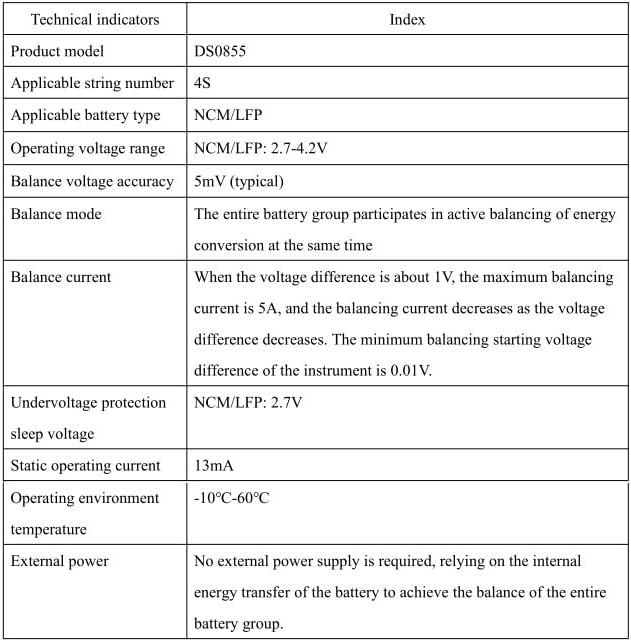
Figure 7.1: Technical Specifications Table
| Feature | Specification |
|---|---|
| Product Model | DS0855 |
| Applicable String Number | 4S |
| Applicable Battery Type | NCM/LFP (Ternary Lithium, Lithium Iron Phosphate, Lithium Titanate) |
| Operating Voltage Range | 1.8V-4.5V per cell (NCM/LFP: 2.7-4.2V) |
| Balance Voltage Accuracy | Within 5mV (typical) |
| Balance Mode | Entire battery group participates in active balancing of energy conversion. |
| Balance Current | 0-5.5A (max 5A when voltage difference is ~1V, decreases with smaller difference; min starting difference 0.01V) |
| Undervoltage Protection Sleep Voltage | 3.0V (NCM/LFP: 2.7V) |
| Static Operating Current | Approximately 12mA (13mA) |
| Operating Environment Temperature | -10°C to 60°C |
| External Power | Not required; relies on internal energy transfer of the battery. |
| Recommended Battery Capacity | 60-300AH |
8. Warranty and Support
Heltecbms is committed to providing reliable products and excellent customer service. If you encounter any issues or have questions regarding your 4S NCM/LFP Active Balancer, please do not hesitate to contact our support team.
- Customer Service: We offer 24-hour online service. For assistance, please email SELLER SUPPORT directly.
- Contact: For support, please refer to the contact information provided with your purchase or on the official Heltecbms website.


