
AULA S98 Pro
AULA S98 Pro Wireless Mechanical Keyboard User Manual
Model: S98 Pro | Brand: AULA
Product Overview
The AULA S98 Pro is a versatile mechanical keyboard featuring tri-mode connectivity (2.4GHz wireless, Bluetooth 5.0, and USB-C wired), a smart LCD screen, and a multi-function knob. It is designed for a comfortable and customizable typing experience with hot-swappable switches and PBT keycaps.

Image: The AULA S98 Pro mechanical keyboard, showcasing its full layout, integrated LCD screen, and multi-function knob. The keyboard features RGB backlighting visible beneath the keys.
What's Included
- AULA S98 Pro Mechanical Keyboard x1
- USB Cable x1
- 2-in-1 Keycap & Switch Puller x1
- 2.4GHz Receiver x1
- Extra Leobog Star Vector Switches x2
- User Manual x1

Image: A visual representation of all items included in the AULA S98 Pro keyboard package, including the keyboard, USB cable, keycap/switch puller, 2.4GHz receiver, and extra switches.
Setup
Initial Charging
Before first use, it is recommended to fully charge the keyboard. Connect the provided USB-C cable to the keyboard's USB-C port and the other end to a power source (e.g., computer USB port, USB wall adapter). The LCD screen will indicate charging status.

Image: A close-up of the AULA S98 Pro keyboard highlighting its 5000mAh high-capacity battery, indicating long usage times with and without backlighting.
Connecting the Keyboard
The AULA S98 Pro supports three connection modes: 2.4GHz Wireless, Bluetooth 5.0, and USB-C Wired.
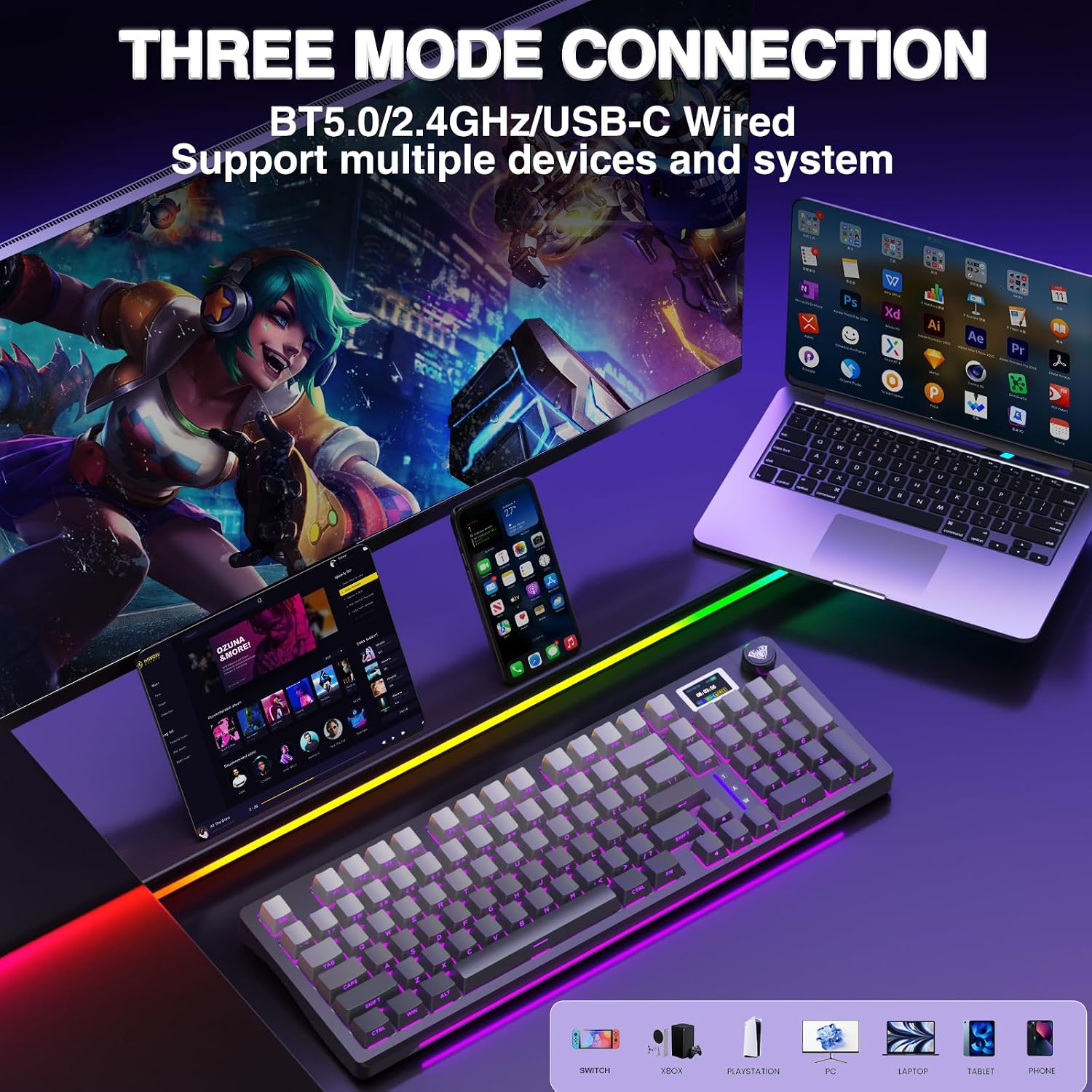
Image: The AULA S98 Pro keyboard connected to multiple devices (PC, laptop, tablet, smartphone) illustrating its tri-mode connectivity options: 2.4GHz Wireless, USB-C Wired, and Bluetooth 5.0.
2.4GHz Wireless Connection
- Locate the 2.4GHz USB receiver.
- Plug the receiver into an available USB port on your computer.
- On the keyboard's LCD screen, use the multi-function knob to select the 2.4GHz wireless mode. The keyboard should automatically connect.
Bluetooth 5.0 Connection
- On the keyboard's LCD screen, use the multi-function knob to select one of the Bluetooth channels (BT1, BT2, or BT3).
- The keyboard will enter pairing mode.
- On your device (PC, laptop, tablet, smartphone), enable Bluetooth and search for "AULA S98 Pro".
- Select the keyboard to pair. The LCD screen will confirm successful connection.
- The keyboard can save up to five devices and can be easily switched using the knob.
USB-C Wired Connection
- Connect the provided USB-C cable to the keyboard's USB-C port.
- Connect the other end of the USB-C cable to an available USB port on your computer.
- The keyboard will automatically switch to wired mode.

Image: A detailed view of the AULA S98 Pro keyboard's side, showing the USB-C port for wired connection and charging, and the ON/OFF switch for power management.
Operating Instructions
Smart LCD Screen and Multi-function Knob
The smart LCD screen displays various information such as date, time, battery level, system, connection mode, and status indicators. The multi-function knob allows for quick adjustments.

Image: A close-up of the AULA S98 Pro's smart LCD screen and multi-function knob, detailing how to adjust settings like system, connection mode, volume, RGB light mode, language, and screen image/GIF.
- Rotate Knob: Navigate through menu options on the LCD screen.
- Press Knob: Confirm selection or enter a menu.
- Adjust System: Rotate to select WIN/MAC/IOS/Android system.
- Adjust Volume: Press the knob to enter volume adjustment, then rotate to change volume. Press again to exit.
- RGB Light Mode: Rotate to cycle through 19 RGB lighting effects.
- Screen Image/GIF: Custom images or GIFs can be set via the software (Windows system, wired mode only).
RGB Backlighting
The keyboard features 19 RGB lighting effects and over 16.8 million colors, including a front side light. Adjustments can be made via the multi-function knob or the custom software.

Image: The AULA S98 Pro keyboard illuminated with vibrant RGB backlighting, demonstrating the customizable lighting effects and the front side light. Instructions for adjusting light mode, brightness, speed, and colors using the Fn key combinations are also shown.
Fn Key Combinations for RGB Adjustment:
- Fn + R_Shift: Switch light bar mode.
- Fn + R_Ctrl: Switch light bar speed.
- Fn + .>: Switch light bar brightness.
- Fn + /?: Switch light bar colors.
Programmable Software
The S98 Pro driver allows for full customization, including key mapping, macro definitions, sleep time, on-screen GIF images, and RGB lighting effects (including music rhythm backlight). The driver is officially released by AULA.
Note: The driver only supports Windows systems and requires the keyboard to be in wired mode for configuration.
Download the driver via: bit.ly/m/AULA

Image: Screenshots of the AULA S98 Pro custom driver interface, showing options for customizing backlighting, macro recording and editing, calibrating screen time, and customizing GIFs. The note about Windows system and wired mode is highlighted.
Maintenance
Cleaning the Keyboard
- Disconnect the keyboard from all power sources and devices before cleaning.
- Use a soft, lint-free cloth slightly dampened with water or a mild cleaning solution to wipe the keycaps and keyboard surface.
- For dust and debris between keys, use compressed air.
- Avoid using harsh chemicals, abrasives, or solvents.
Replacing Switches and Keycaps (Hot-Swappable)
The S98 Pro keyboard features a hot-swappable base compatible with 3-pin or 5-pin switches, allowing for easy customization without soldering. A keycap/switch puller is included.
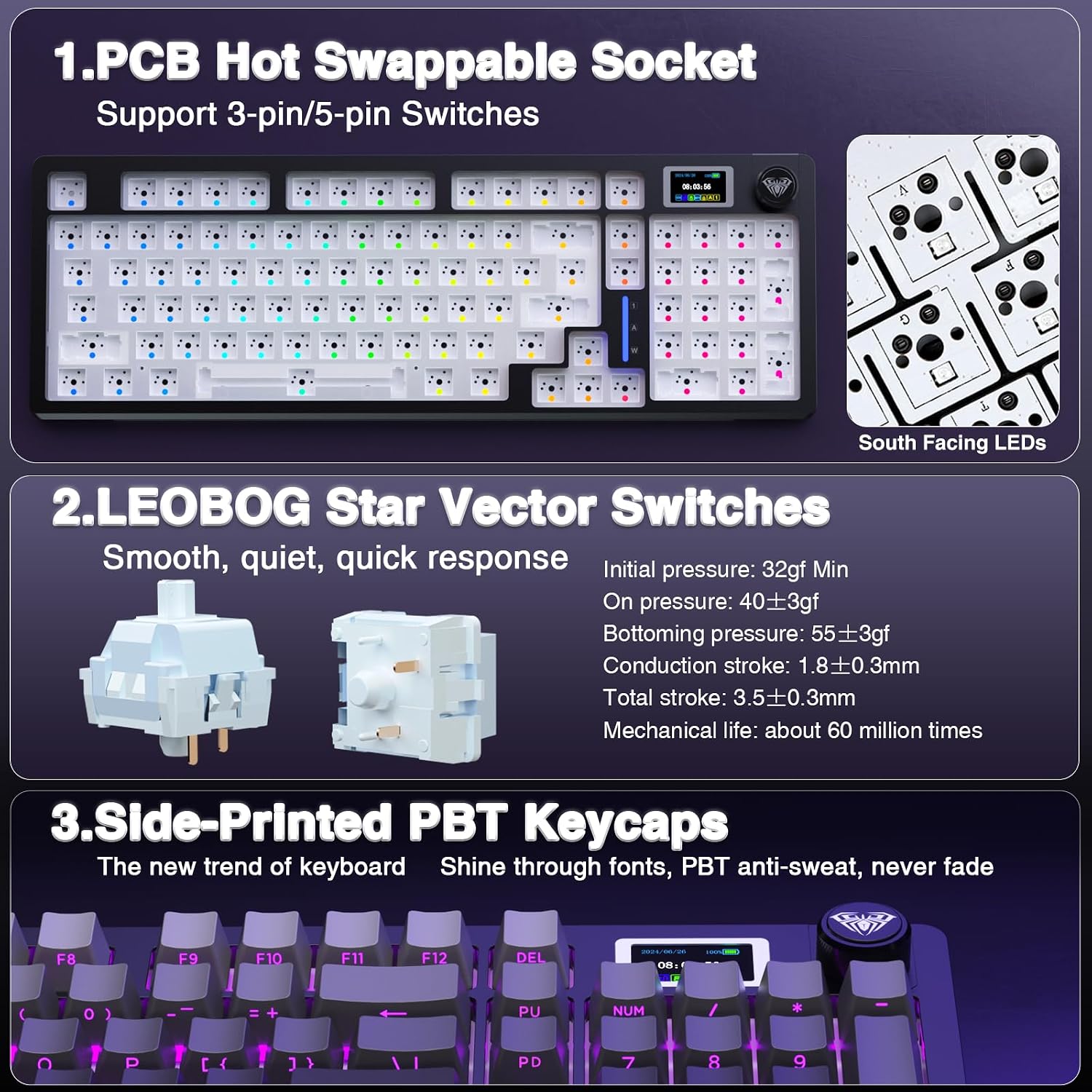
Image: A detailed view illustrating the AULA S98 Pro's hot-swappable PCB socket supporting 3-pin and 5-pin switches, the Leobog Star Vector switches, and the side-printed PBT keycaps. This image demonstrates the ease of switch replacement.
- Important: Turn off the power to the keyboard before replacing switches.
- Use the keycap puller to gently remove the desired keycap.
- Use the switch puller to carefully grip the switch and pull it straight up to remove it from the PCB.
- Align the pins of the new switch with the holes on the PCB and press down firmly until it clicks into place. Ensure pins are not bent.
- Place the keycap back onto the new switch.
Troubleshooting
| Problem | Possible Cause | Solution |
|---|---|---|
| Keyboard not responding | Low battery, incorrect connection mode, loose cable/receiver, keyboard off. | Charge the keyboard. Ensure correct mode (2.4G/BT/Wired) is selected. Check cable/receiver connection. Turn keyboard ON. |
| Bluetooth connection issues | Not in pairing mode, interference, device limit reached. | Ensure keyboard is in BT pairing mode. Move closer to device. Try a different BT channel (BT1/BT2/BT3). Remove old pairings if necessary. |
| LCD screen not displaying correctly / GIF upload failure | Software not installed, incorrect mode for software, software glitch. | Download and install the official AULA S98 Pro driver. Ensure keyboard is in wired mode when using the software. Restart software/keyboard. |
| RGB lighting not working | Lighting turned off, incorrect setting. | Adjust RGB settings via knob or software. Ensure lighting is enabled. |
| Keys not registering after switch replacement | Switch not fully seated, bent pins. | Turn off keyboard power. Re-seat the switch firmly. Check for bent pins on the switch and straighten them carefully if found. |
Specifications
- Model: S98 Pro
- Connectivity: 2.4GHz Wireless, Bluetooth 5.0, USB-C Wired
- Compatible Devices: Gaming Console, Laptop, PC, Smartphone, Tablet
- Keyboard Type: Mechanical
- Switches: Pre-lubed Linear Switches (Hot-Swappable, supports 3-pin/5-pin)
- Keycaps: Side-Printed PBT Keycaps
- Backlighting: RGB (16.8 million colors, 19 effects, south-facing LEDs)
- Battery Capacity: 5000mAh Lithium Ion (included)
- Battery Life: Approx. 20 hours (Backlit ON), Approx. 66.5 hours (Backlit OFF)
- Special Features: Smart LCD Screen, Multi-function Knob, Programmable Keys, Advanced Gasket-Mount Structure with 5 layers of sound-absorbing foam, Two-stage Adjustable Kickstand.
- Number of Keys: 96
- Product Dimensions: 16 x 5.43 x 1.78 inches
- Item Weight: 1.98 pounds
Video: An official product video demonstrating the key features of the AULA S98 Pro Wireless Mechanical Keyboard, including its smart LCD screen, multi-function knob, tri-mode connectivity, pre-lubricated linear switches, gasket-mount design, hot-swappable sockets, PBT keycaps, and programmable RGB backlighting.
Warranty and Support
For warranty information and technical support, please refer to the official AULA website or contact AULA customer service directly. The user manual included in the package also contains detailed warranty terms and contact information.
Manufacturer: AULA
Date First Available: November 15, 2024
For further assistance, please visit the AULA Store on Amazon.
Related documentsS98 Pro


Ask a question about this manual
Ask about setup, troubleshooting, compatibility, parts, safety, or missing instructions. Manuals+ will review the question and use this page’s manual context to help answer it.