
RHYTHM FUN S8-Treadmills for home
RHYTHM FUN S8 Treadmill User Manual
Model: S8-Treadmills for home | Brand: RHYTHM FUN
1. Safety Information
For your safety and to prevent injury or damage to the treadmill, please read all instructions carefully before use. Keep this manual for future reference.
- This product is intended for adult use only.
- Ensure the treadmill is placed on a flat, stable surface.
- Keep children and pets away from the treadmill during operation.
- Always use the safety key during your workout.
- Do not operate the treadmill if it is damaged or malfunctioning.
- Wear appropriate athletic footwear.
2. Product Overview
The RHYTHM FUN S8 Treadmill is designed for home use, offering a versatile and efficient cardio workout. It features adjustable speed, manual incline, and a compact, foldable design for easy storage.
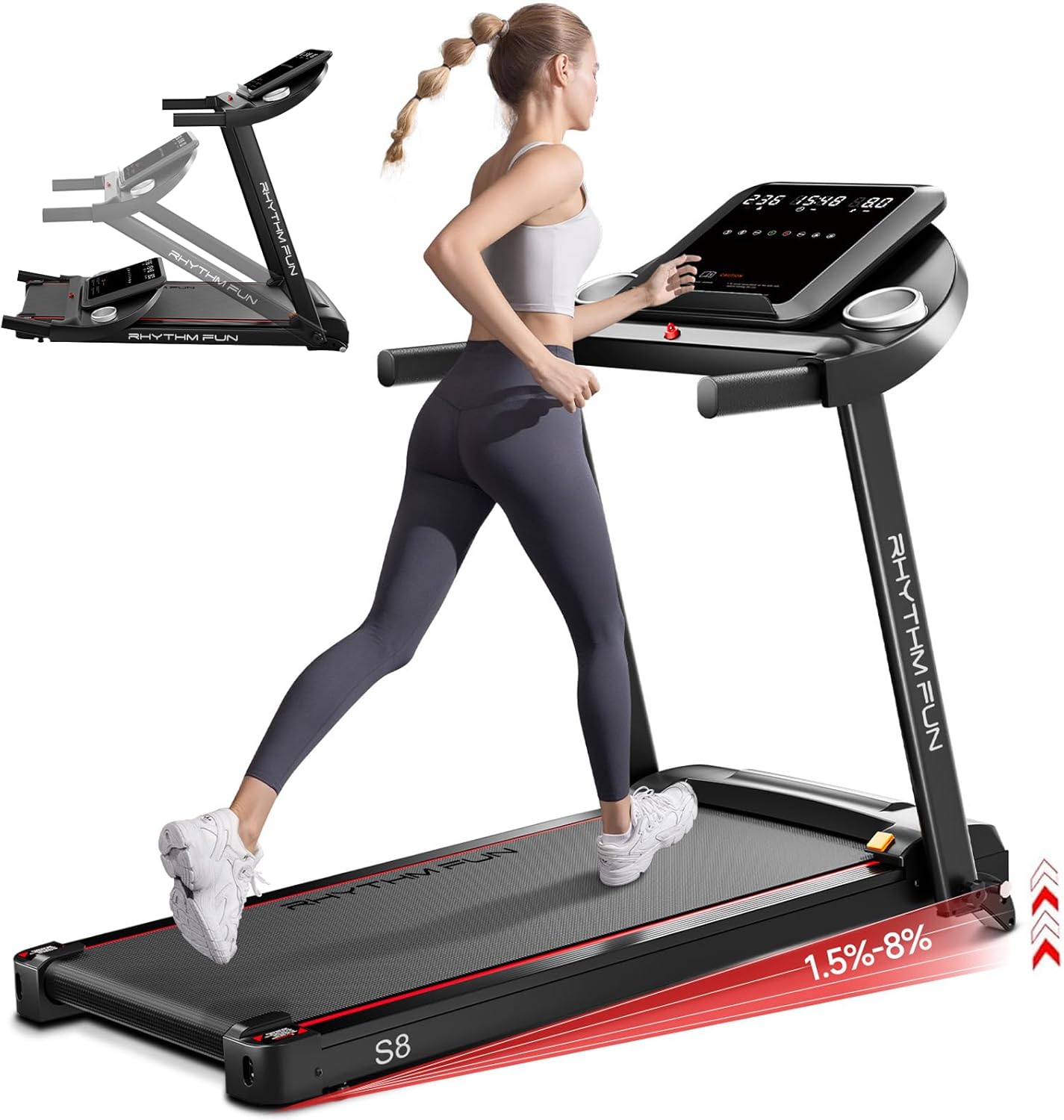
Figure 2.1: RHYTHM FUN S8 Treadmill in operation, highlighting its compact design and incline capability.
Key Features:
- Versatile Speed Options: Adjustable from 0.5 MPH up to 8.0 MPH with quick speed shortcuts (3/6 MPH).
- Manual Incline: Up to 8% incline to increase workout intensity and calorie burn.
- Multifunctional Console: Displays real-time workout data including time, speed, distance, and calories. Includes 12 pre-installed programs.
- App Connectivity: Connects to the YPOOFIT APP for tracking activities and real-time events.
- Foldable Design: 95% pre-assembled for quick setup and easy storage in small spaces.
- Shock Absorption: Designed to reduce knee impact during exercise.
- Weight Capacity: Supports users up to 300 lbs.

Figure 2.2: The treadmill's maximum weight capacity of 300 lbs, with handrails for added safety.

Figure 2.3: Illustration of the treadmill's shock absorption system and five-layer running belt designed to reduce knee impact.
3. Setup and Assembly
The RHYTHM FUN S8 Treadmill comes 95% pre-assembled, requiring minimal setup before first use. Follow these steps to complete the assembly:
- Unpack the Treadmill: Carefully remove all components from the packaging. Ensure all parts listed in the package contents are present.
- Unfold the Treadmill: Gently lift the console and handlebars into the upright position.
- Secure the Handles: Tighten the 4 knobs to secure the handles and console column in place. Refer to the included user manual for specific knob locations.
- Connect Power: Plug the power cord into the treadmill and then into a grounded electrical outlet.
- Insert Safety Key: Place the safety key into its designated slot on the console. The treadmill will not operate without the safety key in place.

Figure 3.1: Contents included in the treadmill package, essential for setup and initial use.

Figure 3.2: The treadmill's foldable design, illustrating how it can be easily collapsed for storage.
4. Operating Instructions
Familiarize yourself with the control panel and various functions to optimize your workout experience.
4.1 Control Panel and Display

Figure 4.1: The treadmill's multifunctional console displaying workout metrics and program options.
The 15.2-inch multifunctional screen displays essential workout data:
- Time: Duration of your workout.
- Speed: Current running speed in MPH.
- Distance: Total distance covered.
- Calories: Estimated calories burned.
Buttons on the console allow for quick adjustments:
- Start/Stop: To begin or end your workout.
- Speed Shortcuts: Direct buttons for 3 MPH and 6 MPH.
- Program Selection: Choose from 12 pre-installed workout programs.
4.2 Adjusting Speed and Incline
The treadmill offers a speed range from 0.5 MPH to 8.0 MPH. Use the speed adjustment buttons on the console to increase or decrease your pace. For quick changes, utilize the 3 MPH and 6 MPH shortcuts.

Figure 4.2: Manual incline settings, demonstrating how higher incline levels increase calorie expenditure.
The treadmill features a manual incline system, allowing you to adjust the incline up to 8%. Increasing the incline simulates outdoor terrain and significantly boosts calorie burn. Adjust the incline before starting your workout or during a pause.
4.3 Using Pre-installed Programs
The S8 Treadmill comes with 12 pre-installed programs designed to vary your workout intensity and help achieve optimal results. Select a program from the console to automatically adjust speed and incline throughout your session.
4.4 App Connectivity (YPOOFIT APP)
Enhance your fitness journey by connecting your treadmill to the YPOOFIT APP. The app allows you to view various training activities, track real-time workout data, and access additional features.

Figure 4.3: Connecting the treadmill to the YPOOFIT APP for enhanced workout tracking and features.
Download the YPOOFIT APP from your device's app store and follow the in-app instructions to pair with your treadmill.
4.5 Built-in Music Speaker
The treadmill features a built-in music speaker. Connect your Bluetooth-enabled device to the treadmill to play music and make your workout more enjoyable.

Figure 4.4: The treadmill's built-in music speaker, allowing for Bluetooth audio streaming during workouts.
5. Maintenance
Regular maintenance ensures the longevity and optimal performance of your RHYTHM FUN S8 Treadmill.
5.1 Lubrication
Proper lubrication of the running belt is crucial for smooth operation and to prevent wear. The frequency of lubrication depends on usage:
| Usage Frequency | Maintenance Frequency (Lubrication) |
|---|---|
| Less than 3 hours/week | Every 30 days |
| 4-7 hours/week | Every 15 days |
| More than 8 hours/week | Every 15 days |
To lubricate, apply the provided lubricating oil into the lubrication hole located near the front of the running deck. Refer to the user manual for detailed instructions and diagrams.

Figure 5.1: Proper lubrication of the treadmill running belt.
5.2 Cleaning
Wipe down the treadmill after each use with a damp cloth to remove sweat and dust. Do not use abrasive cleaners or solvents. Regularly vacuum underneath the treadmill to prevent dust buildup.
6. Troubleshooting
If you encounter issues with your RHYTHM FUN S8 Treadmill, refer to the following common troubleshooting tips:
- Treadmill does not start:
- Ensure the power cord is securely plugged into both the treadmill and a grounded outlet.
- Check that the power switch on the treadmill is in the "ON" position.
- Verify that the safety key is correctly inserted into its slot on the console.
- Check the circuit breaker in your home.
- Running belt slips or is off-center:
- Adjust the belt tension using the rear roller bolts. Refer to the full user manual for detailed instructions on belt alignment.
- Ensure the treadmill is on a level surface.
- Unusual noises during operation:
- Check for loose parts and tighten them if necessary.
- Ensure the running belt is properly lubricated (refer to Maintenance section).
- If the noise persists, contact customer support.
- Console display is not working:
- Ensure all connections to the console are secure.
- Try unplugging the treadmill for 60 seconds and plugging it back in to reset the console.
For issues not covered here, or if troubleshooting steps do not resolve the problem, please contact RHYTHM FUN customer support.
7. Specifications
Detailed technical specifications for the RHYTHM FUN S8 Treadmill:
| Specification | Detail |
|---|---|
| Brand | RHYTHM FUN |
| Model Number | M4438 (S8-Treadmills for home) |
| Product Dimensions | 132.08 x 60.96 x 109.22 cm (52 x 24 x 43 inches) |
| Item Weight | 26.76 kg (58.99 lbs) |
| Colour | Black |
| Display Size | 15.2 Inches |
| Display Type | LED |
| Frame Material | Alloy Steel |
| Horsepower | 2.5 Horsepower |
| Maximum Speed | 8 Miles per Hour |
| Number of Programs | 12 |
| Special Features | Compact Design, Manual Incline, Wheeled |
| Included Components | Power Cord, Safety Key, Tool Kit, User Manual |
| Recommended Uses | Walking, Running, Jogging |
| Target Audience | Adult |
8. Warranty and Support
RHYTHM FUN is committed to providing excellent products and customer service. Your treadmill comes with a manufacturer's warranty. For specific warranty details, please refer to the warranty card included with your product or contact customer support.
If you have any questions, require assistance with setup, or need support for any issues, our dedicated team is ready to help.

Figure 8.1: RHYTHM FUN customer support team is available to assist with product inquiries and support.
Contact Information: Please refer to the official RHYTHM FUN website or the contact details provided in your product packaging for the most up-to-date support information.
Ask a question about this manual
Ask about setup, troubleshooting, compatibility, parts, safety, or missing instructions. Manuals+ will review the question and use this page’s manual context to help answer it.