
Introduction
Thank you for choosing the CYCLAMI Front Bike Light. This manual provides essential information for the proper setup, operation, and maintenance of your new bike light. Please read it thoroughly before use to ensure optimal performance and safety.

The CYCLAMI Front Bike Light, designed for easy integration with bike computer mounts.
Key Features
- Garmin Mount Compatibility: Easily installs on Garmin mounts, with an additional bracket for bike computers (Garmin Edge, iGPSPORT, COSSPO, XOSS, CYCPLUS).
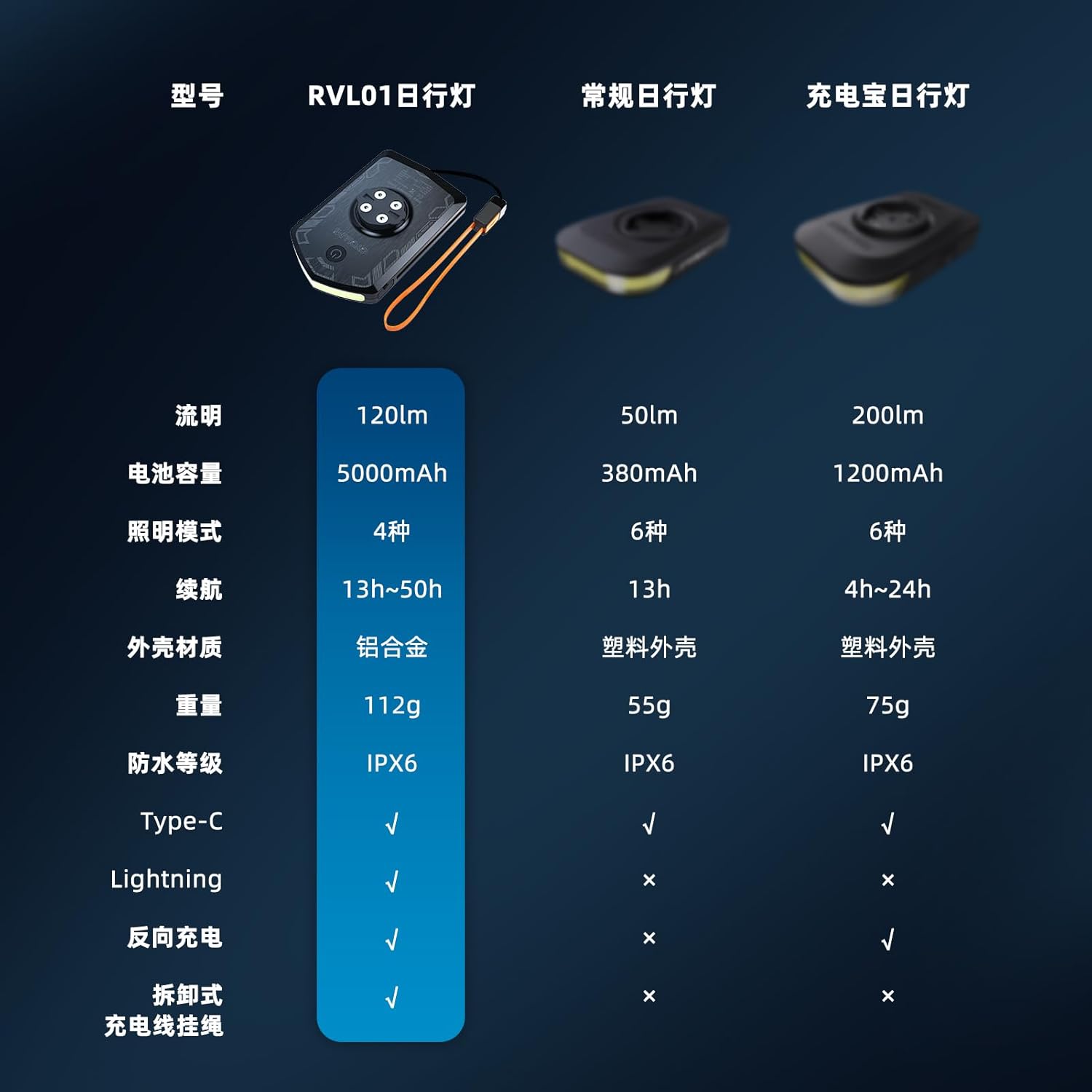
- 5000mAh Power Bank: Equipped with a 5000mAh battery and a rechargeable tether, capable of charging bike computers or mobile phones.
- Enhanced Safety Lighting: Provides 120 lumens of illumination for both day and night use, with a 220° wide-angle floodlight warning.
- Multiple Lighting Modes: Features High brightness, Low brightness, Double flash, and Breathing flash modes for various riding conditions.
- Type-C Rechargeable: 5000mAh battery offers up to 13 hours of high brightness runtime, with mode memory function.
- IPX6 Waterproof Rating: Designed to operate normally in rainy conditions (ensure charging port cover is tightened).
- Durable Aluminum Alloy Shell: Robust construction for increased durability and strength.

The 220° floodlight provides wide-angle warning for enhanced visibility.
Setup and Installation
Mounting the Light
The CYCLAMI Front Bike Light is designed for easy installation on standard Garmin-style bike computer mounts. Simply align the light's base with the mount and twist until it locks securely into place. The light also features an integrated top bracket to attach your bike computer directly above it.

Convenient installation on Garmin-style bike computer mounts.
Initial Charging
Before first use, fully charge the bike light. Connect the included Type-C or Lightning detachable sling data cable to the charging port on the light and plug the other end into a USB power source (e.g., wall adapter, computer USB port). The power indicator light will show charging status.

The light features a 5000mAh battery and Type-C/Lightning compatibility for charging.

The detachable sling data cable provides versatile charging options.
Operating Your CYCLAMI Bike Light
Power On/Off
To turn the light on, press and hold the power button located on the top of the unit for approximately 2 seconds. To turn it off, press and hold the power button again for 2 seconds.
Switching Lighting Modes
Once the light is on, short press the power button to cycle through the available lighting modes. The light features four distinct modes:
- High Brightness: Provides maximum illumination (120 lumens) for night riding.
- Low Brightness: Offers reduced illumination (40 lumens) for extended battery life or less demanding conditions.
- Double Flashing: An intermittent flash pattern for increased visibility.
- Breathing Flicker: A pulsating light effect for enhanced daytime visibility.
The light has a mode memory function, which means it will remember the last mode used when you turn it on again.

Overview of the four lighting modes, luminous flux, and approximate runtimes.

The light provides sufficient illumination for cycling at night and acts as a warning light during the day.
Using as a Power Bank
The CYCLAMI Front Bike Light can also function as a portable power bank for your electronic devices. With its 5000mAh battery capacity and reversible charging capability, you can use the detachable sling data cable to charge your bike computer, smartphone, or other small USB-powered devices.
- Connect the appropriate end of the detachable sling data cable (Type-C or Lightning) to your device.
- Connect the other end of the cable to the charging port on the bike light.
- Charging will begin automatically.
The 5000mAh battery allows the light to function as a power bank for various devices.

One lamp for multiple purposes: charging different devices on the go.
Care and Maintenance
- Cleaning: Wipe the light with a soft, damp cloth. Do not use abrasive cleaners or solvents.
- Water Resistance: The light has an IPX6 waterproof rating, meaning it is protected against powerful water jets. For optimal water resistance, always ensure the charging port cover is securely tightened after charging. Do not submerge the light in water.
- Storage: Store the light in a cool, dry place away from direct sunlight when not in use. If storing for an extended period, charge the battery to approximately 50% every few months to maintain battery health.
Troubleshooting
| Problem | Possible Cause | Solution |
|---|---|---|
| Light does not turn on. | Battery is depleted. | Charge the light fully using the provided Type-C/Lightning cable. |
| Light does not charge. | Cable or power source issue; charging port not clean. | Try a different USB cable or power adapter. Ensure the charging port is free of debris. |
| Light flickers or dims unexpectedly. | Low battery; loose connection. | Recharge the light. Ensure the light is securely mounted. |
| Cannot switch modes. | Button malfunction; software glitch. | Ensure the button is pressed correctly. Try turning the light off and on again. If the issue persists, contact customer support. |
Technical Specifications
| Feature | Specification |
|---|---|
| Model | RVL01 |
| Luminous Flux | 120 lumens (High Brightness) |
| Battery Capacity | 5000mAh |
| Lighting Modes | 4 (High, Low, Double Flash, Breathing Flicker) |
| Runtime | Approx. 13 hours (High Brightness) to 50 hours (Breathing Flicker) |
| Shell Material | Aluminum Alloy |
| Weight | 112 grams |
| Waterproof Rating | IPX6 |
| Charging Port | Type-C / Lightning (via detachable cable) |
| Reverse Charging | Supported |
| Dimensions (L x W x H) | 95mm x 61mm x 19mm |
Physical dimensions of the CYCLAMI Front Bike Light.
Warranty and Customer Support
The CYCLAMI Front Bike Light is covered by a standard manufacturer's warranty. Please refer to the product packaging or the official CYCLAMI website for specific warranty terms and conditions.
For technical assistance, troubleshooting, or warranty claims, please contact CYCLAMI customer support through the retailer's platform or the official brand website. Provide your product model number (RVL01) and purchase details when seeking support.


