
1. Introduction
Thank you for choosing the MERACH MR-T12B2 Treadmill. This manual provides essential information for the safe and efficient use of your new fitness equipment. Please read this manual thoroughly before assembly or operation and retain it for future reference.
Important Safety Information
To reduce the risk of serious injury, read all instructions before using the treadmill. The manufacturer assumes no responsibility for personal injury or property damage sustained by or through the use of this product. Observe the following safety precautions:
- Consult your physician before starting any exercise program, especially if you have pre-existing medical conditions.
- Keep children and pets away from the treadmill at all times.
- Place the treadmill on a solid, level surface with at least 0.6 meters (2 feet) of clear space around it.
- Ensure the power cord is not pinched or damaged. Do not use extension cords.
- Always attach the safety key clip to your clothing before starting a workout. In case of an emergency, the safety key will stop the treadmill.
- Do not operate the treadmill if it is damaged or malfunctioning. Contact customer support immediately.
- Wear appropriate athletic footwear and clothing during use.
2. Package Contents
Carefully unpack the box and ensure all components are present. If any parts are missing or damaged, contact customer support.
- MERACH MR-T12B2 Treadmill (Main Unit)
- Safety Key
- Power Cord
- User Manual
- Tool Kit
- Remote Control


3. Setup
Unpacking and Placement
- Remove the treadmill from its packaging. The unit is 90% pre-assembled.
- Place the treadmill on a firm, level surface. Ensure there is adequate clearance (at least 0.6 meters or 2 feet) behind and on both sides of the treadmill for safe operation and access.
- Connect the power cord to a grounded electrical outlet.
Folding and Unfolding
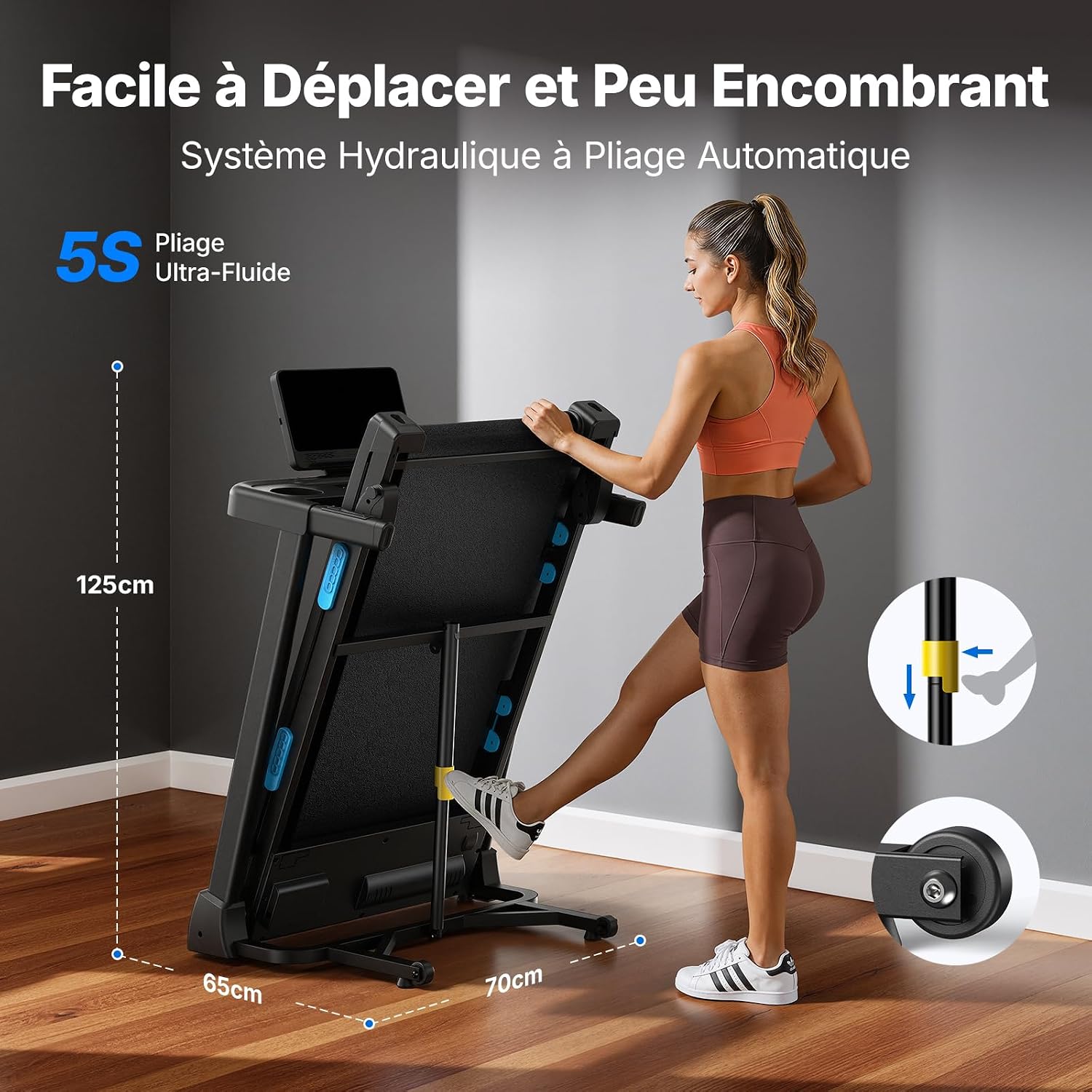
The MERACH MR-T12B2 features a hydraulic folding system for easy storage.
- To Unfold: Gently press the foot pedal at the base of the treadmill. The running deck will slowly lower into position.
- To Fold: Lift the running deck until it locks into the upright position. The hydraulic system assists in this process.
4. Operating Instructions
Control Panel Overview
The treadmill features an intuitive LED display and control buttons for easy operation.

Starting a Workout
- Ensure the treadmill is plugged in and the power switch is ON.
- Stand on the side rails of the treadmill.
- Attach the safety key clip to your clothing and insert the safety key into its designated slot on the console. The display will illuminate.
- Press the START button. The treadmill will begin at a low speed (e.g., 0.8 km/h) after a short countdown.
Adjusting Speed and Incline
- Speed Adjustment: Use the SPEED + and SPEED - buttons on the console or remote control to adjust the speed from 0.8 km/h to 12 km/h. Quick speed buttons may also be available for preset speeds.
- Incline Adjustment: Use the INCLINE + and INCLINE - buttons to adjust the automatic incline from 0% to 15%. Quick incline buttons may also be available for preset incline levels.

Stopping a Workout
- Press the STOP button on the console or remote control. The treadmill will gradually slow down and stop.
- Alternatively, pull the safety key from its slot for an immediate emergency stop.
Workout Programs and Features
- Pre-loaded Workouts: The treadmill includes pre-loaded workout programs. Refer to the display for program selection and details.
- Heart Rate Monitoring: Grip the heart rate sensors on the handlebars to display your heart rate on the LED screen.
- MERACH App Connectivity: Connect your treadmill to the MERACH app for interactive courses, virtual landscapes, and data tracking.

5. Maintenance
Regular maintenance ensures the longevity and optimal performance of your treadmill.
Cleaning
- Wipe down the treadmill surfaces with a damp cloth after each use to remove sweat and dust.
- Do not use abrasive cleaners or solvents, as they may damage the finish.
- Keep the area around the treadmill clean and free of obstructions.
Running Belt Lubrication
The running belt requires periodic lubrication to reduce friction and wear. Refer to the specific instructions provided with your lubricant or contact customer support for guidance on frequency and type of lubricant.
Running Belt Adjustment
If the running belt becomes off-center or slips, it may need adjustment. Use the included tool kit to adjust the tension bolts at the rear of the treadmill. Adjust in small increments (quarter turns) and test the belt after each adjustment. Refer to the detailed instructions in the full user manual for precise steps.
6. Troubleshooting
If you encounter any issues with your MERACH MR-T12B2 Treadmill, refer to the following common problems and solutions:
| Problem | Possible Cause | Solution |
|---|---|---|
| Treadmill does not power on. | Power cord not connected, power switch off, safety key not inserted. | Check power cord connection, ensure power switch is ON, insert safety key. |
| Running belt slips or is off-center. | Belt tension too loose, belt alignment incorrect. | Adjust running belt tension or alignment using the rear bolts (refer to maintenance section). |
| Unusual noises during operation. | Loose parts, lack of lubrication, foreign object. | Inspect for loose parts and tighten. Lubricate the running belt if needed. Check for any foreign objects under the belt. |
| Display shows an error code. | System malfunction. | Turn off the treadmill, unplug it, wait 5 minutes, then plug it back in and restart. If the error persists, contact customer support. |
For issues not listed here or if solutions do not resolve the problem, please contact MERACH customer support.
7. Specifications
| Feature | Specification |
|---|---|
| Brand | MERACH |
| Model Number | MR-T12B2 |
| Color | Black (15% Automatic Incline variant) |
| Motor Power | 2.5 HP (Peak) |
| Speed Range | 0.8 - 12 km/h |
| Incline Range | 0% - 15% (Automatic) |
| Running Surface (L x W) | 108 cm x 42 cm |
| Max User Weight Capacity | 136 kg |
| Product Dimensions (L x W x H) | 140 cm x 70 cm x 116 cm |
| Folded Dimensions (L x W x H) | 65 cm x 70 cm x 125 cm |
| Item Weight | 44.98 kg |
| Display Type | LED |
| Material | Carbon Steel, ABS, Aluminum (Frame) |
| Special Features | Shock Absorbing, Pre-loaded Workouts, Quiet Operation, Automatic Incline, Adjustable Speed, Heart Rate Monitor |
| Assembly | 90% Pre-assembled |


8. Warranty and Support
Warranty Information
The MERACH MR-T12B2 Treadmill comes with a 1-year warranty from the date of purchase. This warranty covers manufacturing defects and material faults under normal use. Please retain your proof of purchase for warranty claims.
Customer Support
If you have any questions, require assistance with assembly, operation, maintenance, or troubleshooting, or need to make a warranty claim, please contact MERACH customer support. Refer to the contact information provided with your purchase or on the official MERACH website.


