
1. Introduction
This manual provides essential information for the installation, operation, and maintenance of the LTS LTN6216N-P16 16-Channel Network Video Recorder (NVR). Please read this manual thoroughly before using the product and retain it for future reference.
The LTN6216N-P16 is a high-performance 16-channel NVR designed for advanced surveillance systems. It supports 4K recording, H.265+ compression, and offers a maximum bitrate of 160Mbps. Key features include dual SATA drive support (up to 10TB each), 8MP preview and playback, a new 4.0 user interface, and comprehensive AI capabilities when paired with compatible cameras.
2. Safety Information
Observe the following safety precautions to prevent injury or damage to the product:
- Ensure the power supply voltage is stable and meets the NVR's requirements.
- Do not expose the NVR to water or moisture.
- Avoid placing the NVR in direct sunlight or near heat sources.
- Install the NVR in a well-ventilated area to prevent overheating.
- Use only accessories specified by the manufacturer.
- Do not attempt to disassemble or modify the NVR. Refer all servicing to qualified personnel.
3. Package Contents
Verify that all items are present in the package:
- LTS LTN6216N-P16 NVR Unit
- Power Adapter/Cable
- USB Mouse
- Installation Hardware (Screws for HDD, SATA cables)
- Quick Start Guide
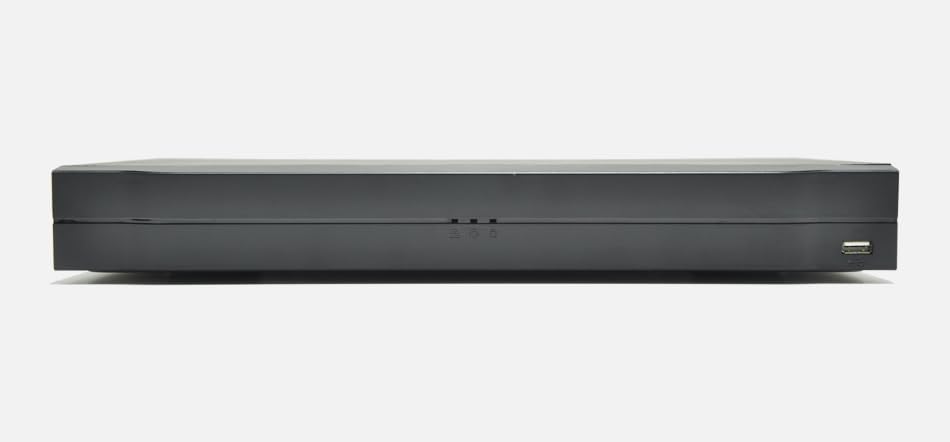
Figure 3.1: LTN6216N-P16 NVR and included accessories.
4. Physical Overview
4.1 Front Panel
The front panel typically includes status indicators and a USB port for mouse or backup devices.
- Power Indicator: Illuminates when the NVR is powered on.
- Status Indicator: Indicates system status (e.g., recording, alarm).
- USB Port: For connecting a USB mouse or external storage.
4.2 Rear Panel
The rear panel houses all essential connectivity ports.
- Power Input: Connect the provided power adapter.
- HDMI Output: Connect to a monitor for high-resolution display (up to 4K).
- VGA Output: Connect to a monitor for standard display.
- LAN Port (RJ45): Connect to your network for internet access and camera communication.
- PoE Ports (RJ45 x 16): Connect IP cameras directly for power and data transmission.
- USB Ports: Additional USB ports for peripherals.
- Audio In/Out: For connecting external audio devices (if applicable).
5. Setup
5.1 Hard Drive Installation
The NVR supports two SATA hard drives, up to 10TB each (hard drives not included).
- Unscrew and remove the NVR's top cover.
- Connect the SATA data and power cables to the hard drive(s).
- Secure the hard drive(s) to the NVR chassis using the provided screws.
- Replace the top cover and secure it with screws.
5.2 Connecting Peripherals
- Connect a monitor to the HDMI or VGA output port.
- Connect the USB mouse to a USB port.
- Connect IP cameras to the PoE ports on the rear panel.
- Connect the NVR's LAN port to your network router/switch.
- Connect the power adapter to the NVR and a power outlet.
5.3 Initial Configuration
Upon first boot, the NVR will guide you through a setup wizard:
- Set Password: Create a strong password for the admin account.
- Network Settings: Configure network parameters (DHCP or Static IP).
- Hard Drive Initialization: Format the newly installed hard drive(s).
- Camera Search: The NVR will automatically search for connected IP cameras. Add them to the system.
- Time and Date: Set the correct system time and date.
6. Operating the NVR
6.1 User Interface (UI 4.0)
The NVR features an intuitive new 4.0 user interface. Navigate using the connected USB mouse. Right-click to access the main menu.
6.2 Live View and Recording
- Live View: Displays real-time footage from connected cameras.
- Recording Settings: Configure continuous, motion-triggered, or scheduled recording. The NVR supports 4K recording with H.265+ compression for efficient storage.
- Bitrate: The NVR supports a maximum bitrate of 160Mbps.
6.3 Playback
Access recorded footage through the playback menu.
- Search: Search by date, time, event, or camera.
- Decoding: Supports 8MP preview and playback, with flexible decoding options of 2 channels at 4K or 8 channels at 1080P.
6.4 Remote Access
The NVR supports P2P remote surveillance and mobile video playback for convenient access from anywhere.
- Mobile App: Download the official mobile application (refer to the Quick Start Guide for app name).
- P2P Cloud Service: Enable P2P in the network settings for easy remote connection without complex port forwarding.
6.5 AI Features (by Camera)
When paired with compatible IP cameras, the NVR can process and record advanced AI events:
- Face Detection: Identifies human faces in the video stream.
- Perimeter Protection: Detects intrusions into defined areas.
- Intelligent Video Analysis (IVS): Includes tripwire and intrusion detection.
- People Counting: Counts individuals entering or exiting a specified zone.
- Heat Mapping: Visualizes areas of high activity.
- Smart Motion Detection (SMD): Differentiates between human/vehicle motion and other movements.
7. Maintenance
7.1 Firmware Updates
Regularly check for and install firmware updates to ensure optimal performance and security. Updates can typically be performed via the NVR's web interface or local UI.
7.2 Hard Drive Management
Monitor the health of your hard drives and ensure sufficient storage space. The NVR supports overwriting old footage when storage is full.
7.3 System Backup
Regularly back up important video footage to external storage (e.g., USB drive, network storage) to prevent data loss.
8. Troubleshooting
| Problem | Possible Cause | Solution |
|---|---|---|
| No video output on monitor. | Loose cable connection; incorrect input source on monitor; NVR not powered on. | Check HDMI/VGA cable connections; select correct input on monitor; ensure NVR is powered. |
| Cameras not displaying. | Camera not powered; network issue; incorrect camera settings. | Verify PoE connection to cameras; check network cables; ensure cameras are added and configured correctly in NVR. |
| Cannot access NVR remotely. | P2P disabled; network firewall; incorrect mobile app settings. | Enable P2P in NVR settings; check router firewall; ensure correct NVR details in mobile app. |
| Hard drive not detected. | Loose SATA cables; faulty drive; drive not initialized. | Check SATA power/data connections; try a different drive; initialize drive in NVR settings. |
9. Specifications
| Feature | Description |
|---|---|
| Model | LTN6216N-P16 |
| Channels | 16-channel |
| Form Factor | 1U |
| SATA Drives | 2 SATA interfaces, up to 10TB each (20TB total) |
| PoE Ports | 16 PoE ports |
| Video Compression | H.265+, H.265, H.264+, H.264 |
| Max Bitrate | 160Mbps |
| Video Output | HDMI (up to 4K), VGA (simultaneous) |
| Preview/Playback | 8MP resolution |
| Decoding Capability | 2ch@4K or 8ch@1080P |
| User Interface | New 4.0 UI |
| AI Features (by camera) | Face detection, perimeter protection, IVS, people counting, heat mapping, SMD |
| Remote Access | P2P, Mobile App |
10. Warranty and Support
For warranty information and technical support, please refer to the official LTS website or contact your authorized dealer. Keep your purchase receipt for warranty claims.
Note: Product specifications and features are subject to change without prior notice.