
1. Introduction and Overview
The Amazon Echo Dot Max is a smart speaker designed to deliver rich, room-filling audio and integrate seamlessly into your smart home ecosystem. It features a built-in smart home hub and a high-speed AZ3 processor for enhanced performance.
This device automatically analyzes the acoustic characteristics of your room to fine-tune sound playback for an optimal listening experience. Enjoy music from various streaming services with deep bass and clear sound.
The Echo Dot Max also offers robust privacy features, including a microphone on/off button, ensuring your personal information remains protected.

Image 1.1: The Amazon Echo Dot Max in Glacier White.
2. Setup
2.1 What's in the Box
- Echo Dot Max (2025 Release)
- Power Adapter (22W)
- Quick Start Guide
2.2 Initial Setup
- Plug In Your Echo Dot Max: Connect the included power adapter to your Echo Dot Max and then to a power outlet. The light ring on the device will turn blue, then orange, indicating it's ready for setup.
- Download the Alexa App: On your smartphone or tablet, download the Amazon Alexa app from your device's app store (compatible with Fire OS, iOS, and Android). You can also access Alexa setup via a computer browser.
- Connect to Wi-Fi: Open the Alexa app and follow the on-screen instructions to connect your Echo Dot Max to your Wi-Fi network. The device ships ready to connect to a Wi-Fi network.
- Complete Setup: Once connected, the Alexa app will guide you through personalizing your device, including setting your location, time zone, and preferred voice assistant language.
2.3 Smart Home Hub Setup
The Echo Dot Max includes a built-in smart home hub supporting Zigbee, Matter, and Thread Border Router protocols. This allows you to connect and control compatible smart home products (e.g., lighting, air conditioners) without needing a separate hub.
For easy setup of compatible smart home products, utilize Amazon Wi-Fi Simple Setup through the Alexa app.

Image 2.1: Echo Dot Max on a counter, ready for smart home integration.
3. Operating Your Echo Dot Max
3.1 Voice Commands with Alexa
To interact with your Echo Dot Max, simply say the wake word "Alexa" followed by your command. For example:
- "Alexa, what's the weather today?"
- "Alexa, set a reminder for 3 PM."
- "Alexa, play my workout playlist."
3.2 Audio Playback
The Echo Dot Max delivers high-quality audio with a 0.8-inch tweeter and a 2.5-inch woofer, supporting Lossless HD audio and Room Adaptation Technology for optimized sound. You can stream music from services like Amazon Music, Spotify, and Apple Music.
3.3 Connecting Other Devices
- Multi-Room Audio: Connect compatible Echo devices (sold separately) in different rooms to create a multi-room audio experience.
- Stereo Pairing: Pair two Echo Dot Max devices (sold separately) for immersive stereo sound.
- Home Theater: Connect with compatible Fire TV devices (sold separately) to build a home theater system for an immersive viewing experience.
- Bluetooth: Use the A2DP profile to connect your smartphone and play music through the Echo Dot Max speaker. Alternatively, connect the Echo Dot Max to an external Bluetooth-enabled speaker. The AVRCP profile allows voice control for playback and pause on connected devices (not compatible with Mac OS X devices or devices requiring a PIN for Bluetooth connection).

Image 3.1: Multiple Echo Dot Max devices creating a home theater experience.
3.4 Smart Home Automation
Leverage the built-in indoor temperature sensor and occupancy detection to automate actions. For example, you can set up routines where lights turn on when you enter a room, or a fan activates if the room temperature exceeds a predefined limit.
4. Maintenance
4.1 Cleaning Your Device
To clean your Echo Dot Max, use a soft, dry, lint-free cloth. Do not use abrasive cleaners or sprays directly on the device. Keep the device away from liquids.
4.2 Software Updates
Your Echo Dot Max automatically receives software updates over Wi-Fi. Ensure your device is connected to the internet to receive the latest features and security enhancements.
5. Troubleshooting
5.1 No Power
- Ensure the power adapter is securely connected to both the Echo Dot Max and a working power outlet.
- Verify the power outlet is functional by plugging in another device.
5.2 Wi-Fi Connection Issues
- Check if your Wi-Fi router is on and working correctly.
- Move the Echo Dot Max closer to your Wi-Fi router to improve signal strength.
- Restart your Echo Dot Max by unplugging it for 30 seconds and then plugging it back in.
- If issues persist, try resetting your Wi-Fi router.
5.3 Alexa Not Responding
- Ensure the microphone is not muted. The microphone on/off button is located on the top of the device. When muted, the light ring will typically show a red color.
- Speak clearly and at a normal volume.
- Check your internet connection. Alexa requires an active internet connection to function.

Image 5.1: Microphone on/off button for privacy control.
6. Specifications
| Feature | Description |
|---|---|
| Size | 109mm (W) x 109mm (D) x 99mm (H) |
| Weight | 505.3g (Actual size and weight may vary due to manufacturing processes) |
| Audio | 0.8-inch tweeter x1, 2.5-inch woofer x1, Lossless HD, Room Adaptation Technology |
| Wi-Fi Connectivity | 1x1 Wi-Fi 6E (802.11a/b/g/n/ac/ax) |
| Bluetooth Connectivity | BT5.3/Bluetooth Low Energy, A2DP, AVRCP (not compatible with Mac OS X or PIN-required devices) |
| Smart Home Hub | Zigbee, Matter, Thread Border Router |
| Processor | AZ3 with AI Accelerator |
| Sensors | Indoor temperature sensor, ambient light sensor, occupancy detection, accelerometer (tap gestures) |
| Supported Languages | Japanese, English, Japanese-English bilingual, and languages from 15 countries/regions. (Some services may not be available in all languages). |
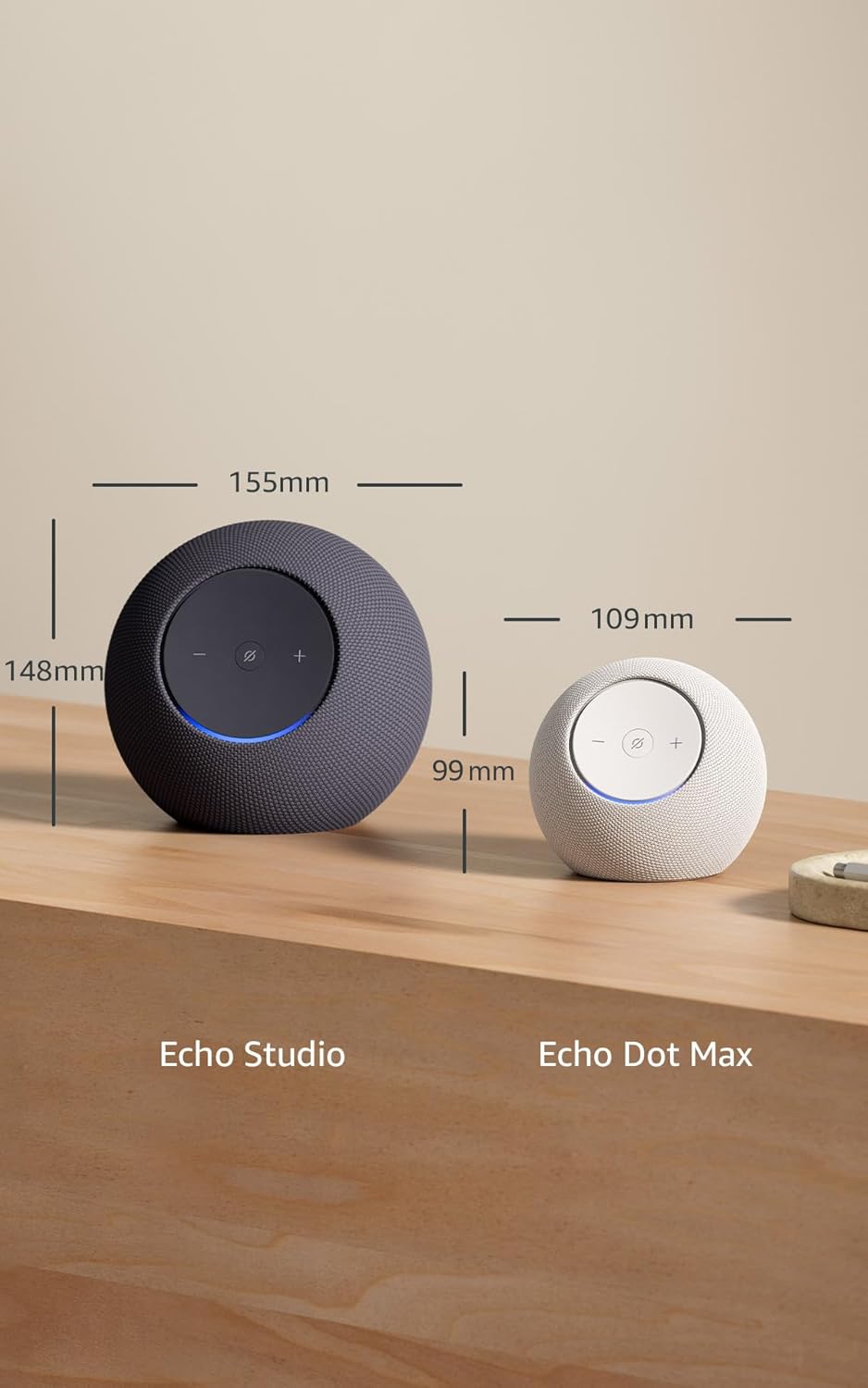
Image 6.1: Size comparison of Echo Studio and Echo Dot Max.
7. Warranty and Support
7.1 Warranty Information
The Amazon Echo Dot Max comes with a 1-year limited warranty. In Japan, an optional extended warranty is available for purchase. Use of the Echo Dot Max is subject to the applicable terms of service.
7.2 Customer Support
For further assistance, troubleshooting, or to learn more about your device's features, please visit the official Amazon support website or contact Amazon customer service.
7.3 Privacy Features
Amazon does not sell your personal information to third parties. The Echo Dot Max is designed with multiple privacy protection measures, including wake word detection technology, a microphone on/off button, and the ability to review and delete voice recordings. For detailed information on how Alexa and Echo devices protect your privacy, please refer to the Alexa Privacy Portal on the Amazon website.
7.4 Accessibility Features
The Alexa app and Alexa-enabled devices offer various features to assist customers with visual, auditory, motor, or speech needs. More information on these accessibility features can be found on the Amazon support website.


