
Introduction
The Walker's Razor Walkie Talkie Attachment is designed to provide seamless, hands-free communication when integrated with compatible Walker's Razor RSEM Series shooting muffs. This device offers 22 channels and 99 sub-channels for clear, reliable communication over a range of up to 3 miles, enhancing coordination and safety during various activities.
Safety Information
- Battery Safety: Use only specified AAA batteries. Do not mix old and new batteries, or different types of batteries. Dispose of used batteries responsibly.
- Volume Levels: Avoid prolonged exposure to high volume levels, especially when using with hearing protection muffs, to prevent hearing damage.
- Environmental Conditions: While weather-resistant, avoid submerging the device in water. Protect from extreme temperatures.
- Interference: This device operates on radio frequencies. Be aware of potential interference with other electronic devices.
Package Contents
Verify that all items are present in your package:
- Walker's Razor Walkie Talkie Attachment
- 3 x AAA Batteries
Product Overview


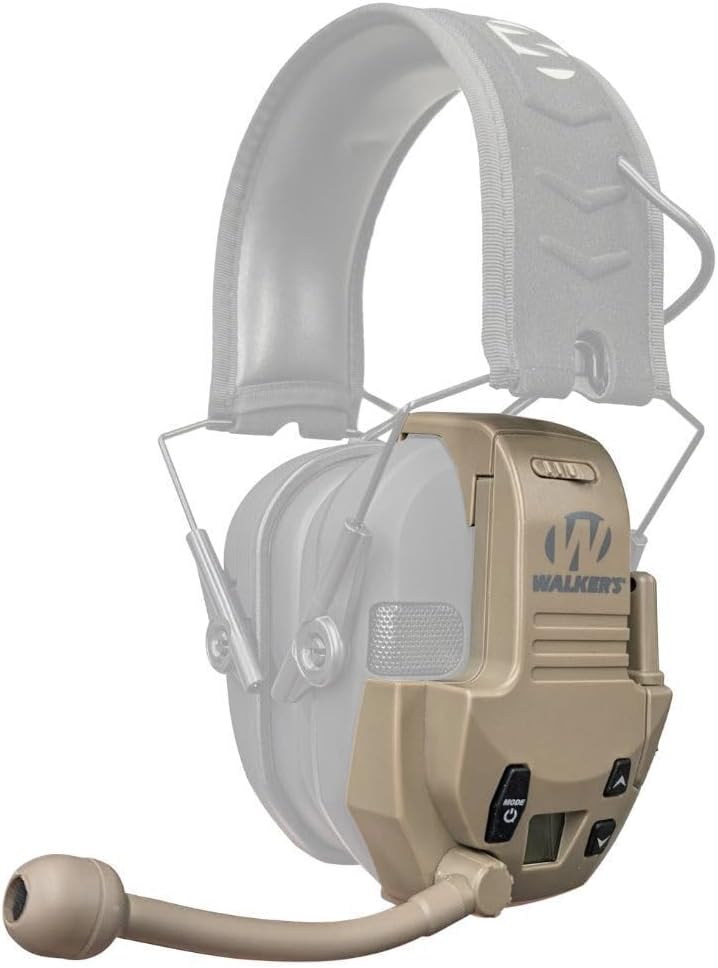
The attachment features tactile rubber buttons for control, an LCD screen for channel and setting display, a wind-proof microphone, and a short-range antenna. It is designed to clip directly onto compatible Walker's Razor series earmuffs.
Setup
- Install Batteries: Open the battery compartment on the back of the walkie-talkie attachment. Insert the 3 AAA batteries, ensuring correct polarity (+/-). Close the compartment securely.
- Attach to Muffs: Align the attachment's clip with the side of your Walker's Razor RSEM Series muff that has an audio input jack. Securely clip the walkie-talkie onto the muff.
- Connect Audio Cable: Insert the audio cable from the walkie-talkie attachment into the audio input jack of your Walker's Razor muff. This connects the communication audio to your muff's speakers.
Operating Instructions
Power On/Off
- To Power On: Press and hold the Mode/Power button until the LCD screen illuminates.
- To Power Off: Press and hold the Mode/Power button until the LCD screen turns off. Caution: A loud beep may occur when powering on/off. It is recommended to remove muffs before powering on/off.
Channel and Sub-Channel Selection
- Press the Mode/Power button briefly to cycle through settings (Channel, Sub-Channel, VOX Sensitivity).
- When "Channel" is displayed, use the Up and Down arrow buttons to select one of the 22 available channels.
- Press the Mode/Power button again to move to "Sub-Channel" selection. Use the Up and Down arrow buttons to select one of the 99 sub-channels. All communicating parties must be on the same channel and sub-channel.
Voice-Activated Transmission (VOX)
- The VOX feature allows for hands-free communication. When enabled, the device transmits automatically when it detects your voice.
- To adjust VOX sensitivity: Press the Mode/Power button until "VOX" is displayed. Use the Up and Down arrow buttons to set the sensitivity level (e.g., higher sensitivity for quiet environments, lower for noisy ones to prevent false activations).
Push-to-Talk (PTT) Operation
For direct control over transmissions, use the Push-to-Talk (PTT) button.
- Press and hold the PTT button (typically located on the side of the unit) to transmit your voice.
- Release the PTT button to stop transmitting and listen for incoming messages.
Maintenance
- Cleaning: Wipe the device with a soft, damp cloth. Do not use harsh chemicals or abrasive cleaners.
- Battery Replacement: Replace all 3 AAA batteries when the low battery indicator appears on the LCD screen or when performance degrades.
- Storage: When not in use for extended periods, remove batteries to prevent leakage. Store in a cool, dry place.
Troubleshooting
| Problem | Possible Cause | Solution |
|---|---|---|
| No power/Device does not turn on. | Dead or incorrectly installed batteries. | Check battery polarity. Replace with fresh AAA batteries. |
| Cannot communicate with other users. | Incorrect channel/sub-channel; Out of range; Audio cable disconnected. | Ensure all devices are on the same channel and sub-channel. Move closer to other users. Verify audio cable connection to muffs. |
| Poor audio quality or static. | Weak signal; Interference; Low battery. | Move to an open area. Avoid sources of electronic interference. Replace batteries. |
| VOX activates unintentionally or not at all. | VOX sensitivity set incorrectly for environment. | Adjust VOX sensitivity (higher for quiet, lower for noisy environments). |
Specifications
- Model: GWP-RZRWT-FDE
- Channels: 22
- Sub-Channels: 99
- Range: Up to 3 miles (actual range may vary based on terrain and conditions)
- Power Source: 3 x AAA Batteries (included)
- Battery Life: Approximately 12 hours
- Special Features: VOX (Voice-Activated Transmission), Push-to-Talk (PTT), LCD Screen, Weather Resistant
- Compatibility: Walker's Razor RSEM Series Muffs with audio input jack (muffs sold separately)
- Frequency Range: 400-470 MHz
- Voltage: 4.5 Volts
- Item Weight: 6.9 ounces
- Product Dimensions: 5 x 10 x 10 inches (approximate)
Warranty and Support
For warranty information or technical support, please refer to the official Walker's website or contact their customer service department. Keep your purchase receipt as proof of purchase.
Visit the Walker's Store on Amazon for more products and information.