
1. Product Overview
The SmallRig 8X Telephoto Lens Kit (Model 4737) is designed to enhance mobile photography and videography by providing 8x optical zoom capabilities. This kit allows users to capture distant subjects with clarity and improved depth of field, transforming a smartphone into a more versatile photographic tool. It supports both handheld and tripod-mounted shooting for various scenarios.

Image: The SmallRig 8X Telephoto Lens Kit, including the lens, phone clamp, and desktop tripod, ready for use.
2. Package Contents
Verify that all items listed below are included in your package:
- 1x 8x Telephoto Lens
- 1x Mobile Phone Lens Clamp
- 1x Desktop Tripod
- 1x Tripod Mount Adapter
- 2x Silicone Lens Protective Covers (Lens Cap + Eyepiece Cover)
- 1x Storage Bag
- 1x Lens Cleaning Cloth
- 1x Operating Instruction (this manual)

Image: All included accessories and the 8X Telephoto Lens, mobile phone clamp, and tripod.
3. Setup Guide
Follow these steps to assemble and prepare your SmallRig 8X Telephoto Lens Kit for use:
3.1 Attaching the Lens Clamp to your Phone
- Identify the main camera lens on your mobile phone.
- Adjust the mobile phone lens clamp to securely fit your phone, ensuring the clamp's opening aligns with your phone's main camera lens. The clamp is compatible with iPhone 16 / 15 / 14 / 13 / 12 series.
- Tighten the locking knob on the clamp to hold your phone firmly in place. Ensure the clamp does not obstruct any buttons or ports.

Image: The innovative rail structure of the lens clamp, designed for flexible alignment to prevent vignetting.
3.2 Mounting the Telephoto Lens
- Remove the protective caps from both ends of the 8x telephoto lens.
- Align the T-mount of the telephoto lens with the corresponding mount on the phone clamp.
- Rotate the lens 90 degrees clockwise to securely attach it to the clamp. Adjust the angle so the white scale line on the lens faces upwards, ensuring a perfect horizontal alignment.
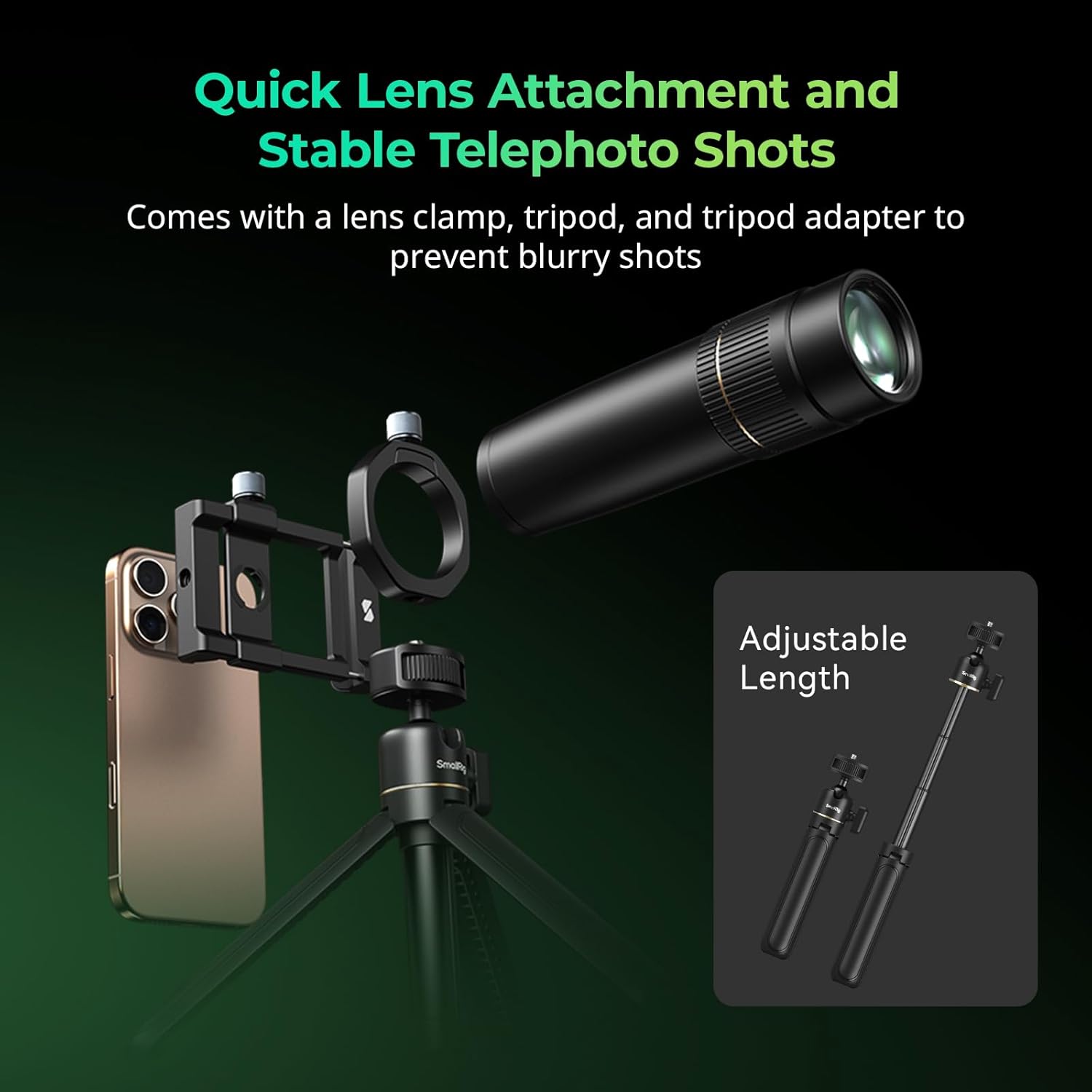
Image: Visual guide for quick lens attachment to the phone clamp and the use of the tripod for stable shots.
3.3 Attaching the Desktop Tripod
- Screw the tripod mount adapter onto the bottom of the phone clamp.
- Attach the desktop tripod to the tripod mount adapter.
- Extend the tripod legs and adjust its height as needed. The tripod can be stretched in three sections for length adjustment.
Video Guide: SmallRig 8X Telephoto Lens Installation
Video: A detailed installation guide for the SmallRig 8X Telephoto Lens, demonstrating how to attach the lens clamp, telephoto lens, and tripod.
4. Operating Instructions
The 8x telephoto lens provides 4K HD image quality and is designed for capturing distant subjects. Follow these guidelines for optimal performance:
4.1 General Usage Tips
- Main Camera Use: Always use the 8x telephoto lens with your phone's main camera. Turn off any macro mode settings on your phone.
- Vignetting: Ensure the lens hole is perfectly aligned with your phone's main camera lens to avoid vignetting (dark corners in the image). If vignetting occurs, zoom in slightly (e.g., to 1.1x or higher) using your phone's camera app.
- Focus: The lens features a manual focus ring. Rotate the ring to achieve sharp focus on your subject.

Image: A side-by-side comparison demonstrating the enhanced detail captured by the 8x telephoto lens compared to a standard mobile phone camera.
4.2 Shooting Modes
- Handheld Shooting: For quick shots, the lens can be used handheld. However, due to the 8x magnification, stability is crucial.
- Tripod Spot Shooting: For maximum stability and sharp images, especially for distant subjects, use the included desktop tripod. This is recommended for capturing intricate details without image blur from camera shake.

Image: The 8x telephoto lens mounted on a smartphone and tripod, illustrating its use for capturing detailed distant shots like the moon.
5. Maintenance
Proper care will extend the lifespan and maintain the performance of your telephoto lens kit:
- Cleaning the Lens: Use the provided lens cleaning cloth to gently wipe the lens surfaces. For stubborn smudges, use a specialized lens cleaning solution and a microfiber cloth. Avoid using abrasive materials or harsh chemicals.
- Storage: When not in use, store the lens and accessories in the provided storage bag to protect them from dust, scratches, and impacts. Ensure the silicone lens caps are on the lens.
- Handling: Avoid dropping the lens or subjecting it to strong impacts. The optical components are delicate.
- Environmental Conditions: Do not expose the lens to extreme temperatures, high humidity, or corrosive environments.
6. Troubleshooting
If you encounter issues with your telephoto lens, refer to the following common problems and solutions:
- Vignetting (Dark Corners):
- Ensure the phone lens clamp is perfectly centered over your phone's main camera lens.
- Verify the 8x telephoto lens is securely and correctly attached to the clamp.
- If the issue persists, slightly zoom in on your phone's camera app (e.g., 1.1x or higher) to eliminate the dark edges.
- Blurry Images:
- Adjust the manual focus ring on the telephoto lens until your subject is sharp.
- Ensure the phone and lens setup is stable. Use the desktop tripod for best results, especially at 8x magnification.
- Clean the lens surfaces with the provided cleaning cloth to remove any smudges or dust.
- Lens Not Attaching Securely:
- Check that the T-mount on the lens and the clamp are free from debris.
- Ensure the lens is rotated 90 degrees clockwise until it locks into place.
- Verify your phone model is compatible with the lens clamp (iPhone 16 / 15 / 14 / 13 / 12 series).
7. Product Specifications
| Feature | Detail |
|---|---|
| Model Number | 4737 |
| Magnification | 8x |
| Focal Length | 400mm / 15.7in |
| Optical Structure | 13 Elements in 12 Groups |
| Coating Type | Multi-layer Anti-reflective Broadband |
| Mount Type | Standard T-mount |
| Minimum Focus Distance | 2.0 - 2.2m / 6.56 - 7.2ft |
| Distortion | <1% |
| Angle of View (Diagonal) | 10° |
| Product Dimensions (Single Lens) | 151.0 x 44.0 x 44.0mm / 5.9 x 1.7 x 1.7in |
| Item Weight (Single Lens) | 375 ± 5.0g / 13.2 ± 0.2oz |
| Package Dimensions | 135.0 x 86.0 x 215.0mm / 5.3 x 3.4 x 8.5in |
| Package Weight | 920.0 ± 5.0g / 32.4 ± 0.2oz |

Image: A visual representation of the product specifications and the items included in the box.
8. Warranty and Support
For warranty information, technical support, or further assistance, please refer to the official SmallRig website or contact their customer service directly. Keep your purchase receipt for warranty claims.
