
CAPXSNOB ST-542S EU(CE)
Magician1 Mini 5-in-1 Coffee Machine User Manual
Brand: CAPXSNOB | Model: ST-542S EU(CE)
This manual provides detailed instructions for the safe and efficient use of your Magician1 Mini 5-in-1 Coffee Machine. Please read it thoroughly before first use and keep it for future reference.
Important Safety Instructions
When using electrical appliances, basic safety precautions should always be followed to reduce the risk of fire, electric shock, and/or injury to persons, including the following:
- Read all instructions.
- Do not touch hot surfaces. Use handles or knobs.
- To protect against fire, electric shock, and injury to persons, do not immerse cord, plugs, or coffee machine in water or other liquid.
- Close supervision is necessary when any appliance is used by or near children.
- Unplug from outlet when not in use and before cleaning. Allow to cool before putting on or taking off parts, and before cleaning the appliance.
- Do not operate any appliance with a damaged cord or plug or after the appliance malfunctions, or has been damaged in any manner. Return appliance to the nearest authorized service facility for examination, repair, or adjustment.
- The use of accessory attachments not recommended by the appliance manufacturer may result in fire, electric shock, or injury to persons.
- Do not use outdoors.
- Do not let cord hang over edge of table or counter, or touch hot surfaces.
- Do not place on or near a hot gas or electric burner, or in a heated oven.
- Always attach plug to appliance first, then plug cord into the wall outlet. To disconnect, turn any control to "off", then remove plug from wall outlet.
- Do not use appliance for other than intended use.
- Exercise extreme caution when dispensing hot water or steam.
- This appliance is intended for household use only.
Product Overview
The Magician1 Mini is a versatile 5-in-1 coffee machine designed to accommodate various coffee formats, including Nespresso Original, Dolce Gusto, Lavazza A Modo Mio, ESE 44mm pods, and ground coffee. It features a 20-bar pump, 1450W power, and an LED display for easy operation.

Figure 1: Front view of the Magician1 Mini Coffee Machine with various coffee types it supports.
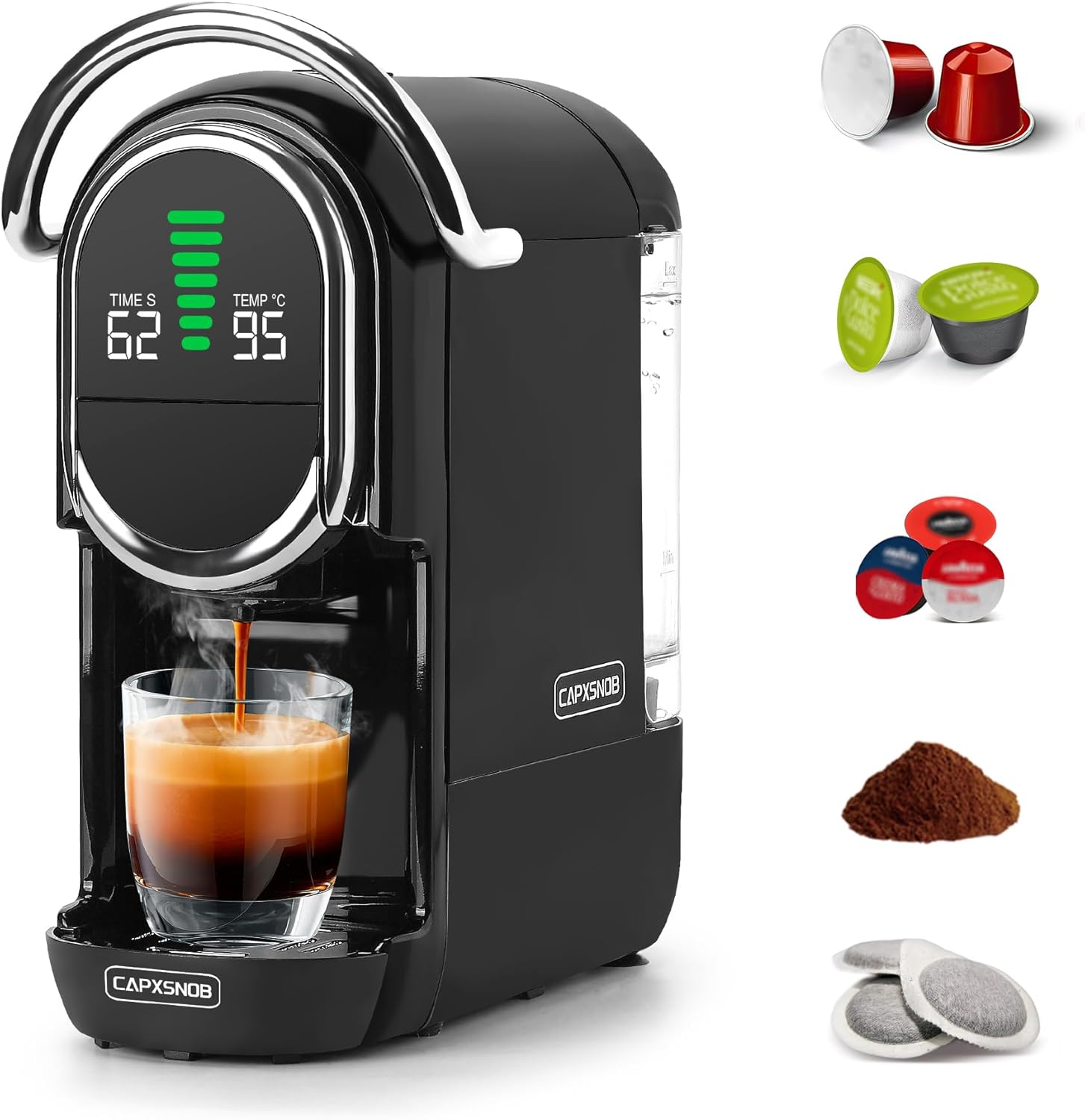
Figure 2: Side view of the Magician1 Mini Coffee Machine, highlighting the removable water tank.
Key Features:
- 5-in-1 Compatibility: Supports Nespresso Original, Dolce Gusto, Lavazza A Modo Mio, ESE 44mm pods, and ground coffee.
- High Pressure Pump: 20 Bar pump for optimal extraction (15-19 Bar stable extraction).
- Fast Heating: Pre-heats in just 25 seconds.
- Temperature Control: Adjustable brewing temperature from 85°C to 97°C.
- Volume Customization: 7 adjustable water volume levels for various cup sizes.
- Hot & Cold Brewing: Capable of preparing both hot and cold coffee.
- LED Display: Clear display showing temperature, water volume, and time.
- Compact Design: Space-saving dimensions (27.4D x 14.4W x 28.5H cm) with a 600ml removable water tank.
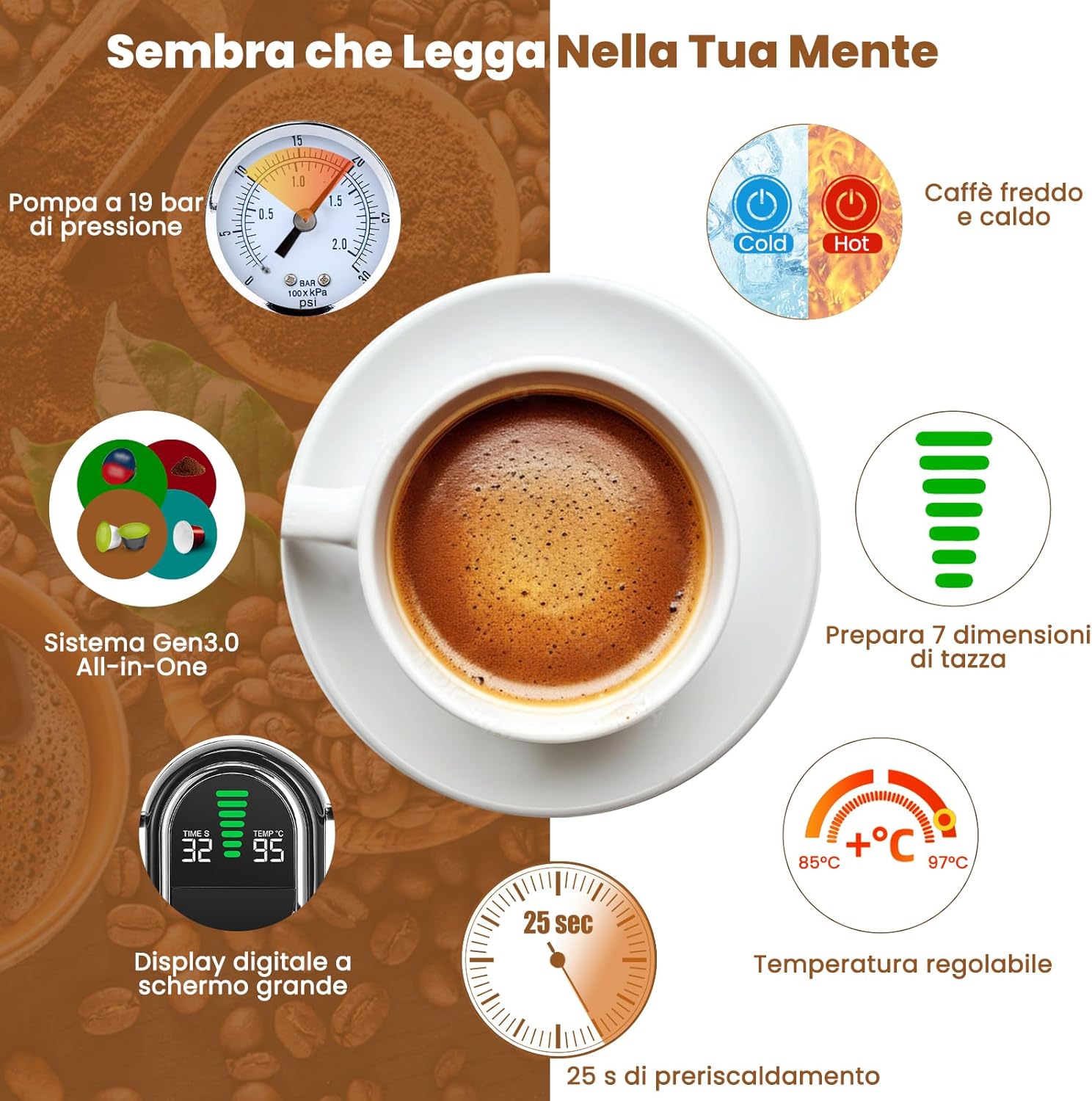
Figure 3: Overview of the Magician1 Mini's advanced features.
Setup
1. Unpacking
Carefully remove all packaging materials and the coffee machine from the box. Ensure all components are present: main unit, water tank, drip tray, and various capsule adapters.
2. First Use and Initial Cleaning
Before first use, clean all removable parts (water tank, drip tray, capsule adapters) with warm, soapy water. Rinse thoroughly and dry. Perform a pre-rinse cycle without coffee:
- Fill the water tank with fresh water.
- Place an empty cup on the drip tray.
- Insert an empty adapter (e.g., the ground coffee adapter without coffee) into the machine.
- Press the brew button to run a full cycle of hot water through the machine. Repeat this process 2-3 times to ensure the internal system is clean.
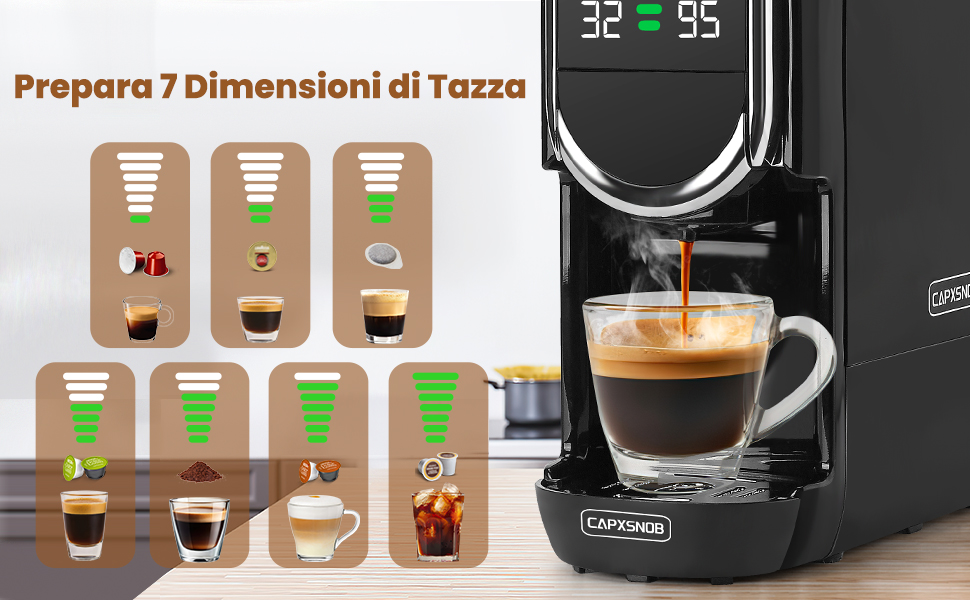
Figure 4: Useful tips, including the importance of pre-rinsing.
3. Filling the Water Tank
- Remove the water tank from the back of the machine.
- Fill the tank with fresh, cold drinking water up to the MAX fill line.
- Place the water tank back onto the machine, ensuring it is securely seated.
Operating Instructions
1. Powering On/Off
- Plug the machine into a grounded electrical outlet.
- Press the power button to turn on the machine. The LED display will light up.
- The machine will begin pre-heating, which takes approximately 25 seconds. The display will show the temperature.
- To turn off, press the power button again. The machine also features programmable automatic shut-off.
2. Brewing Coffee (Hot)
The Magician1 Mini supports various coffee formats. Ensure you use the correct adapter for your chosen coffee type.

Figure 5: Overview of compatible capsule types and their respective adapters.
- Select and Insert Adapter: Choose the appropriate adapter for your capsule/pod/ground coffee.
- For Nespresso Original, Dolce Gusto, Lavazza A Modo Mio: Insert the capsule into its dedicated adapter.
- For ESE 44mm Pods: Place the ESE pod into the ground coffee adapter.
- For Ground Coffee: Fill the ground coffee adapter with 12-14g of fine ground coffee and tamp lightly.
- Place Adapter in Machine: Insert the filled adapter firmly into the machine's brewing chamber.
- Lower Handle: Close the handle securely.
- Place Cup: Position your cup on the drip tray. Note: The machine supports cups between 8.5-9.8 cm in height.
- Select Water Volume: Use the volume selection buttons to choose one of the 7 available levels, ranging from Ristretto (25ml) to Americano (240ml). The LED display will show the selected volume.
- Adjust Temperature (Optional): To adjust the brewing temperature (85°C to 97°C):
- Press and hold the temperature button for 5 seconds until the temperature flashes on the screen.
- Use the volume buttons to adjust the temperature.
- The setting will be saved automatically after 3 seconds.
- Start Brewing: Press the brew button. The machine will start dispensing coffee.
- Stop Brewing: The machine will stop automatically once the selected volume is reached. You can also manually stop brewing by pressing the brew button again.

Figure 6: Simple three-step brewing process.
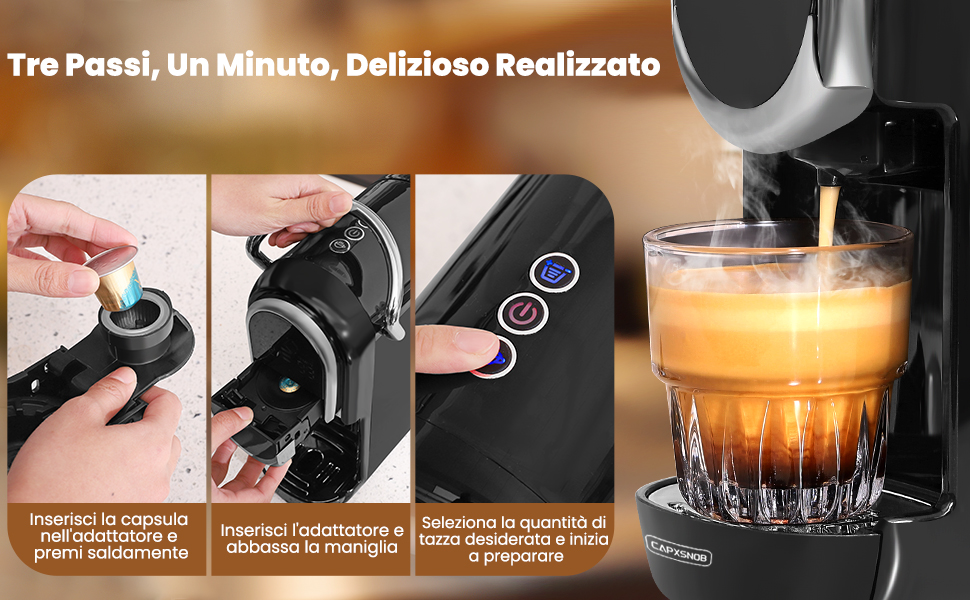
Figure 7: Seven cup size options for different coffee types.
3. Hot and Cold Brewing
The machine supports both hot and cold brewing. Cold brew refers to preparation with room temperature water. This machine does not support ice production.
- To switch between hot and cold modes, press and hold the power button for 5 seconds until the power light changes. The display will show "CO" for cold mode.
- Follow the same brewing steps as above, ensuring the water tank is filled with room temperature water for cold brewing.
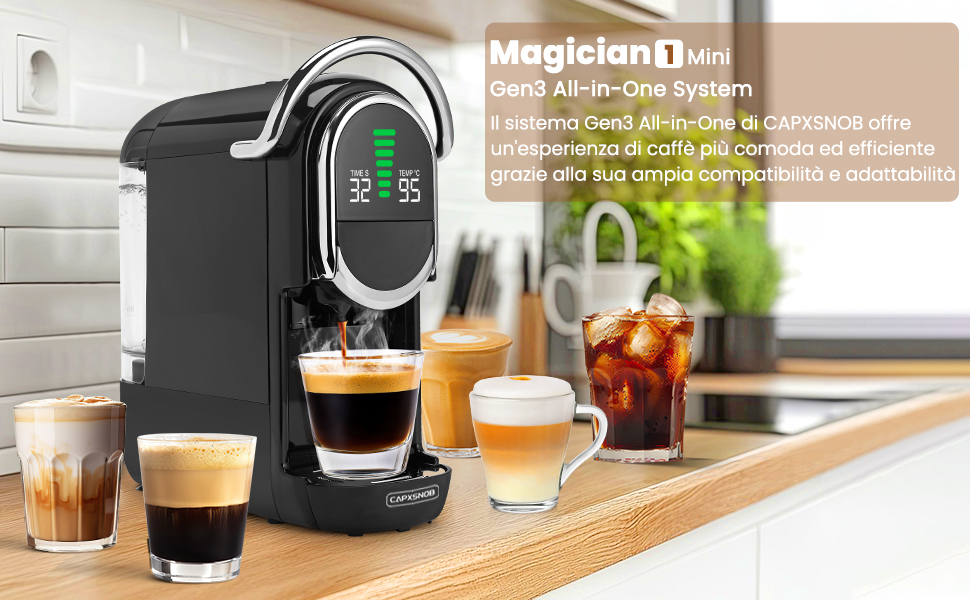
Figure 8: Hot and Cold brewing options.
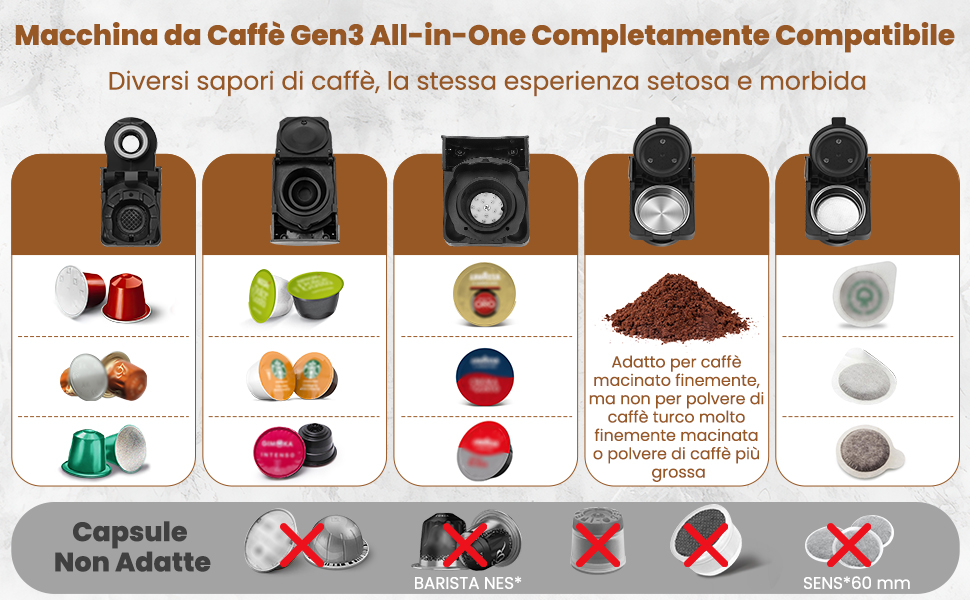
Figure 9: Customizing temperature settings.
Maintenance and Cleaning
1. Daily Cleaning
- Drip Tray: Empty and rinse the drip tray after each use or when the indicator shows it's full.
- Capsule Container: Remove and empty the used capsule container after each use. Rinse with warm water.
- Water Tank: Rinse the water tank daily and refill with fresh water.
- Exterior: Wipe the exterior of the machine with a soft, damp cloth. Do not use abrasive cleaners or immerse the machine in water.
2. Ground Coffee Adapter Care
Proper care of the ground coffee adapter is crucial for optimal performance and to prevent blockages.
- After each use, remove the ground coffee adapter.
- Discard used coffee grounds.
- Rinse the plastic holes and stainless steel filters thoroughly. Blockages can prevent coffee from dispensing or cause leaks.
- For thorough cleaning, the adapter can be disassembled and reassembled as shown in Figure 10.
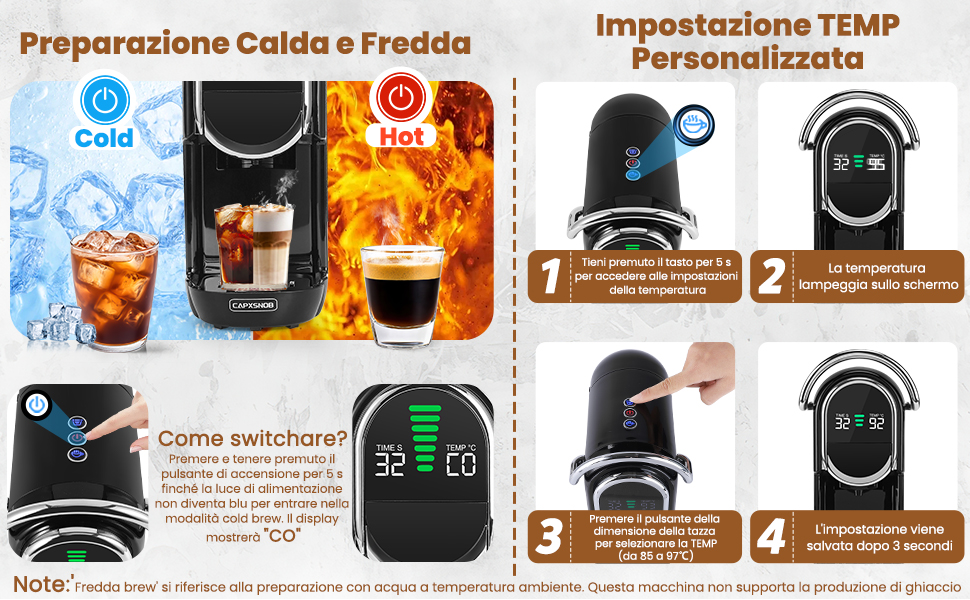
Figure 10: Maintenance and care of the ground coffee adapter.
3. Descaling
Regular descaling is essential to maintain the machine's performance and extend its lifespan, especially in areas with hard water. Descale every 3-6 months depending on water hardness and usage.
- Empty the water tank and fill it with a descaling solution (follow the descaler manufacturer's instructions for dilution).
- Place a large container under the coffee spout.
- Run several brewing cycles without coffee until the water tank is empty.
- Rinse the water tank thoroughly and fill it with fresh water.
- Run several cycles of fresh water through the machine to rinse out any descaling solution residue.
Troubleshooting
If you encounter any issues with your coffee machine, please refer to the table below for common problems and their solutions.
| Problem | Possible Cause | Solution |
|---|---|---|
| Machine does not turn on. | Not plugged in; power outlet malfunction; machine fault. | Check power cord connection; try another outlet; contact customer support. |
| No coffee dispenses or only a few drops. | Water tank empty; air in the system; clogged adapter/filter; machine needs descaling. | Fill water tank; run a few cycles without coffee to prime; clean adapter/filter; descale the machine. |
| Coffee is too weak or watery. | Incorrect water volume selected; coffee grounds too coarse (for ground coffee); capsule/pod not properly inserted. | Adjust water volume setting; use finer ground coffee; ensure capsule/pod is seated correctly. |
| Machine is leaking. | Water tank not properly seated; drip tray full; adapter not correctly inserted; internal seal issue. | Ensure water tank is secure; empty drip tray; re-insert adapter; contact customer support if problem persists. |
| Coffee is not hot enough. | Temperature setting too low; machine needs descaling. | Adjust temperature setting (see Operating Instructions); descale the machine. |
| Machine makes unusual noise. | Normal pump operation; air in the system; blockage. | Some noise is normal during brewing. If excessive, run a few cycles without coffee to clear air; check for blockages. |
Technical Specifications
- Brand: CAPXSNOB
- Model: ST-542S EU(CE)
- Color: Black
- Product Dimensions: 27.5 x 14.4 x 28.5 cm (D x W x H)
- Item Weight: 3.3 kg
- Voltage: 230 Volts (AC)
- Power: 1450W
- Pump Pressure: 20 Bar
- Water Tank Capacity: 600 ml
- Special Features: Automatic cleaning function, Programmable, Single cup brew, Removable tank, Adjustable brew strength, LED Display.
- Automatic Shut-off: Yes
Warranty and Support
Your Magician1 Mini Coffee Machine comes with a comprehensive warranty and support package for your peace of mind.
- 60-Day Money-Back Guarantee: If you are not completely satisfied with your purchase, you may be eligible for a refund within 60 days.
- 2-Year Limited Manufacturer's Warranty: The product is covered by a 2-year limited warranty from the manufacturer against defects in materials and workmanship.
- Free Replacement Service: By registering your product on the official CAPXSNOB website, you may receive a free replacement service for 2 years. Please visit the official CAPXSNOB website for registration details and full warranty terms and conditions.
For further assistance, troubleshooting, or warranty claims, please contact CAPXSNOB customer support through their official website or the retailer where you purchased the product.
Related documentsST-542S EU(CE)


Ask a question about this manual
Ask about setup, troubleshooting, compatibility, parts, safety, or missing instructions. Manuals+ will review the question and use this page’s manual context to help answer it.